It’s been a while since my last post, time sure flies when you’re bouncing all over the place busy as hell. I’ve been invited to Tech Field Day next week and need to get back in the swing of things so here goes.
In order for Cisco’s Unified Computing System (UCS) to provide the benefits, interoperability and management simplicity it does, the networking infrastructure is handled in a unique fashion. This post will take a look at that unique setup and point out some considerations to focus on when designing UCS application systems. Because Fibre Channel traffic is designed to be utilized with separate physical fabrics exactly as UCS does this post will focus on Ethernet traffic only.  This post focuses on End Host mode, for the second art of this post focusing on switch mode use this link: http://www.definethecloud.net/inter-fabric-traffic-in-ucspart-ii. Let’s start with taking a look at how this is accomplished:
UCS Connectivity
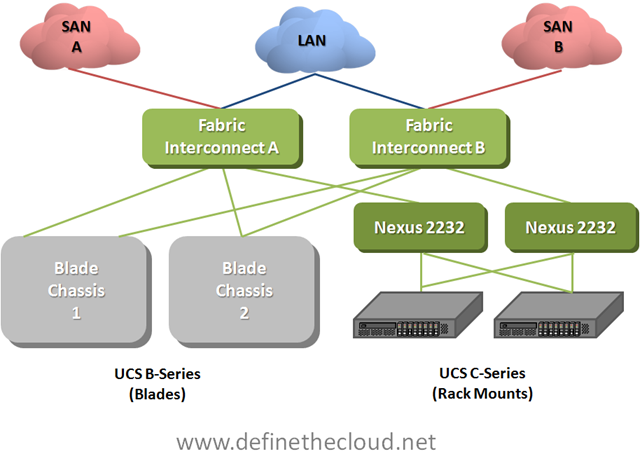
In the diagram above we see both UCS rack-mount and blade servers connected to a pair of UCS Fabric Interconnects which handle the switching and management of UCS systems. The rack-mount servers are shown connected to Nexus 2232s which are nothing more than remote line-cards of the fabric interconnects known as Fabric Extenders. Fabric Extenders provide a localized connectivity point (10GE/FCoE in this case) without expanding management points by adding a switch. Not shown in this diagram are the I/O Modules (IOM) in the back of the UCS chassis. These devices act in the same way as the Nexus 2232 meaning they extend the Fabric Interconnects without adding management or switches. Next let’s look at a logical diagram of the connectivity within UCS.
UCS Logical Connectivity
 In the last diagram we see several important things to note about UCS Ethernet networking:
At first glance handling all switching at the Fabric Interconnect level looks as though it would add latency (inter-blade traffic must be forwarded up to the fabric interconnects then back to the blade chassis.) While this is true, UCS hardware is designed for low latency environments such as High Performance Computing (HPC.) Because of this design goal all components operate at very low latency. The Fabric Interconnects themselves operate at approximately 3.2us (micro seconds), and the Fabric Extenders operate at about 1.5us. This means total roundtrip time blade to blade is approximately 6.2us right inline or lower than most Access Layer solutions. Equally as important with this design switching between any two blades/servers in the system will occur at the same speed regardless of location (consistent predictable latency.)
The question then becomes how is traffic between fabrics handled? The answer is that traffic between fabrics must be handled upstream (next hop device(s) shown in the diagrams as the LAN cloud.) This is an important consideration when designing UCS implementations and selecting a redundancy/load-balancing behavior for server NICs.
Let’s take a look at two examples, first a bare-metal OS (Windows, Linux, etc.) next a VMware server.
Bare-Metal Operating System
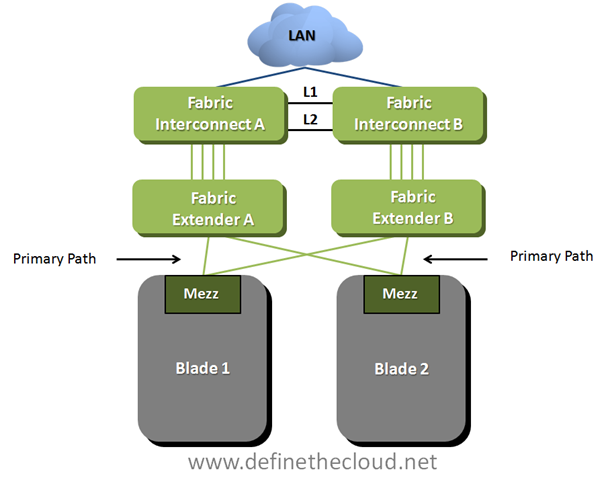 In the diagram above we see two blades which have been configured in an active/passive NIC teaming configuration using separate fabrics (within UCS this is done within the service profile.) This means that blade 1 is using Fabric A as a primary path with B available for failover and blade 2 is doing the opposite. In this scenario any traffic sent from blade 1 to blade 2 would have to be handled by the upstream device depicted by the LAN cloud. This is not necessarily an issue for the occasional frame but will impact performance for servers that communicate frequently.
Recommendation:
For bare-metal operating systems analyze the blade to blade communication requirements and ensure chatty server to server applications are utilizing the same fabric as a primary:
VMware Servers
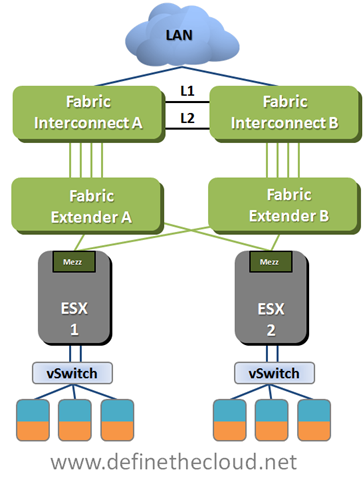
In the above diagram we see that the connectivity is the same from a physical perspective but in this case we are using VMware as the operating system. In this case a vSwitch, vDS, or Cisco Nexus 1000v will be used to connect the VMs within the Hypervisor. Regardless of VMware switching option the case will be the same. It is necessary to properly design the the virtual switching environment to ensure that server to server communication is handled in the most efficient way possible.
Recommendation:
Summary:
UCS utilizes a unique switching design in order to provide high bandwidth, low-latency switching with a greatly reduced management architecture compared to competing solutions. The networking requires a thorough understanding in order to ensure architectural designs provide the greatest available performance. Ensuring application groups that utilize high levels of server to server traffic are placed on the same path will provide maximum performance and minimal additional overhead on upstream networking equipment.



[...] This post was mentioned on Twitter by Thomas Jones, Joe Onisick. Joe Onisick said: New Blog Post (finally): Inter-Fabric Traffic in UCS http://bit.ly/ciLYtk #UCS #Cisco #DataCenter [...]
Hi Joe!
Great writeup, as usual.
One good point for users to keep in mind is that you are describing only one of two switching modes that the UCS Fabric Interconnects (FI) support. The FI's support "End Host Mode" and "Switch Mode".
Your article describes "End Host Mode" (EHM). The best summary description of EHM is that when the FIs are in EHM, they basically behave like hardware implementations of VMware vSwitches - no spanning tree, LAN safe, no loops, don't look like switched to the external network, etc.
The other mode, Switch Mode, means the FIs can act like a normal switch (use spanning tree, etc.) and also means that East-West traffic can be configured to go directely between the two FIs without going external to another switch.
Customer almost always choose End Host mode, however, they have the option to pick Switch mode if the East-West traffic flow is a concern.
Thanks again for the great write-up!
-sean
Sean,
Thanks for the feedback and clarification. I'm thinking I need to add another section to this post describing switched mode inter-fabric traffic. There are some catches there as well. If you're using a VLAN that exists on both FIs and upstream it won't be switched accross the FIs either because PVRST+ will kick in and block the link between FIs. Basically you'd have to use a local only VLAN for inter-fabric traffic. It's a great design to have in your back pocket but not one I'd go to often, as you said customers almost always choose EH mode for the simplicity and removal of reliance on STP.
Joe
[...] This post was mentioned on Twitter by Rod Gabriel and Joe Onisick, Chris Fendya. Chris Fendya said: Great post by @jonisick http://bit.ly/bMYCgd. UCS inter-fabric traffic explained very nicely. Thanks for the post Joe! [...]
[...] Inter-Fabric Traffic in UCS [...]
Wow, great job at describing this and what Joe added was really insightful. You can almost enable datacenter communication if you enable the throughput for it by utilizing some more of the 10GbE. Those blade systems can go up to 4 10gig on each card and can hold a total of two of those cards. 8x10Gbe is alot of throughput plus the ease of switching makes it a huge plus. I can see how TCO can be plus if it is implemented correctly. I twittered and commented on this earlier. Thanks guys!
[...] Joe Onisick has a good write-up on the behavior of inter-fabric traffic in UCS. [...]
[...] Inter-Fabric Traffic in UCS–Part II January 3, 2011 By Joe Onisick Leave a Comment [...]
[...] about from deploying VMware vSphere on Cisco UCS. Have a look at Joe’s articles on his site (Part 1 and Part [...]
The diagram is inaccurate and not possible today. You cannot connect Nexus 2232 to the Fabric Interconnect. The data-bearing 10G ports on a C-series must connect directly to the Fabric Interconnects. The CIMC port must be connected to a Nexus 2248 connected to a single Fabric Interconnect.
Sal,
You are correct as far as current capabilities, the CIMC port connects to an FI controlled Nexus 2248 and the data ports connect directly to the FI. The diagram above was the original intended method for connecting UCS rack mounts and at the time this post was written was expected to be the way it was done. I would also expect the model to move to this connectivity method again in the future within the UCS environment.
Joe
Hi Joe, great summary.
I'd like to add to the picture the recent addition of storage direct-attach to the Fabric Interconnects, via "Appliance Ports". These ports behave just like server ports, and enable NAS access from servers without the need to traverse the LAN cloud. This NAS is also accessible from the outside as well, in case it is to be shared with other environments.
What's interesting here is that you should be very careful when designing server-to-NAS connectivity patterns, and must take this into account when deploying services. A careful planning will prevent storage traffic from traversing the LAN cloud, and it will only fallback to the upper-layer switches in failover scenarios. A random deployment will however bring many different traffic flows and latencies, and is a mess you likely want to avoid. Bear this in mind too.
Cheers!
Pablo.
Pablo,
Thanks for the added info. I definitely need to revise this post based on all of the recent enhancements to firmware including appliance ports. I'm going to hold off for some features I'm expecting shortly and then do an update.
Joe
[...] How Inter-fabric traffic is handled in End-Host mode: http://www.definethecloud.net/inter-fabric-traffic-in-ucs [...]
Hi there to every one, it's truly a nice for me to pay a visit this website, it consists of
helpful Information.
Excellent items from you, man. I have be aware your stuff previous to and you're just too fantastic.
I really like what you have obtained right here, really like
what you're stating and the way by which you say it.
You are making it entertaining and you still take care of to keep it wise.
I can't wait to read much more from you. That is actually
a wonderful web site.
Robert/Nick: Thanks for responses. I had have an interest to listen of just about any rewards to your WEB OPTIMIZATION campaigns the moment this really is implemented.
Robert/Nick: Appreciate your comments. I had be interested to hear involving any rewards towards your WEB OPTIMIZATION activities the moment this is certainly executed.