Inter-Fabric Traffic in UCS
It’s been a while since my last post, time sure flies when you’re bouncing all over the place busy as hell. I’ve been invited to Tech Field Day next week and need to get back in the swing of things so here goes.
In order for Cisco’s Unified Computing System (UCS) to provide the benefits, interoperability and management simplicity it does, the networking infrastructure is handled in a unique fashion. This post will take a look at that unique setup and point out some considerations to focus on when designing UCS application systems. Because Fibre Channel traffic is designed to be utilized with separate physical fabrics exactly as UCS does this post will focus on Ethernet traffic only.  This post focuses on End Host mode, for the second art of this post focusing on switch mode use this link: http://www.definethecloud.net/inter-fabric-traffic-in-ucspart-ii. Let’s start with taking a look at how this is accomplished:
UCS Connectivity
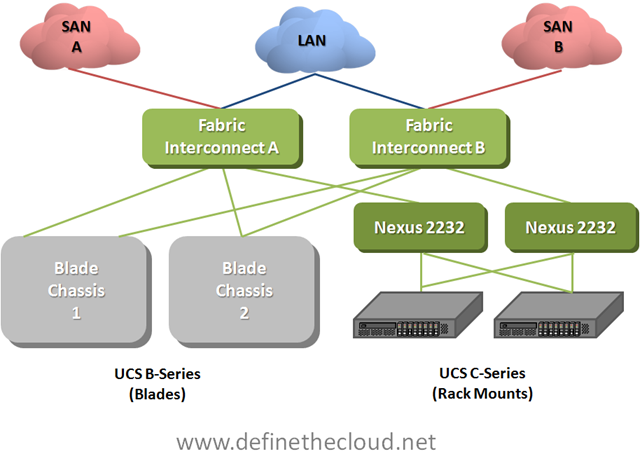
In the diagram above we see both UCS rack-mount and blade servers connected to a pair of UCS Fabric Interconnects which handle the switching and management of UCS systems. The rack-mount servers are shown connected to Nexus 2232s which are nothing more than remote line-cards of the fabric interconnects known as Fabric Extenders. Fabric Extenders provide a localized connectivity point (10GE/FCoE in this case) without expanding management points by adding a switch. Not shown in this diagram are the I/O Modules (IOM) in the back of the UCS chassis. These devices act in the same way as the Nexus 2232 meaning they extend the Fabric Interconnects without adding management or switches. Next let’s look at a logical diagram of the connectivity within UCS.
UCS Logical Connectivity
 In the last diagram we see several important things to note about UCS Ethernet networking:
-
UCS is a Layer 2 system meaning only Ethernet switching is provided within UCS. This means that any routing (L3 decisions) must occur upstream.
-
All switching occurs at the Fabric Interconnect level. This means that all frame forwarding decisions are made on the Fabric Interconnect and no intra-chassis switching occurs.
-
The only connectivity between Fabric Interconnects is the cluster links. Both Interconnects are active from a switching perspective but the management system known as UCS Manger (UCSM) is an Active/Standby clustered application. This clustering occurs across these links. These links do not carry data traffic which means that there is no inter-fabric communication within the UCS system and A to B traffic must be handled upstream.
At first glance handling all switching at the Fabric Interconnect level looks as though it would add latency (inter-blade traffic must be forwarded up to the fabric interconnects then back to the blade chassis.) While this is true, UCS hardware is designed for low latency environments such as High Performance Computing (HPC.) Because of this design goal all components operate at very low latency. The Fabric Interconnects themselves operate at approximately 3.2us (micro seconds), and the Fabric Extenders operate at about 1.5us. This means total roundtrip time blade to blade is approximately 6.2us right inline or lower than most Access Layer solutions. Equally as important with this design switching between any two blades/servers in the system will occur at the same speed regardless of location (consistent predictable latency.)
The question then becomes how is traffic between fabrics handled? The answer is that traffic between fabrics must be handled upstream (next hop device(s) shown in the diagrams as the LAN cloud.) This is an important consideration when designing UCS implementations and selecting a redundancy/load-balancing behavior for server NICs.
Let’s take a look at two examples, first a bare-metal OS (Windows, Linux, etc.) next a VMware server.
Bare-Metal Operating System
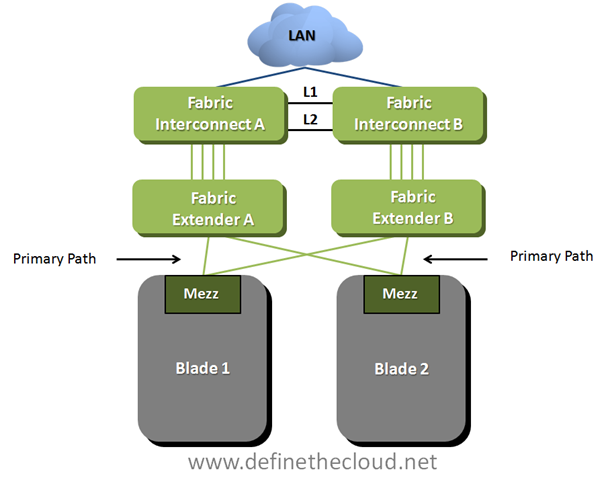 In the diagram above we see two blades which have been configured in an active/passive NIC teaming configuration using separate fabrics (within UCS this is done within the service profile.) This means that blade 1 is using Fabric A as a primary path with B available for failover and blade 2 is doing the opposite. In this scenario any traffic sent from blade 1 to blade 2 would have to be handled by the upstream device depicted by the LAN cloud. This is not necessarily an issue for the occasional frame but will impact performance for servers that communicate frequently.
Recommendation:
For bare-metal operating systems analyze the blade to blade communication requirements and ensure chatty server to server applications are utilizing the same fabric as a primary:
-
When using a card that supports hardware failover provide only one vNIC (made redundant through HW failover) and place its primary path on the same fabric as any other servers that communicate frequently.
-
When using cards that don’t support HW failover use active/passive NIC teaming and ensure that the active side is set to the same fabric for servers that communicate frequently.
VMware Servers
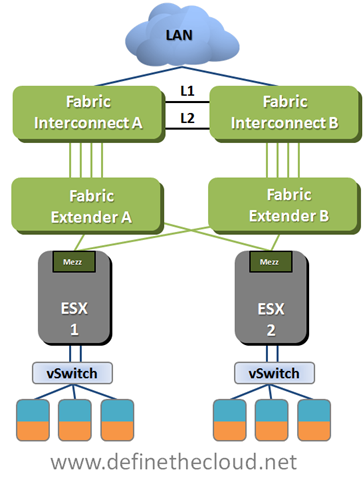
In the above diagram we see that the connectivity is the same from a physical perspective but in this case we are using VMware as the operating system. In this case a vSwitch, vDS, or Cisco Nexus 1000v will be used to connect the VMs within the Hypervisor. Regardless of VMware switching option the case will be the same. It is necessary to properly design the the virtual switching environment to ensure that server to server communication is handled in the most efficient way possible.
Recommendation:
-
For half-width blades requiring 10GE or less total throughput, or full-width blades requiring 20GE or less total throughput provide a single vNIC with hardware failover if available or use an active/passive NIC configuration for the VMware switching.
-
For blades requiring the total active/active throughput of available NICs determine application profiles and utilize port-groups (port-profiles with Nexus 1000v) to ensure active paths are the same for application groups which communicate heavily.
Summary:
UCS utilizes a unique switching design in order to provide high bandwidth, low-latency switching with a greatly reduced management architecture compared to competing solutions. The networking requires a thorough understanding in order to ensure architectural designs provide the greatest available performance. Ensuring application groups that utilize high levels of server to server traffic are placed on the same path will provide maximum performance and minimal additional overhead on upstream networking equipment.