Why NetApp is my ‘A-Game’ Storage Architecture

One of, if not the, most popular of my blog posts to date has been ‘Why Cisco UCS is my ‘A-Game’ Server Architecture (http://www.definethecloud.net/why-cisco-ucs-is-my-a-game-server-architecture.)  In that post I describe why I lead with Cisco UCS for most consultative engagements.  This follow up for storage has been a long time coming, and thanks to some ‘gentle’ nudging and random coincidence combined with an extended airport wait I’ve decided to get this posted.

If you haven’t read my previous post I take the time to define my ‘A-Game’ architectures as such:

“The rule in regards to my A-Game is that it’s not a rule, it’s a launching point. I start with a specific hardware set in mind in order to visualize the customer need and analyze the best way to meet that need. If I hit a point of contention that negates the use of my A-Game I’ll fluidly adapt my thinking and proposed architecture to one that better fits the customer. These points of contention may be either technical, political, or business related:

  • Technical: My A-Game doesn’t fit the customers requirement due to some technical factor, support, feature, etc.
  • Political: My A-Game doesn’t fit the customer because they don’t want Vendor X (previous bad experience, hype, understanding, etc.)
  • Business: My A-Game isn’t on an approved vendor list, or something similar.

If I hit one of these roadblocks I’ll shift my vendor strategy for the particular engagement without a second thought. The exception to this is if one of these roadblocks isn’t actually a roadblock and my A-Game definitely provides the best fit for the customer I’ll work with the customer to analyze actual requirements and attempt to find ways around the roadblock.

Basically my A-Game is a product or product line that I’ve personally tested, worked with and trust above the others that is my starting point for any consultative engagement.”

In my A-Game Server post I run through my hate then love relationship that brought me around to trust, support, and evangelize UCS; I cannot express the same for NetApp.  My relationship with NetApp fell more along the lines of love at first sight.

NetApp – Love at first sight:

I began working with NetApp storage at the same time I was diving headfirst into datacenter as a whole.  I was moving from server admin/engineer to architect and drinking from the SAN, Virtualization, and storage firehouse.  I had a fantastic boss who to this day is a mentor and friend that pushed me to learn quickly and execute rapidly and accurately, thanks Mike!  The main products our team handled at the time were: IBM blades/servers, VMware, SAN (Brocade and Cisco) and IBM/NetApp storage.  I was never a fan of the IBM storage.  It performed solidly but was a bear to configure, lacked a rich feature set and typically got put in place and left there untouched until refresh.  At the same time I was coming up to speed on IBM storage I was learning more and more about NetApp.

From the non-technical perspective NetApp had accessible training and experts, clear value-proposition messaging and a firm grasp on VMware, where virtualization was heading and how/why it should be executed on.  This hit right on with what my team was focused on.  Additionally NetApp worked hard to maintain an excellent partner channel relationship, make information accessible, and put the experts a phone call or flight away.  This made me WANT to learn more about their technology.

The lasting bonds:

Breakfast food, yep breakfast food is what made NetApp stick for me, and still be my A-game four years later. Not just any breakfast food, but a personal favorite of mine; beer and waffles, err, umm… WAFL (second only to chicken and waffles and missing only bacon.)  Data ONTAP (the beer) and NetApp’s Write Anywhere File System (WAFL) are at the heart of why they are my A-Game.  While you can find dozens of blogs, competitive papers, etc. attacking the use of WAFL for primary block storage, what WAFL enables is amazing from a feature perspective, and the performance numbers NetApp can put up speak for themselves.  Because, unlike a traditional block based array, NetApp owns the underlying file system they can not only do more with the data, but they can more rapidly adapt to market needs with software enhancements.  Don’t take my word for it, do some research, look at the latest announcements from other storage leaders and check to see what year NetApp announced their version of those same features, with few exceptions you’ll be surprised.  The second piece of my love for NetApp is Data ONTAP.  NetApp has several storage controller systems ranging from the lower end to the Tier-1 high-capacity, high availability systems.  Regardless of which one you use, you’re always using the same operating/management system, Data ONTAP.  This means that as you scale, change, refresh, upgrade, downgrade, you name it, you never have to retrain AND you keep a common feature set.

My love for breakfast is not the only draw to NetApp, and in fact without a bacon offering I would have strayed if there weren't more (note to NetApp: Incorporate fatty pork the way politicians do.) 

Other features that keep NetApp top of my list are:

Add to that more recent features such as first to market with FCoE based storage and you’ve got a winner in my book.  All that being said I still haven’t covered the real reason NetApp is the first storage vendor in my head anytime I talk about storage.

Unification:

Anytime I’m talking about servers I’m talking about virtualization as well.  Because I don’t work in the Unix or Mainframe worlds I’m most likely talking about VMware (90% market share has that effect.)  When dealing with virtualization my primary goals are consolidation/optimization and flexibility.  In my opinion nobody can touch NetApp storage for this.  I’m a fan of choice and options, I also like particular features/protocols for particular use cases.  On most storage platforms I have to choose my hardware based on the features and protocols my customers require, and most likely use more than one platform to get them all.  This isn’t the case with NetApp.  With few exceptions every protocol/feature is available simultaneously with any given hardware platform.  This means I can run iSCSI, FC, FCoE or all of the above for block based needs at the same time I run CIFS natively to replace Windows file servers, and NFS for my VMware data stores.  All of that from the same box or even the same ports!  This lets me tier my protocols and features to the application requirements instead of to my hardware limitations.

I’ve been working on VMware deployments in some fashion for four years, and have seen dozens of unique deployments but personally never deployed or worked with a VMware environment that ran off a single protocol, typically at a minimum NFS is used for ISO datastores and CIFS can be used to eliminate Windows file servers rather than virtualize them, with a possible block based protocol involved for boot or databases.

Additionally NetApp offers features and functionality to allow multiple storage functions to be consolidated on a single system.  You no longer require separate hardware for primary, secondary, backup, DR, and archive.  All of this can then be easily setup and managed for replication across any of NetApp’s platforms, or many 3rd party systems front-ended with V-series.  These two pieces combined create a truly ‘unified’ platform.

When do I bring out my B-Game?

NetApp like any solution I’ve ever come across is not the right tool for every job.  For me they hit or exceed the 80/20 rule perfectly.  A few places where I don’t see NetApp as a current fit:

Summary:

While I stick to there are no ‘one-size fits all’ IT solutions, and that my A-Game is a starting point not a rule I find NetApp to hit the bulls eye for 80+ percent of the market I work with.  Not only do they fit upfront, but they back it up with support, continued innovation, and product advancement.  NetApp isn’t ‘The Growth Company’ and #2 in storage by luck or chance (although I could argue they did luck out quite a bit with the timing of the industry move to converged storage on 10GE.)

Another reason NetApp still reigns king as my A-Game is the way in which it marries to my A-Game server architecture.  Cisco UCS enables unification, protocol choice and cable consolidation as well as virtualization acceleration, etc.  All of these are further amplified when used alongside NetApp storage which allows rapid provisioning, protocol options, storage consolidation and storage virtualization, etc.  Do you want to pre-provision 50 (or 250) VMware hosts with 25 GB read/write boot LUNs ready to go at the click of a template?  Do you want to do this without utilizing any space up front?  UCS and NetApp have the toolset for you.  You can then rapidly bring up new customers, or stay at dinner with your family while a Network Operations Center (NOC) administrator deploys a pre-architected pre-secured, pre-tested and provisioned server from a template to meet a capacity burst.

If you’re considering a storage decision, a private cloud migration, or a converged infrastructure pod make sure you’re taking a look at NetApp as an option and see it for yourself.  For some more information on NetApp’s virtualization story see the links below:

TR3856: Quantifying the Value of Running VMware on NetApp 

TR3808: VMware vSphere and ESX 3.5 Multiprotocol Performance Comparison Using FC, iSCSI, and NFS
Redundancy in Data Storage: Part 2: Geographical Replication

This is a followup to my previous article, Redundancy in Data Storage: Part 1: RAID Levels, where I discussed various site-local data redundancy technologies. Here, I will attempt to detail many of the choices available to provide redundancy beyond the data center that organizations use to solve disaster recovery, business continuity, and continuity of operations (COOP).

It's obvious that site-local redundancy isn't enough for critical applications. The threat of natural disasters is always looming, regional power outages occur, building electrical and mechanical systems fail, and backhoes seem to hate fiber optic cable. Enterprises therefore attempt to use geographic redundancy to ensure that even when these things happen critical applications and data remain available. At the heart of making an application geographically redundant is making sure the application's data resides in more than one geographical location. There are a number of technology and architectural choices that can be used to achieve this geographical replication of data. Often these solutions will be evaluated in terms of cost, RTO (recovery time objective), and RPO (recovery point objective), as I outlined in Disaster Recovery and the Cloud.

One obvious place to build redundancy is at the storage area network level. There are a variety of technologies available to replicate SAN volumes between geographic locations. Synchronous replication tightly couples the primary and backup sites and does not return success to the storage controller until a write completes in both locations, providing a zero RPO. However, synchronous replication requires very fast network connections and requires that the backup site be located very close to the primary location because otherwise latency will severely reduce storage performance. To allow the sites to be further apart, asynchronous replication can be used where the changes are streamed to the backup site but completion of the I/O is signalled before receiving an acknowledgement. Finally, point-in-time replication generates many snapshots of the storage and sends the delta between each snapshot.

All of these SAN replication approaches are bandwidth intensive. Applications make many changes to the disk as part of their ordinary functioning and these changes are almost certainly not encoded in a dense fashion that allows them to efficiently cross networks. An application might make small updates to the same disk block many times in short order and all of these changes would have to be sent across the network in asynchronous or synchronous replication. Point in time replication lowers this overhead a small amount (because redundant changes between snapshots are not sent) at the cost of worse RPO.

Redundancy can also be implemented through database replication. Just as in SAN replication, synchronous, asynchronous, and snapshot-based techniques are available. Many of the same tradeoffs apply, although generally database changes can be sent more efficiently across a WAN. Unfortunately, effectively using database replication to provide geographic redundancy is difficult. For one, database replication can only stand on its own if all of the critical application data resides within the database. This is often not the case. Moreover, sophisticated database deployments involving data partitioning, federation, and integration often greatly complicate replication to the point that effective configuration becomes prohibitive.

Finally, the application itself can handle data redundancy. Often the highest end applications (for instance financial, logistics, and reservation systems) require the federation of data at the application level. This allows extreme top-end performance to be reached and also allows compliance with various types of data jurisdiction requirements (for instance, national directives requiring customer identifiable information to remain in the country of origin.) Unfortunately, this is very difficult and error prone.

Data redundancy is only one piece of the business continuity problem. Applications require other infrastructure to run, such as the network and application servers. Some organizations are using virtualized approaches here with some success to build geographically redundant architectures. Others rely on configuration management technologies to ensure that the disaster recovery sites remain synchronized and ready to handle workload. Another important point to consider is how to handle moving the active instance of the application to the backup site, and also how to re-establish redundancy after a failure and move applications back to the primary. Any approach to provide geographic redundancy must be designed carefully and continually tested well, because today's complicated application architectures provide too many opportunities for mistakes to be made in provisioning redundancy.

These replication techniques still require the site-local mechanisms like RAID discussed in part 1, because otherwise the facilities involved would be far too unreliable, and also require significant investments in network links, replication technologies, and personnel effort. Also, for the most part, these technologies require the duplication of infrastructure for disaster recovery purposes. In my forthcoming part 3, I will discuss emerging approaches in cloud architectures that unify redundancy mechanisms and significantly simplify the effort involved in implementing resilient business systems.

About the Author

Michael Lyle (@MPLyle) is CTO and co-founder of Translattice, and is responsible for the company's strategic technical direction.  He is a recognized leader in developing distributed systems technologies and has extensive experience in datacenter and information technology operations.

OTV and Vplex: Plumbing for Disaster Avoidance

High availability, disaster recovery, business continuity, etc. are all key concerns of any data center design. They all describe separate components of the big concept: 'When something does go wrong how do I keep doing business.'

Very public real world disasters have taught us as an industry valuable lessons in what real business continuity requires. The Oklahoma City bombing can be at least partially attributed to the concepts of off-site archives and Disaster Recovery (DR.) Prior to that having only local or off-site tape archives was commonly acceptable, data gets lost I get the tape and restore it. That worked well until we saw what happens when you have all the data and no data center to restore to.

September 11th, 2001 taught us another lesson about distance. There were companies with primary data centers in one tower and the DR data center in the other. While that may seem laughable now it wasn't unreasonable then. There were latency and locality gains from the setup, and the idea that both world class engineering marvels could come down was far-fetched.

With lessons learned we're now all experts in the needs of DR, right up until the next unthinkable happens ;-). Sarcasm aside we now have a better set of recommended practices for DR solutions to provide Business Continuity (BC.). It's commonly acceptable that the minimum distance between sites be 50KM away. 50KM will protect from an explosion, a power outage, and several other events, but it probably won't protect from a major natural disaster such as earthquake or hurricane. If those are concerns the distance increases, and you may end up with more than two data centers.

There are obviously significant costs involved in running a DR data center. Due to these costs the concept of running a 'dark' standby data center has gone away. If we pay for: compute, storage, and network we want to be utilizing it. Running Test/Dev systems or other non-frontline mission critical applications is one option, but ideally both data centers could be used in an active fashion for production workloads with the ability to failover for disaster recovery or avoidance.

While solutions for this exist within the high end Unix platforms and mainframes it has been a tough cookie to crack in the x86/x64 commodity server system market. The reason for this is that we've designed our commodity server environments as individual application silos directly tied to the operating system and underlying hardware. This makes it extremely complex to decouple and allow the application itself to live resident in two physical locations, or at least migrate non-disruptively between the two. 

In steps VMware and server virtualization.  With VMware’s ability to decouple the operating system and application from the hardware it resides on.  With the direct hardware tie removed, applications running in operating systems on virtual hardware can be migrated live (without disruption) between physical servers, this is known as vMotion.  This application mobility puts us one step closer to active/active datacenters from a Disaster Avoidance (DA) perspective, but doesn’t come without some catches: bandwidth, latency, Layer 2 adjacency, and shared storage.

The first two challenges can be addressed between data centers using two tools: distance and money.  You can always spend more money to buy more WAN/MAN bandwidth, but you can’t beat physics, so latency is dependent on the speed of light and therefore distance.  Even with those two problems solved there has traditionally been no good way to solve the Layer 2 adjacency problem.  By Layer 2 adjacency I’m talking about same VLAN/Broadcast domain, i.e. MAC based forwarding.  Solutions have existed and still exist to provide this adjacency across MAN and WAN boundaries (EoMPLS and VPLS) but they are typically complex and difficult to manage with scale.  Additionally these protocols tend to be cumbersome due to L2 flooding behaviors.

Up next is Cisco with Overlay Transport VLANs (OTV.)  OTV is a Layer 2 extension technology that utilizes MAC routing to extend Layer 2 boundaries between physically separate data centers.  OTV offers both simplicity and efficiency in an L2 extension technology by pushing this routing to Layer 2 and negating the flooding behavior of unknown unicast.  With OTV in place a VLAN can safely span a MAN or WAN boundary providing Layer 2 adjacency to hosts in separate data centers.  This leaves us with one last problem to solve.

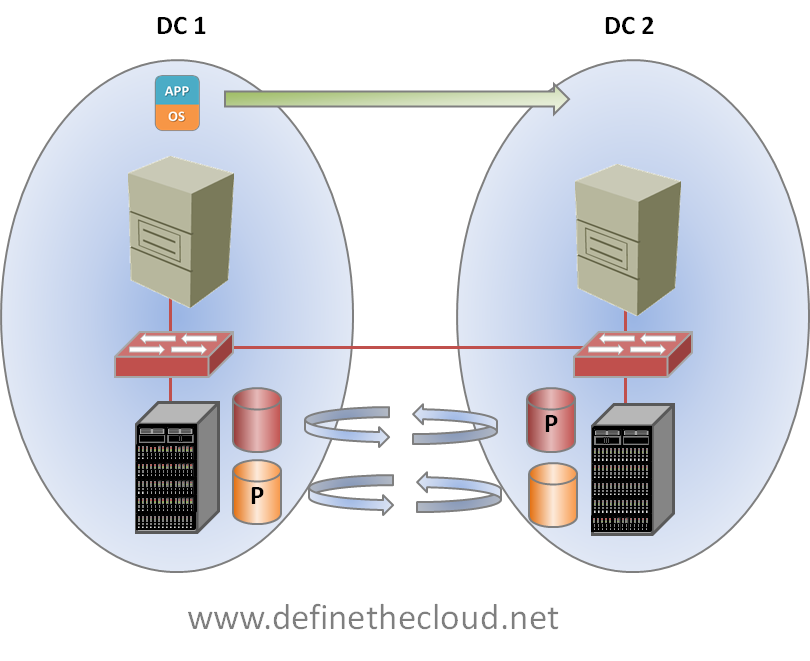
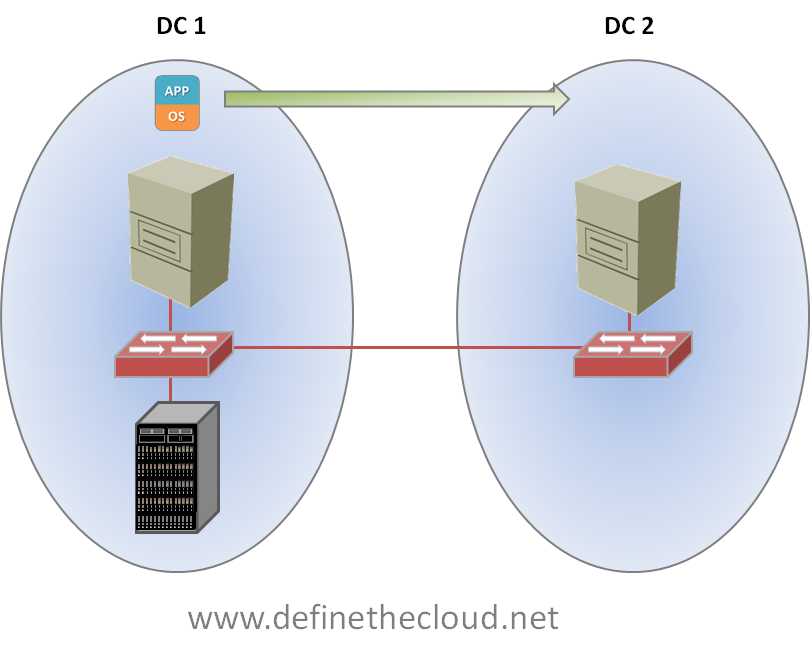
The last step in putting the plumbing together for Long Distance vMotion is shared storage.  In order for the magic of vMotion to work, both the server the Virtual Machine (VM) is currently running on, and the server the VM will be moved to must see the same disk.  Regardless of protocol or disk type both servers need to see the files that comprise a VM.  This can be accomplished in many ways dependent on the storage protocol you’re using, but traditionally what you end up with is one of the following two scenarios:image

In the diagram above we see that both servers can access the same disk, but that the server in DC 2, must access the disk across the MAN or WAN boundary, increasing latency and decreasing performance.  The second option is:

image

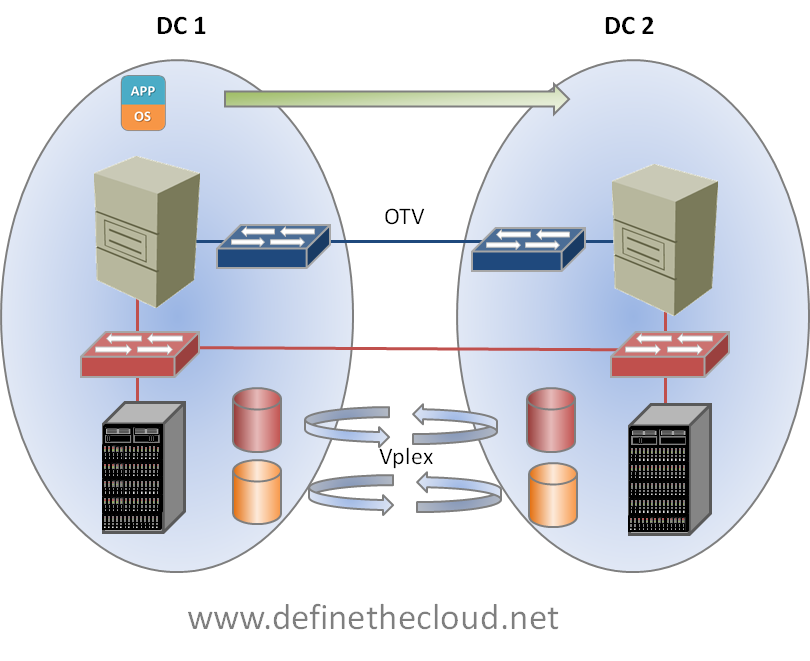
In the next diagram shown above we see storage replication at work.  At first glance it looks like this would solve our problem, as the data would be available in both data centers, however this is not the case.  With existing replication technologies the data is only active or primary in one location, meaning it can only be read from and written to on a single array.  The replicated copy is available only for failover scenarios.  This is depicted by the P in the diagram.  While each controller/array may own active disk as shown, it’s only accessible on a single side at a single time, that is until Vplex.

EMC’s Vplex provides the ability to have active/active read/write copies of the same data in two places at the same time.  This solves our problem of having to cross the MAN/WAN boundary for every disk operation.  Using Vplex the virtual machine data can be accessed locally within each data center.

image

Putting both pieces together we have the infrastructure necessary to perform a Long Distance vMotion as shown above.

Summary:

OTV and Vplex provide an excellent and unique infrastructure for enabling long-distance vMotion.  They are the best available ‘plumbing’ for use with VMware for disaster avoidance.  I use the term plumbing because they are just part of the picture, the pipes.  Many other factors come into play such as rerouting incoming traffic, backup, and disaster recovery.  When properly designed and implemented for the correct use cases OTV and Vplex provide a powerful tool for increasing the productivity of Active/Active data center designs.

World Wide Technology’s Upcoming Geek Day

Coming up very quickly is World Wide Technology’s (www.wwt.com) annual Geek Day, March 10th 2011 (http://www.wwt.com/geekday/.)  I’m very much looking forward to the event for two reasons:

  1. It’s free to customers
  2. It’s totally focused on geeks interacting with geeks.

The event is focused around live interactive demo’s from sponsor technology companies with breakout sessions chosen by the attendees via online voting.  My favorite parts are that the sponsors aren’t allowed to do lead collecting (badge scanning you know from conferences), gimmicky swag giveaways, or stock their booths with gobs of marketing fluff.  It’s true focus is the demo, and engineer to engineer discussion.  See the link above for more information, and the video below for some customer feedback on the events.  I hope to see you here in St. Louis in March!

Cisco unified Computing System (UCS) High-Level Overview

I’ve been looking for tools to supplement Power Point, Whiteboard, etc. and Brian Gracely (@bgracely) suggested I try Prezi (www.prezi.com.) Prezi is a very slick tool for non-slide based presentations.   I don’t think it will replace slides or white board for me, but it’s a great supplement.  It’s got a fairly quick learning curve if you watch the quick tutorials.  Additionally it works quite well for mind-mapping, I just throw all of my thoughts on the canvas and then start tying them together, whereas slides are very linear and take more planning.  My favorite feature of Prezi is the ability to break out of the flow, and quickly return to it at any time during a presentation.  I love this because real world discussions never go the way you mapped them out in advance.  To start learning the tool I created the following high-level overview of the Cisco Unified Computing System (UCS.)  This content is fully/usable and recyclable so do with it what you want!

Inter-Fabric Traffic in UCS–Part II

In the first part of this post (http://www.definethecloud.net/inter-fabric-traffic-in-ucs) I discuss server traffic flows within a UCS system focusing on End-Host mode (EH mode.)  EH mode is the default and recommended mode for the majority of UCS implementations, but the system can also be used in ‘Switch mode’ which causes the Fabric Interconnects to operate as standard L2 switches.  This post will focus on server-to-server communication in switched mode.  For more information on when/where to use switch mode and the recommended upstream connectivity options see Brad Hedlund’s post in HD video: http://bradhedlund.com/2010/06/22/cisco-ucs-networking-best-practices/ and the white paper he co-authored on the subject: http://bradhedlund.com/2010/12/01/cisco-nexus-7000-connectivity-solutions-for-cisco-ucs/.  Both of these are must reads for anyone designing UCS solutions as well as great traffic flow information on the Nexus 7000 as a whole.

Note: Remember that switched-mode is rarely recommended and has become less important with the 12/2010 release of UCSM 1.4 which allows for ‘Appliance’ and ‘Storage’ ports in EH Mode.  For more information on the new port types see Dave Alexander's post on the new feature: http://www.unifiedcomputingblog.com/?p=187.

The only time I would recommend using switch mode is when locally switch traffic is required within the UCS system itself.  Lets take a quick look at the typical UCS connectivity diagram:

image

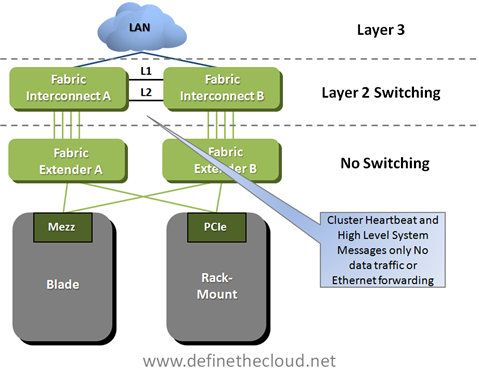
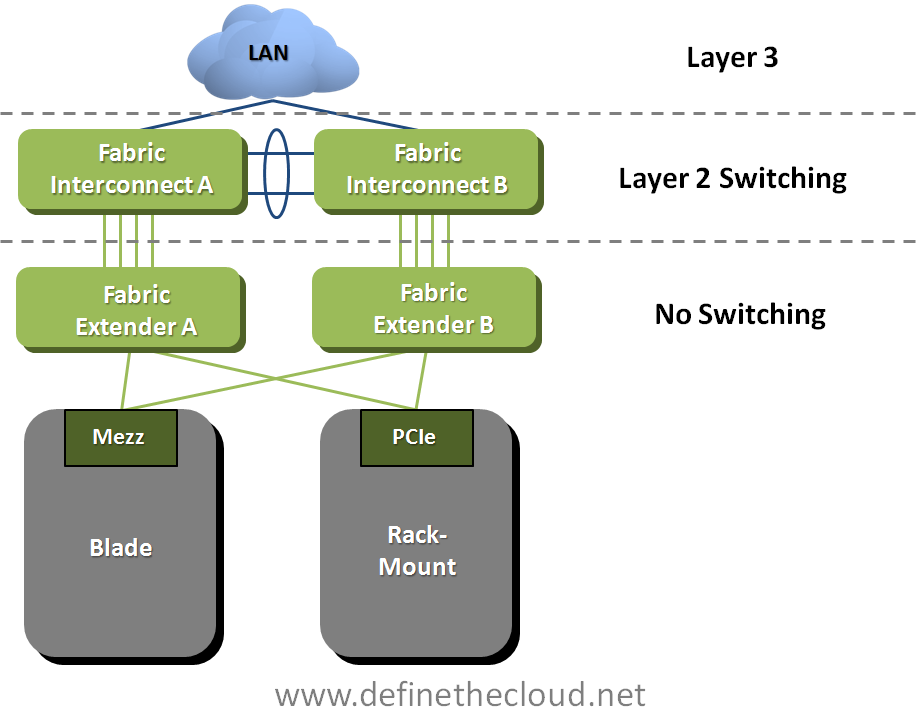
In the diagram above we see the basic connectivity for a UCS system.  In the default EH mode the only connections supported between the Fabric interconnects are the cluster links shown which do not carry data traffic.  This means that all switching from Fabric A to Fabric B must traverse the uplinks and be handled by an upstream device.

When the Fabric interconnects are moved into Switched Mode data links are now supported between Fabric Interconnect A and B.  Lets take a look at how this works.

image

The only change in the above drawing is that I’ve replaced the cluster links with 10GE port-channel carrying data traffic.  In this diagram and the following I have removed the cluster links for visual clarity, but they would still be required and follow the same rules as in EH mode.  With port-channel in place it is possible for data to be switched between the Fabric Interconnects, there are however some considerations.

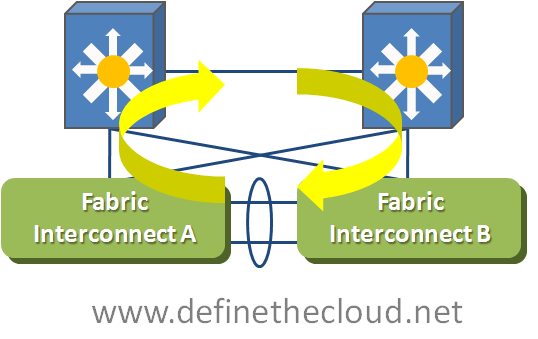
When the Fabric Interconnects are placed in Switch Mode they begin to operate as traditional switches, this includes participating in Spanning-Tree Protocol (STP) for loop avoidance.  In the case of UCS the STP protocol used is Per-VLAN Rapid Spanning Tree+   (PVRST+.)  PVRST+ is a faster converging version of traditional spanning tree that operates independently on a per VLAN basis.  PVRST+ is commonly used, standards based and backward compatible with other STP versions.  With Switch Mode running the Fabric Interconnects will send and receive Bridge Protocol Data Units (BPDU) and block ports based on the network topology information in those BPDUs.  Now let’s take a closer look at how this looks within UCS.

image

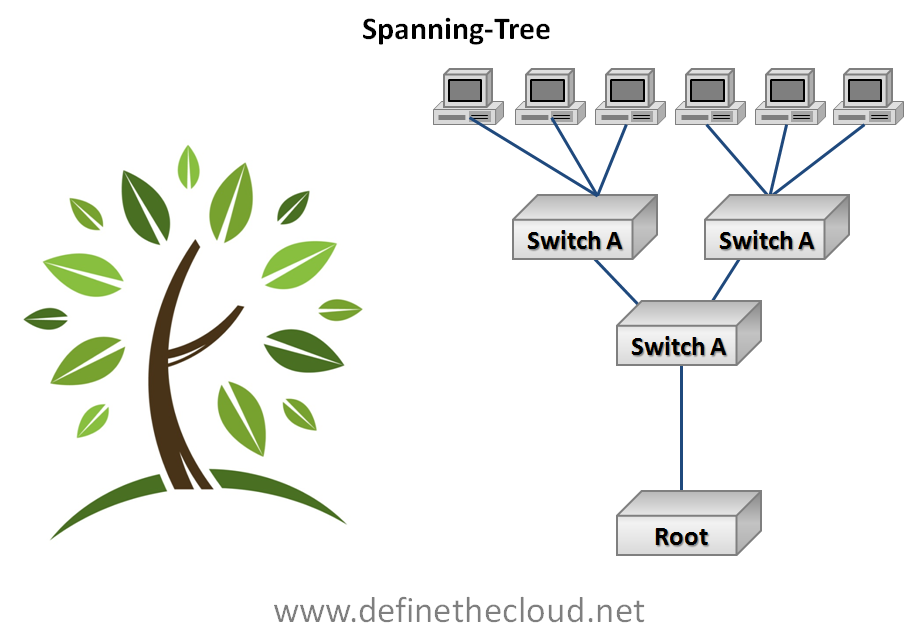
In the diagram above we can see that moving to switch mode and connecting the Fabric Interconnects together via data links we’ve created loops which will have to be closed by STP.  STP utilizes a loop avoidance algorithm based on a root bridge which acts as the base of the network topology and a loop free branch topology is built providing each ‘leaf’ one path to the root by blocking redundant links.  image

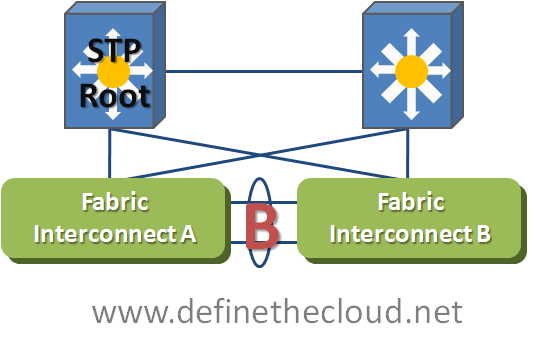
Best practices dictate that the root bridge be manually configured as a highly available switch typically in the aggregation or core layer, for performance and stability reasons.  With this in mind we can assume that the UCS Fabric Interconnects will not be the STP root bridge.  This means that our UCS network diagram will look similar to the following diagram.

image


In the above diagram we can see an example where the top left upstream switch is the root for a given VLAN.  In order to avoid looped behavior STP will block the links between the two Fabric Interconnects.  This means that no traffic will pass between the Fabric Interconnects for that VLAN and all Fabric A to B communication will be passed upstream the same way it would in EH mode.  This will occur for any VLANs that exist in both the upstream network and the Fabric Interconnects.  This behavior would be the same regardless of which upstream switch were acting as the Root Bridge for that VLAN.  This means that even in switch mode there is no Fabric A to Fabric B switching handled locally for common VLANs.  Common VLANs is the key phrase in that sentence, let’s take a look at how we get Fabric A to B switching handled locally.

image

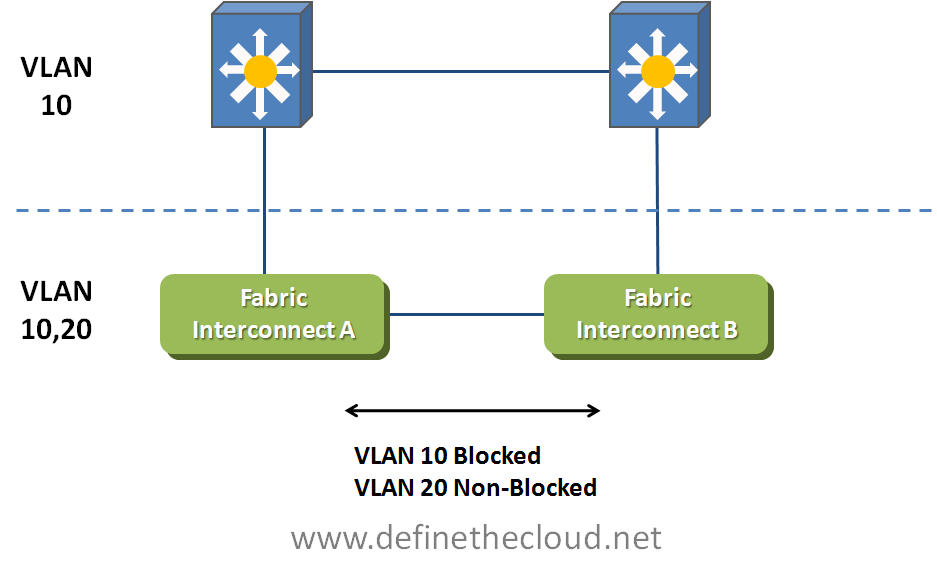
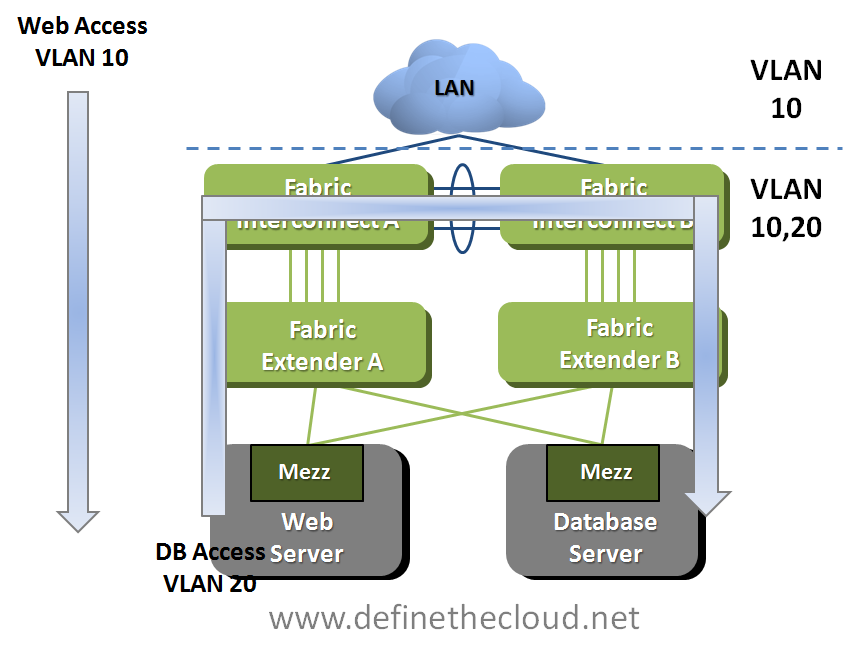
In the above diagram we see that VLAN 10 is common upstream and on the Fabric Interconnects.  Assuming best practices are in place VLAN 10’s Root Bridge will be upstream and therefore VLAN 10 will be blocked on the link between Fabric Interconnects.  VLAN 20 on the other hand only exists within the UCS system and therefore there is no loop in place or requirement for blocked links.  For VLAN 20 one of the Fabric interconnects will operate as the root bridge and traffic will be forwarded across the links.  This UCS only VLAN can be used for server to server communication, one example is depicted in the following diagram.

image

In the example above we see web access on VLAN 10 incoming from the upstream network.  This VLAN is blocked across the connections between Fabric Interconnects because it is common upstream and within UCS.  VLAN 20 is used for the web servers to access the database servers and is only needed within the UCS system.  Because this VLAN only exists internally traffic is forwarded across the links between Fabric interconnects and is switched locally.  Local VLANs can be used to utilize the high-bandwidth low-latency of the UCS switching system for server to server communication.

Summary:

Utilizing switched mode enables inter-fabric traffic to be switched locally but there are design considerations that must be addressed.  When deciding between modes for these purposes remember that UCS is a very low-latency system with sub 7us switching latency which means that with the appropriate switch hardware upstream total latency for round-trip inter-fabric traffic will still be below 40-50us or faster depending on hardware.  Also remember that intra-fabric traffic (A to A or B to B) is always switched locally sub 7us regardless of mode.  In most cases it is best to design your applications to utilize the same fabric if they communicate frequently rather than designing a switched mode solution.