Building a Hybrid Cloud

At a recent Data Center Architect summit I attended cloud computing was a key focus.  Of the concepts that were discussed one that was a recurring theme was Hybrid Clouds.  Conceptually a Hybird-Cloud is a mix of any two cloud types, typically thought of as a mix of a Private Cloud and Public Cloud services.  For more information on the cloud types see my previous post on the subject (http://www.definethecloud.net/?p=109.)  There are several great use cases for this type of architecture, the two that resonate most with me are:

Cloud Bursting: 

Not to be confused with the psychokinesis exercise from “The Men Who Stare At Goats.”  Cloud Bursting is the ability to utilize public cloud resources for application burst requirements during peak periods.  This allows a company to maintain performance during expected or unexpected peak periods without maintaining additional hardware.  Simply said on-demand capacity.  This allows companies with varying workloads to maintain core processing in house and burst into the cloud for peaks.

Disaster Recovery / Business Continuity:

Business continuity is a concern for customers of all shapes and sizes but can be extremely costly to implement well.  For the companies that don’t have the budget of a major oil company, bank, etc. maintaining a DR site is typically out of the question.  Lower cost solutions/alternatives exist but the further down the spectrum you move the less data/capability you’ll recover and the longer it will take to do that.  In steps cloud based DR/Business continuity services.  Rather than maintaining your own DR capabilities you contract the failover out to a company that maintains multi-tenant infrastructure for that purpose and specializes in getting your business back online quickly.

Overall I’m an advocate for properly designed hybrid clouds as they provide the ability to utilize cloud resources while still maintaining control of the services/data you don’t want in the cloud.  Even more appealing from my perspective is the ability to use private and hybrid-clouds as a migration strategy for a shift to fully public cloud based IT infrastructure.  If you begin building your applications for in-house cloud infrastructures you’ll be able to migrate them more easily to public clouds.  There are also tools available to use your private cloud exactly as some major public cloud providers do to make that transition even easier.

We also thoroughly covered barriers to adoption for hybrid cloud architectures.  Most of the considerations were the usual concerns:

There were two others discussed that I see as the key challenges: Organizational and cloud lock-in.

Organizational:

In my opinion organizational challenges are typically the most difficult to overcome when adopting new technology.  If the organization is on board and properly aligned to the shift they will find solutions for the technical challenges.  Cloud architectures of all types require a change in organizational structure.  Companies that attempt to move to cloud architecture without first considering the organizational structure will at best have a painful transition and at worst fail and pull back to silo data centers.  I have a post covering some of the organizational challenges in more detail (http://www.definethecloud.net/?p=122.)

Cloud Lock-In:

Even more interesting was the concept of not just moving applications and services into the cloud, but also being able to move out.  This is a very interesting concern because it means that cloud computing has progressed in the acceptance stages. Customers and architects have moved past whether migration to cloud will happen and how applications will be migrated onto how do I get them back if I want them?  There are several times when this may become important:

In order for the end-user of cloud services to be comfortable migrating applications into the cloud they need to be confident that they can get them back if/when they want them.  Cloud service providers who make their services portable to other vendor offerings will gain customers more quickly and most likely maintain them longer.

Summary:

Cloud computing still has several concerns but none of them are road-blocks.  A sound strategy with a focus on analyzing and planning for problems will help ensure a successful migration.  The one major thing I gained from the discussion this week was that cloud has moved from an argument of should we/shouldn’t we to how do we make it happen and ensure it’s a smooth transition.

Building a Private Cloud

Private clouds are currently one of the most popular concepts in cloud computing.  They promise the flexibility of cloud infrastructures without sacrificing the control of owning and maintaining your own data center.  For a definition of cloud architectures see my previous blog on Cloud Types  (http://www.definethecloud.net/?p=109.)

Private clouds are an architecture that is owned by an individual company typically for internal use.  in order to be considered a true cloud architecture it must layer automation and orchestration over robust scalable architectures.  The intent of private clouds is the ability to have an infrastructure that reacts fluidly to business changes by scaling up and scaling down as applications and requirements change.  Typically consolidation and virtualization are the foundation of these architectures and advanced management, monitoring and automation systems are layered on top.  In some cases this can be taken a step further by loading cloud management software suites on the underlying infrastructure to provide an internal self service Software as a Service (SaaS) or Platform as a Service (PaaS) environment.

Private cloud architectures provide the additional benefit of being an excellent way to test the ability for a company to migrate to public cloud architecture.  Additionally if designed correctly private clouds also act as a migration step to public clouds by migrating applications onto cloud based platforms without exporting them to a cloud service host.  Private clouds can also be used in conjunction with public clouds in order to leverage public cloud resources for extra capacity, failover, or disaster recovery purposes.  This use is known as a hybrid cloud.

Private cloud architectures can be done in a roll-your-own fashion, selecting best of breed hardware, software, and services to build the appropriate architecture.  This can maximize the reuse of existing equipment while providing a custom tailored solution to achieve specific goals.  The drawback with roll-your-own solutions is that it requires extensive in-house knowledge in order to architect the solution properly.

A more common practice for migration into private clouds is to use packaged solutions offered by the major IT vendors, companies like IBM, Sun, Cisco, and HP have announced cloud or cloud-like architecture solutions and initiatives.  These provide a more tightly coupled solution, and in some cases a single point of contact and expertise on the complete solution.  These types of solutions can expedite your migration to the private cloud. 

When selecting the hardware and software for private cloud infrastructures ensure you do your homework.  Work with a trusted integrator or reseller with expertise in the area, gather multiple vendor proposals and read the fine print.  These solutions are not all created equal.  Some of the offered solutions are no more than vaporware and a good number are just repackaging of old junk in a shiny new part number.  Some will support a staged migration and others will require rip-and-replace or at least a new build out.

There are several key factors I would focus on when selecting a solution:

Compatibility and Support:

Tested compatibility and simplified support are key factors that should be considered when choosing a solution.  If you use products from multiple vendors that don’t work together you’ll need to tie the support pieces together in-house and may need to open and maintain several support tickets when things go awry.  Additionally if compatibility hasn't been tested or support isn’t in place for a specific configuration you may be up a creek without a paddle when something comes up.

Flexibility vs. Guaranteed Performance:

Some of the available solutions are very strict on hardware types and quantities but in return provide performance guarantees that have been thoroughly tested. This is a trade off that must be considered.

Hardware subcomponents of the solution:

Building a private cloud is a large commitment to both architectural and organizational changes.  Real Return On Investment (ROI) won’t be seen without both.  When making that kind of investment you don’t want to end up with a subpar component of your infrastructure (software or hardware) because your vendor tried to bundle their best of breed X and best of breed Y with their so so Z.  Getting everything under one corporate logo has its pros and cons.

Hardware Virtualization and Abstraction:

A great statement I’ve heard about cloud computing was that when defining it if you start talking about hardware you’re already wrong (I don’t remember the source so if you know it please comment.)  This is because cloud is more about the process and people than the equipment.  When choosing hardware/software for private cloud keep this in mind.  You don’t want to end up with a private cloud that can’t flex because your software and process is tied to the architecture or equipment underneath.

Summary:

Private cloud architectures provide a fantastic set of tools to regain control of the data center and turn it back into a competitive advantage rather than a hole to throw money into.  Many options and technologies exist to accelerate your journey to private cloud but they must be carefully assessed.  If you don’t have the in-house expertise but are serious about cloud there are lots of consultant and integrator options out there to help walk you through the process.

The Cloud Storage Argument

The argument over the right type of storage for data center applications is an ongoing battle.  This argument gets amplified when discussing cloud architectures both private and public.  Part of the reason for this disparity in thinking is that there is no ‘one size fits all solution.’  The other part of the problem is that there may not be a current right solution at all.

When we discuss modern enterprise data center storage options there are typically five major choices:

In a Windows server environment these will typically be coupled with Common internet File Service (CIFS) for file sharing.  Behind these protocols there are a series of storage arrays and disk types that be used to meet the applications I/O requirements.

As people move from traditional server architectures to virtualized servers, and from static physical silos to cloud based architectures they will typically move away from DAS into one of the other protocols listed above to gain the advantages, features and savings associated with shared storage.  For the purpose of this discussion we will focus on these four: FC, FCoE, iSCSI, NFS.

The issue then becomes which storage protocol to use for transport of your data from the server to the disk?  I’ve discussed the protocol differences in a previous post (http://www.definethecloud.net/?p=43) so I won’t go into the details here.  Depending on who you’re talking to it’s not uncommon to find extremely passionate opinions.  There a quite a few consultants and engineers that are hard coded to one protocol or another.  That being said most end-users just want something that works, performs adequately and isn’t a headache to manage.

Most environments currently work on a combination of these protocols, plenty of FC data centers rely on DAS to boot the operating system and NFS/CIFS for file sharing.  The same can be said for iSCSI.  With current options a combination of these protocols is probably always going to be best, iSCSI, FCoE, and NFS/CIFS can be used side by side to provide the right performance at the right price on an application by application basis.

The one definite fact in all of the opinions is that running separate parallel networks as we do today  with FC and Ethernet is not the way to move forward, it adds cost, complexity, management, power, cooling and infrastructure that isn’t needed.  Combining protocols down to one wire is key to the flexibility and cost savings promised by end-to-end virtualization and cloud architectures.  If that’s the case which wire do we choose, and which protocol rides directly on top to transport the rest?

10 Gigabit Ethernet is currently the industries push for a single wire and with good reason:

For the sake of argument let’s assume we all agree on 10GE as the right wire/protocol to carry all of our traffic, what do we layer on top?  FCoE, iSCSI, NFS, something else?  Well that is a tough question.  the first part of the answer is you don’t have to decide, this is very important because none of these protocols is mutually exclusive.  The second part of the answer is, maybe none of these is the end-all-be-all long-term solution.  Each current protocol has benefits and draw backs so let’s take a quick look:

And a quick look at comparative performance:

Protocol Performanceimage

While the above performance model is subjective and network tuning and specific equipment will play a big role the general idea holds sound.

One of the biggest factors that needs to be considered when choosing these protocols is block vs. file.  Some applications require direct block access to disk, many databases fall into this category.  As importantly if you want to boot an operating system from disk block level protocol (iSCSI, FCoE) are required.  This means that for most diskless configurations you’ll need to make a choice between FCoE and iSCSI (still within the assumption of consolidating on 10GE.)  Diskless configurations have major benefits in large scale deployments including power, cooling, administration, and flexibility so you should at least be considering them.

If you chosen a diskless configuration and settled on iSCSI or FCoE for your boot disks now you still need to figure out what to do about file shares?  CIFS or NFS are your next decision, CIFS is typically the choice for Windows, and NFS for Linux/UNIX environments.  Now you’ve wound up with 2-3 protocols running to get your storage settled and your stacking those alongside the rest of your typical LAN data.

Now to look at management step back and take a look at block data as a whole.  If you’re using enterprise class storage you’ve got several steps of management to configure the disk in that array.  It varies with vendor but typically something to the effect of:

  1. Configure the RAID for groups of disks
  2. Pool multiple RAID groups
  3. Logically sub divide the pool
  4. Assign the logical disks to the initiators/servers
  5. Configure required network security (FC zoning/ IP security/ACL, etc)

While this is easy stuff for storage and SAN administrators it’s time consuming, especially when you start talking about cloud infrastructures with lots and lots of moves adds and changes.  It becomes way to cumbersome to scale into petabytes with hundreds or thousands of customers.  NFS has more streamlined management but it can’t be used to boot an OS.  This makes for extremely tough decisions when looking to scale into large virtualized data center architectures or cloud infrastructure.

There is a current option that allows you to consolidate on 10GE, reduce storage protocols and still get diskless servers.  I
t’s definitely not the solution for every use case (there isn’t one), and it’s only a great option because there aren’t a whole lot of other great options.

In a fully virtualized environment NFS is a great low management overhead protocol for Virtual Machine disks.  Because it can’t boot we need another way to get the operating system to server memory.  That’s where PXE Boot comes in.  Pre eXecutionEnvironment (PXE) is a network OS boot that works well for small operating systems, typically terminal clients or Linux images.  It allows for a single instance of the operating system to be stored on a PXE server attached to the network, and a diskless server to retrieve that OS at boot time.  Because some virtualization operating systems (Hypervisors) are light weight, they are great candidates for PXE boot.  This allows the architecture below.

PXE/NFS 100% Virtualized Environment

image

Summary:

While there are  several options for data center storage none of them solves every need.  Current options increase in complexity and management as the scale of the implementation increases.  Looking to the future we need to be looking for better ways to handle storage.  Maybe block based storage has run it’s course, maybe SCSI has run it’s course, either way we need more scalable storage solutions available to the enterprise in order to meet the growing needs of the data center and maintain manageability and flexibility.  New deployments should take all current options into account and never write off the advantages of using more than one, or all of them where they fit.

The Organizational Challenge

One of the major challenges when looking into cloud architectures is the organizational/process shifts required to make the transition.  Technology refreshes seem daunting but changing organizational structure and internal auditing/change management can make rip-and-replace seem like child’s play.  In this post  I’ll discuss some ways in which to simplify the migration into cloud (there’s a vaporize your silos pun hidden around here somewhere.)  For more background see my post on barriers to adoption for cloud computing (http://www.definethecloud.net/?p=73.)

There are several ways in which companies can begin the process of migrating into the cloud and preparing their IT organization for the transition.  These same principles can be applied to each cloud architecture type and to the concept of data center virtualization.  In order to properly the first step is defining a cloud strategy:

Cloud Strategy:

Cloud strategies will be unique per company but should include the following (not an all inclusive list):

With strategy in hand you can now begin planning the organizational migrations that will be required to make the  move to cloud computing.  The first step is a history lesson (you should never move forward without first looking backward.)

Our data center has a sordid history which is often forgotten because it all occurs in a short lifespan of about 30 years.  We scaled out from main frames to commodity hardware, then up to dense hardware, then virtualized to repair utilization problems and ended up in our current mess.

During that process we’ve built large technology silos and tailored our organizations to them.  We’ve actually built our processes around the technology mistakes or oversights we’ve made.  We’ve architected siloed organizational structures to marry our departmental or technological silos. Breaking those silos is not an easy task but it is key to moving forward.

image

You can not and will not break out of technological silos without first breaking organizational silos.

Organizational change cannot be an instantaneous thing in most companies.  Even when it could be, it’s best to err on the side of caution.  Assess your goals, reference your strategy and plan the changes to break the silos and bond the data center teams.

Some short-term suggestions for long-term results:

Summary:

These are just a few broad concepts to expedite the planning of your organizations move to the cloud.  Overall cloud will be no more of a rip-and-replace of your data center than a rip-and-replace of your organization, it’s as gradual a progression as you plan, so plan it well.

Cloud Types

Within the discussion of cloud computing there are several concepts that get tossed around and mixed up.  Part of the reason for this is that there are several cloud architecture types.  While there are tons of types and sub-types discussed I'll focus on four major deployment models here: Public Cloud, Private Cloud, Community Cloud and Hybrid Cloud.  Each cloud type can be used to deliver any combination of XaaS.  The key requirements to be defined as a cloud architecture are:

I’ve discussed the business drivers for a transition to cloud in a previous post (http://www.definethecloud.net/?p=27) and the technical drivers here (http://www.definethecloud.net/?p=52.)

Public Clouds:

According to NIST with Public Clouds ‘The cloud infrastructure is made available to the general public or a large industry group and is owned by an organization selling cloud services’ (http://bit.ly/cilxSJ.)  This is the service model for cloud computing, A company owns the resources that provide a service and sell that service to other users/companies.  This is a similar model to the utilities, companies pay for the amount of: infrastructure, processing, etc. that is use.  Examples of Public Cloud providers are:

These and more can be found on Search Cloud Computing’s Top 10 list (http://bit.ly/buIKh9.)

image

 Private Clouds:

NIST defines the Private Cloud as: ‘The cloud infrastructure is operated solely for an organization. It may be managed by the organization or a third party and may exist on premise or off premise.’

Private clouds are data center architectures owned by a single company that provide flexibility, scalability, provisioning, automation and monitoring.  The goal of a private cloud is not to sell XaaS to external customers but instead to gain the benefits of a cloud architecture without giving up the control of maintaining your own data center.  Typical private cloud architectures will be built on a foundation of end-to-end virtualization, with automation, monitoring, and provisioning tools layered on top.  While not in the definition of Private Clouds bear in mind that security should be a primary concern at every level of design.

There are several complete Private Cloud offerings from various industry leading vendors.  These solutions typically have the advantages joint testing, and joint support among others.  That being said Private Clouds can be built on any architecture you choose.

image

Community Clouds:

Community Clouds are when an ‘infrastructure is shared by several organizations and supports a specific community that has shared concerns (e.g., mission, security requirements, policy, and compliance considerations). It may be managed by the organizations or a third party and may exist on premise or off premise’ according to NIST.

A community cloud is a cloud service shared between multiple organizations with a common tie.  These types of clouds are traditionally thought of as farther out in the timeline of adoption.

image

Hybrid Clouds:

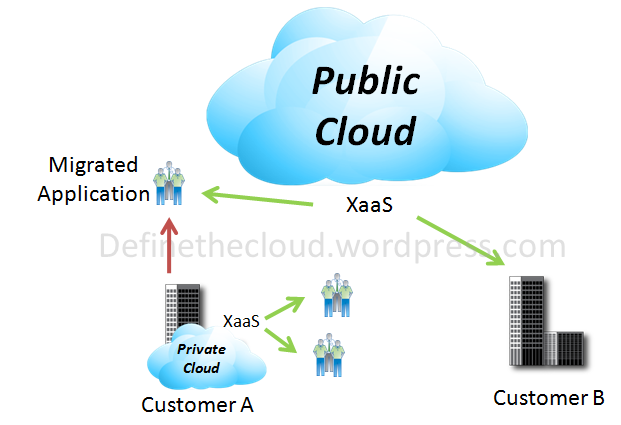
So while you can probably guess what a hybrid cloud is I’ll give you the official NIST definition first: ‘The cloud infrastructure is a composition of two or more clouds (private, community, or public) that remain unique entities but are bound together by standardized or proprietary technology that enables data and application portability (e.g., cloud bursting for load-balancing between clouds).

Using a Hybrid approach companies can maintain control of an internally managed private cloud while relying on the public cloud as needed.  For instance during peak periods individual applications, or portions of applications can be migrated to the Public Cloud.  This will also be beneficial during predictable outages: hurricane warnings, scheduled maintenance windows, rolling brown/blackouts.

image

Summary:

When defining a cloud strategy for your organization or customer’s organization it is important to understand the different models and the advantages each can have for a given workload.  No cloud model is mutually exclusive and many organizations will be able to benefit from more than one model at the same time.

Defining a long term vision now and developing a staged migration path to it with set timelines will help ease the transition into cloud based architectures and allow a faster ROI.

When Cloud Goes Bad:

image

What's Stopping cloud?

So with everyone talking about cloud and all of the benefits of cloud computing why isn't everyone diving in?  The barriers to adoption can be classified into three major categories: Personal, Technical, and Business.

Personal Reasons:

Personal barriers to cloud adoption are broad ranging and can be quite difficult to overcome.  Many IT professionals have fears of job loss and staff reduction as things become more centralized or moved to a service provider.  In some ways this may very well be true.  If more and more companies increase IT efficiency and outsource applications and infrastructure there will be a reduction in the necessary work force, that being said it won't be as quick or extreme as some predict in the sky is falling books and blogs.  The IT professionals that learn and adapt will always have a place to work, and quite possibly a bigger paycheck for their more specialized or broader scope jobs. 

Additionally human beings tend to have a natural fear of the unknown and desire to stay within a certain comfort zone.  If you've built your career in a siloed data center cloud can be a scary proposition.  You can see this in the differences of IT professionals that have been in the industry for varying amounts of time.  Many of those who started their career in main frames were tough to push into distributed computing, those that started in distributed computing had issues with server virtualization, and those who built a career in the virtualized server world may still have issues with pushing more virtualization into the network and storage.  Overall we tend to have a level of complacency that is hard to break.  To that point I always think of a phrase we used in the Marines 'Complacency Kills' in that environment it was meant quite literally, in a business environment it still rings true 'Complacency kills business.'  A great example of this from the U.S. market is the Kroger grocery stores catapult to greatness.  When grocery stores were moving from small stores to 'super stores' the retail giant at the time A&P opened a super store which was far more succesful than its other stores.  Rather than embracing this change and expanding on it A&P closed the store for fear of ruining their existing market.  Kroger on the other hand saw the market shift and changed existing stores to superstores while closing down stores that couldn't fit the model.  This ended up launching Kroger to the number one grocery store in the U.S.

Technical Reasons:

Technical barriers to adoption for cloud also come in many flavors, but on the whole the technical challenges are easier to solve.  Issues such as performance, security, reliability, and recovery are major concerns for cloud adoption.  Can I trust someone else to protect and secure my data?  The answer to that question in most cases is yes, the tools all exist to provide secure environments to multiple tenants.  These tools exist at all sizes from the small enterprise (or smaller) to the global giants.  When thinking about the technical challenges take a step back from how good you are at your job, how good the IT department is, or how great your data center is, and think about how much better you'd be if that was your businesses primary focus?  If I made widgets as a byproduct of my primary business my widgets would probably not be as good, or as low a cost as a company that only made widgets.  If your focus was data center and your company was built on providing data centers you'd be better at data center.  co-location data centers are a great example of this.  The majority of companies can't afford to run a Tier III or IV data center but could definitely benefit from the extra up-time.  Rather than building their own they can host equipment at a colo with the appropriate rating and in most cases save overall cost over the TCO of data center ownership.

Business Barriers:

Business barriers can be the most difficult to solve.  The majority of the business challenges revolve around the idea of guarantees.  What guarantees do I have that my data is: safe, secure, and accessible?  Issues like the Microsoft/T-Mobile sidekick fiasco bring this type of issue to the spotlight.  If I pay to have my business applications hosted what happens when things fail?  Currently hosted services typically provide Service Level Agreements (SLA) that guarantee up-time.  The issue is that if the up-time isn't met the repercussion is typically a pro-rated monthly fee or repayment of the service cost for the time by the provider.  To put that in perspective say you pay 100K a month to host your SAP deployment which directly affects a 20 million dollars per month in sales.  If that hosted SAP deployment fails for a week it costs you 5 million dollars, receiving a refund of the 100K monthly fee doesn't even begin to make up for the loss.  The 5 million dollar loss doesn't even begin to take into account the residual losses of customer satisfaction and confidence.

The guarantee issue is one that will definitely need to be worked out, tested, and retested.  The current SLA model will not cut it for full-scale cloud deployments.  One concept that might ease this process would be insurance, that's right cloud insurance.  For example as a cloud service provider you hire an insurance company to rate your data centers risk, and ensure your SLAs against the per minute value of each customers hosted services/infrastructure.  This allows you to guarantee each customer an actual return on the lost revenue in the event of a failure.  Not only is the cloud provider protected but the customer now has the confidence that their actual costs will be paid if the SLA is not met.

Overall none of the challenges of cloud adoption are show stoppers, but the adoption will not be an immediate one.  The best path to take as a company is to start with the 'low hanging fruit.'  For instance if you're looking at using cloud services, try starting with something like email.  Rather than run your own email servers use a hosted service.  Email is a commoditized application and runs basically the same in-house or out, most companies are spending unneeded money running their own email infrastructure because that's what they're used to.  The next step up may be to use hosted infrastructure, co-location, or services for disaster recovery (DR) purposes.

Another approach to take is my personal favorite.  Start realizing the power of cloud infrastructures in your own data center.  Many companies are already highly utilizing the benefits of server virtualization but missing the mark on network and storage virtualization.  Use end-to-end virtualization to collapse silos and increase flexibility.  This will allow the IT infrastructure to more rapidly adapt to immediate business needs.  From there start looking at automation technologies that can further reduce administrative costs.  The overall concept here is the 'Private Cloud' also sometimes called 'Internal Cloud.'  This not only has immediate business impact but also provides a test bed for the value of cloud computing.  Additionally once the data center workload is virtualized on a standard platform it's easier to replicate it or move it into hosted cloud environments.

Most importantly remember moving to a cloud architecture is not an instantaneous rip-and-replace operation it's a staged gradual shift.  Make the strategic business decision to move towards cloud computing and move towards that path over an alloted time frame with tactical decisions that coincide with your purchasing practices and refresh cycles.  Cloud doesn't have to be a unantainable goal or mystery, utilize independent consultants or strong vendor ties to define the long-term vision and then execute.

Technical Drivers for Cloud Computing

In a previous post I've described the business drivers for Cloud Computing infrastructures (http://www.definethecloud.net/?p=27.)  Basically the idea of transforming data center from a cost center into a profit center.  In this post I'll look at the underlying technical challenges that cloud looks to address in order to reduce data center cost and increase data center flexibility.

There are several infrastructure challenges faced by most data centers globally: Power, Cooling, Space and Cabling,  In addition to these challenges data centers are constantly driven to adapt more rapidly and do more with less.  Let's take a look at the details of these challenges.

Power:

Power is a major data center consideration.  As data centers have grown and hardware has increased in capacity power requirements have exponentially scaled.  This large power usage causes concerns of both cost and of environmental impact.  Many power companies provide incentives for power reduction due to the limits on the power they can produce.  Additionally many governments provide either incentives for power reduction or mandates for the reduction of usage typically in the form of 'green initiatives.

Power issues within the data center come in two major forms: total power usage, and usage per square meter/foot.  Any given data center can experience either or both of these issues.  Solving one without addressing the other may lead to new problems.

Power problems within the data center as a whole come from a variety of issues such as equipment utilization and how effectively purchased power is used.  A common metric for identifying the latter is Power Usage Effectiveness (PUE.)  PUE is a measure of how much power drawn from the utility company is actually available for the computing infrastructure.  PUE is usually expressed as a Kilowatt ratio X:Y where X is power draw and Y is power that reaches computing equipment such as switches, servers and storage.  The rest is lost to such things as power distribution, battery backup and cooling.  Typically PUE numbers for data centers average 2.5:1 meaning 1.5 KW is lost for every 1 KW delivered to the compute infrastructure.  Moving to state-of-the-art designs has brought a few data centers to 1.2:1 or lower.

Power per square meter/foot is another major concern and increases in importance as compute density increases.  More powerful servers, switches, and storage require more power to run.  Many data centers were not designed to support modern high density hardware such as blades and therefore cannot support full density implementations of this type of equipment.  It's not uncommon to find data centers with either near empty racks housing a single blade chassis or increased empty floor space in order to support sparsely set fully populated racks.  The same can be said for cooling.

Cooling:

Data center cooling issues are closely tied to the issues with power.  Every watt of power used in the data center must also be cooled, the coolers themselves in turn draw more power.  Cooling also follows the same two general areas of consideration: cooling as a whole and cooling per square meter/foot.

One of the most common traditional data center cooling methods uses forced-air cooling provided under raised floors.  This air is pushed up through the raised floor in 'cold-aisles' with the intake side of equipment facing in.  The equipment draws the air through cooling internal components and exhausts into 'hot-aisles' which are then vented back into the system.  As data center capacity has grown and equipment density has increased traditional cooling methods have been pushed to or past their limits.

Many solutions exist to increase cooling capacity and or reduce cooling cost.  Specialized rack and aisle enclosures prevent hot/cold air mixing, hot spot fans alleviate trouble points, and ambient outside air can be used for cooling in some geographic locations.  Liquid cooling is another promising method of increasing cooling capacity and/or reducing costs.  Many liquids have a higher capacity for storing heat than air, allowing them to more efficiently pull heat away from equipment.  Liquid cooling systems for high-end devices have existed for years, but more and more solutions are being targeted at a broader market.  Solutions such as horizontal liquid racks allow off-the-shelf-traditional servers to be fully immersed in mineral oil based solutions that have a high capacity for transferring heat and are less conductive than dry wood.

Beyond investing in liquid cooling solutions or moving the data center to Northern Washington there are  tools that can be used to reduce data center cooling requirements.  One method that works effectively is that equipment can be run at higher temperatures to reduce cooling cost with acceptable increases in mean-time-to-failure for components.  The most effective solution for reducing cooling is reducing infrastructure.  The 'greenest' equipment is the equipment you don't ever bring into the data center, less power drawn equates directly to less cooling required.

Space:

Space is a very interesting issue because it's all about who you are and more importantly, where you are.  For instance many companies started their data centers in locations like London, Tokyo and New York because that's where they were based.  Those data centers pay an extreme premium for the space they occupy.  Using New York as an example many of those companies could save hundreds of dollars per month moving the data center across the Hudson with little to no loss in performance.

That being said many data centers require high dollar space because of location.  As an example 'Market data' is all about latency (time to receive or transmit data) every micro-second counts.  These data centers must be in financial hubs such as London and New York.  Other data centers may pay less per square meter/foot but could reduce costs by reducing space.  In either event reducing space reduces overhead/cost.

Cabling:

Cabling is often a pain point understood by administrators but forgotten by management.  Cabling nightmares have become an accepted norm of rapid change in a data center environment.  The reason cabling has such a potential for neglect is that it's been an unmanageable and or not understood problem.  Engineers tend to forget that a 'rat's nest' of cables behind the servers/switches or under the floor tiles hinder cooling efficiency.  To understand this think of the back of the last real-world server rack you saw and the cables connecting those servers.  Take that thought one step further and think about the cables under the floor blocking what may be primary cold air flow.

When thinking about cabling it's important to remember the key points: Each cable has a purchase cost, each cable has a power cost, and each cable has a cooling cost.  Regardless of complex metrics to quantify those three on a total basis it's easy to see that reducing cables reduce cost.

Taking all four of those factors in mind and producing a solution that provides benefits for each is the goal of cloud computing.  If you solve one problem by itself you will most likely increase another.  Cloud computing is a tool to reduce infrastructure and cabling within a Small-to-Medium-Business (SMB) all the way up to a global enterprise.  At the same time cloud-infrastructures support faster adoption times for business applications.  Say that how you will, but 'cloud' has the potential to reduce cost while increasing 'mean-time-to-market' 'business-agility' 'data-center flexibility' or any other term you'd like to apply.  Cloud is simply the concept of rethinking the way we do IT today in order to meet the challenges of the way we do business today.  If right now you're asking 'why aren't we/they all doing it' then stay tuned for my next post on the challenges of adopting cloud architectures.

Virtualization

While not a new concept virtualization has hit the main stream over the last few years and become a uncontrollable buzz word driven by VMware, and other server virtualization platforms.  Virtualization has been around in many forms for much longer than some realizes, things like Logical partitions (LPAR) on IBM Mainframes have been around since the 80's and have been extended to other non-mainframe platforms.  Networks have been virtualized by creating VLANs for years.  The virtualization term now gets used for all sorts of things in the data center.  like it or love the term doesn't look like it's going away anytime soon.

Virtualization in all of its forms is a pillar of Cloud Computing especially in the private/internal cloud architecture.  To define it loosely for the purpose of this discussion let's use 'The ability to divide a single hardware device or infrastructure into separate logical components.

Virtualization is key to building cloud based architectures because it allows greater flexibility and utilization of the underlying equipment.  Rather than requiring  separate physical equipment for each 'Tenant' multiple tenants can be separated logically on a single underlying infrastructure.  This concept is also known as 'multi-tenancy.'  Depending on the infrastructure being designed a tenant can be an individual application, internal team/department, or external customer.  There are three areas to focus on when discussing a migration to cloud computing, servers, network, and storage.

Server Virtualization:

Within the x86 server platform (typically the Windows/Linux environment.) VMware is the current server virtualization leader.  Many competitors exist such as Microsoft's HyperV and Zen for Linux, and they are continually gaining market share.  The most common server virtualization allows a single physical server to be divided into logical subsets by creating virtual hardware, this virtual hardware can then have an Operating System and application suite installed and will operate as if it were an independent server.  Server virtualization comes in two major flavors, Bare metal virtualization and OS based virtualization.

Bare metal virtualization means that a lightweight virtualization capable operating system is installed directly on the server hardware and provides the functionality to create Virtual Servers.  OS based virtualization operates as an application or service within an OS such as Microsoft Windows that provides the ability to create virtual servers.  While both methods are commonly used Bare Metal virtualization is typically preferred for production use due to the reduced overhead involved.

Server virtualization provides many benefits but the key benefits to cloud environments are: increased server utilization, and operational flexibility.  Increased utilization means that less hardware is required to perform the same computing tasks which reduces overall cost.  The increased flexibility of virtual environments is key to cloud architectures.  When a new application needs to be brought online it can be done without procuring new hardware, and equally as important when an application is decommissioned the physical resources are automatically available for use without server repurposing.  Physical servers can be added seamlessly when capacity requirements increase.

Network Virtualization:

Network virtualization comes in many forms.  VLANs, LSANs, VSANs allow a single physical  LAN or SAN architecture to be carved up into separate networks without dependence on the physical connection.  Virtual Routing and Forwarding (VRF) allows separate routing tables to be used on a single piece of hardware to support different routes for different purposes.  Additionally technologies exist which allow single network hardware components to be virtualized in a similar fashion to what VMware does on servers.  All of these tools can be used together to provide the proper underlying architecture for cloud computing.  The benefits of network virtualization are very similar to server virtualization, increased utilization and flexibility.

Storage Virtualization:

Storage virtualization encompasses a broad range of topics and features.  The term has been used to define anything from the underlying RAID configuring and partitioning of the disk to things like IBMs SVC, and NetApp's V-Series both used for managing heterogeneous storage.  Without getting into what's right and wrong when talking about storage virtualization, let's look at what is required for cloud.

First consolidated storage itself is a big part of cloud infrastructures in most applications.  Having the data in one place to manage can simplify the infrastructure, but also increases the feature set especially when virtualizing servers.  At a top-level looking at storage for cloud environments there are two major considerations: flexibility and cost.  The storage should have the right feature set and protocol options to support the initial design goals, it should also offer the flexibility to adapt as the business requirements change.  Several vendors offer great storage platforms for cloud environments depending on the design goals and requirements.  Features that are typically useful for the cloud (and sometimes lumped into virtualization) are:

De-Duplication - Maintaining a single copy of duplicate data, reducing overall disk usage.

Thin-provisioning - Optimizes disk usage by allowing disks to be assigned to servers/applications based on predicted growth while consuming only the used space.  Allows for applications to grow without pre-consuming disk.

Snapshots - Low disk use point in time record which can be used in operations like point-in-time restores.

Overall virtualization from end-to-end is the foundation of cloud environments, allowing for flexible high utilization infrastructures.

Business Drivers for Cloud Infrastructures

There are several business challenges that drive the cloud discussion and cloud infrastructure market.  These business challenges are very different from the technical challenges that are more commonly discussed along with cloud.  It's key to differentiate between the two because typically only one or the other is relevant to any given audience.  If you're talking to an engineer something like hardware redundancy is quite relevant, but that same concept isn't relevant to an end-user or CxO.

For this discussion we'll focus on Business drivers for cloud and save technical demands for a later time.  While thinking about business demands you'll want to put the data center as a whole in perspective from a business standpoint.  Put on a CxO hat for a minute and decide what data center means to you.  If you're thinking like many CxO's you're thinking of the data center as a cost center, not much different from the cost of paying the lease on a building, or paying taxes.  It's a necessary expense of doing business.

Recently this has been very true, for instance the business needs a way to communicate more quickly than the typed memo so they invest in an email system, the email system is a cost no different from the paper and ink required for the memos.  This wasn't always the case, originally Information Technology (IT) was a competitive advantage, remember way back when not everybody had a data center infrastructure?  Back then building a server or network for a business application gave you an edge, lately it's more of a keeping up with the Jones's, who by the way are very hard to keep up with.  That brings us to our first business driver for cloud:

Competitive Advantage: The ability to do something, better, faster, or at lower cost than the competition.

Applying that to the cloud: If my competition is thinking/building their IT infrastructure in the traditional methods and paying the price for it what can I do to improve on that?

Now let's look for some other business drivers, and lets grab the easy ones ('low hanging fruit.')  Nearly every business on earth has one common goal, 'grow the business.'  There are few if any businesses that hit a certain size and say 'This is just right, let's stop right here!.'  That only works for Goldilocks.  So then to put this in simple terms let's assume all businesses want the ability to 'scale.'  Now that seems easy enough but let's take that idea one step further: in a good economy I may want to scale out (grow), in a bad economy I may want to scale in (focus on core competencies.)  With that in mind let's move on to our next business objective:

Ability to scale the business (out and in):  Being able to deploy business applications on demand and retire them when needs change.

Applying that to the cloud: I need to bring new business initiatives online quickly and decommission non-profitable initiatives on-demand.

So now we have two business drivers, and while there are many we don't have time for a comprehensive list.  Let's look for one more that is another nearly ubiquitous driver.  In most companies globally, private or publicly traded, there is one major focus and that is profit.  Profit is what can be applied to the owner's pocket or increase the share value.  Profit is what's left over after all of the business costs.  What's an easy way to increase profit?  Reduce cost.

Reduce Costs:  Reducing the amount spent to run the business.  If the goal is increasing profits then costs must be reduced without sacrificing revenue (total amount of money received by a company for goods or services sold.)

Applying that to the cloud: I need to reduce IT overhead without sacrificing business revenue.

So three of the major business drivers that push the various cloud initiatives are: Competitive Advantage, Ability to scale, and Reduction in cost.  These are the real reasons people are looking to cloud architectures of all shapes and sizes in order to redesign the way IT is done.

The most important concept is that cloud is retooling the way we think of IT.  If you think in terms of 'How can I improve upon the way I run IT now' you'll miss the mark.  In order to gain the maximum benefits from cloud infrastructures you need to think 'What am I trying to do and what's the best way to do that.'

Consolidated I/O

Consolidated I/O (input/output) is a hot topic and has been for the last two years, but it's not a new concept.  We've already consolidated I/O once in the data center and forgotten about it, remember those phone PBXs before we replaced them with IP Telephony?  The next step in consolidating I/O comes in the form of getting management traffic, backup traffic and storage traffic from centralized storage arrays to the servers on the same network that carries our IP data.  In the most general terms the concept is 'one wire.'  'Cable Once' or 'One Wire' allows a flexible I/O infrastructure with a greatly reduced cable count and a single network to power, cool and administer.

Solutions have existed and been used for years to do this, iSCSI (SCSI storage data over IP networks) is one tool that has been commonly used to do this.  The reason the topic has hit the mainstream over the last 2 years is that 10GB Ethernet was ratified and we now have a common protocol with the proper bandwidth to support this type of consolidation.  Prior to 10GE we simply didn't have the right bandwidth to effectively put everything down the same pipe.

The first thing to remember when discussing I/O consolidation is that contrary to popular belief I/O consolidation does not mean Fibre Channel over Ethernet (FCoE.)  I/O consolidation is all about using a single infrastructure and underlying protocol to carry any and all traffic types required in the data center.  The underlying protocol of choice is 10G Ethernet because it's lightweight, high bandwidth and Ethernet itself is the most widely used data center protocol today.  Using 10GE and the IEEE standards for Data Center bridging (DCB) as the underlying data center network, any and all protocols can be layered on top as needed on a per application basis.  See my post on DCB for more information (http://www.definethecloud.net/?p=31.)These protocols can be FCoE, iSCSI, UDP, TCP, NFS, CIFS, etc. or any combination of them all.

If you look at the data center today most are already using a combination of these protocols, but typically have 2 or more separate infrastructures to support them.  A data center that uses Fibre Channel heavily has two Fibre Channel networks (for redundancy) and one or more LAN networks. These 'Fibre Channel shops' are typically still using additional storage protocols such as NFS/CIFS for file based storage.  The cost of administering, powering, cooling, and eventually upgrading/refreshing these separate networks continues to grow.

Consolidating onto a single infrastructure not only provides obvious cost benefits but also provides the flexibility required for a cloud infrastructure.  Having a 'Cable Once' infrastructure allows you to provide the right protocol at the right time on an application basis, without the need for hardware changes.

Call it what you will I/O Consolidation, Network Convergence, or Network Virtualization, a cable once topology that can support the right protocol at the right time is one of the pillars of cloud architectures in the data center.