Server Networking With gen 2 UCS Hardware

** this post has been slightly edited thanks to feedback from Sean McGee**

In previous posts I’ve outlined:

If you’re not familiar with UCS networking I suggest you start with those for background.  This post is an update to those focused on UCS B-Series server to Fabric Interconnect communication using the new hardware options announced at Cisco Live 2011.  First a recap of the new hardware:

The UCS 6248UP Fabric Interconnect

The 6248 is a 1RU model that provides 48 universal ports (1G/10G Ethernet or 1/2/4/8G FC.)  This provides 20 additional ports over the 6120 in the same 1RU form factor.  Additionally the 6248 is lower latency at 2.0us from 3.2us previously.

The UCS 2208XP I/O Module

The 2208 doubles the total uplink bandwidth per I/O module providing a total of 160Gbps total throughput per 8 blade chassis.  It quadruples the number of internal 10G connections to the blades allowing for 80Gbps per half-width blade.

UCS 1280 VIC

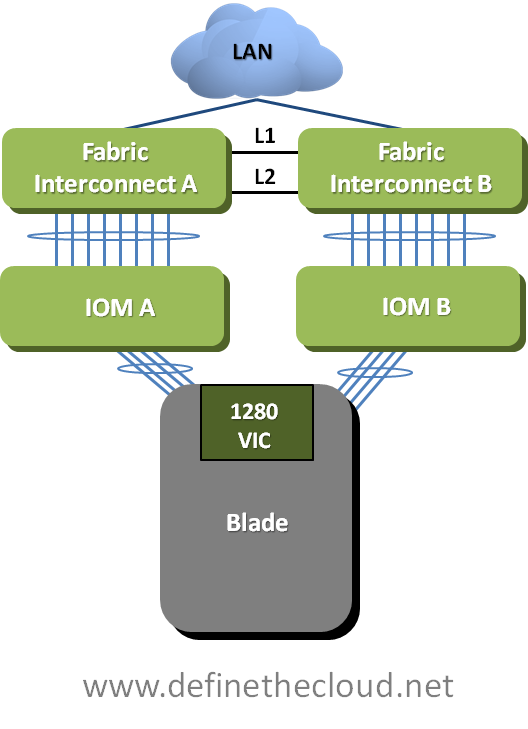
The 1280 VIC provides 8x10GE ports total, 4x to each IOM for a total of 80Gbps per half-width slot (160 Gbs with 2x in a full-width blade.)  It also double the VIF numbers of the previous VIC allowing for 256 (theoretical)  vNICs or vHBAs.  The new VIC also supports port-channeling to the UCS 2208 IOM and iSCSI boot.

The other addition that affects this conversation is the ability to port-channel the uplinks from the 2208 IOM which could not be done before (each link on a 2104 IOM operated independently.)  All of the new hardware is backward compatible with all existing UCS hardware.  For more detailed information on the hardware and software announcements visit Sean McGee’s blog where I stole these graphics: http://www.mseanmcgee.com/2011/07/ucs-2-0-cisco-stacks-the-deck-in-las-vegas/.

Let’s start by discussing the connectivity options from the Fabric Interconnects to the IOMs in the chassis focusing on all gen 2 hardware.

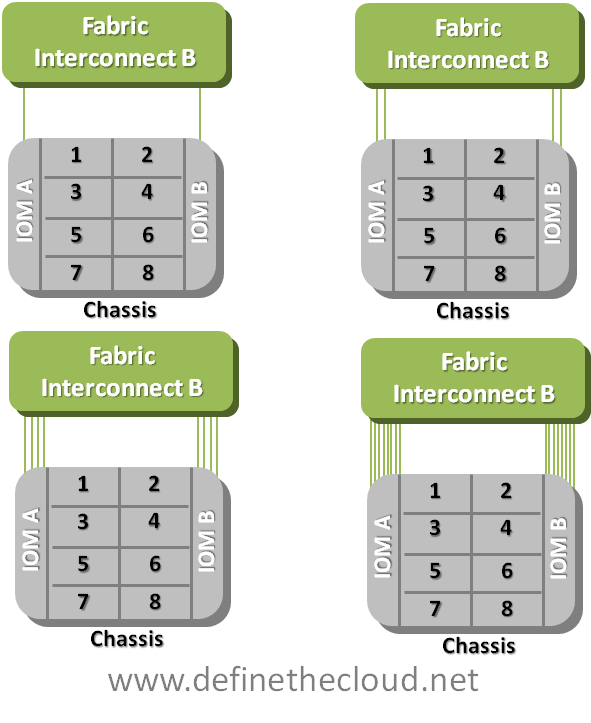
There are two modes of operation for the IOM: Discrete and Port-Channel.  in both modes it is possible to configure 1, 2 , 4, or 8 uplinks from each IOM in either Discrete mode (non-bundled) or port-channel mode (bundled.)

UCS 2208 fabric Interconnect Failover

image

Discrete Mode:

In discrete mode a static pinning mechanism is used mapping each blade to a given port dependent on number of uplinks used.  This means that each blade will have an assigned uplink on each IOM for inbound and outbound traffic.  In this mode if a link failure occurs the blade will not ‘re-pin’ on the side of the failure but instead rely on NIC-Teaming/bonding or Fabric Failover for failover to the redundant IOM/Fabric.  The pinning behavior is as follows with the exception of 1-Uplink (not-shown) in which all blades use the only available Port:

2 Uplinks

Blade

Port 1

Port 2

Port 3

Port 4

Port 5

Port 6

Port 7

Port 8

1

image

2

image

3

image

4

image

5

image

6

image

7

image

8

image

4 Uplinks

Blade

Port 1

Port  2

Port 3

Port 4

Port 5

Port 6

Port 7

Port 8

1

image

2

image

3

image

4

image

5

image

6

image

7

image

8

image

8 Uplinks

Blade

Port 1

Port2

Port 3

Port 4

Port 5

Port 6

Port 7

Port 8

1

image

2

image

3

image

4

image

5

image

6

image

7

image

8

image

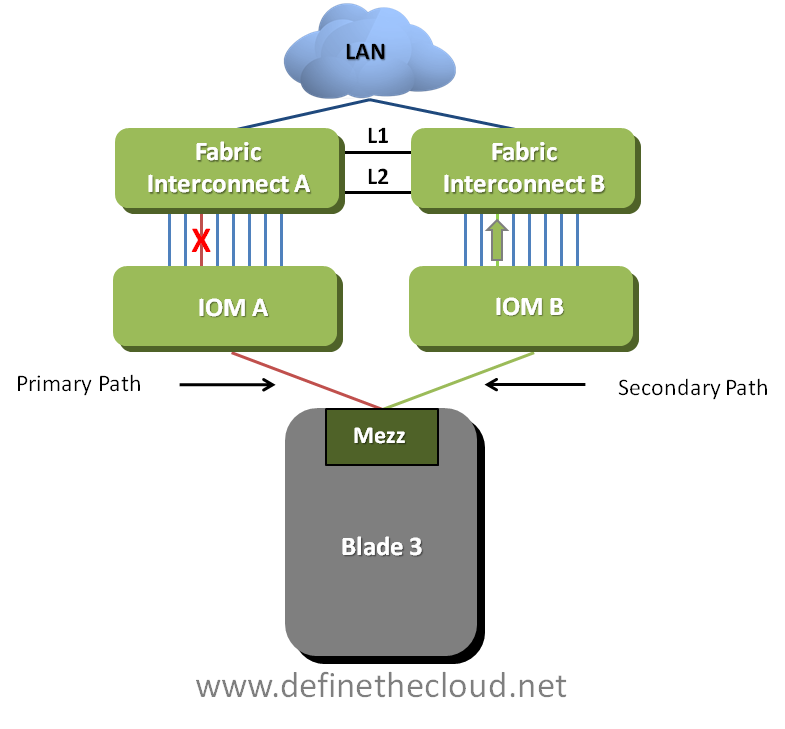
The same port-pinning will be used on both IOMs, therefore in a redundant configuration each blade will be uplinked via the same port on separate IOMs to redundant fabrics.  The draw of discrete mode is that bandwidth is predictable in link failure scenarios.  If a link fails on one IOM that server will fail to the other fabric rather than adding additional bandwidth draws on the active links for the failure side.  In summary it forces NIC-teaming/bonding or Fabric Failover to handle failure events rather than network based load-balancing.  The following diagram depicts the failover behavior for server three in an 8 uplink scenario.

Discrete Mode Failover

image

In the previous diagram port 3 on IOM A has failed.  With the system in discrete mode NIC-teaming/bonding or Fabric Failover handles failover to the secondary path on IOM B (which is the same port (3) based on static-pinning.)

Port-Channel Mode:

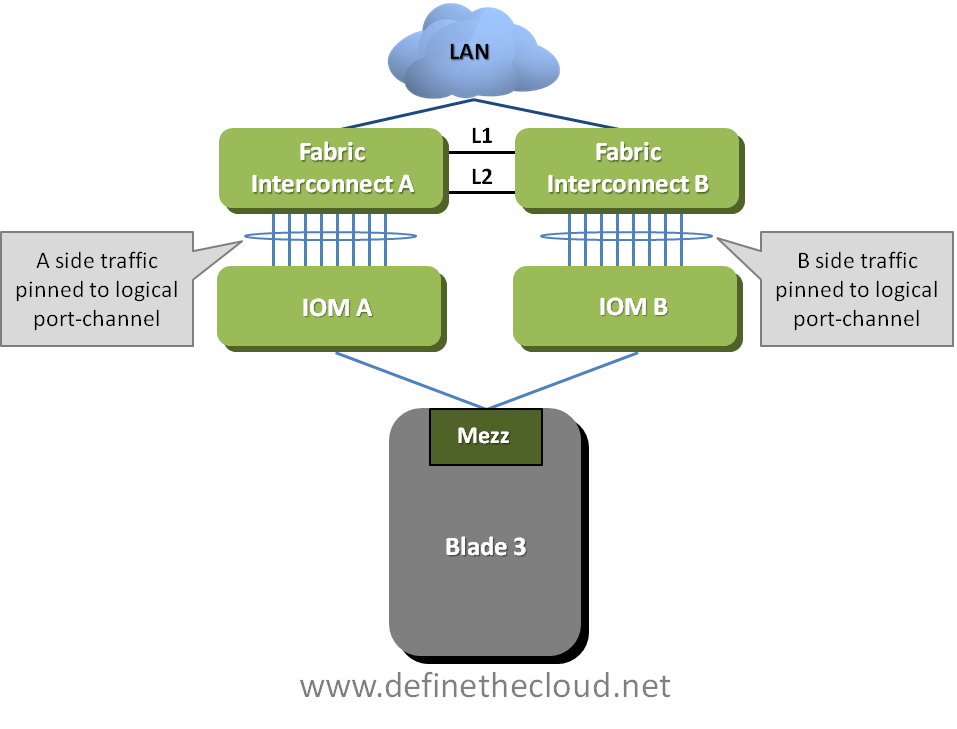
In Port-Channel mode all available links are bonded and a port-channel hashing algorithm (TCP/UDP + Port VLAN, non-configurable) is used for load-balancing server traffic.  In this mode all server links are still ‘pinned’ but they are pinned to the logical bundle rather than individual IOM uplinks.  The following diagram depicts this mode.

Port-Channel Mode

image

In this scenario when a port fails on an IOM port-channel load-balancing algorithms handle failing the server traffic flow to another available port in the channel.  This failover will typically be faster than NIC-teaming/bonding failover.  This will decrease the potential throughput for all flows on the side with a failure, but will only effect performance if the links are saturated.  The following diagram depicts this behavior.

image

In the diagram above Blade 3 was pinned to Port 1 on the A side.  When port 1 failed port 4 was selected (depicted in green) while fabric B port 6 is still active leaving a potential of 20 Gbps.

Note: Actual used ports will vary dependent on port-channel load-balancing.  These are used for example purposes only.

As you can see the port-channel mode enables additional redundancy and potential per-server bandwidth as it leaves two paths open.  In high utilization situations where the links are fully saturated this will degrade throughput of all blades on the side experiencing the failure.  This is not necessarily a bad thing (happens with all port-channel mechanisms), but it is a design consideration.  Additionally port-channeling in all forms can only provide the bandwidth of a single link per flow (think of a flow as a conversation.)  This means that each flow can only utilize 10Gbps max even though 8x10Gbps links are bundled.  For example a single FTP transfer would max at 10Gbps bandwidth, while 8xFTP transfers could potentially use 80Gbps (10 per link) dependent on load-balancing.

Next lets discuss server to IOM connectivity (yes I use discuss to describe me monologuing in print, get over it, and yes I know monologuing isn’t a word) I’ll focus on the new UCS 1280 VIC because all other current cards maintain the same connectivity.  the following diagram depicts the 1280 VIC connectivity.

image

The 1280 VIC utilizes 4x10Gbps links across the mid-pane per IOM to form two 40Gbps port-channels.  This provides for 80Gbps total potential throughput per card.  This means a half-width blade has a total potential of 80Gbps using this card and a full-width blade can receive 160Gbps (of course this is dependent upon design.)  As with any port-channel, link-bonding, trunking or whatever you may call it, any flow (conversation) can only utilize the max of one physical link (or back plane trace) of bandwidth.  This means every flow from any given UCS server has a max potential bandwidth of 10Gbps, but with 8 total uplinks 8 different flows could potentially utilize 80Gbps.

This becomes very important with things like NFS-based storage within hypervisors.  Typically a virtualization hypervisor will handle storage connectivity for all VMs.  This means that only one flow (conversation) will occur between host and storage.  In these typical configurations only 10Gbps will be available for all VM NFS data traffic even though the host may have a potential 80Gbps bandwidth.  Again this is not necessarily a concern, but a design consideration as most current/near-future hosts will never use more than 10Gbps of storage I/O.

Summary:

The new UCS hardware packs a major punch when it comes to bandwidth, port-density and failover options.  That being said it’s important to understand the frame flow, port-usage and potential bandwidth in order to properly design solutions for maximum efficiency.  As always comments, complaints and corrections are quite welcome!

GD Star Rating
loading...

How to Boost Cloud Reliability

Clouds fail. That’s a fact. But if your company uses business apps that are tied to the availability of public cloud services, you can—and must—take steps to mitigate these failures by getting schooled on a few key factors:  service-level agreements (SLAs), redundancy options, application design, and the type of service being used. We’ll outline how these factors affect the availability of your applications in the cloud…


Read my full article in the August issue of Network Computing (For IT by IT) (Requires a free registration, my apologies.)

http://www.informationweek.com/nwcdigital/nwcaug11?k=nwchp&cid=onedit_ds_nwchp

GD Star Rating
loading...

The Need to Design for Workload Mobility in the Cloud: DR and ROI Considerations


The pressure is on for business and information technology services to produce 100% available environments with an equally high return of the capital investment allocated to the infrastructure used to support and operate their technology environments. Despite businesses’ desire for 100% availability and an “availability-as- a-utility” model, a highly available IT infrastructure should not be architected as a utility. The availability-as-a-utility model currently lacks standards and the implementation architectures are complex; it is also interdependent on many components, and the level of people and process complexity in IT service delivery increases the risk of downtime when compared to technology adoption risks.  These components are not easily quantized and their interactions are not well understood, which is preventing practical development of the availability-a-as-utility model.

While availability-as- a-utility may not be practical, architecting your IT environment to be part of an active / active cloud is practical.  A recent study published by Gartner Research suggests that if the business impact of downtime can be considered significant for some business processes, such as those affecting revenue, regulatory compliance, customer loyalty, health, and safety, then the owners of enterprise technology infrastructure should invest in continuous availability architectures whose operating context is active / active (Scott, 2010).


Creating an active / active environment can be accomplished by using application level clustering or cloud based virtual mobile workloads.  The traditional approach of application level clustering does not scale at the same rate as a virtualization based application platforms.  In most cases, application level clusters need to be architected and coded on a case-by-case basis.  At the same time, the hosting of these applications on a virtualized server platform typically requires no changes to the application level confirmation or metadata.  Many third party analysts recommend emerging technologies that enable mobile workloads to replace the fragile, script-based or application dependent recovery routines.  These new technologies are easier to maintain and can provide more granularity and greater consistency, and can increase efficiencies in the pursuit of this goal.  Because emerging tools in this space tend to be more loosely coupled, rather than tightly coupled (like that of traditional application clustering), enterprises will be more likely to reduce the “spare” infrastructures required for recovery, and thus reduce the overall cost of providing highly available recovery infrastructures.  In addition, as more virtualized cloud environments are deployed into production, these tools will be able to make use of the underlying virtual platform for providing something close to availability-as- a-utility via virtual server mobility (Witty & Morency, 2010).  Therefore, both large and small organizations gain a greater ROI to virtualize the hosted application and rely on virtualized mobile workloads to provide availability versus investing in an application level active / active deployment.


Keep in mind that a subset of cloud, automated utility compute environments, do not improve availability alone. To deliver high preforming and highly available services and applications, storage and networking infrastructures must also be designed to support these environments via support for workload mobility (Filks & Passmore, 2010).  For this, the best solution is to prepare your applications and infrastructure to exist within a virtual datacenter environment or to utilize fabric computing. This type of strategy can offer a number of advantages to an organization, such as improved time to deployment, greater infrastructure efficiencies, and increased resource utilization in the datacenter.  In addition, recent studies found that placing fabric computing and creating a virtualized datacenters on the priority list of data center architecture planning when your virtualization plans call for a dynamic infrastructure (Weiss & Butler, Febuary 2011).  High availability, highly efficient multiple datacenter implementations are prime examples of the previously mentioned dynamic infrastructure.


One of the tools to implement virtualized mobile workloads is the use of long-distance live migration of virtualized workloads through one of the various types of datacenter bridging technologies.  The live migration of virtualized workloads enables an IT organization to move workloads as required.  This can be a manual process such as in anticipation of a disaster, datacenter moves, workload migrations, and planned maintenance.  It is also implemented automatically to rebalance capacity across datacenters.  Architecting your application infrastructure to support mobile workloads will reduce or eliminate the downtime associated with these initiatives or projects.   Moreover, the support for long-distance live migration could be used to enable live workload migration across internal and external service providers.  An example of this is leveraging additional utility compute resources of cloud datacenters and hybrid private / public cloud architectures.

Consider a VDI deployment deployed in virtualized datacenter model over two geographic locations.  This deployment would leverage long distance live migrations of workloads, first host redundancy protocol localization for egress traffic, an application delivery network for ingress traffic selection, and active / active SAN extensions to ensure storage consistency.

In this scenario:

  • The operations team is able to migrate workloads between datacenters and perform routine maintenance without the need for specialized maintenance windows.  This allows for an increased level of operational productivity by way more efficient time management.
  • The need to maintain state of infrastructure metadata and configuration revisions is diminished significantly as the active / active virtualized datacenter is providing continuous validation of operational consistency.  This also increases productivity and reduces the task load of the operations team.
  • The investment of the compute, network, and storage infrastructure at both sites is being realized on a continual basis; one whole set of infrastructure is not sitting dormant for lengthy periods of time.
  • The need for periodic full scale “failover-test” is eliminated.  Both site’s operational veracity is validated through continuous use.  Again, this reduces operational staff requirements and workload.  It also can result in removing the capitol required to secure large recovery centers for testing purposes only.

This short example demonstrates where ROI can be increased while simultaneously providing for increased application performance and utilization.

The purposeful design and integration of workload mobility technologies into an organization’s IT strategy has significant potential business benefits.  Most enterprises approach availability in an opportunistic way after they have put their IT infrastructure into production. However, achieving 100% or near-100% availability and infrastructure efficiency requires a comprehensive planning and integration; ad-hoc or point-in-time designs and implementations will not suffice.  When constructing your cloud or virtualized datacenter environment, it is critical to not just consider enabling specific piece-parts of workload migrations and automation, but also enable the entire end-to-end information technology service including network and storage infrastructures (Witty & Morency, 2010).
In some security circles there are the sayings, “secure by design” and “an environment that is 99% secure is eventually 100% insecure,” which are lessons directly related to the deployment of clouds and virtualized datacenters (in addition to the direct implications of the obvious InfoSec context).  Specifically, a cloud environment should be designed with location agnosticism via virtualized mobile workloads from the start.  It should not rely on legacy scripting, warm-standby modes, or offline migration processes that work 99% of the time.  Doing so increases the probability for a costly redesign to improve infrastructure productivity, or worse, failure – to 100% of the time.


Jason Maki is a Datacenter Business Consultant with World Wide Technologies.  He currently leads the cloud architecture design and implementation efforts for datacenter, commercial service providers, and federal customers.  Jason was chosen to speak at VMWorld to comment on the trajectory of information infrastructure best practices in the business continuity and disaster planning space.  Jason’s solutions have linked technical engineering and operational efficiencies, creating profitable innovative solutions.  During Jason’s career he has been honored by Cisco, VMware, SunGard Availability Services, Dell, and Fujitsu Network Services as being an architectural leader in the datacenter and business continuity space.


References

Filks, V., & Passmore, R. E. (2010). How to Implement High-Availability Storage for Server Virtualized Environments. Gartner Report

Scott, D. (2010). Continuous Availability Architectures. Garnter Report

Weiss, G. J., & Butler, A. (Febuary 2011). Fabric Computing Poised as a Preferred Infrastructure. Gartner Report

Witty, R. J., & Morency, J. P. (2010). Hype Cycle for Business Continuity Management and IT. Gartner Report


GD Star Rating
loading...

Why NetApp is my ‘A-Game’ Storage Architecture

One of, if not the, most popular of my blog posts to date has been ‘Why Cisco UCS is my ‘A-Game’ Server Architecture (http://www.definethecloud.net/why-cisco-ucs-is-my-a-game-server-architecture.)  In that post I describe why I lead with Cisco UCS for most consultative engagements.  This follow up for storage has been a long time coming, and thanks to some ‘gentle’ nudging and random coincidence combined with an extended airport wait I’ve decided to get this posted.

If you haven’t read my previous post I take the time to define my ‘A-Game’ architectures as such:

“The rule in regards to my A-Game is that it’s not a rule, it’s a launching point. I start with a specific hardware set in mind in order to visualize the customer need and analyze the best way to meet that need. If I hit a point of contention that negates the use of my A-Game I’ll fluidly adapt my thinking and proposed architecture to one that better fits the customer. These points of contention may be either technical, political, or business related:

  • Technical: My A-Game doesn’t fit the customers requirement due to some technical factor, support, feature, etc.
  • Political: My A-Game doesn’t fit the customer because they don’t want Vendor X (previous bad experience, hype, understanding, etc.)
  • Business: My A-Game isn’t on an approved vendor list, or something similar.

If I hit one of these roadblocks I’ll shift my vendor strategy for the particular engagement without a second thought. The exception to this is if one of these roadblocks isn’t actually a roadblock and my A-Game definitely provides the best fit for the customer I’ll work with the customer to analyze actual requirements and attempt to find ways around the roadblock.

Basically my A-Game is a product or product line that I’ve personally tested, worked with and trust above the others that is my starting point for any consultative engagement.

In my A-Game Server post I run through my hate then love relationship that brought me around to trust, support, and evangelize UCS; I cannot express the same for NetApp.  My relationship with NetApp fell more along the lines of love at first sight.

NetApp – Love at first sight:

I began working with NetApp storage at the same time I was diving headfirst into datacenter as a whole.  I was moving from server admin/engineer to architect and drinking from the SAN, Virtualization, and storage firehouse.  I had a fantastic boss who to this day is a mentor and friend that pushed me to learn quickly and execute rapidly and accurately, thanks Mike!  The main products our team handled at the time were: IBM blades/servers, VMware, SAN (Brocade and Cisco) and IBM/NetApp storage.  I was never a fan of the IBM storage.  It performed solidly but was a bear to configure, lacked a rich feature set and typically got put in place and left there untouched until refresh.  At the same time I was coming up to speed on IBM storage I was learning more and more about NetApp.

From the non-technical perspective NetApp had accessible training and experts, clear value-proposition messaging and a firm grasp on VMware, where virtualization was heading and how/why it should be executed on.  This hit right on with what my team was focused on.  Additionally NetApp worked hard to maintain an excellent partner channel relationship, make information accessible, and put the experts a phone call or flight away.  This made me WANT to learn more about their technology.

The lasting bonds:

Breakfast food, yep breakfast food is what made NetApp stick for me, and still be my A-game four years later. Not just any breakfast food, but a personal favorite of mine; beer and waffles, err, umm… WAFL (second only to chicken and waffles and missing only bacon.)  Data ONTAP (the beer) and NetApp’s Write Anywhere File System (WAFL) are at the heart of why they are my A-Game.  While you can find dozens of blogs, competitive papers, etc. attacking the use of WAFL for primary block storage, what WAFL enables is amazing from a feature perspective, and the performance numbers NetApp can put up speak for themselves.  Because, unlike a traditional block based array, NetApp owns the underlying file system they can not only do more with the data, but they can more rapidly adapt to market needs with software enhancements.  Don’t take my word for it, do some research, look at the latest announcements from other storage leaders and check to see what year NetApp announced their version of those same features, with few exceptions you’ll be surprised.  The second piece of my love for NetApp is Data ONTAP.  NetApp has several storage controller systems ranging from the lower end to the Tier-1 high-capacity, high availability systems.  Regardless of which one you use, you’re always using the same operating/management system, Data ONTAP.  This means that as you scale, change, refresh, upgrade, downgrade, you name it, you never have to retrain AND you keep a common feature set.

My love for breakfast is not the only draw to NetApp, and in fact without a bacon offering I would have strayed if there weren’t more (note to NetApp: Incorporate fatty pork the way politicians do.) 

Other features that keep NetApp top of my list are:

  • Primary block-level storage Deduplication with real world savings at 70+ % with minimal performance hit (and no license fee to boot)
  • Ease of upgrade/downgrade (keep the shelves of disks, replace the controllers, data stays)
  • Read/Write ‘0’ space/cost clones (the ability to clone various data sets in a read/write status using only pointers and storing only the change ‘delta’) and FlexClone capabilities as a whole
  • Highly optimized snapshots for point-in-time rollback, test/dev, etc.
  • VMware plugins to enable VMware admins to manage and monitor their own storage allotments
  • Storage virtualization, the ability to carve out storage and the management of that storage to multiple tenants in a similar fashion to what VMware does for servers
  • Ability to get 80% of the performance benefits of a shelf of SSD drives by adding Flash Cache (PAM II) cards 

Add to that more recent features such as first to market with FCoE based storage and you’ve got a winner in my book.  All that being said I still haven’t covered the real reason NetApp is the first storage vendor in my head anytime I talk about storage.

Unification:

Anytime I’m talking about servers I’m talking about virtualization as well.  Because I don’t work in the Unix or Mainframe worlds I’m most likely talking about VMware (90% market share has that effect.)  When dealing with virtualization my primary goals are consolidation/optimization and flexibility.  In my opinion nobody can touch NetApp storage for this.  I’m a fan of choice and options, I also like particular features/protocols for particular use cases.  On most storage platforms I have to choose my hardware based on the features and protocols my customers require, and most likely use more than one platform to get them all.  This isn’t the case with NetApp.  With few exceptions every protocol/feature is available simultaneously with any given hardware platform.  This means I can run iSCSI, FC, FCoE or all of the above for block based needs at the same time I run CIFS natively to replace Windows file servers, and NFS for my VMware data stores.  All of that from the same box or even the same ports!  This lets me tier my protocols and features to the application requirements instead of to my hardware limitations.

I’ve been working on VMware deployments in some fashion for four years, and have seen dozens of unique deployments but personally never deployed or worked with a VMware environment that ran off a single protocol, typically at a minimum NFS is used for ISO datastores and CIFS can be used to eliminate Windows file servers rather than virtualize them, with a possible block based protocol involved for boot or databases.

Additionally NetApp offers features and functionality to allow multiple storage functions to be consolidated on a single system.  You no longer require separate hardware for primary, secondary, backup, DR, and archive.  All of this can then be easily setup and managed for replication across any of NetApp’s platforms, or many 3rd party systems front-ended with V-series.  These two pieces combined create a truly ‘unified’ platform.

When do I bring out my B-Game?

NetApp like any solution I’ve ever come across is not the right tool for every job.  For me they hit or exceed the 80/20 rule perfectly.  A few places where I don’t see NetApp as a current fit:

  • Small to Medium Business (SMB) – At the SMB level a single protocol solution may work and you can find lower cost solutions that fit the bill, but if you scale faster than expected you’re stuck with a single protocol platform and may end up having to purchase and manage additional devices if/when needs change
  • Massive scalability – Here I’m talking public cloud petabytes upon petabytes where systems like Isilon from EMC and its competitors have the lead
  • Top-Tier performance and enterprise class reliability for Tier-1 applications –  Here at the very high end typically EMC or Hitachi are the players, and IBM using SVC may also play
  • Mainframes, NetApp don’t play that and Big Blue don’t support it  

Summary:

While I stick to there are no ‘one-size fits all’ IT solutions, and that my A-Game is a starting point not a rule I find NetApp to hit the bulls eye for 80+ percent of the market I work with.  Not only do they fit upfront, but they back it up with support, continued innovation, and product advancement.  NetApp isn’t ‘The Growth Company’ and #2 in storage by luck or chance (although I could argue they did luck out quite a bit with the timing of the industry move to converged storage on 10GE.)

Another reason NetApp still reigns king as my A-Game is the way in which it marries to my A-Game server architecture.  Cisco UCS enables unification, protocol choice and cable consolidation as well as virtualization acceleration, etc.  All of these are further amplified when used alongside NetApp storage which allows rapid provisioning, protocol options, storage consolidation and storage virtualization, etc.  Do you want to pre-provision 50 (or 250) VMware hosts with 25 GB read/write boot LUNs ready to go at the click of a template?  Do you want to do this without utilizing any space up front?  UCS and NetApp have the toolset for you.  You can then rapidly bring up new customers, or stay at dinner with your family while a Network Operations Center (NOC) administrator deploys a pre-architected pre-secured, pre-tested and provisioned server from a template to meet a capacity burst.

If you’re considering a storage decision, a private cloud migration, or a converged infrastructure pod make sure you’re taking a look at NetApp as an option and see it for yourself.  For some more information on NetApp’s virtualization story see the links below:

TR3856: Quantifying the Value of Running VMware on NetApp 

TR3808: VMware vSphere and ESX 3.5 Multiprotocol Performance Comparison Using FC, iSCSI, and NFS

GD Star Rating
loading...

Redundancy in Data Storage: Part 2: Geographical Replication

This is a followup to my previous article, Redundancy in Data Storage: Part 1: RAID Levels, where I discussed various site-local data redundancy technologies. Here, I will attempt to detail many of the choices available to provide redundancy beyond the data center that organizations use to solve disaster recovery, business continuity, and continuity of operations (COOP).

It’s obvious that site-local redundancy isn’t enough for critical applications. The threat of natural disasters is always looming, regional power outages occur, building electrical and mechanical systems fail, and backhoes seem to hate fiber optic cable. Enterprises therefore attempt to use geographic redundancy to ensure that even when these things happen critical applications and data remain available. At the heart of making an application geographically redundant is making sure the application’s data resides in more than one geographical location. There are a number of technology and architectural choices that can be used to achieve this geographical replication of data. Often these solutions will be evaluated in terms of cost, RTO (recovery time objective), and RPO (recovery point objective), as I outlined in Disaster Recovery and the Cloud.

One obvious place to build redundancy is at the storage area network level. There are a variety of technologies available to replicate SAN volumes between geographic locations. Synchronous replication tightly couples the primary and backup sites and does not return success to the storage controller until a write completes in both locations, providing a zero RPO. However, synchronous replication requires very fast network connections and requires that the backup site be located very close to the primary location because otherwise latency will severely reduce storage performance. To allow the sites to be further apart, asynchronous replication can be used where the changes are streamed to the backup site but completion of the I/O is signalled before receiving an acknowledgement. Finally, point-in-time replication generates many snapshots of the storage and sends the delta between each snapshot.

All of these SAN replication approaches are bandwidth intensive. Applications make many changes to the disk as part of their ordinary functioning and these changes are almost certainly not encoded in a dense fashion that allows them to efficiently cross networks. An application might make small updates to the same disk block many times in short order and all of these changes would have to be sent across the network in asynchronous or synchronous replication. Point in time replication lowers this overhead a small amount (because redundant changes between snapshots are not sent) at the cost of worse RPO.

Redundancy can also be implemented through database replication. Just as in SAN replication, synchronous, asynchronous, and snapshot-based techniques are available. Many of the same tradeoffs apply, although generally database changes can be sent more efficiently across a WAN. Unfortunately, effectively using database replication to provide geographic redundancy is difficult. For one, database replication can only stand on its own if all of the critical application data resides within the database. This is often not the case. Moreover, sophisticated database deployments involving data partitioning, federation, and integration often greatly complicate replication to the point that effective configuration becomes prohibitive.

Finally, the application itself can handle data redundancy. Often the highest end applications (for instance financial, logistics, and reservation systems) require the federation of data at the application level. This allows extreme top-end performance to be reached and also allows compliance with various types of data jurisdiction requirements (for instance, national directives requiring customer identifiable information to remain in the country of origin.) Unfortunately, this is very difficult and error prone.

Data redundancy is only one piece of the business continuity problem. Applications require other infrastructure to run, such as the network and application servers. Some organizations are using virtualized approaches here with some success to build geographically redundant architectures. Others rely on configuration management technologies to ensure that the disaster recovery sites remain synchronized and ready to handle workload. Another important point to consider is how to handle moving the active instance of the application to the backup site, and also how to re-establish redundancy after a failure and move applications back to the primary. Any approach to provide geographic redundancy must be designed carefully and continually tested well, because today’s complicated application architectures provide too many opportunities for mistakes to be made in provisioning redundancy.

These replication techniques still require the site-local mechanisms like RAID discussed in part 1, because otherwise the facilities involved would be far too unreliable, and also require significant investments in network links, replication technologies, and personnel effort. Also, for the most part, these technologies require the duplication of infrastructure for disaster recovery purposes. In my forthcoming part 3, I will discuss emerging approaches in cloud architectures that unify redundancy mechanisms and significantly simplify the effort involved in implementing resilient business systems.

About the Author

Michael Lyle (@MPLyle) is CTO and co-founder of Translattice, and is responsible for the company’s strategic technical direction.  He is a recognized leader in developing distributed systems technologies and has extensive experience in datacenter and information technology operations.

GD Star Rating
loading...

Inter-Fabric Traffic in UCS–Part II

In the first part of this post (http://www.definethecloud.net/inter-fabric-traffic-in-ucs) I discuss server traffic flows within a UCS system focusing on End-Host mode (EH mode.)  EH mode is the default and recommended mode for the majority of UCS implementations, but the system can also be used in ‘Switch mode’ which causes the Fabric Interconnects to operate as standard L2 switches.  This post will focus on server-to-server communication in switched mode.  For more information on when/where to use switch mode and the recommended upstream connectivity options see Brad Hedlund’s post in HD video: http://bradhedlund.com/2010/06/22/cisco-ucs-networking-best-practices/ and the white paper he co-authored on the subject: http://bradhedlund.com/2010/12/01/cisco-nexus-7000-connectivity-solutions-for-cisco-ucs/.  Both of these are must reads for anyone designing UCS solutions as well as great traffic flow information on the Nexus 7000 as a whole.

Note: Remember that switched-mode is rarely recommended and has become less important with the 12/2010 release of UCSM 1.4 which allows for ‘Appliance’ and ‘Storage’ ports in EH Mode.  For more information on the new port types see Dave Alexander’s post on the new feature: http://www.unifiedcomputingblog.com/?p=187.

The only time I would recommend using switch mode is when locally switch traffic is required within the UCS system itself.  Lets take a quick look at the typical UCS connectivity diagram:

image

In the diagram above we see the basic connectivity for a UCS system.  In the default EH mode the only connections supported between the Fabric interconnects are the cluster links shown which do not carry data traffic.  This means that all switching from Fabric A to Fabric B must traverse the uplinks and be handled by an upstream device.

When the Fabric interconnects are moved into Switched Mode data links are now supported between Fabric Interconnect A and B.  Lets take a look at how this works.

image

The only change in the above drawing is that I’ve replaced the cluster links with 10GE port-channel carrying data traffic.  In this diagram and the following I have removed the cluster links for visual clarity, but they would still be required and follow the same rules as in EH mode.  With port-channel in place it is possible for data to be switched between the Fabric Interconnects, there are however some considerations.

When the Fabric Interconnects are placed in Switch Mode they begin to operate as traditional switches, this includes participating in Spanning-Tree Protocol (STP) for loop avoidance.  In the case of UCS the STP protocol used is Per-VLAN Rapid Spanning Tree+   (PVRST+.)  PVRST+ is a faster converging version of traditional spanning tree that operates independently on a per VLAN basis.  PVRST+ is commonly used, standards based and backward compatible with other STP versions.  With Switch Mode running the Fabric Interconnects will send and receive Bridge Protocol Data Units (BPDU) and block ports based on the network topology information in those BPDUs.  Now let’s take a closer look at how this looks within UCS.

image

In the diagram above we can see that moving to switch mode and connecting the Fabric Interconnects together via data links we’ve created loops which will have to be closed by STP.  STP utilizes a loop avoidance algorithm based on a root bridge which acts as the base of the network topology and a loop free branch topology is built providing each ‘leaf’ one path to the root by blocking redundant links.  image

Best practices dictate that the root bridge be manually configured as a highly available switch typically in the aggregation or core layer, for performance and stability reasons.  With this in mind we can assume that the UCS Fabric Interconnects will not be the STP root bridge.  This means that our UCS network diagram will look similar to the following diagram.

image


In the above diagram we can see an example where the top left upstream switch is the root for a given VLAN.  In order to avoid looped behavior STP will block the links between the two Fabric Interconnects.  This means that no traffic will pass between the Fabric Interconnects for that VLAN and all Fabric A to B communication will be passed upstream the same way it would in EH mode.  This will occur for any VLANs that exist in both the upstream network and the Fabric Interconnects.  This behavior would be the same regardless of which upstream switch were acting as the Root Bridge for that VLAN.  This means that even in switch mode there is no Fabric A to Fabric B switching handled locally for common VLANs.  Common VLANs is the key phrase in that sentence, let’s take a look at how we get Fabric A to B switching handled locally.

image

In the above diagram we see that VLAN 10 is common upstream and on the Fabric Interconnects.  Assuming best practices are in place VLAN 10’s Root Bridge will be upstream and therefore VLAN 10 will be blocked on the link between Fabric Interconnects.  VLAN 20 on the other hand only exists within the UCS system and therefore there is no loop in place or requirement for blocked links.  For VLAN 20 one of the Fabric interconnects will operate as the root bridge and traffic will be forwarded across the links.  This UCS only VLAN can be used for server to server communication, one example is depicted in the following diagram.

image

In the example above we see web access on VLAN 10 incoming from the upstream network.  This VLAN is blocked across the connections between Fabric Interconnects because it is common upstream and within UCS.  VLAN 20 is used for the web servers to access the database servers and is only needed within the UCS system.  Because this VLAN only exists internally traffic is forwarded across the links between Fabric interconnects and is switched locally.  Local VLANs can be used to utilize the high-bandwidth low-latency of the UCS switching system for server to server communication.

Summary:

Utilizing switched mode enables inter-fabric traffic to be switched locally but there are design considerations that must be addressed.  When deciding between modes for these purposes remember that UCS is a very low-latency system with sub 7us switching latency which means that with the appropriate switch hardware upstream total latency for round-trip inter-fabric traffic will still be below 40-50us or faster depending on hardware.  Also remember that intra-fabric traffic (A to A or B to B) is always switched locally sub 7us regardless of mode.  In most cases it is best to design your applications to utilize the same fabric if they communicate frequently rather than designing a switched mode solution.

GD Star Rating
loading...

Redundancy in Data Storage: Part 1: RAID Levels

I recently read Joe Onisick’s piece, “Have We Taken Data Redundancy Too Far?”  I think Joe raises a good point, and this is a natural topic to dissect in detail after my previous article about cloud disaster recovery and business continuity.  I, too, am concerned by the variety of data redundancy architectures used in enterprise deployments and the duplication of redundancy on top of redundancy that often results.  In a series of articles beginning here, I will focus on architectural specifics of how data is stored, the performance implications of different storage techniques, and likely consequences to data availability and risk of data loss.

The first technology that comes to mind for most people when thinking of data redundancy is RAID, which stands for Redundant Array of Independent Drives.  There are a number of different RAID technologies, but here I will discuss just a few.  The first is mirroring, or RAID-1, which is generally employed with pairs of drives.  Each drive in a RAID-1 set contains the exact same information.  Mirroring generally provides double the random access read performance of a single disk, while providing approximately the same sequential read performance and write performance.  The resulting disk capacity is the capacity of a single drive.  In other words, half the disk capacity is sacrificed.

RAID-1, or Mirroring

RAID-1, or Mirroring;
Courtesy Colin M. L. Burnett

A useful figure of merit for data redundancy architectures is MTTDL, or Mean Time To Data Loss, which can be calculated for a given storage technology using the underlying MTBF, Mean Time Between Failures, and MTTR, Mean Time To Repair/Restore redundancy.  All “mean time” metrics really specify an average rate over an operating lifetime; in other words, if the MTTDL of an architecture is 20 years, there is a 1/20 = approximately 5% chance in any given year of suffering data loss.  Similarly, MTBF specifies the rate of underlying failures.   MTTDL includes only failures in the storage architecture itself, and not the risk of a user or application corrupting data.

For a two-drive mirror set, the classical calculation is:

This is a common reason to have hot-spares in drive arrays; allowing an automatic rebuild significantly reduces MTTR, which would appear to also significantly increase MTTDL.  However…

While hard drive manufacturers claim very large MTBFs, studies such as this one have consistently found numbers closer to 100,000 hours.  If recovery/rebuilding the array takes 12 hours, the MTTDL would be very large, implying an annual risk of data loss of less than 1 in 95,000.  Things don’t work this well in the real world, for two primary reasons:

  • The optimistic assumption that the risk of drive failure for two drives in an array is uncorrelated.  Because disks in an array were likely sourced at the same time and have experienced similar loading, vibration, and temperature over their working life, they are more likely to fail at the same time.  Also, some failure modes have a risk of simultaneously eliminating both disks, such as a facility fire or a hardware failure in the enclosure or disk controller operating the disks.
  • It is also assumed that the repair will successfully restore redundancy if a further drive failure doesn’t occur.  Unfortunately, a mistake may happen if personnel are involved in the rebuild.  Also, the still-functioning drive is under heavy load during recovery and may experience an increased risk of failure.  But perhaps the most important factor is that as capacities have increased, the Unrecoverable Read Error rate, or URE, has become significant.  Even without a failure of the drive mechanism, drives will permanently lose blocks of data at this specified (very low) rate, which generally varies between 1 error per 1014 bits read for low-end SATA drives to 1 per 1016 for enterprise drives.  Assuming that the drives in the mirror are 2 TB low-end SATA drives, and there is no risk of a rebuild failure other than by unrecoverable read errors, the rebuild failure rate is 17%.
RAID 1+0: Mirroring and Striping

RAID 1+0: Mirroring and Striping;
Courtesy MovGP

With the latter in mind, the MTTDL becomes:

When the rebuild failure rate is very large compared to 1/MTBF:

In this case, MTTDL is approximately 587,000 hours, or a 1 in 67 risk of losing data per year.

RAID-1 can be extended to many drives with RAID-1+0, where data is striped across many mirrors.  In this case, capacity and often performance scales linearly with the number of stripes.  Unfortunately, so does failure rate.  When one moves to RAID-1+0, the MTTDL can be determined by dividing the above by the number of stripes.  A ten drive (five stripes of two-disk mirrors) RAID-1+0 set of the above drives would have a 15% chance of losing data in a year (again without considering correlation in failures.)  This is worse than the failure rate of a single drive.

RAID-5RAID-6

RAID-5 and RAID-6;
Courtesy Colin M. L. Burnett

Because of the amount of storage required for redundancy in RAID-1, it is typically only used for small arrays or applications where data availability and performance are critical.  RAID levels using parity are widely used to trade-off some performance for additional storage capacity.

RAID-5 stripes blocks across a number of disks in the array (minimum 3, but generally 4 or more), storing parity blocks that allow one drive to be lost without losing data.  RAID-6 works similarly (with more complicated parity math and more storage dedicated to redundancy) but allows up to two drives to be lost.  Generally, when a drive fails in a RAID-5 or RAID-6 environment, the entire array must be reread to restore redundancy (during this time, application performance usually suffers.)

While SAN vendors have attempted to improve performance for parity RAID environments, significant penalties remain.  Sequential writes can be very fast, but random writes generally entail reading neighboring information to recalculate parity.  This burden can be partially eased by remapping the storage/parity locations of data using indirection.

For RAID-5, the MTTDL is as follows:

Again, when the RFR is large compared to 1/MTBF, the rate of double complete drive failure can be ignored:

However, here RFR is much larger as it is calculated over the entire capacity of the array.  For example, achieving an equivalent capacity to the above ten-drive RAID-1+0 set would require 6 drives with RAID-5.  The RFR here would be over 80%, yielding little benefit from redundancy, and the array would have a 63% chance of failing in a year.

Properly calculating the RAID-6 MTTDL requires either Markov chains or very long series expansions, and there is significant difference in rebuild logic between vendors.  However, it can be estimated, when RFR is relatively large, and an unrecoverable read error causes the array to entirely abandon using that disk for rebuild, as:

Evaluating an equivalent, 7-drive RAID-6 array yields an MTTDL of approximately 100,000 hours, or a 1 in 11 chance of array loss per year.

The key things I note about RAID are:

  • The odds of data loss are improved, but not wonderful, even under favorable assumptions.
  • Achieving high MTTDL with RAID requires the use of enterprise drives (which have a lower unrecoverable error rate).
  • RAID only protects against independent failures.  Additional redundancy is needed to protect against correlated failures (a natural disaster, a cabinet or backplane failure, or significant covariance in disk failure rates.)
  • RAID only provides protection of the data written to the disk.  If the application, users, or administrators corrupt data, RAID mechanisms will happily preserve that corrupted data.  Therefore, additional redundancy mechanisms are required to protect against these scenarios.

Because of these factors, additional redundancy is required in conventional application deployments, which I will cover in subsequent articles in this series.

Images in this article created by MovGP (RAID-1+0, public domain) and Colin M. L. Burnett (all others, CC-SA) from Wikipedia.

This series is continued in Redundancy in Data Storage: Part 2: Geographical Replication.

About the Author

Michael Lyle (@MPLyle) is CTO and co-founder of Translattice, and is responsible for the company’s strategic technical direction.  He is a recognized leader in developing new technologies and has extensive experience in datacenter operations and distributed systems.

GD Star Rating
loading...

Intel’s Betting the Storage I/O Farm on the CPU


I had the privilege of attending Tech Field Day 4 in San Jose this week as a delegate thanks to Stephen Foskett and Gestalt IT.  It was a great event and a lot of information was covered in two days of presentations.  I’ll be discussing the products and vendors that sponsored the event over the next few blogs starting with this one on Intel.  Check out the official page to view all of the delegates and find links to the recordings etc. http://gestaltit.com/field-day/2010-san-jose/.

Intel presented both their Ethernet NIC and storage I/O strategy as well as a processor update and public road map, this post will focus on the Ethernet and I/O presentation.

Intel began the presentation with an overview of the data center landscape and a description of the move towards converged I/O infrastructure, meaning storage, traditional LAN and potentially High Performance Computing (HPC) on the same switches and cables.  Anyone familiar with me or this site knows that I am a fan and supporter of converging the network infrastructure to reduce overall cost and complexity as well as provide more flexibility to data center I/O so I definitely liked this messaging.  Next was a discussion of iSCSI and its tradition of being used as a consolidation tool.

iSCSI:

iSCSI has been used for years in order to provide a mechanism for consolidated block storage data without the need for a separate physical network.  Most commonly iSCSI has been deployed as a low-cost alternative to Fibre Channel.  Its typically been used in the SMB space and for select applications in larger datacenters.  iSCSI was previously limited to 1 Gigabit pipes (prior to the 10GE ratification) and it also suffers from higher latency and lower throughput than Fibre Channel.  The beauty of iSCSI is the ability to use existing LAN infrastructure and traditional NICs to provide block access to shared disk, the Achilles heal is performance.  Because of this cost has always been the primary deciding factor to use iSCSI. For more information on iSCSI see my post on storage protocols: http://www.definethecloud.net/storage-protocols.

In order to increase the performance of iSCSI and decrease the overhead on the system processor(s) the industry developed iSCSI Host Bus Adapters (HBA) which offload the protocol overhead to the I/O card hardware.  These were not widely adopted due to the cost of the cards, this means that a great deal of iSCSI implementations rely on a protocol stack in the operating system (OS.) 

Intel then drew parallels to doing the same with FCoE via the FCoE software stack available for Windows and included in current Linux kernels.  The issue with drawing this parallel is that iSCSI is a mid-market technology that sacrifices some performance and reliability for cost, whereas FCoE is intended to match/increase the performance and reliability of FC while utilizing Ethernet as the transport.  This means that when looking at FCoE implementations the additional cost of specialized I/O hardware makes sense to gain the additional performance and reduce the CPU overhead.

Intel also showed some performance testing of FCoE software stack versus hardware offload using a CNA.  The IOPS they showed were quite impressive for a software stack, but IOPS isn’t the only issue.  The other issue is protocol overhead on the processor.Their testing showed an average of about 6% overhead for the software stack.  6% is low but we were only being shown one set of test criteria for a specific workload.  Additionally we were not provided the details of the testing criteria.  Other tests I’ve seen of the software stack are about 2 years old and show very comparable CPU utilization for FCoE software stack and Generation I CNAs for 8 KB reads, but a large disparity as the block size increased (CPU overhead became worse and worse for the software stack.)  In order to really understand the implications of utilizing a software stack Intel will need to publish test numbers under multiple test conditions:

  • Sequential and random
  • Various read and write combinations
  • Various block sizes
  • Mixed workloads of FCoE and other Ethernet based traffic

I’ve since located the test Intel referenced from Demartek.  It can be obtained here (http://www.demartek.com/Reports_Free/Demartek_Intel_10GbE_FCoE_iSCSI_Adapter_Performance_Evaluation_2010-09.pdf.)  Notice that in the forward Demartek states the importance of CPU utilization data and stresses that they don’t cherry pick data then provides CPU utilization data only for the Microsoft Exchange simulation through JetStress, not for the SQLIO simulation at various block sizes.  I find that you can learn more from the data not shown in vendor sponsored testing, than the data shown.

Even if we were to make two big assumptions: Software stack IOPS are comparable to CNA hardware, and additional CPU utilization is less than or equal to 6% would you want to add an additional 6% CPU overhead to your virtual hosts?  The purpose of virtualization is to come as close as possible to full hardware utilization via placing multiple workloads on a single server.  In that scenario adding additional processor overhead seems short sighted.

The technical argument for doing this is two fold:

  • Saving cost on specialized I/O hardware
  • Processing capacity evolves faster than I/O offload capacity and speeds mainly due to economies of scale therefore your I/O performance will increase with each processor refresh using a software stack

If you’re looking to save cost and are comfortable with the processor and performance overhead then there is no major issue with using the software stack.  That being said if you’re really trying to maximize performance and or virtualization ratios you want to squeeze every drop you can out of the processor for the virtual machines.  As far as the second point of processor capacity goes, it most definitely rings true but with each newer faster processor you buy you’re losing that assumed 6% off the top for protocol overhead.  That isn’t acceptable to me.

The Other Problem:

FC and FCoE have been designed to carry native SCSI commands and data and treat them as SCSI expects, most importantly frames are not dropped (lossless network.)  The flow control mechanism FC uses for this is called buffer-to-buffer credits (B2B.)  This is a hop-to-hop mechanism implemented in hardware on HBAs/CNAs and FC switches.  In this mechanism when two ports initialize a link they exchange a number of buffer spaces they have dedicated to the device on the other side of the link based on agreed frame size. When any device sends a frame it is responsible for keeping track of the buffer space available on the receiving device based on these credits.  When a device receives a frame and has processed it (removing it from the buffer) it returns an R_RDY similar to a TCP ACK which lets the sending device know that a buffer has been freed.  For more information on this see the buffer credits section of my previous post: http://www.definethecloud.net/whats-the-deal-with-quantized-congestion-notification-qcn.  This mechanism ensures that a device never sends a frame that the receiving device does not have sufficient buffer space for and this is implemented in hardware. 

On FCoE networks we’re relying on Ethernet as the transport so B2B credits don’t exist.  Instead we utilize Priority Flow Control (PFC) which is a priority based implementation of 802.3x pause.  For more information on DCB see my previous post: http://www.definethecloud.net/data-center-bridging-exchange.  PFC is handled by DCB capable NICs and will handle sending a pause before the NIC buffers overflow.  This provides for a lossless mechanism that can be translated back into B2B credits at the FC edge. 

The issue here with the software stack is that while the DCB capable NIC ensures the frame is not dropped on the wire via PFC it has to pass processing across the PCIe bus to the processor and allow the protocol to be handled by the OS kernel.  This adds layers in which the data could be lost or corrupted that don’t exist with a traditional HBA or CNA.

Summary:

FCoE software stack is not a sufficient replacement for a CNA.  Emulex, Broadcom, Qlogic and Brocade are all offloading protocol to the card to decrease CPU utilization and increase performance.  HP has recently announced embedding Emulex OneConnect adapters, which offload iSCSI, TCP and FCoE, on the system board.  That’s a lot of backing for protocol offload with only Intel standing on the other side of the fence.  My guess is that Intel’s end goal is to sell more processors, and utilizing more cycles for protocol processing makes sense.  Additionally Intel doesn’t have a proven FC stack to embed on a card and the R/D costs would be significant, so throwing it in the kernel and selling their standard NIC makes sense to the business.  Lastly don’t forget storage vendor qualification, Intel has an uphill battle getting an FCoE software stack on the approved list for the major storage vendors.

Full Discloser:  Tech Field Day is organized by the folks at Gestalt IT and paid for by the presenters of the event.  My travel, meals and accommodations were paid for by the event but my opinions negative or positive are all mine.

GD Star Rating
loading...

Inter-Fabric Traffic in UCS

It’s been a while since my last post, time sure flies when you’re bouncing all over the place busy as hell.  I’ve been invited to Tech Field Day next week and need to get back in the swing of things so here goes.

In order for Cisco’s Unified Computing System (UCS) to provide the benefits, interoperability and management simplicity it does, the networking infrastructure is handled in a unique fashion.  This post will take a look at that unique setup and point out some considerations to focus on when designing UCS application systems.  Because Fibre Channel traffic is designed to be utilized with separate physical fabrics exactly as UCS does this post will focus on Ethernet traffic only.   This post focuses on End Host mode, for the second art of this post focusing on switch mode use this link: http://www.definethecloud.net/inter-fabric-traffic-in-ucspart-ii.  Let’s start with taking a look at how this is accomplished:

UCS Connectivity

image

In the diagram above we see both UCS rack-mount and blade servers connected to a pair of UCS Fabric Interconnects which handle the switching and management of UCS systems.  The rack-mount servers are shown connected to Nexus 2232s which are nothing more than remote line-cards of the fabric interconnects known as Fabric Extenders.  Fabric Extenders provide a localized connectivity point (10GE/FCoE in this case) without expanding management points by adding a switch.  Not shown in this diagram are the I/O Modules (IOM) in the back of the UCS chassis.  These devices act in the same way as the Nexus 2232 meaning they extend the Fabric Interconnects without adding management or switches.  Next let’s look at a logical diagram of the connectivity within UCS.

UCS Logical Connectivity

imageIn the last diagram we see several important things to note about UCS Ethernet networking:

  • UCS is a Layer 2 system meaning only Ethernet switching is provided within UCS.  This means that any routing (L3 decisions) must occur upstream.
  • All switching occurs at the Fabric Interconnect level.  This means that all frame forwarding decisions are made on the Fabric Interconnect and no intra-chassis switching occurs.
  • The only connectivity between Fabric Interconnects is the cluster links.  Both Interconnects are active from a switching perspective but the management system known as UCS Manger (UCSM) is an Active/Standby clustered application.  This clustering occurs across these links.  These links do not carry data traffic which means that there is no inter-fabric communication within the UCS system and A to B traffic must be handled upstream.

At first glance handling all switching at the Fabric Interconnect level looks as though it would add latency (inter-blade traffic must be forwarded up to the fabric interconnects then back to the blade chassis.)  While this is true, UCS hardware is designed for low latency environments such as High Performance Computing (HPC.)  Because of this design goal all components operate at very low latency.  The Fabric Interconnects themselves operate at approximately 3.2us (micro seconds), and the Fabric Extenders operate at about 1.5us.  This means total roundtrip time blade to blade is approximately 6.2us right inline or lower than most Access Layer solutions.  Equally as important with this design switching between any two blades/servers in the system will occur at the same speed regardless of location (consistent predictable latency.)

The question then becomes how is traffic between fabrics handled?  The answer is that traffic between fabrics must be handled upstream (next hop device(s) shown in the diagrams as the LAN cloud.)  This is an important consideration when designing UCS implementations and selecting a redundancy/load-balancing behavior for server NICs.

Let’s take a look at two examples, first a bare-metal OS (Windows, Linux, etc.) next a VMware server.

Bare-Metal Operating System

image In the diagram above we see two blades which have been configured in an active/passive NIC teaming configuration using separate fabrics (within UCS this is done within the service profile.)  This means that blade 1 is using Fabric A as a primary path with B available for failover and blade 2 is doing the opposite.  In this scenario any traffic sent from blade 1 to blade 2 would have to be handled by the upstream device depicted by the LAN cloud.  This is not necessarily an issue for the occasional frame but will impact performance for servers that communicate frequently.

Recommendation:

For bare-metal operating systems analyze the blade to blade communication requirements and ensure chatty server to server applications are utilizing the same fabric as a primary:

  • When using a card that supports hardware failover provide only one vNIC (made redundant through HW failover) and place its primary path on the same fabric as any other servers that communicate frequently.
  • When using cards that don’t support HW failover use active/passive NIC teaming and ensure that the active side is set to the same fabric for servers that communicate frequently.

VMware Servers

image

In the above diagram we see that the connectivity is the same from a physical perspective but in this case we are using VMware as the operating system.  In this case a vSwitch, vDS, or Cisco Nexus 1000v will be used to connect the VMs within the Hypervisor.  Regardless of VMware switching option the case will be the same.  It is necessary to properly design the the virtual switching environment to ensure that server to server communication is handled in the most efficient way possible.

Recommendation:

  • For half-width blades requiring 10GE or less total throughput, or full-width blades requiring 20GE or less total throughput provide a single vNIC with hardware failover if available or use an active/passive NIC configuration for the VMware switching.
  • For blades requiring the total active/active throughput of available NICs determine application profiles and utilize port-groups (port-profiles with Nexus 1000v) to ensure active paths are the same for application groups which communicate heavily.

Summary:

UCS utilizes a unique switching design in order to provide high bandwidth, low-latency switching with a greatly reduced management architecture compared to competing solutions.  The networking requires a  thorough understanding in order to ensure architectural designs provide the greatest available performance.  Ensuring application groups that utilize high levels of server to server traffic are placed on the same path will provide maximum performance and minimal additional overhead on upstream networking equipment.

GD Star Rating
loading...

Access Layer Network Virtualization: VN-Tag and VEPA

One of the highlights of my trip to lovely San Francisco for VMworld was getting to join Scott Lowe and Brad Hedlund for an off the cuff whiteboard session.  I use the term join loosely because I contributed nothing other than a set of ears.  We discussed a few things, all revolving around virtualization (imagine that at VMworld.)  One of the things we discussed was virtual switching and Scott mentioned a total lack of good documentation on VEPA, VN-tag and the differences between the two.  I’ve also found this to be true, the documentation that is readily available is:

  • Marketing fluff
  • Vendor FUD
  • Standards body documents which might as well be written in a Klingon/Hieroglyphics slang manifestation

This blog is my attempt to demystify VEPA and VN-tag and place them both alongside their applicable standards, and by that I mean contribute to the extensive garbage info revolving around them both.  Before we get into them both we’ll need to understand some history and the problems they are trying to solve.

First let’s get physical.  Looking at a traditional physical access layer we have two traditional options for LAN connectivity: Top-of-Rack (ToR) and End-of-Row (EoR) switching topologies.  Both have advantages and disadvantages.

EoR:

EoR topologies rely on larger switches placed on the end of each row for server connectivity.

Pros:

  • Less Management points
  • Smaller Spanning-Tree Protocol (STP) domain
  • Less equipment to purchase, power and cool

Cons:

  • More above/below rack cable runs
  • More difficult cable modification, troubleshooting and replacement
  • More expensive cabling

ToR:

ToR utilizes a switch at the top of each rack (or close to it.)

Pros:

  • Less cabling distance/complexity
  • Lower cabling costs
  • Faster move/add/change for server connectivity

Cons:

  • Larger STP domain
  • More management points
  • More switches to purchase, power and cool

Now let’s virtualize.  In a virtual server environment the most common way to provide Virtual Machine (VM) switching connectivity is a Virtual Ethernet Bridge (VEB) in VMware we call this a vSwitch.  A VEB is basically software that acts similar to a Layer 2 hardware switch providing inbound/outbound and inter-VM communication.  A VEB works well to aggregate multiple VMs traffic across a set of links as well as provide frame delivery between VMs based on MAC address.  Where a VEB is lacking is network management, monitoring and security.  Typically a VEB is invisible and not configurable from the network teams perspective.  Additionally any traffic handled by the VEB internally cannot be monitored or secured by the network team.

Pros:

  • Local switching within a host (physical server)
    • Less network traffic
    • Possibly faster switching speeds
  • Common well understood deployment
  • Implemented in software within the hypervisor with no external hardware requirements

Cons:

  • Typically configured and managed within the virtualization tools by the server team
  • Lacks monitoring and security tools commonly used within the physical access layer
  • Creates a separate management/policy model for VMs and physical servers

These are the two issues that VEPA and VN-tag look to address in some way.  Now let’s look at the two individually and what they try and solve.

Virtual Ethernet Port Aggregator (VEPA):

VEPA is standard being lead by HP for providing consistent network control and monitoring for Virtual Machines (of any type.)  VEPA has been used by the IEEE as the basis for 802.1Qbg ‘Edge Virtual Bridging.’  VEPA comes in two major forms: a standard mode which requires minor software updates to the VEB functionality as well as upstream switch firmware updates, and a multi-channel mode which will require additional intelligence on the upstream switch.

Standard Mode:

The beauty of VEPA in it’s standard mode is in it’s simplicity, if you’ve worked with me you know I hate complex designs and systems, they just lead to problems.  In the standard mode the software upgrade to the VEB in the hypervisor simply forces each VM frame out to the external switch regardless of destination.  This causes no change for destination MAC addresses external to the host, but for destinations within the host (another VM in the same VLAN) it forces that traffic to the upstream switch which forwards it back instead of handling it internally, called a hairpin turn.)  It’s this hairpin turn that causes the requirement for the upstream switch to have updated firmware, typical STP behavior prevents a switch from forwarding a frame back down the port it was received on (like the saying goes, don’t egress where you ingress.)  The firmware update allows the negotiation between the physical host and the upstream switch of a VEPA port which then allows this hairpin turn.  Let’s step through some diagrams to visualize this.

image  image

Again the beauty of this VEPA mode is in its simplicity.  VEPA simply forces VM traffic to be handled by an external switch.  This allows each VM frame flow to be monitored managed and secured with all of the tools available to the physical switch.  This does not provide any type of individual tunnel for the VM, or a configurable switchport but does allow for things like flow statistic gathering, ACL enforcement, etc.  Basically we’re just pushing the MAC forwarding decision to the physical switch and allowing that switch to perform whatever functions it has available on each transaction.  The drawback here is that we are now performing one ingress and egress for each frame that was previously handled internally.  This means that there are bandwidth and latency considerations to be made.  Functions like Single Root I/O Virtualization (SR/IOV) and Direct Path I/O can alleviate some of the latency issues when implementing this.  Like any technology there are typically trade offs that must be weighed.  In this case the added control and functionality should outweigh the bandwidth and latency additions.

Multi-Channel VEPA:

Multi-Channel VEPA is an optional enhancement to VEPA that also comes with additional requirements.  Multi-Channel VEPA allows a single Ethernet connection (switchport/NIC port) to be divided into multiple independent channels or tunnels.  Each channel or tunnel acts as an unique connection to the network.  Within the virtual host these channels or tunnels can be assigned to a VM, a VEB, or to a VEB operating with standard VEPA.  In order to achieve this goal Multi-Channel VEPA utilizes a tagging mechanism commonly known as Q-in-Q (defined in 802.1ad) which uses a service tag ‘S-Tag’ in addition to the standard 802.1q VLAN tag.  This provides the tunneling within a single pipe without effecting the 802.1q VLAN.  This method requires Q-in-Q capability within both the NICs and upstream switches which may require hardware changes.

image VN-Tag:

The VN-Tag standard was proposed by Cisco and others as a potential solution to both of the problems discussed above: network awareness and control of VMs, and access layer extension without extending management and STP domains.  VN-Tag is the basis of 802.1qbh ‘Bridge Port Extension.’  Using VN-Tag an additional header is added into the Ethernet frame which allows individual identification for virtual interfaces (VIF.)

image

The tag contents perform the following functions:


Ethertype

Identifies the VN tag

D

Direction, 1 indicates that the frame is traveling from the bridge to the interface virtualizer (IV.)

P

Pointer, 1 indicates that a vif_list_id is included in the tag.

vif_list_id

A list of downlink ports to which this frame is to be forwarded (replicated). (multicast/broadcast operation)

Dvif_id

Destination vif_id of the port to which this frame is to be forwarded.

L

Looped, 1 indicates that this is a multicast frame that was forwarded out the bridge port on which it was received. In this case, the IV must check the Svif_id and filter the frame from the corresponding port.

R

Reserved

VER

Version of the tag

SVIF_ID

The vif_id of the source of the frame

The most important components of the tag are the source and destination VIF IDs which allow a VN-Tag aware device to identify multiple individual virtual interfaces on a single physical port.

VN-Tag can be used to uniquely identify and provide frame forwarding for any type of virtual interface (VIF.)  A VIF is any individual interface that should be treated independently on the network but shares a physical port with other interfaces.  Using a VN-Tag capable NIC or software driver these interfaces could potentially be individual virtual servers.  These interfaces can also be virtualized interfaces on an I/O card (i.e. 10 virtual 10G ports on a single 10G NIC), or a switch/bridge extension device that aggregates multiple physical interfaces onto a set of uplinks and relies on an upstream VN-tag aware device for management and switching.

image

Because of VN-tags versatility it’s possible to utilize it for both bridge extension and virtual networking awareness.  It also has the advantage of allowing for individual configuration of each virtual interface as if it were a physical port.  The disadvantage of VN-Tag is that because it utilizes additions to the Ethernet frame the hardware itself must typically be modified to work with it.  VN-tag aware switch devices are still fully compatible with traditional Ethernet switching devices because the VN-tag is only used within the local system.  For instance in the diagram above VN-tags would be used between the VN-tag aware switch at the top of the diagram to the VIF but the VN-tag aware switch could be attached to any standard Ethernet switch.  VN-tags would be written on ingress to the VN-tag aware switch for frames destined for a VIF, and VN-tags would be stripped on egress for frames destined for the traditional network. 

Where does that leave us?

We are still very early in the standards process for both 802.1qbh and 802.1Qbg, and things are subject to change.  From what it looks like right now the standards body will be utilizing VEPA as the basis for providing physical type network controls to virtual machines, and VN-tag to provide bridge extension.  Because of the way in which each is handled they will be compatible with one another, meaning a VN-tag based bridge extender would be able to support VEPA aware hypervisor switches.

Equally as important is what this means for today and today’s hardware.  There is plenty of Fear Uncertainty and Doubt (FUD) material out there intended to prevent product purchase because the standards process isn’t completed.  The question becomes what’s true and what isn’t, let’s take care of the answers FAQ style:

Will I need new hardware to utilize VEPA for VM networking?

No, for standard VEPA mode only a software change will be required on the switch and within the Hypervisor.  For Multi-Channel VEPA you may require new hardware as it utilizes Q-in-Q tagging which is not typically an access layer switch feature.

Will I need new hardware to utilize VN-Tag for bridge extension?

Yes, VN-tag bridge extension will typically be implemented in hardware so you will require a VN-tag aware switch as well as VN-tag based port extenders. 

Will hardware I buy today support the standards?

That question really depends on how much change occurs with the standards before finalization and which tool your looking to use:

  • Standard VEPA – Yes
  • Multi-Channel VEPA – Possibly (if Q-in-Q is supported)
  • VN-Tag – possibly

Are there products available today that use VEPA or VN-Tag?

Yes Cisco has several products that utilize VN-Tag: Virtual interface Card (VIC), Nexus 2000, and the UCS I/O Module (IOM.)  Additionally HP’s FlexConnect technology is the basis for multi-channel VEPA.

Summary:

VEPA and VN-tag both look to address common access layer network concerns and both are well on their way to standardization.  VEPA looks to be the chosen method for VM aware networking and VN-Tag for bridge extension.  Devices purchased today that rely on pre-standards versions of either protocol should maintain compatibility with the standards as they progress but it’s not guaranteed.    That being said standards are not required for operation and effectiveness, and most start as unique features which are then submitted to a standards body.

GD Star Rating
loading...