FlexFabric – Small Step, Right Direction

Note: I've added a couple of corrections below thanks to Stuart Miniman at Wikibon (http://wikibon.org/wiki/v/FCoE_Standards)  See the comments for more.

I’ve been digging a little more into the HP FlexFabric announcements in order to wrap my head around the benefits and positioning.  I’m a big endorser of a single network for all applications, LAN, SAN, IPT, HPC, etc. and FCoE is my tool of choice for that right now.  While I don’t see FCoE as the end goal, mainly due to limitations on any network use of SCSI which is the heart of FC, FCoE and iSCSI, I do see FCoE as the way to go for convergence today.  FCoE provides a seamless migration path for customers with an investment in Fibre Channel infrastructure and runs alongside other current converged models such as iSCSI, NFS, HTTP, you name it.  As such any vendor support for FCoE devices is a step in the right direction and provides options to customers looking to reduce infrastructure and cost.

FCoE is quickly moving beyond the access layer where it has been available for two years now.  That being said the access layer (server connections) is where it provides the strongest benefits for infrastructure consolidation, cabling reduction, and reduced power/cooling.  A properly designed FCoE architecture provides a large reduction in overall components required for server I/O.  Let’s take a look at a very simple example using standalone servers (rack mount or tower.)
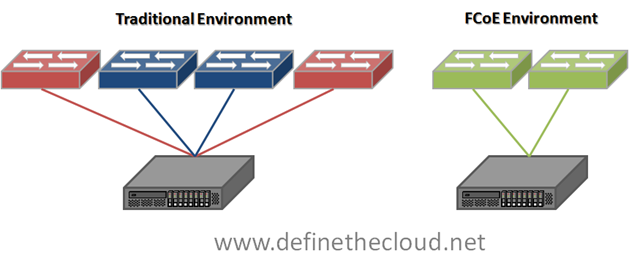
imageIn the diagram we see traditional Top-of-Rack (ToR) cabling on the left vs. FCoE ToR cabling on the right.  This is for the access layer connections only.  The infrastructure and cabling reduction is immediately apparent for server connectivity.  4 switches, 4 cables, 2-4 I/O cards reduced to 2, 2, and 2.  This is assuming only 2 networking ports are being used which is not the case in many environments including virtualized servers.  For servers connected using multiple 1GE ports the savings is even greater.

Two major vendor options exist for this type of cabling today:

Brocade:

Note: Both Brocade data sheets list support for CEE which is a proprietary pre-standard implementation of DCB which is in the process of being standardized with some parts ratified by the IEEE and some pending.  The terms do get used interchangeably so whether this is a typo or an actual implementation will be something to discuss with your Brocade account team during the design phase.  Additionally Brocade specifically states use for Tier 3 and ‘some Tier 2’ applications which suggests a lack of confidence in the protocol and may suggest a lack of commitment to support and future products.  (This is what I would read from it based on the data sheets and Brocade’s overall positioning on FCoE from the start.)

Cisco:

Note: The Nexus 7000 currently only supports the DCB standard, not FCoE.  FCoE support is planned for Q3CY10 and will allow for multi-hop consolidated fabrics.

Taking the noted considerations into account any of the above options will provide the infrastructure reduction shown in the diagram above for stand alone server solutions.

When we move into blade servers the options are different.  This is because Blade Chassis have built in I/O components which are typically switches.  Let’s look at the options for IBM and Dell then take a look at what HP and FlexFabric bring to the table for HP C-Class systems.

IBM:

Note: Versions of the Nexus 4000 also exist for HP and Dell blades but have not been certified by the vendors, currently only IBM supports the device.  Additionally the Nexus 4000 is a standards compliant DCB switch without FCF capabilities, this means that it provides the lossless delivery and bandwidth management required for FCoE frames along with FIP snooping for FC security on Ethernet networks, but does not handle functions such as encapsulation and de-encapsulation.  This means that the Nexus 4000 can be used with any vendor FCoE forwarder (Nexus or Brocade currently) pending joint support from both companies.

Dell

Both Dell and IBM offer Pass-Through technology which will allow blades to be directly connected as a rack mount server would.  IBM additionally offers two other options: using the Qlogic and BNT switches to provide FCoE capability to blades, and using the Nexus 4000 to provide FCoE to blades. 

Let’s take a look at the HP options for FCoE capability and how they fit into the blade ecosystem.

HP:

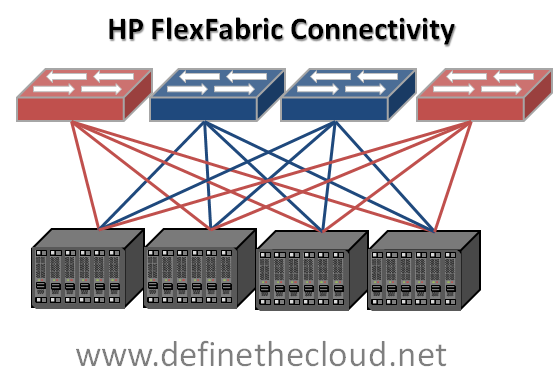
On the surface FlexFabric sounds like the way to go with HP blades, and it very well may be, but let’s take a look at what it’s doing for our infrastructure/cable consolidation.
image

With the FlexFabric solution FCoE exists only within the chassis and is split to native FC and Ethernet moving up to the Access or Aggregation layer switches.  This means that while reducing the number of required chassis switch components and blade I/O cards from four to two there has been no reduction in cabling.  Additionally HP has no announced roadmap for a multi-hop FCoE device and their current offerings for ToR multi-hop are OEM Cisco or Brocade switches.  Because the HP FlexFabric switch is a Qlogic switch this means any FC or FCoE implementation using FlexFabric connected to an existing SAN will be a mixed vendor SAN which can pose challenges with compatibility, feature/firmware disparity, and separate management models.

HP’s announcement to utilize the Emulex OneConnect adapter as the LAN on motherboard (LOM) adapter makes FlexFabric more attractive but the benefits of that LOM would also be recognized using the 10GE Pass-Through connected to a 3rd party FCoE switch, or a native Nexus 4000 in the chassis if HP were to approve and begin to OEM he product.

Summary:

As the title states FlexFabric is definitely a step in the right direction but it’s only a small one.  It definitely shows FCoE commitment which is fantastic and should reduce the FCoE FUD flinging.  The main limitation is the lack of cable reduction and the overall FCoE portfolio.  For customers using, or planning to use VirtualConnect to reduce the management overhead of the traditional blade architecture this is a great solution to reduce chassis infrastructure.  For other customers it would be prudent to seriously consider the benefits and drawbacks of the pass-through module connected to one of the HP OEM ToR FCoE switches.
UCS Server Failover

I spent the day today with a customer doing a proof of concept and failover testing demo on a Cisco UCS, VMware and NetApp environment.  As I sit on the train heading back to Washington from NYC I thought it might be a good time to put together a technical post on the failover behavior of UCS blades.  UCS has some advanced availability features that should be highlighted, it additionally has some areas where failover behavior may not be obvious.  In this post I’m going to cover server failover situations within the UCS system, without heading very deep into the connections upstream to the network aggregation layer (mainly because I’m hoping Brad Hedlund at http://bradhedlund.com will cover that soon, hurry up Brad 😉

**Update** Brad has posted his UCS Networking Best Practices Post I was hinting at above.  It's a fantastic video blog in HD, check it out here: http://bradhedlund.com/2010/06/22/cisco-ucs-networking-best-practices/

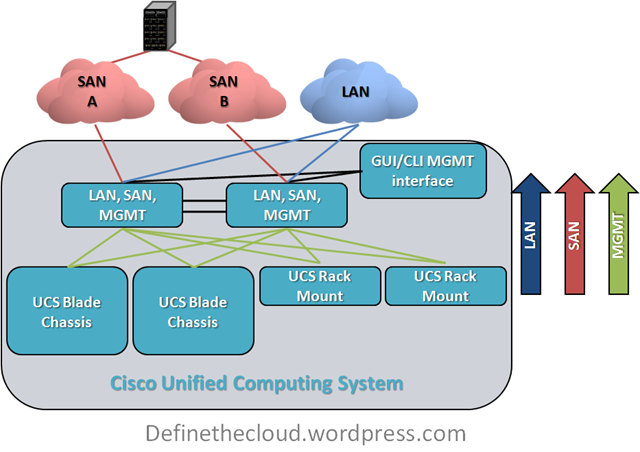
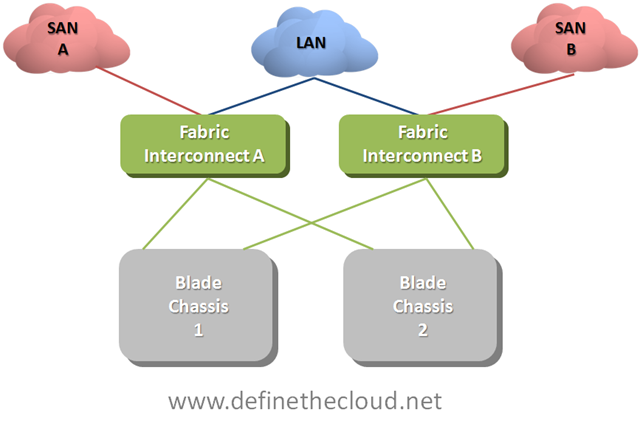
To start this off let’s get up to a baseline level of understanding on how UCS moves server traffic.  UCS is comprised of a number of blade chassis and a pair of Fabric Interconnects (FI.)  The blade chassis hold the blade servers and the FIs handle all of the LAN and SAN switching as well as chassis/blade management that is typically done using six separate modules in each blade chassis in other implementations.

Note: When running redundant Fabric interconnects you must configure them as a cluster using L1 and L2 cluster links between each FI.  These ports carry only cluster heartbeat and high-level system messages no data traffic or Ethernet protocols and therefore I have not included them in the following diagrams.

UCS Network Connectivity

image

Each individual blade gets connectivity to the network(s) via mezzanine form factor I/O card(s.)  Depending on which blade type you select  each blade will either have one redundant set of connections to the FIs or two redundant sets.  Regardless of the type of I/O card you select you will always have 1x10GE connection to each FI through the blade chassis I/O module (IOM.)

UCS Blade Connectivity

image In the diagram your seeing the blade connectivity for a blade with a single mezzanine slot.  You can see that the blade is redundantly connected to both Fabric A and Fabric B via 2x10GE links.  This connection occurs via the IOM which is not a switch itself and instead acts as a remote device managed by the fabric interconnect. What this means is that all forwarding decisions are handled by the FIs and frames are consistently scheduled within the system regardless of source and or destination.  The total switching latency of the UCS system is approximately equal to a top-of-rack switch or blade form factor LAN switch within other blade products.  Because the IOM is not making switching decisions it will need another method to move 8 internal mid-plane ports traffic upstream using it’s 4 available uplinks.  the method it uses is static pinning.  This method provides a very elegant switching behavior with extremely predictable failover scenarios. Let’s first look at the pinning later what this means for the UCS network failures.

Static Pinningimage

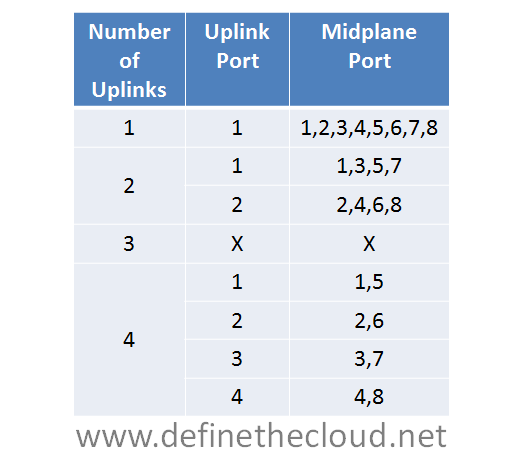
The chart above shows the static pinning mechanism used within UCS.  Given the configured number of uplinks from IOM to FI you will know exactly which uplink port a particular mid-plane port is using.  Each half-width blade attaches to a single mid-plane port and each full width blade attaches to two.  In the diagram the use of three ports does not have a pinning mechanism because this is not supported.  If three links are used the 2 port method will define how uplinks are utilized.  This is because eight devices cannot be evenly load-balanced across three links.

IOM Connectivity

image

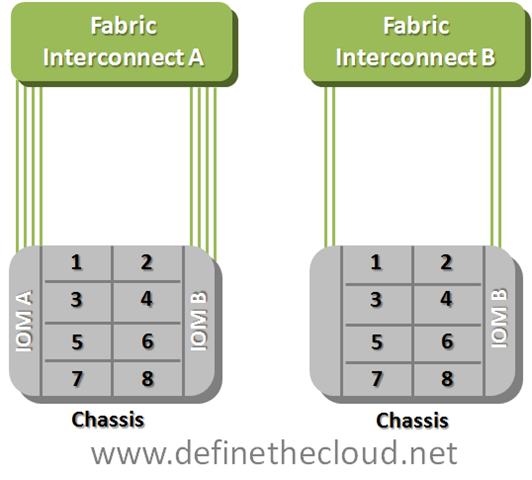
The example above shows the numbering of mid-plane ports.  If you were using half width blades their numbering would match.  When using full-width blades each blade has access to a pair of mid-plane ports (1-2, 3-4, 5-6, 7-8.)In the example above blade three would utilize mid-plane port three in the left example and one in the second based on the static pinning in the chart.

So now let’s discuss how failover happens, starting at the operating system.  We have two pieces of failover to discuss, NIC teaming, and SAN multi-pathing.  In order to understand that we need a simple logical connectivity view of how a UCS blade see’s the world.

UCS Logical Connectivity

image

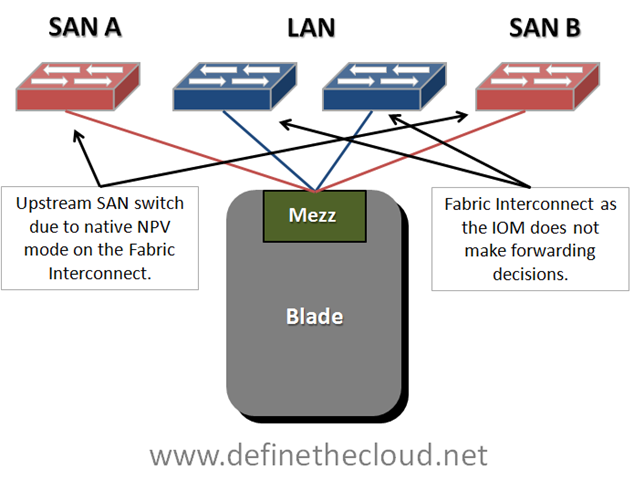
In order to simplify your thinking when working with blade systems reduce your logical diagram to the key components, do this by removing the blade chassis itself from the picture.  Remember that a blade is nothing more than a server connected to a set of switches, the only difference is that the first hop link is on the mid-plane of the chassis rather than a cable.  The diagram above shows that a UCS blade is logically cabled directly to redundant Storage Area Network (SAN) switches for Fibre Channel (FC) and to the FI for Ethernet.  Out of personal preference I leave the FIs out of the SAN side of the diagram because they operate in N_Port Virtualizer (NPV) mode which means forwarding decisions are handled by the upstream NPiV standard compliant SAN switch.

Starting at the Operating System (OS) we will work up the network stack to the FIs to discuss failover.  We will be assuming FCoE is being used, if you are not using FCoE ignore the FC piece of the discussion as the Ethernet will remain the same.

SAN Multi-Pathing:

SAN multi-pathing is the way we obtain redundancy in FC, FCoE, and iSCSI networks.  It is used to provide the OS with two separate paths to the same logical disk.  This allows the server to access the data in the event of a failure and in some cases load-balance traffic across two paths to the same disk.  Multi-pathing comes in two general flavors: active/active, or active passive.  Active/active load balances and has the potential to use the full bandwidth of all available paths.  Active/Passive uses one link as a primary and reserves the others for failover.  Typically the deciding factor is cost vs. performance.

Multi-pathing is handled by software residing in the OS usually provided by the storage vendor.  The software will monitor the entire path to the disk ensuring data can be written and/or read from the disk via that path.  Any failure in the path will cause a multi-pathing failover.

Multi-Pathing Failure Detection

image

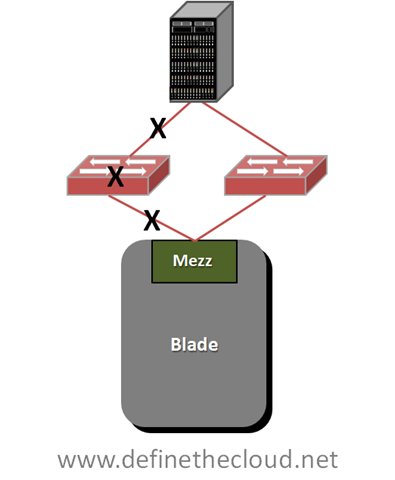
Any of the failures designated by the X’s in the diagram above will trigger failover, this also includes failure of the storage controller itself which are typically redundant in an enterprise class array.  SAN multi-pathing is an end-to-end failure detection system.  This is much easier to implement in SAN as there is one constant target as opposed to a LAN where data may be sent to several different targets across the LAN and WAN.  Within UCS SAN multi-pathing does not change from the system used for standalone servers.  Each blade is redundantly connected and any path failure will trigger a failover.

NIC-Teaming:

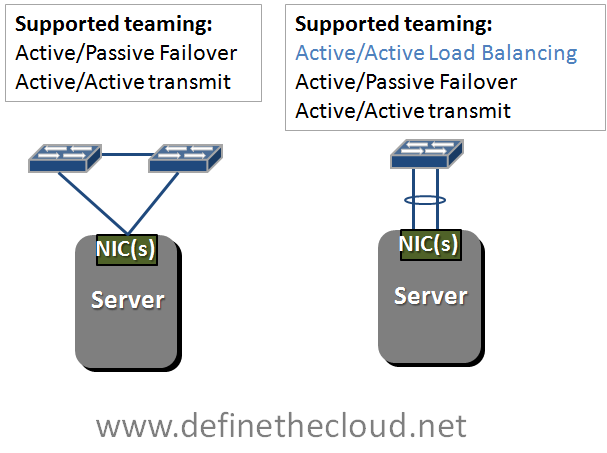
NIC teaming is handled in one of three general ways: active/active load-balancing, active/passive failover, or active/active transmit with active/passive receive.  The teaming type you use is dependant on the network configuration.

Supported teaming Configurations

image 

In the diagram above we see two network configurations, one with a server dual connected to two switches, and a second with a server dual connected to a single switch using a bonded link.  Bonded links act as a single logical link with the redundancy of the physical links within.  Active/Active load-balancing is only supported using a bonded link due to MAC address forwarding decisions of the upstream switch.  In order to load balance an active/active team will share a logical MAC address, this will cause instability upstream and lost packets if the upstream switches don’t see both links as a single logical link.  This bonding is typically done using the Link Aggregation Control Protocol (LACP) standard.

If you glance back up at the UCS logical connectivity diagram you’ll see that UCS blades are connected in the method on the left of the teaming diagram.  This means that our options for NIC teaming are Active/Passive failover and Active Active transmit only.  This is assuming a bare metal OS such as Windows or Linux installed directly on the hardware, when using virtualized environments such as VMware all links can be actively used for transmit and receive because there is another layer of switching occurring in the hypervisor. 

I typically get feedback that the lack of active/active NIC teaming on UCS bare metal blades is a limitation.  In reality this is not the case.  Remember Active/Active NIC teaming was traditionally used on 1GE networks to provide greater than 1GE of bandwidth.  This was limited to a max of 8 aggregated links for a total of 8GE of bandwidth.  A single UCS link at 10GE provides 20% more bandwidth than an 8 port active/active team.

NIC teaming like SAN multi-pathing relies on software in the OS, but unlike SAN multi-pathing it typically only detects link failures and in some cases loss of a gateway.  Due to the nature of the UCS system NIC teaming in UCS will detect failures of the mid-plane path, the IOM, the utilized link from the IOM to the Fabric Interconnect or the FI itself.  This is because the IOM is a linecard of the FI and the blade is logically connected directly to the FI.

UCS Hardware Failover:

UCS has a unique feature on several of the available mezzanine cards to provide hardware failure detection and failover on the card itself.  Basically some of the mezzanine cards have a mini-switch built in with the ability to fail path A to path B or vice versa.  This provides additional failure functionality and improved bandwidth/failure management.  This feature is available on Generation I Converged network Adapters (CNA) and the Virtual Interface Card (VIC) and is currently only available in UCS blades.

UCS Hardware Failover

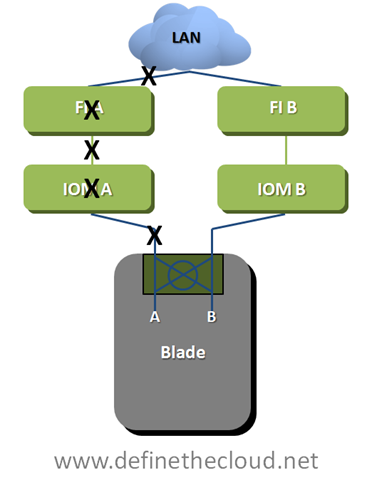
image

UCS Hardware failover will provide greater failure visibility than traditional NIC teaming due to advanced intelligence built into the FI as well as the overall architecture of the system.  In the diagram above HW failover detects: mid-plane path, IOM and IOM uplink failures as link failures due to the architecture.  Additionally if the FI loses it’s upstream network connectivity to the LAN it will signal a failure to the mezzanine card triggering failure.  In the diagram above any failure at a point designated by an X will trigger the mezzanine card to divert Ethernet traffic to the B path.  UCS hardware failover applies only to Ethernet traffic as SAN networks are built as redundant independent networks and would not support this failover method.

Using UCS hardware failover provides two key advantages over other architectures:

The next piece of UCS server failover involves the I/O modules themselves.  Each I/O module has a maximum of four 10GE uplinks providing 8x10GE mid-plane connections to the blades at an oversubscription of 1:1 to 8:1 depending on configuration.  As stated above UCS uses a static non-configurable pinning mechanism to assign a mid-plane port to a specific uplink from the IOM to the FI.  Using this pinning system allows the IOM to operate as an extension of the FI without the need for Spanning Tree Protocol (STP) within the UCS system.  Additionally this system provides a very clear network design for designing oversubscription in both nominal and failure situations.

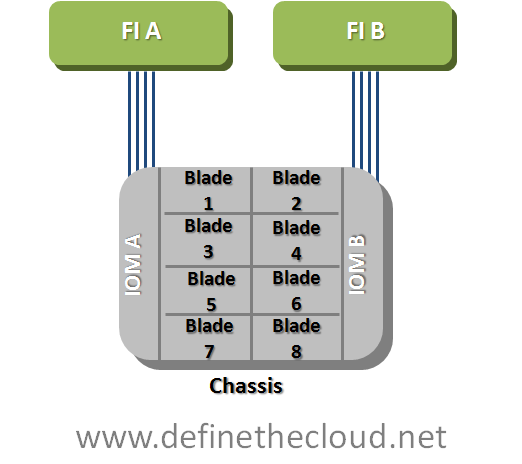
For the discussion of IOM failover we will use an example of a max configuration of 8 half-width blades and 4 uplinks on each redundant IOM.

Fully Configured 8 Blade UCS Chassis

image In this diagram each blade is currently redundantly connected via 2x10GE links.  One link through each IOM to each FI.  Both IOMs and FIs operate in an active/active fashion from a switching perspective so each blade in this scenario has a potential bandwidth of 20GE depending on the operating system configuration.  The overall blade chassis is configured with 2:1 oversubscription in this diagram as each IOM is using its max of 4x10GE uplinks while providing its max of 8x10GE mid-plane links for the 8 blades.  If each blade were to attempt to push a sustained 20GE of throughput at the same time (very unlikely scenario) it would receive only 10GE because of this oversubscription.  The bandwidth can be finely tuned to ensure proper performance in congestion scenarios such as this one using Quality of Service (QoS) and Enhanced Transmission Selection (ETS) within the UCS system.

In the event that a link fails between the IOM and the FI the servers pinned to that link will no longer have a path to that FI.  The blade will still have a path to the redundant FI and will rely on SAN multi-pathing, NIC teaming and or UCS hardware failover to detect the failure and divert traffic to the active link.

For example if link one on IOM A fails blades one and five would lose connectivity through Fabric A and any traffic using that path would fail to link one on Fabric B ensuring the blade was still able to send and receive data.  When link one on IOM A was repaired or replaced data traffic would immediately be able to start using the A path again.

IOM A will not automatically divert traffic from Blade one and five to an operational link, nor is this possible through a manual process.  The reason for this is that diverting blade one and fives traffic to available links would further oversubscribe those links and degrade servers that should be unaffected by the failure of link one.  In a real world data center a failed link will be quickly replaced and the only servers that will have been affected are blade one and five. 

In the event that the link cannot be repaired quickly there is a manual process called re-acknowledgement which an administrator can perform.  This process will adjust the pinning of IOM to FI links based on the number of active links using the same static pinning referenced above.  In the above example servers would be re-pinned based on two active ports because three port configurations are not supported. 

Overall this failure method and static pinning mechanism provides very predictable bandwidth management as well as limiting the scope of impact for link failures.

Summary:

The UCS system architecture is uniquely designed to minimize management points and maximize link utilization by removing dependence on STP internally.  Because of its unique design network failure scenarios must be clearly understood in order to maximize the benefits provided by UCS.  The advanced failure management tools within UCS will provide for increased application uptime and application throughput in failure scenarios if properly designed.

Why Cisco UCS is my 'A-Game' Server Architecture

A-Game:

When I discuss my A-Game it’s my go to hardware vendor for a specific data center component.  For example I have an A-Game platform for:

As this post is in regards to my server A-Game I’ll leave the rest undefined for now and may blog about them later.

Over the last 4 years I’ve worked in some capacity or another as an independent customer advisor or consultant with several vendor options to choose from.  This has been either with a VAR or strategic consulting firm such as www.fireflycom.net.)  In both cases there is typically a company lean one way or another but my role has given me the flexibility to choose the right fit for the customer not my company or the vendors which is what I personally strive to do.  I’m not willing to stake my own integrity on what a given company wants to push today.  I’ve written about my thoughts on objectivity in a previous blog (http://www.definethecloud.net/?p=112.)

Another rule in regards to my A-Game is that it’s not a rule, it’s a launching point.  I start with a specific hardware set in mind in order to visualize the customer need and analyze the best way to meet that need.  If I hit a point of contention that negates the use of my A-Game I’ll fluidly adapt my thinking and proposed architecture to one that better fits the customer.  These points of contention may be either technical, political, or business related:

If I hit one of these roadblocks I’ll shift my vendor strategy for the particular engagement without a second thought.  The exception to this is if one of these roadblocks isn’t actually a roadblock and my A-Game definitely provides the best fit for the customer I’ll work with the customer to analyze actual requirements and attempt to find ways around the roadblock.

Basically my A-Game is a product or product line that I’ve personally tested, worked with and trust above the others that is my starting point for any consultative engagement.

A quick read through my blog page or a jump through my links will show that I work closely with Cisco products and it would be easy to assume that I am therefore inherently skewed towards Cisco.  In reality the opposite is true, over the last few years I’ve had the privilege to select my job(s) and role(s) based on the products I want to work with.

My sorted UCS history:

As anyone who’s worked with me can attest to I’m not one to pull punches, feign friendliness, or accept what you try and sell me based on a flashy slide deck or eloquent rhetoric.  If you’re presenting to me don’t expect me to swallow anything without proof, don’t expect easy questions, and don’t show up if you can’t put the hardware in my hands to cash the checks your slides write.  When I’m presenting to you, I expect and encourage the same.

Prior to my exposure to UCS I worked with both IBM and HP servers and blades.  I am an IBM Certified Blade Expert (although dated at this point.)  IBM was in fact my A-Game server and blade vendor.  This had a lot to do with the technology of the IBM systems as well as the overall product portfolio IBM brought with it.  That being said I’d also be willing to concede that HP blades have moved above IBM’s in technology and innovation, although IBM’s MAX5 is one way IBM is looking to change that.

When I first heard about Cisco’s launch into the server market I thought, and hoped, it was a joke.  I expected some Frankenstein of a product where I’d place server blades in Nexus or Catalyst chassis.  At the time I was working heavily with the Cisco Nexus product line primarily 5000, 2000, and 1000v.  I was very impressed with these products, the innovation involved, and the overall benefit they’d bring to the customer.  All the love in the world for the Nexus line couldn’t overcome my feeling that there was no way Cisco could successfully move into servers.

Early in 2009 my resume was submitted among several others by my company to Learning at Cisco and the business unit in charge of UCS.  This was part of an application process for learning partners in order to be invited to the initial external Train The Trainer (TTT) and participate in training UCS to: Cisco, partners, and customers worldwide.  Myself and two other engineer/trainers (Dave Alexander and Fabricio Grimaldi) were selected from my company to attend.  The first interesting thing about the process was that the three of us were selected above CCIEs, 2x CCIEs and more experienced instructors from our company based on our server backgrounds.  It seemed Cisco really was looking to push servers not some network adaptation.

During the TTT I remained very skeptical.  The product looked interesting but not ‘game-changing.’  The user interfaces were lacking and definitely showed their Alpha and Beta colors.  Hardware didn’t always behave as expected and the real business/technological benefits of the product didn’t shine through.  That being said remember that at this point the product was months away from launch and this was a very Beta version of hardware/software we were working with.  Regardless of the underlying reasons I walked away from the TTT feeling fully underwhelmed.

I spent the time on my flight back to the East Coast from San Jose looking through my notes and thinking about the system and components.  It definitely had some interesting concepts but I didn’t feel it was a platform I would stake my name to at this point.

Over the next couple of months Fabricio Grimaldi and I assisted Dave Alexander (http://theunifiedcomputingblog.com) in developing the UCS Implementation certification course.  Through this process I spent a lot of time digging into the underlying architecture, relating it back to my server admin days and white boarding the concepts and connections in my home office.  Additionally I got more and more time on the equipment to ‘kick-the-tires.’  During this process Dave myself and Fabrico began instructing an internal Cisco course known as UCS Bootcamp.  The course was designed for Cisco engineers from both pre-sales and post-sales roles and focused specifically on the technology as a product deep dive.

It was over these months having discussions on the product, wrapping my head around the technology, and developing training around the components that the lock cylinders in my brain started to click into place and finally the key turned: UCS changes the game for server architecture, the skeptic had become a convert.

UCS the game changer:

The term game changer ge
ts thrown around all willy nilly like in this industry.  Every minor advancement is touted by its owner as a ‘Game Changer.’  In reality ‘Game Changers’ are few and far between.  In order to qualify you must actually shift the status quo, not just improve upon it.  To use vacuums as an example, if your vacuum sucks harder it just sucks harder, it doesn’t change the game.  A Dyson vacuum may vacuum better than anyone else’s but Roomba (http://www.irobot.com/uk/home_robots.cfm) is the one that changed the game.  With Dyson I still have to push the damn thing around the living room, with Roomba I watch it go.

In order to understand why UCS changes the game rather than improving upon it, you first need to define UCS:

UCS is NOT a blade system it is a server architecture

Cisco’s unified Computing System (UCS) is not all about blades, it is about rack mount servers, blade servers, and management being used as a flexible pool of computing resources.  Because of this it has been likened to an x86-64 based mainframe system.

UCS takes a different approach to the original blade system designs.  It’s not a solution for data center point problems (power, cooling, management, space, cabling) in isolation it’s a redefinition of the way we do computing.

‘Instead of asking how can I improve upon current architectures’

Cisco/Nuova asked

‘What’s the purpose of the server and what’s the best way to accomplish that goal.’

Many of the ideas UCS utilizes have been tried and implemented in other products before: Unified I/O, single point of management, modular scalability, etc., but never all in one cohesive design.

There are two major features of UCS that I call ‘the cake’ and three more that are really icing.  The two cake features are the reason UCS is my A-Game and the others just further separate it.

Unified Management:

Blade architectures are traditionally built with space savings as a primary concern.  In order to do this a blade chassis is built with a shared LAN, SAN, power, cooling infrastructure and an onboard management system to control server hardware access, fan speeds, power levels, etc.  M. Sean McGee describes this much better than I could hope to in his article The “Mini-Rack” approach to Blade Design (http://bit.ly/bYJVJM.)  This traditional design saves space and can also save on overall power, cooling, and cabling but causes pain points in management among other considerations.

UCS was built from the ground up with a different approach, and Cisco has the advantage of zero legacy server investment which allows them to execute on this.  The UCS approach is:

The key difference here is that all management of the LAN, SAN, server hardware, and chassis itself is pulled into the access layer and performed on the UCS Fabric Interconnect which provides all of the switching and management functionality for the system.  The system itself was built from the ground up with this in mind, and as such this is designed into each hardware component.  Other systems that provide a single point of management do so by layering on additional hardware and software components in order to manage underlying component managers.  Additionally these other systems only manage blade enclosures while UCS is designed to manage both blades and traditional rack mounts from one point.  This functionality will be available in firmware by the end of CY10.

To put this in perspective Cisco UCS provides a very similar rapid repeatable physical server deployment model to the virtual server deployment model VMware provides.  Through the use of granular Role Based Access Control (RBAC) UCS ensures that organizational changes are not required, while at the same time providing the flexibility to streamline people and process if desired.

Workload Portability:

Workload portability has significant benefits within the data center, the concept itself is usually described as ‘statelessness.’  If you’re familiar with VMware this is the same flexibility VMware provides for virtual machines, i.e. there is no tie to the underlying hardware. One of the key benefits of UCS is the ability to apply this type of statelessness at the hardware level.  This removes the tie of the server or workload to the blade or slot it resides in, and provides major flexibility to maintenance and repair cycles, as well as deployment times for new or expanding applications.

Within UCS all management is performed on the Fabric Interconnect through the UCS Manager GUI or CLI.  This includes any network configuration for blades, chassis, or rack-mounts, all server configuration including firmware BIOS, NIC/HBA and boot order among other things.  The actual blade is configured through an object called a ‘service profile'.’  This profile defines the server on the network as well as the way in which the server hardware operates (BIOS/Firmware, etc.)

All of the settings contained within a server profile are traditionally configured, managed and stored in hardware on a server.  Because these are now defined in a configuration file the underlying hardware tie is stripped away and a server workload can be quickly moved from one physical blade to another without requiring changes in the networks, or storage arrays.  This decreases maintenance windows and speeds roll-out.

Within UCS, Service Profiles can be created using templates or pools which is unique to UCS.  This further increases the benefits of service profiles and decreases the risk inherent with multiple configuration points, and case-by-case deployment models.

UCS Profiles and Templates

image

These two features and their real world applications and value are what place UCS in my A-Game slot.  These features will provide benefits to ANY server deployment model, and are unique to UCS.  While subcomponents exist within other vendors they are not:

Icing on the cake:

Each of these feature also offer real world benefits but the real heart of UCS is the Unified management and server statelessness.  You can find more information on these other features through var
ious blogs and Cisco documentation.

When is it time for my B-Game?:

By now you should have an understanding as to why I chose UCS as my A-Game (not to say you necessarily agree, but that you understand my approach.)  So what are the factors that move me towards my B-Game?  I will list three considerations and the qualifying question that would finalize a decision to position a B-Game system:

Infiniband If the customer is using Infiniband for networking UCS does not currently support it.  I would first assess whether there was an actual requirement for Infiniband or if it was just the best option at the time of last refresh.  If Infiniband is required I would move to another solution.
Non-Intel Processors Requirement for non-Intel processors would steer me towards another vendor as UCS does not currently support non-Intel.  As above I would first verify whether non-Intel was a requirement or a choice.
Requirement for chassis based storage If a customer had a requirement for chassis based storage there is no current Cisco offering for this within UCS.  This is however very much a corner case and only a configuration I would typically recommend for single chassis deployments with little need to scale.  In-chassis storage becomes a bottle neck rather than a benefit in multi-chassis configurations.

While there are other reasons I may have to look at another product for a given engagement they are typically few and far between.  UCS has the right combination of entry point and scalability to hit a great majority of server deployments.  Additionally as a newer architecture there is no concern with the architectural refresh cycle of other vendors.  As other blade solutions continue to age there will be an increased risk to the customer in regards to forward compatibility.

Summary:

UCS is not the only server or blade system on the market, but it is the only complete server architecture.  Call it consolidated, unified, virtualized, whatever but there isn’t another platform to combine rack-mounts and blades under a single architecture with a single management window and tools for rapid deployment.  The current offering is appropriate for a great majority of deployments and will continue to get better.

If your considering a server refresh or new deployment it would be a mistake not to take a good look at the UCS architecture.  Even if it’s not what you choose it may give you some ideas as to how you want to move forward, or features to ask your chosen vendor for.

Even if you never buy a UCS server you can still thank Cisco for launching UCS.  The lower pricing you’re getting today, and the features being put in place on other vendors product lines are being driven by a new server player in the market, and the innovation they launched with.

Comments, concerns, complaints always appreciated!

Objectivity

I came across a blog recently that peaked my interest.  The post was from Nate at TechOpsGuys (http://bit.ly/9PxZQV) and it purports to explain the networking deficiencies of UCS.  The problem with the posts explanation is that it’s based off of The Tolly Report on HP vs. UCS (http://bit.ly/bRQW2g) which has been shown to be a flawed test funded by HP.  Cisco was of course invited to participate, but this is really just lip service as HP funded the project and designed the test in order to show specific results, typically vendor’s will opt out in this scenario.

There were three typical reactions from the Tolly Report:

The TechOpsGuys post mentioned above will have the same types of reactions.  Lover’s of HP will swallow it whole heartedly, major Cisco fans will write it and TechOpsGuys off, and the unbiased will seek more info to make an informed decision.

I initially began writing a response to the post, but stopped short when I realized two things:

Nate is admittedly biased towards Cisco and has been for 10 years according to the post.  Nate read the Tolly report and assumed it was spot on because he already believes that Cisco makes bad technology.  Nate didn’t take the time to fact check or do research, he just regurgitated bad information.

This is not a post about Nate, or about HP vs. Cisco, it’s about objectivity.  As IT professionals it’s easy to get caught up in the vendor wars, but unless you’re a vendor it’s never beneficial.  Everyone will have their favorites but just because you prefer one over the other doesn’t mean you should never look at what the other vendor is doing.

If you’re a consultant, reseller, integrator, or customer you’re most powerful ally is options.  Options to choose best-of-breed, option to price multiple vendors, option to switch vendors when it suites your customer.  Throwing away an entire set of options due to a specific vendor bias is a major disadvantage.  Every major vendor has some great products, some bad products, and some in the middle.  Every major vendor plays marketing games, and teases with roadmaps.  It’s part of the business.

If a major vendor makes a market transition into a new area it’s beneficial to just about everyone.  The product itself may be a better fit for the customer, the new product may force price drops in existing vendors products, the new product may drive new innovation into the field which will shortly be adopted by the existing vendors.  The list goes on.

Summary:

As IT professionals objectivity is one of our key strengths, sacrifice it due to bias and your making a mistake.  When you see blogs, articles, reports, tests that emphatically favor one product over another take them with a grain of salt and do your own research.

If you have engineer in your title or job role you shouldn’t be making major product decisions based on feelings, PowerPoint, or PDF.  Real hands on and raw data (with a knowledge of how the data was gathered and why) are key tools to making informed decisions.