The Difference Between Private Cloud and Converged Infrastructure

With all of the  hype around private clouds and manufacturer private cloud infrastructure stacks I thought I’d take some time  to differentiate between ‘private-cloud’ and ‘converged-infrastructure.’  For some background on Private Cloud see two of my previous posts: http://www.definethecloud.net/building-a-private-cloud and http://www.definethecloud.net/is-private-cloud-a-unicorn.

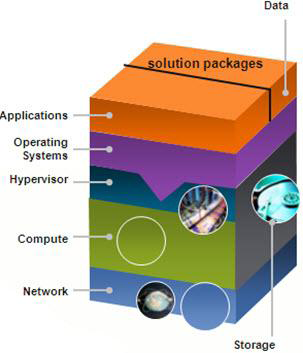
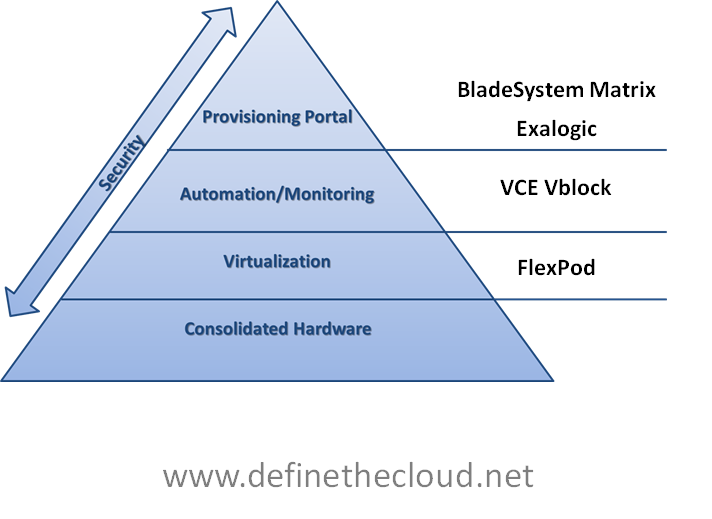
Private clouds typically consist of four architectural stages (I describe these here: http://www.definethecloud.net/smt-matrix-and-vblock-architectures-for-private-cloud):

To build a true private cloud hardware/platform consolidation is layered with virtualization, automation and orchestration (without which the ‘On-Demand Self Service requirement of NIST’s definition is not met.)  The end result is a IT model and infrastructure that moves at the pace of business.

Converged infrastructure on the other hand is a subset of this, typically consolidation and virtualization but could possibly include some automation.  With all major vendors selling some form of ‘Integrated stack’ marketed at Private Cloud I thought I’d take a look at where four of the most popular actually fall along the path.


image

Starting from the bottom (as in bottom of the pyramid rather than bottom in quality, value, etc.)

FlexPod: FlexPod is an architecture designed using NetApp storage and Cisco compute and networking components.  The FlexPod architectures address various business and application needs but do not include automation/orchestration software.  The idea being that customers will have the flexibility to choose the level and type of automation/orchestration suite they require.

Vblock: Vblocks consist of EMC storage couple with VMware virtualization and Cisco Network/Compute.  Additionally VBlock incorporates EMC’s Unified Infrastructure Manager (UIM) which enables automation and single point of management for most of the infrastructure components. An orchestration suite would still be required for true private cloud.

Exalogic: Oracle’s stack offering is Exalogic which combines Oracle hardware with their middleware and software to provide a private cloud platform tailored toward Java environments.  The provisioning tools included offer the promise of private cloud ‘on-demand self-service.’

BladeSystem Matrix: Is built upon HP BladeSystem, storage, network and software components and is managed by HP’s Cloud Service Automation.  The automation and orchestration tools included in that software suite put HP’s offering in the private cloud arena.

Bottom Line:

Depending on the drivers, requirements, and individual environment all of these stacks can offer customers a platform from which to rapidly build cloud services.  The key is in deciding what you want and what is the best tool to get you there.  The best tool to get you there will be based on both ROI and business agility as cost is not the only reason for a migration to cloud.

For a deeper look at private cloud stacks check out my post at Networking Computing (http://www.networkcomputing.com/private-cloud/229900081.)

Is Private Cloud a Unicorn?

With all of the discussion, adoption, and expansion of cloud offerings there is a constant debate that continues to rear its head: Public vs. Private or more bluntly ‘Is there even such thing as a private cloud?’  You typically have two sides of this debate coming from two different camps:

Public Cloud Proponents:  There is no such thing as private cloud and or you won’t gain the economies of scale and benefits of a cloud model when building it privately.

Private Cloud Proponents: Building a cloud IT delivery model in-house provides greater resource control, accountability, security and can leverage existing infrastructure investment.

Before we begin let’s start with the basics, The National Institute of Standards and Technology (NIST) definition of cloud:

Cloud computing is a model for enabling ubiquitous, convenient, on-demand network access to a shared
pool of configurable computing resources (e.g., networks, servers, storage, applications, and services) that
can be rapidly provisioned and released with minimal management effort or service provider interaction.
This cloud model promotes availability and is composed of five essential characteristics, three service
models, and four deployment models.

Essential Characteristics:

On-demand self-service: A consumer can unilaterally provision computing capabilities, such as
server time and network storage, as needed automatically without requiring human
interaction with each service’s provider.

Broad network access: Capabilities are available over the network and accessed through standard
mechanisms that promote use by heterogeneous thin or thick client platforms (e.g.,
mobile phones, laptops, and PDAs).

Resource pooling: The provider’s computing resources are pooled to serve multiple consumers
using a multi-tenant model, with different physical and virtual resources dynamically
assigned and reassigned according to consumer demand. There is a sense of location
independence in that the customer generally has no control or knowledge over the exact
location of the provided resources but may be able to specify location at a higher level of
abstraction (e.g., country, state, or datacenter). Examples of resources include storage,
processing, memory, network bandwidth, and virtual machines.

Rapid elasticity: Capabilities can be rapidly and elastically provisioned, in some cases
automatically, to quickly scale out, and rapidly released to quickly scale in. To the
consumer, the capabilities available for provisioning often appear to be unlimited and can
be purchased in any quantity at any time.

Measured Service: Cloud systems automatically control and optimize resource use by leveraging
a metering capability at some level of abstraction appropriate to the type of service (e.g.,
storage, processing, bandwidth, and active user accounts). Resource usage can be
monitored, controlled, and reported, providing transparency for both the provider and
consumer of the utilized service.

Service Models:

Cloud Software as a Service (SaaS): The capability provided to the consumer is to use the
provider’s applications running on a cloud infrastructure. The applications are accessible
from various client devices through a thin client interface such as a web browser (e.g.,
web-based email). The consumer does not manage or control the underlying cloud
infrastructure including network, servers, operating systems, storage, or even individual
application capabilities, with the possible exception of limited user-specific application
configuration settings.

Cloud Platform as a Service (PaaS): The capability provided to the consumer is to deploy onto
the cloud infrastructure consumer-created or acquired applications created using
programming languages and tools supported by the provider. The consumer does not
manage or control the underlying cloud infrastructure including network, servers,
operating systems, or storage, but has control over the deployed applications and possibly
application hosting environment configurations.

Cloud Infrastructure as a Service (IaaS): The capability provided to the consumer is to provision
processing, storage, networks, and other fundamental computing resources where the
consumer is able to deploy and run arbitrary software, which can include operating
systems and applications. The consumer does not manage or control the underlying cloud
infrastructure but has control over operating systems, storage, deployed applications, and
possibly limited control of select networking components (e.g., host firewalls).


Deployment Models:

Private cloud: The cloud infrastructure is operated solely for an organization. It may be managed
by the organization or a third party and may exist on premise or off premise.

Community cloud: The cloud infrastructure is shared by several organizations and supports a
specific community that has shared concerns (e.g., mission, security requirements, policy,
and compliance considerations). It may be managed by the organizations or a third party
and may exist on premise or off premise.

Public cloud: The cloud infrastructure is made available to the general public or a large industry
group and is owned by an organization selling cloud services.

Hybrid cloud: The cloud infrastructure is a composition of two or more clouds (private,
community, or public) that remain unique entities but are bound together by standardized
or proprietary technology that enables data and application portability (e.g., cloud
bursting for load balancing between clouds).

http://csrc.nist.gov/publications/drafts/800-145/Draft-SP-800-145_cloud-definition.pdf

Obviously NIST believes there is a place for private cloud, as do several others, so where does the issue arise?

The argument against private cloud:

Public cloud proponents believe in another defining characteristic of cloud computing: Utility Pricing.  They believe that the ‘pay for only what you use’ component of public cloud should be required for all clouds, which would negate the concept of private cloud where the infrastructure is paid for up front and has a cost whether or not it’s used.  The driver for this is Cloud’s benefit of moving CapEx (capital expenditure) to OpEx (Operating Expenditure.)  Because you aren’t buying infrastructure you have no upfront costs and pay as you go for use.  This has obvious advantages and this type of utility model makes sense (think power grid in big picture terms, you have metered use.)

So public cloud it is?

Not so fast!  There are several key concerns for public cloud that may drive the decision to utilize a private cloud:

These factors must be considered when making a decision to utilize a public cloud.  For most organizations they’re typically not roadblocks, but speed bumps that must be navigated carefully.

So which it it?

That question will be answered differently for every organization.  It’s based on what you want to do and how you want to do it.  Chris Hoff uses laundry to explain this: http://www.rationalsurvivability.com/blog/?p=2384.  Additionally cost will be a major factor, Wikibon has an excellent post arguing that private cloud is more cost effective for organizations over $1 billion: http://wikibon.org/wiki/v/Private_Cloud_is_more_Cost_Effective_than_Public_Cloud_for_Organizations_over_$1B.  Additionally in many cases a hybrid model may work best either as a permanent solution or migration path.

Summary:

Private cloud is no unicorn and will be here to stay.  For some it will be a stepping stone to a fully public IT model, and for others it will be the solution.  Organizations like the federal government have the data security needs to require a private cloud and the size/scale to gain the benefits of that model.  Other large organizations may find that private makes more monetary sense.  Availability, security, compliance etc. may drive other companies to look at a private cloud model.

Cloud is about cost but it’s more importantly about accelerating the business.  When IT can respond immediately to new demands the business can execute more quickly.  Both public and private models provide this benefit, each organization will have to decide for itself which model fits their demands.

The Reality of Cloud Bursting

Recently while researching the concept of ‘Cloud Bursting‘ I received a history lesson in Cloud Computing after a misguided tweet at Chris Hoff (@Beaker.)  My snarky comment suggested Chris needed a lesson in Cloud history, but as it turns out I received the lesson.  My reference turned out to be a long debunked myth of Amazon cloud origins (S3 storage followed by EC2 Compute) the details of which can be found here: http://www.quora.com/How-and-why-did-Amazon-get-into-the-cloud-computing-business.  The silver lining of my self induced public twitter thrashing was two things: I learned yet again that the best preventative measure for Foot-In-Mouth-Disease is proper research, and I got some great background and info from Chris, Brian Gracely (@bgracely), Matt Davis (@da5is), Roman Tarnavski (@romant), Denis Guyadeen (@dguyadeen) and others.  This all began when I read Chris’s ‘Incomplete Thought: Cloudbursting Your Bubble – I call Bullshit’ (http://www.rationalsurvivability.com/blog/?p=3016.)  Chris takes the stance ‘TODAY cloud bursting is BS...’ to quote the man himself.  The ‘today’ is the part I didn’t infer from his blog post (lack of cloud history knowledge aside.)

Before we kick off let’s look at the concept of Cloud Bursting:

Cloud Bursting:

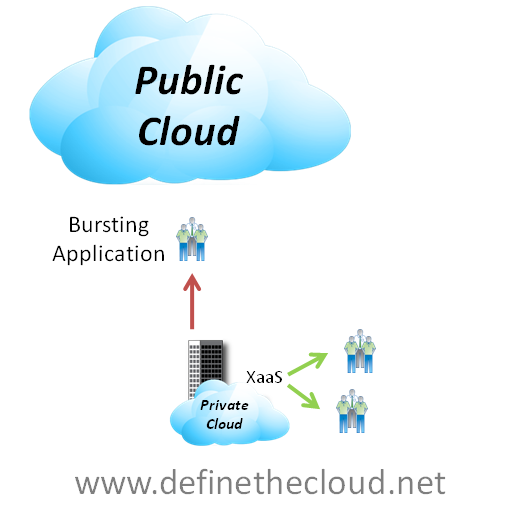
In a broad strokes fashion cloud bursting is the idea that an application normally runs in one type of cloud and is capable of utilizing additional resources of another cloud type during peak periods, or ‘bursting.’  The most common example of this type of utilization would be a retail company utilizing a private cloud for day-to-day operations bursting to the public cloud for peak periods such as a holiday season.

image

At first glance cloud bursting looks like a great way to have your cake and eat it too.  You get the comfort and security blanket of hosting your own applications with the knowledge that if your capacity spikes you’ve got excess available in the public cloud on-demand with a pay for use model.

The issue:

The issue is in the reality of this system, as several problems come to play:

  1. If you’ve designed the application to be public cloud compatible why wouldn’t you just run it there in the first place?
  2. Building a new private cloud infrastructure that doesn’t support your capacity demands is short-sighted.
  3. Designing an application for cloud bursting capability is no easy task and would probably require some portion (data?) to exist in the public cloud constantly skewing the benefits of the ‘on-demand’ concept of cloud bursting.
  4. Complicated cost model for any given application in which infrastructure is purchased up front and depreciated over time alongside pay-for-use costs as the application bursts

After carefully looking at these and other issues cloud bursting will most likely not be a reality for most enterprises and applications, and is currently a very rare cloud use case.

Note: Chris Hoff draws a distinction which I wholeheartedly echo: Cloud bursting is separate from Hybrid cloud approaches where specific apps are run in public or private clouds based on application/business requirements.  The issue above is specifically directed at individual applications bursting between clouds.

The Reality:

For the average enterprise cloud bursting is not an option today and will probably not be in the future.  While hybrid models can thrive, i.e. some applications run privately and some publicly, or a private cloud designed to failover to public cloud etc. individual applications bursting back forth between clouds will not be a reality.  Exceptions exist and there will still be use cases for cloud bursting, but they will be corner cases.  Things like high Performance Computing (HPC) can lend themselves well to cloud bursting due to the dynamic and distributed nature. 

Another possible use case for cloud bursting is environments that heavily utilize development and test systems but must utilize on-premise resources for production due to requirements such as security.  In these cases the dev/test may be capable of running in the cloud but can more cost effectively reside locally in the private cloud during off peak production hours.  The dev/test systems could be designed so that they burst to the cloud when production peaks and spare cycles are sparse.

Cisco Unified Computing System Value: A Customer’s Perspective

For those who do not know me, I’ve been blogging since April 2010.  My primary subject has been Cisco UCS and everything around it.  Now, when I say “everything around it”, I really mean “everything around it as it pertains to my organization”.  If you want to read a lot, you can check out my blog, http://itvirtuality.wordpress.com.  Be sure to start with the early April postings.  However, I am going to summarize how we came to purchase Cisco UCS, what our business drivers were, and what my current impressions of the product after being in production for a bit over 90 days.

Some history:  My organization exclusively used rack mounts until a friend of a C-level executive suggested we go blade.  It was a fair suggestion.  The only reason we’ve stayed rack mount so long is that the dollar savings just wasn’t there.  We own our real estate; we are the power company, etc.   All those areas where it is easy to quantify dollar savings either just don’t exist for us, or they aren’t significant.

So we started down the road of researching blades.  In the beginning, blades were scary to us.  There were so many different options to configure that it was a bit numbing.  It was at this juncture that we decided to look around and see if there was something else in the market that could simplify things for us.  It just happens that the press was still writing about Cisco UCS so naturally we homed in on it.

It wasn’t love at first sight.  We are not a Cisco shop, it was a new product, and we were a bit dubious on some of the claims.  So we did some serious research into it.  I personally read the Project California book, all the published manuals and tech-notes available at that time, and more.  I did the same for HP.  Just to be sure we were doing our due diligence, we were asked to consider IBM and a few others.  After about four months of research, we put together a technical specifications sheet just to see what the differences were.  Then we listed out all our pain points, strategic direction, and business challenges/opportunities and finally scored each vendor’s offerings in regards to the aforementioned items.  In almost every case, Cisco UCS came out on top.

Our first major comparison was price.  Believe it not; based on our 5yr estimates, Cisco was the most cost-effective.  Part of what made UCS the price leader was its affects on our data center.  Pretty much a cable once type of deal.  To top it off, we did not (and will not for the foreseeable future) need to purchase any additional SAN or network ports.  By choosing any of the other blade brands, I would have needed to purchase additional ports.

Once we completed a cost analysis, we focused on our pain points.  The top two were cable management and complexity.  We (meaning my team) hate cabling and managing those cables.  We are server administrators, not cable administrators.  Moving, adding, or removing a server means at least an extra hour of work undoing nicely bundled cables in the server cabinets and data center cable trays, tracing the appropriate cable (we don’t trust labels 100%), and then cleaning up.  We also have to ensure that we have cables of various lengths in stock so we can accommodate changes fairly quickly.  Otherwise, we have to order the appropriate lengths.  With UCS, just run the cables once and be done with it.

As for complexity, with UCS one pretty much does the bulk of the management through a single interface and at one device level (fabric interconnects).  If we went with HP, we would need to manage the blade, manage the SAN switch in the chassis, manage the network switch in the chassis, etc.  If your shop is already understaffed and overworked, why add more complexity and/or work into the environment?

On to strategic initiatives…A major strategic initiative of ours requires multi-tenancy support.  We envision ourselves are being service providers to other government entities in our area.  We arguably have the best data center around in our area (as far as local governments compare).  In the last two years we have upgraded our PDUs, UPS/Batteries, Air Conditioning, and physical security systems.  While not perfect, we found the RBAC capabilities of UCS to be ahead of the others.

A second major initiative focuses on DR.  We are in the process of building out a DR site.  Once completed, we will be able to replicate our UCS configuration (Service Profiles and such) and data over to the DR site.  Not only will we have a DR site, having a mirror UCS configuration will provide for a nice dev environment.

So now that I have been in production for a while now, what do I think of UCS?  Overall, I am happy.  I haven’t had any outages related to UCS.  Performance has been better than expected and the system gets easier to use as time goes by.  Like all new systems, you just need to get used to it.

Support has generally been excellent.  I use the word “generally” because I have noticed that sometimes a tech will give direction that will solve the issue at hand, but that direction may cause other problems.  It’s as if the technicians don’t always see the “big picture”.  Once we inform the tech that we are not so sure about the direction, a new solution will be provided that does the trick.

So what hasn’t been perfect?  Integrating into our environment was not easy.  I mentioned early on that we are not a Cisco shop.  This had ramifications in network design that we were not aware of, but we believed that the UCS product was the right way to go and redesigned part of our network to accommodate it.

We have also opened up a number of tech support tickets for errors that ended up being cosmetic only.  In other words, we were not having real problems, just erroneous errors being reported.  Most of these have been fixed in subsequent firmware upgrades.

A caveat to would be buyers: I think Cisco oversells some of the capabilities.  For example, Cisco markets that one set of fabric interconnects can support up to forty chassis.  While there may be a few customers who can do this, I am not so sure that this is a supported configuration.  Go read the current release notes and you will see that only fourteen chassis are currently supported.  The forty is a future feature and each major firmware release ups the number of chassis supported.

The same can also be said for the much ballyhooed Palo adapter.  Cisco throws around the capability to provision up to 128 vNICs.  The real number right now is 58 and it is based on the number of cables that are used to connect the chassis IOM to the fabric interconnect.  If you use two cables per IOM, you are limited to 28 vNICs.  Again, the 128 is a future feature.

Given all that we now know, all that we have gone through, all that has occurred…I would not hesitate to purchase UCS again.  I think it is a great system that has clearly been designed to overcome today’s data center challenges (cabling, cooling, etc).  It’s a system that has been designed to grow, both in features and capacity, without major modifications.  And it is a system designed for the future..
Dell, Backing the Right Horse in the Wrong Race

Horse racingWith Dell’s announced acquisition of 3par I’ve been pondering the question of what it is they’re thinking.  I’ve been scouring the blogs looking for an answer and there is none that resonates well with me.  Most of what I find states they picked a good horse and that the business behind buying a horse to race makes sense, but nobody asks are they in the right race.  The separate races I’m talking about are private and public clouds.
Dell bid on 3Par which is a small high end storage company with a product line positioned to compete with EMC and Hitachi for some use cases.  This complements Dell’s own storage offering which was built upon the Equalogix iSCSI storage acquisition and geared toward the SMB space.  Dell also has had a traditionally strong partnership with EMC and resold a great deal of EMC storage where Equalogix was not a good fit.  The Equalogix acquisition did not appear to damage the Dell EMC partnership significantly but by adding 3par to the mix this may change.  On the other hand EMC is heavily backing Cisco UCS, so this may very well be a defensive play.

So what is Dell’s play expanding their internal storage capabilities and risking damage to a profitable partnership with EMC?  Most of the analysis I find states that Dell is looking to grow data center revenue to regain profit they are losing to HP in the desktop/laptop space.  In order to do this they are putting together more of the key hardware components of private cloud architectures.  The thinking being that they will try and put together an offering to compete with vBlock, Matrix, SMT, CloudBurst, etc. 

At first glance this all makes sense, Dell doesn’t want to be left without a horse in the private cloud race so they make some moves and acquisitions and get their offering in place, late, but maybe not too late.  On the flip side they can utilize the small market share 3par has as an avenue for Dell server sales, and reversely use Dell server sales to boost 3par’s struggling sales.  With any luck Dell will have the same success with 3par that they did with Equalogix.  That’s what I see at first glance, upon further thought there are more concerns:

The most important question in my mind: Is Dell putting their horse in the right race?

Dell is looking to attack the enterprise and federal data center where private cloud will be a big play.  This is the home of solid high performance, feature rich, innovative platforms.  It’s also a place where trust means everything, i.e. ‘Nobody gets fired for buying vendor x.’  Dell is not vendor X, they’ve typically competed solely on price.  Moving heavily into this market they will be in constant battle with HP, IBM, EMC, NetApp, Cisco and others.

I think Dell is missing an opportunity to execute on their traditional strengths and attack public cloud markets with a unique offering.  Public cloud is all about massive scale and the intelligence, redundancy, etc. is built into the software layers.  This means that a company who can effectively deliver bulk, reliable, low cost servers, storage and networking will have a very strong offering.  The HP’s, Cisco’s, IBM’s etc. will have a much harder time selling into this space due to cost.  Their products have traditionally been more about performance and usability features which may not have a strong a message in the public cloud.

Summary:

Dell solidly executed on the merger and acquisition of Equalogix and has had great success there providing a low-end, low-cost storage system paired perfectly with their server offering.  The 3par acquisition and recent Dell innovations in their server offering show a preview of a new model for Dell.  Whether this is a successful model or not is yet to be seen.  From my point of view successful or not Dell would be better suited to pairing their traditional business to public cloud solutions and creating a new market for themselves with less competition.

SMT, Matrix and Vblock: Architectures for Private Cloud

Cloud computing environments provide enhanced scalability and flexibility to IT organizations.  Many options exist for building cloud strategies, public, private etc.  For many companies private cloud is an attractive option because it allows them to maintain full visibility and control of their IT systems.  Private clouds can also be further enhanced by merging private cloud systems with public cloud systems in a hybrid cloud.  This allows some systems to gain the economies of scale offered by public cloud while others are maintained internally.  Some great examples of hybrid strategies would be:

Many more options exist and any combination of options is possible.  If private cloud is part of the cloud strategy for a company there is a common set of building blocks required to design the computing environment.

image

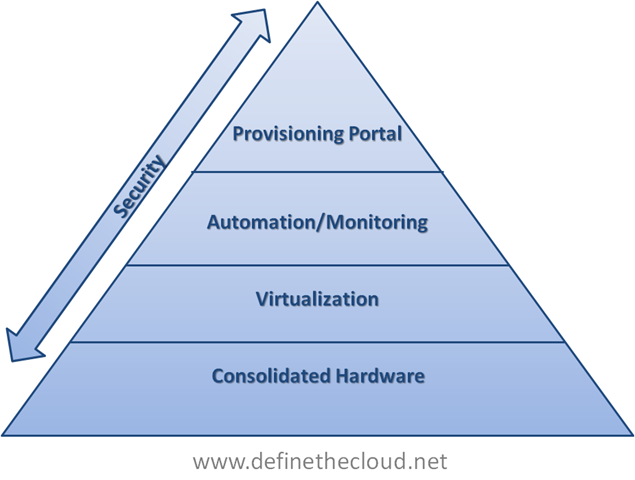
In the diagram above we see that each component builds upon one another.  Starting at the bottom we utilize consolidated hardware to minimize power, cooling and space as well as underlying managed components.  At the second tier of the private cloud model we layer on virtualization to maximize utilization of the underlying hardware while providing logical separation for individual applications. 

If we stop at this point we have what most of today’s data centers are using to some extent or moving to.  This is a virtualized data center.  Without the next two layers we do not have a cloud/utility computing model.  The next two layers provide the real operational flexibility and organizational benefits of a cloud model.

To move out virtualized data center to a cloud architecture we next layer on Automation and Monitoring.  This layer provides the management and reporting functionality for the underlying architecture.  It could include: monitoring systems, troubleshooting tools, chargeback software, hardware provisioning components, etc.  Next we add a provisioning portal to allow the end-users or IT staff to provision new applications, decommission systems no longer in use, and add/remove capacity from a single tool.  Depending on the level of automation in place below some things like capacity management may be handled without user/staff intervention.

The last piece of the diagram above is security.  While many private cloud discussions leave security out, or minimize its importance it is actually a key component of any cloud design.  When moving to private cloud customers are typically building a new compute environment, or totally redesigning an existing environment.  This is the key time to design robust security in from end-to-end because you’re not tied to previous mistakes (we all make them)or legacy design.  Security should be part of the initial discussion for each layer of the private cloud architecture and the solution as a whole.

Private cloud systems can be built with many different tools from various vendors.  Many of the software tools exist in both Open Source and licensed software versions.  Additionally several vendors have private cloud offerings of an end-to-end stack upon which to build design a private cloud system.  The remainder of this post will cover three of the leading private cloud offerings:

Scope: This post is an overview of three excellent solutions for private cloud.  It is not a pro/con discussion or a feature comparison.  I would personally position any of the three architectures for a given customer dependant on customer requirements, existing environment, cloud strategy, business objective and comfort level.  As always please feel free to leave comments, concerns or corrections using the comment form at the bottom of the post.

Secure Multi-Tenancy (SMT):

Vendor positioning:  ‘This includes the industry’s first end-to-end secure multi-tenancy solution that helps transform IT silos into shared infrastructure.’

image

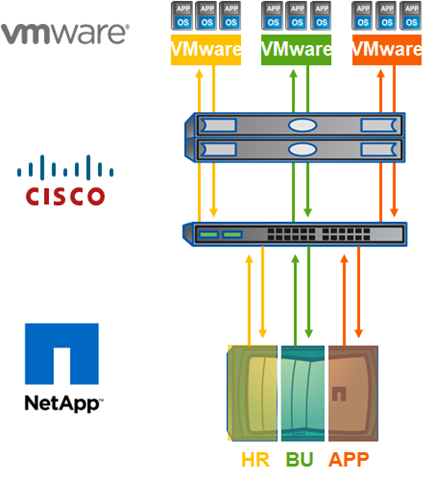
SMT is a pairing of: VMware vSphere, Cisco Nexus, UCS, MDS, and NetApp storage systems.  SMT has been jointly validated and tested by the three companies, and a Cisco Validated Design (CVD) exists as a reference architecture.  Additionally a joint support network exists for customers building or using SMT solutions.

Unlike the other two systems SMT is a reference architecture a customer can build internally or along with a trusted partner.  This provides one of the two unique benefits of this solution.

Unique Benefits:

HP Matrix:

Vendor positioning:  ‘The industry’s first integrated infrastructure platform that enables you to reduce capital costs and energy consumption and more efficiently utilize the talent of your server administration teams for business innovation rather than operations and maintenance.’

prod-shot-170x190

Matrix is a integration of HP blades, HP storage, HP networking and HP provisioning/management software.  HP has tested the interoperability of the proven components and software and integrated them into a single offering. 

Unique benefits:

Vblock:

Vendor positioning:  ‘The industry's first completely integrated IT offering that combines best-in-class virtualization, networking, computing, storage, security, and management technologies with end-to-end vendor accountability.’

image

Vblocks are a combination of EMC software and storage storage, Cisco UCS, MDS and Nexus, and VMware virtualization.  Vblocks are complete infrastructure packages sold in one of three sizes based on number of virtual machines.  Vblocks offer a thoroughly tested and jointly supported infrastructure with proven performance levels based on a maximum number of VMs. 

Unique Benefits:

Summary:

Private cloud can provide a great deal of benefits when implemented properly, but like any major IT project the benefits are greatly reduced by mistakes and improper design.  Pre-designed and tested infrastructure solutions such as the ones above provide customers a proven platform on which they can build a private cloud.

Why You’re Ready to Create a Private Cloud

I’m catching up on my reading and ran into David Linthicum’s ‘Why you're not ready to create a private cloud’ (http://www.infoworld.com/d/cloud-computing/why-youre-not-ready-create-private-cloud-458.)  It’s a great article and points out a major issue with private-cloud adoption – internal expertise.  The majority of data center teams don’t have the internal expertise required to execute effectively on private-cloud architectures.  This isn’t a knock on these teams, it’s a near impossibility to have and maintain that internal expertise.  Remember back when VMware was gaining adoption.  Nobody had virtualization knowledge so they learned it on the fly.  As people became experts many times they left the nest where they learned it in search of bigger better worms.  More importantly because it was a learn-as-you-go process the environments were inherently problematic and were typically redesigned several times to maximize performance and benefit.

Looking at the flip side of that coin, what is the value to the average enterprise or federal data center in retaining a private cloud architect?  If they’re good at their job they only do it once.  Yes there will be optimization and performance assessments to maintain it, but that’s not typically a full time job. The question becomes:  Because you don’t have the internal expertise to build a private cloud should you ignore the idea or concept?  I would answer a firm no.

The company I work for has the ability, reseller agreements, service offerings and expertise to execute on private clouds.  We’re capable of designing and deploying these solutions from the data center walls to the provisioning portals with experts on hand that have experience in each aspect, and enough overlap to tie it all together.  To put our internal capabilities in perspective one of my companies offerings is private cloud containers and ruggedized deployable private cloud racks.  These aren’t throw some stuff in a box solutions they are custom designed containers outfitted with shock absorption, right-sized power/cooling, custom rack rails providing full equipment serviceability and private cloud IT architectures built on several industry leading integrated platforms. That’s a very unique home grown offering for a systems integrator (typically DC containers are the space of IBM, Sun, etc.)  I accepted this position for these reasons, among others. 

This is not an advertisement for my company but instead an example of why you’re ready to build private cloud infrastructures.  You should not expect to have the internal expertise to architect and build a private cloud infrastructure, you should utilize industry experts to assist with your transition.  There are two major methods of utilizing experts to assess, design, and deploy a private cloud: a capable reseller/solutions provider or a capable consultant/consulting firm.  Both methods have pros and cons.

Reseller/Systems Integrator:

Utilizing a reseller and systems integrator has some major advantages in the form of what is provided at no cost and having a one stop shop for design, purchase, and deployment.  Typically when working with a reseller much of the upfront consulting and design is provided free, this is because it is considered pre-sales and the hardware sale is where they make their money.  With complex systems and architectural designs such as Virtual Desktop Infrastructures (VDI) and cloud architectures don’t expect everything to be cost free, but good portions will be.  These type of deployments require in depth assessment and planning sessions, some of which will be paid engagements but are typically low overall cost and vital to success.  For example you won’t deploy VDI successfully without first understanding your applications in depth.  Application assessments are extended technical engagements.

Another advantage of using a reseller is that the hardware design, purchase and and installation can all be provided from the same company.  This simplifies the overall process and provides the ever so important ‘single-neck-to-choke.’  If something isn’t right before, during or after the deployment a good reseller will be able to help you coordinate actions to repair the issue without you having to call 10 separate vendors.

Lastly a reseller of sufficient size to handle private cloud design and migration will have an extensive pool of technical resources to draw upon during the process both internally and through vendor relationships, which means the team your working with has back-end support in several disciplines and product areas.

There are also some potential downsides to using a reseller that you’ll want to fully understand.  First a reseller typically partners with a select group of vendors that they’ve chosen.  This means that the architectural design will tend to revolve around those vendors.  This is not necessarily a  bad thing as long as:

Obviously a reseller is in the business of making a sale, but a good reseller will leverage their industry knowledge and vendor relationships to build the right solution for the customer. Another note is even if your reseller doesn’t partner with a specific vendor, they should be able to make appropriate arrangements to include anything you choose in your design.

Consultant/Consulting Firm:

Utilizing a consultant is another good option for designing and deploying a private-cloud.  A good consultant can help assess the existing environment/organization and begin to map out an architecture and road map to build the private cloud.  One advantage of a consultant will be the vendor independence you’ll have with an independent consultant or firm.  Once they’ve helped you map out the architecture and roadmap they can typically work with you during with the purchase process through vendors or resellers.

Some potential drawbacks to independent consultants will be identifying a reliable individual or team with the proper capabilities to outline a cloud strategy. The best bet here to minimize risk here will be to use references from colleagues that have made the transition, trusted vendors, etc.  Excellent cloud architecture consultants exist, you’ll just need to find the right fit.

Hybrid Strategy:

These two options are never mutually exclusive.  In many cases I’d recommend working with a trusted reseller and utilizing an independent consultant as well.  There are benefits to this approach, one the consultant can assist to ‘keep the reseller honest’ and additionally should be able to provide alternative opinions and design considerations.

Summary:

Migrating to cloud is not an overnight process and most likely not something that can be planned for, designed and implemented using all internal resources.  When making the decision to move to cloud utilize the external resources available to you. As one last word of caution, don’t even bother looking at cloud architectures until your ready to align your organization to the flexibility provided by cloud, a cloud architecture is of no value to a silo driven organization (see my post ‘The Organizational Challenge’ for more detail: http://www.definethecloud.net/?p=122)

Building a Hybrid Cloud

At a recent Data Center Architect summit I attended cloud computing was a key focus.  Of the concepts that were discussed one that was a recurring theme was Hybrid Clouds.  Conceptually a Hybird-Cloud is a mix of any two cloud types, typically thought of as a mix of a Private Cloud and Public Cloud services.  For more information on the cloud types see my previous post on the subject (http://www.definethecloud.net/?p=109.)  There are several great use cases for this type of architecture, the two that resonate most with me are:

Cloud Bursting: 

Not to be confused with the psychokinesis exercise from “The Men Who Stare At Goats.”  Cloud Bursting is the ability to utilize public cloud resources for application burst requirements during peak periods.  This allows a company to maintain performance during expected or unexpected peak periods without maintaining additional hardware.  Simply said on-demand capacity.  This allows companies with varying workloads to maintain core processing in house and burst into the cloud for peaks.

Disaster Recovery / Business Continuity:

Business continuity is a concern for customers of all shapes and sizes but can be extremely costly to implement well.  For the companies that don’t have the budget of a major oil company, bank, etc. maintaining a DR site is typically out of the question.  Lower cost solutions/alternatives exist but the further down the spectrum you move the less data/capability you’ll recover and the longer it will take to do that.  In steps cloud based DR/Business continuity services.  Rather than maintaining your own DR capabilities you contract the failover out to a company that maintains multi-tenant infrastructure for that purpose and specializes in getting your business back online quickly.

Overall I’m an advocate for properly designed hybrid clouds as they provide the ability to utilize cloud resources while still maintaining control of the services/data you don’t want in the cloud.  Even more appealing from my perspective is the ability to use private and hybrid-clouds as a migration strategy for a shift to fully public cloud based IT infrastructure.  If you begin building your applications for in-house cloud infrastructures you’ll be able to migrate them more easily to public clouds.  There are also tools available to use your private cloud exactly as some major public cloud providers do to make that transition even easier.

We also thoroughly covered barriers to adoption for hybrid cloud architectures.  Most of the considerations were the usual concerns:

There were two others discussed that I see as the key challenges: Organizational and cloud lock-in.

Organizational:

In my opinion organizational challenges are typically the most difficult to overcome when adopting new technology.  If the organization is on board and properly aligned to the shift they will find solutions for the technical challenges.  Cloud architectures of all types require a change in organizational structure.  Companies that attempt to move to cloud architecture without first considering the organizational structure will at best have a painful transition and at worst fail and pull back to silo data centers.  I have a post covering some of the organizational challenges in more detail (http://www.definethecloud.net/?p=122.)

Cloud Lock-In:

Even more interesting was the concept of not just moving applications and services into the cloud, but also being able to move out.  This is a very interesting concern because it means that cloud computing has progressed in the acceptance stages. Customers and architects have moved past whether migration to cloud will happen and how applications will be migrated onto how do I get them back if I want them?  There are several times when this may become important:

In order for the end-user of cloud services to be comfortable migrating applications into the cloud they need to be confident that they can get them back if/when they want them.  Cloud service providers who make their services portable to other vendor offerings will gain customers more quickly and most likely maintain them longer.

Summary:

Cloud computing still has several concerns but none of them are road-blocks.  A sound strategy with a focus on analyzing and planning for problems will help ensure a successful migration.  The one major thing I gained from the discussion this week was that cloud has moved from an argument of should we/shouldn’t we to how do we make it happen and ensure it’s a smooth transition.

Building a Private Cloud

Private clouds are currently one of the most popular concepts in cloud computing.  They promise the flexibility of cloud infrastructures without sacrificing the control of owning and maintaining your own data center.  For a definition of cloud architectures see my previous blog on Cloud Types  (http://www.definethecloud.net/?p=109.)

Private clouds are an architecture that is owned by an individual company typically for internal use.  in order to be considered a true cloud architecture it must layer automation and orchestration over robust scalable architectures.  The intent of private clouds is the ability to have an infrastructure that reacts fluidly to business changes by scaling up and scaling down as applications and requirements change.  Typically consolidation and virtualization are the foundation of these architectures and advanced management, monitoring and automation systems are layered on top.  In some cases this can be taken a step further by loading cloud management software suites on the underlying infrastructure to provide an internal self service Software as a Service (SaaS) or Platform as a Service (PaaS) environment.

Private cloud architectures provide the additional benefit of being an excellent way to test the ability for a company to migrate to public cloud architecture.  Additionally if designed correctly private clouds also act as a migration step to public clouds by migrating applications onto cloud based platforms without exporting them to a cloud service host.  Private clouds can also be used in conjunction with public clouds in order to leverage public cloud resources for extra capacity, failover, or disaster recovery purposes.  This use is known as a hybrid cloud.

Private cloud architectures can be done in a roll-your-own fashion, selecting best of breed hardware, software, and services to build the appropriate architecture.  This can maximize the reuse of existing equipment while providing a custom tailored solution to achieve specific goals.  The drawback with roll-your-own solutions is that it requires extensive in-house knowledge in order to architect the solution properly.

A more common practice for migration into private clouds is to use packaged solutions offered by the major IT vendors, companies like IBM, Sun, Cisco, and HP have announced cloud or cloud-like architecture solutions and initiatives.  These provide a more tightly coupled solution, and in some cases a single point of contact and expertise on the complete solution.  These types of solutions can expedite your migration to the private cloud. 

When selecting the hardware and software for private cloud infrastructures ensure you do your homework.  Work with a trusted integrator or reseller with expertise in the area, gather multiple vendor proposals and read the fine print.  These solutions are not all created equal.  Some of the offered solutions are no more than vaporware and a good number are just repackaging of old junk in a shiny new part number.  Some will support a staged migration and others will require rip-and-replace or at least a new build out.

There are several key factors I would focus on when selecting a solution:

Compatibility and Support:

Tested compatibility and simplified support are key factors that should be considered when choosing a solution.  If you use products from multiple vendors that don’t work together you’ll need to tie the support pieces together in-house and may need to open and maintain several support tickets when things go awry.  Additionally if compatibility hasn't been tested or support isn’t in place for a specific configuration you may be up a creek without a paddle when something comes up.

Flexibility vs. Guaranteed Performance:

Some of the available solutions are very strict on hardware types and quantities but in return provide performance guarantees that have been thoroughly tested. This is a trade off that must be considered.

Hardware subcomponents of the solution:

Building a private cloud is a large commitment to both architectural and organizational changes.  Real Return On Investment (ROI) won’t be seen without both.  When making that kind of investment you don’t want to end up with a subpar component of your infrastructure (software or hardware) because your vendor tried to bundle their best of breed X and best of breed Y with their so so Z.  Getting everything under one corporate logo has its pros and cons.

Hardware Virtualization and Abstraction:

A great statement I’ve heard about cloud computing was that when defining it if you start talking about hardware you’re already wrong (I don’t remember the source so if you know it please comment.)  This is because cloud is more about the process and people than the equipment.  When choosing hardware/software for private cloud keep this in mind.  You don’t want to end up with a private cloud that can’t flex because your software and process is tied to the architecture or equipment underneath.

Summary:

Private cloud architectures provide a fantastic set of tools to regain control of the data center and turn it back into a competitive advantage rather than a hole to throw money into.  Many options and technologies exist to accelerate your journey to private cloud but they must be carefully assessed.  If you don’t have the in-house expertise but are serious about cloud there are lots of consultant and integrator options out there to help walk you through the process.

Cloud Types

Within the discussion of cloud computing there are several concepts that get tossed around and mixed up.  Part of the reason for this is that there are several cloud architecture types.  While there are tons of types and sub-types discussed I'll focus on four major deployment models here: Public Cloud, Private Cloud, Community Cloud and Hybrid Cloud.  Each cloud type can be used to deliver any combination of XaaS.  The key requirements to be defined as a cloud architecture are:

I’ve discussed the business drivers for a transition to cloud in a previous post (http://www.definethecloud.net/?p=27) and the technical drivers here (http://www.definethecloud.net/?p=52.)

Public Clouds:

According to NIST with Public Clouds ‘The cloud infrastructure is made available to the general public or a large industry group and is owned by an organization selling cloud services’ (http://bit.ly/cilxSJ.)  This is the service model for cloud computing, A company owns the resources that provide a service and sell that service to other users/companies.  This is a similar model to the utilities, companies pay for the amount of: infrastructure, processing, etc. that is use.  Examples of Public Cloud providers are:

These and more can be found on Search Cloud Computing’s Top 10 list (http://bit.ly/buIKh9.)

image

 Private Clouds:

NIST defines the Private Cloud as: ‘The cloud infrastructure is operated solely for an organization. It may be managed by the organization or a third party and may exist on premise or off premise.’

Private clouds are data center architectures owned by a single company that provide flexibility, scalability, provisioning, automation and monitoring.  The goal of a private cloud is not to sell XaaS to external customers but instead to gain the benefits of a cloud architecture without giving up the control of maintaining your own data center.  Typical private cloud architectures will be built on a foundation of end-to-end virtualization, with automation, monitoring, and provisioning tools layered on top.  While not in the definition of Private Clouds bear in mind that security should be a primary concern at every level of design.

There are several complete Private Cloud offerings from various industry leading vendors.  These solutions typically have the advantages joint testing, and joint support among others.  That being said Private Clouds can be built on any architecture you choose.

image

Community Clouds:

Community Clouds are when an ‘infrastructure is shared by several organizations and supports a specific community that has shared concerns (e.g., mission, security requirements, policy, and compliance considerations). It may be managed by the organizations or a third party and may exist on premise or off premise’ according to NIST.

A community cloud is a cloud service shared between multiple organizations with a common tie.  These types of clouds are traditionally thought of as farther out in the timeline of adoption.

image

Hybrid Clouds:

So while you can probably guess what a hybrid cloud is I’ll give you the official NIST definition first: ‘The cloud infrastructure is a composition of two or more clouds (private, community, or public) that remain unique entities but are bound together by standardized or proprietary technology that enables data and application portability (e.g., cloud bursting for load-balancing between clouds).

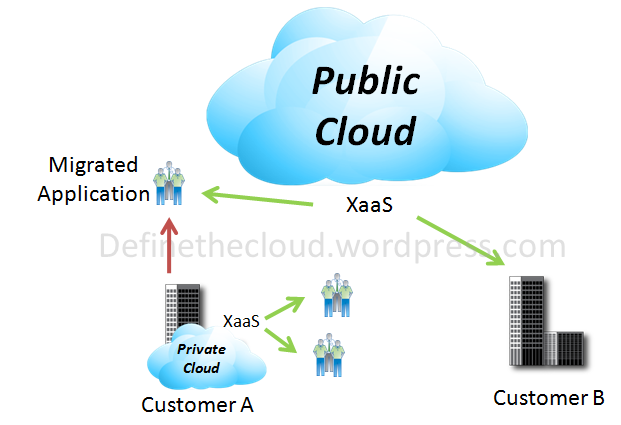
Using a Hybrid approach companies can maintain control of an internally managed private cloud while relying on the public cloud as needed.  For instance during peak periods individual applications, or portions of applications can be migrated to the Public Cloud.  This will also be beneficial during predictable outages: hurricane warnings, scheduled maintenance windows, rolling brown/blackouts.

image

Summary:

When defining a cloud strategy for your organization or customer’s organization it is important to understand the different models and the advantages each can have for a given workload.  No cloud model is mutually exclusive and many organizations will be able to benefit from more than one model at the same time.

Defining a long term vision now and developing a staged migration path to it with set timelines will help ease the transition into cloud based architectures and allow a faster ROI.

When Cloud Goes Bad:

image