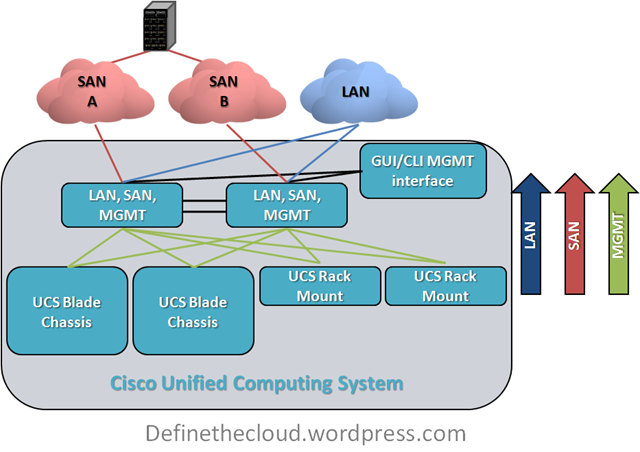
Why Cisco UCS is my 'A-Game' Server Architecture

A-Game:

When I discuss my A-Game it’s my go to hardware vendor for a specific data center component.  For example I have an A-Game platform for:

As this post is in regards to my server A-Game I’ll leave the rest undefined for now and may blog about them later.

Over the last 4 years I’ve worked in some capacity or another as an independent customer advisor or consultant with several vendor options to choose from.  This has been either with a VAR or strategic consulting firm such as www.fireflycom.net.)  In both cases there is typically a company lean one way or another but my role has given me the flexibility to choose the right fit for the customer not my company or the vendors which is what I personally strive to do.  I’m not willing to stake my own integrity on what a given company wants to push today.  I’ve written about my thoughts on objectivity in a previous blog (http://www.definethecloud.net/?p=112.)

Another rule in regards to my A-Game is that it’s not a rule, it’s a launching point.  I start with a specific hardware set in mind in order to visualize the customer need and analyze the best way to meet that need.  If I hit a point of contention that negates the use of my A-Game I’ll fluidly adapt my thinking and proposed architecture to one that better fits the customer.  These points of contention may be either technical, political, or business related:

If I hit one of these roadblocks I’ll shift my vendor strategy for the particular engagement without a second thought.  The exception to this is if one of these roadblocks isn’t actually a roadblock and my A-Game definitely provides the best fit for the customer I’ll work with the customer to analyze actual requirements and attempt to find ways around the roadblock.

Basically my A-Game is a product or product line that I’ve personally tested, worked with and trust above the others that is my starting point for any consultative engagement.

A quick read through my blog page or a jump through my links will show that I work closely with Cisco products and it would be easy to assume that I am therefore inherently skewed towards Cisco.  In reality the opposite is true, over the last few years I’ve had the privilege to select my job(s) and role(s) based on the products I want to work with.

My sorted UCS history:

As anyone who’s worked with me can attest to I’m not one to pull punches, feign friendliness, or accept what you try and sell me based on a flashy slide deck or eloquent rhetoric.  If you’re presenting to me don’t expect me to swallow anything without proof, don’t expect easy questions, and don’t show up if you can’t put the hardware in my hands to cash the checks your slides write.  When I’m presenting to you, I expect and encourage the same.

Prior to my exposure to UCS I worked with both IBM and HP servers and blades.  I am an IBM Certified Blade Expert (although dated at this point.)  IBM was in fact my A-Game server and blade vendor.  This had a lot to do with the technology of the IBM systems as well as the overall product portfolio IBM brought with it.  That being said I’d also be willing to concede that HP blades have moved above IBM’s in technology and innovation, although IBM’s MAX5 is one way IBM is looking to change that.

When I first heard about Cisco’s launch into the server market I thought, and hoped, it was a joke.  I expected some Frankenstein of a product where I’d place server blades in Nexus or Catalyst chassis.  At the time I was working heavily with the Cisco Nexus product line primarily 5000, 2000, and 1000v.  I was very impressed with these products, the innovation involved, and the overall benefit they’d bring to the customer.  All the love in the world for the Nexus line couldn’t overcome my feeling that there was no way Cisco could successfully move into servers.

Early in 2009 my resume was submitted among several others by my company to Learning at Cisco and the business unit in charge of UCS.  This was part of an application process for learning partners in order to be invited to the initial external Train The Trainer (TTT) and participate in training UCS to: Cisco, partners, and customers worldwide.  Myself and two other engineer/trainers (Dave Alexander and Fabricio Grimaldi) were selected from my company to attend.  The first interesting thing about the process was that the three of us were selected above CCIEs, 2x CCIEs and more experienced instructors from our company based on our server backgrounds.  It seemed Cisco really was looking to push servers not some network adaptation.

During the TTT I remained very skeptical.  The product looked interesting but not ‘game-changing.’  The user interfaces were lacking and definitely showed their Alpha and Beta colors.  Hardware didn’t always behave as expected and the real business/technological benefits of the product didn’t shine through.  That being said remember that at this point the product was months away from launch and this was a very Beta version of hardware/software we were working with.  Regardless of the underlying reasons I walked away from the TTT feeling fully underwhelmed.

I spent the time on my flight back to the East Coast from San Jose looking through my notes and thinking about the system and components.  It definitely had some interesting concepts but I didn’t feel it was a platform I would stake my name to at this point.

Over the next couple of months Fabricio Grimaldi and I assisted Dave Alexander (http://theunifiedcomputingblog.com) in developing the UCS Implementation certification course.  Through this process I spent a lot of time digging into the underlying architecture, relating it back to my server admin days and white boarding the concepts and connections in my home office.  Additionally I got more and more time on the equipment to ‘kick-the-tires.’  During this process Dave myself and Fabrico began instructing an internal Cisco course known as UCS Bootcamp.  The course was designed for Cisco engineers from both pre-sales and post-sales roles and focused specifically on the technology as a product deep dive.

It was over these months having discussions on the product, wrapping my head around the technology, and developing training around the components that the lock cylinders in my brain started to click into place and finally the key turned: UCS changes the game for server architecture, the skeptic had become a convert.

UCS the game changer:

The term game changer ge
ts thrown around all willy nilly like in this industry.  Every minor advancement is touted by its owner as a ‘Game Changer.’  In reality ‘Game Changers’ are few and far between.  In order to qualify you must actually shift the status quo, not just improve upon it.  To use vacuums as an example, if your vacuum sucks harder it just sucks harder, it doesn’t change the game.  A Dyson vacuum may vacuum better than anyone else’s but Roomba (http://www.irobot.com/uk/home_robots.cfm) is the one that changed the game.  With Dyson I still have to push the damn thing around the living room, with Roomba I watch it go.

In order to understand why UCS changes the game rather than improving upon it, you first need to define UCS:

UCS is NOT a blade system it is a server architecture

Cisco’s unified Computing System (UCS) is not all about blades, it is about rack mount servers, blade servers, and management being used as a flexible pool of computing resources.  Because of this it has been likened to an x86-64 based mainframe system.

UCS takes a different approach to the original blade system designs.  It’s not a solution for data center point problems (power, cooling, management, space, cabling) in isolation it’s a redefinition of the way we do computing.

‘Instead of asking how can I improve upon current architectures’

Cisco/Nuova asked

‘What’s the purpose of the server and what’s the best way to accomplish that goal.’

Many of the ideas UCS utilizes have been tried and implemented in other products before: Unified I/O, single point of management, modular scalability, etc., but never all in one cohesive design.

There are two major features of UCS that I call ‘the cake’ and three more that are really icing.  The two cake features are the reason UCS is my A-Game and the others just further separate it.

Unified Management:

Blade architectures are traditionally built with space savings as a primary concern.  In order to do this a blade chassis is built with a shared LAN, SAN, power, cooling infrastructure and an onboard management system to control server hardware access, fan speeds, power levels, etc.  M. Sean McGee describes this much better than I could hope to in his article The “Mini-Rack” approach to Blade Design (http://bit.ly/bYJVJM.)  This traditional design saves space and can also save on overall power, cooling, and cabling but causes pain points in management among other considerations.

UCS was built from the ground up with a different approach, and Cisco has the advantage of zero legacy server investment which allows them to execute on this.  The UCS approach is:

The key difference here is that all management of the LAN, SAN, server hardware, and chassis itself is pulled into the access layer and performed on the UCS Fabric Interconnect which provides all of the switching and management functionality for the system.  The system itself was built from the ground up with this in mind, and as such this is designed into each hardware component.  Other systems that provide a single point of management do so by layering on additional hardware and software components in order to manage underlying component managers.  Additionally these other systems only manage blade enclosures while UCS is designed to manage both blades and traditional rack mounts from one point.  This functionality will be available in firmware by the end of CY10.

To put this in perspective Cisco UCS provides a very similar rapid repeatable physical server deployment model to the virtual server deployment model VMware provides.  Through the use of granular Role Based Access Control (RBAC) UCS ensures that organizational changes are not required, while at the same time providing the flexibility to streamline people and process if desired.

Workload Portability:

Workload portability has significant benefits within the data center, the concept itself is usually described as ‘statelessness.’  If you’re familiar with VMware this is the same flexibility VMware provides for virtual machines, i.e. there is no tie to the underlying hardware. One of the key benefits of UCS is the ability to apply this type of statelessness at the hardware level.  This removes the tie of the server or workload to the blade or slot it resides in, and provides major flexibility to maintenance and repair cycles, as well as deployment times for new or expanding applications.

Within UCS all management is performed on the Fabric Interconnect through the UCS Manager GUI or CLI.  This includes any network configuration for blades, chassis, or rack-mounts, all server configuration including firmware BIOS, NIC/HBA and boot order among other things.  The actual blade is configured through an object called a ‘service profile'.’  This profile defines the server on the network as well as the way in which the server hardware operates (BIOS/Firmware, etc.)

All of the settings contained within a server profile are traditionally configured, managed and stored in hardware on a server.  Because these are now defined in a configuration file the underlying hardware tie is stripped away and a server workload can be quickly moved from one physical blade to another without requiring changes in the networks, or storage arrays.  This decreases maintenance windows and speeds roll-out.

Within UCS, Service Profiles can be created using templates or pools which is unique to UCS.  This further increases the benefits of service profiles and decreases the risk inherent with multiple configuration points, and case-by-case deployment models.

UCS Profiles and Templates

image

These two features and their real world applications and value are what place UCS in my A-Game slot.  These features will provide benefits to ANY server deployment model, and are unique to UCS.  While subcomponents exist within other vendors they are not:

Icing on the cake:

Each of these feature also offer real world benefits but the real heart of UCS is the Unified management and server statelessness.  You can find more information on these other features through var
ious blogs and Cisco documentation.

When is it time for my B-Game?:

By now you should have an understanding as to why I chose UCS as my A-Game (not to say you necessarily agree, but that you understand my approach.)  So what are the factors that move me towards my B-Game?  I will list three considerations and the qualifying question that would finalize a decision to position a B-Game system:

Infiniband If the customer is using Infiniband for networking UCS does not currently support it.  I would first assess whether there was an actual requirement for Infiniband or if it was just the best option at the time of last refresh.  If Infiniband is required I would move to another solution.
Non-Intel Processors Requirement for non-Intel processors would steer me towards another vendor as UCS does not currently support non-Intel.  As above I would first verify whether non-Intel was a requirement or a choice.
Requirement for chassis based storage If a customer had a requirement for chassis based storage there is no current Cisco offering for this within UCS.  This is however very much a corner case and only a configuration I would typically recommend for single chassis deployments with little need to scale.  In-chassis storage becomes a bottle neck rather than a benefit in multi-chassis configurations.

While there are other reasons I may have to look at another product for a given engagement they are typically few and far between.  UCS has the right combination of entry point and scalability to hit a great majority of server deployments.  Additionally as a newer architecture there is no concern with the architectural refresh cycle of other vendors.  As other blade solutions continue to age there will be an increased risk to the customer in regards to forward compatibility.

Summary:

UCS is not the only server or blade system on the market, but it is the only complete server architecture.  Call it consolidated, unified, virtualized, whatever but there isn’t another platform to combine rack-mounts and blades under a single architecture with a single management window and tools for rapid deployment.  The current offering is appropriate for a great majority of deployments and will continue to get better.

If your considering a server refresh or new deployment it would be a mistake not to take a good look at the UCS architecture.  Even if it’s not what you choose it may give you some ideas as to how you want to move forward, or features to ask your chosen vendor for.

Even if you never buy a UCS server you can still thank Cisco for launching UCS.  The lower pricing you’re getting today, and the features being put in place on other vendors product lines are being driven by a new server player in the market, and the innovation they launched with.

Comments, concerns, complaints always appreciated!

FCoE initialization Protocol (FIP) Deep Dive

In an attempt to clarify my future posts I will begin categorizing a bit.  The following post will be part of a Technical Deep Dive series.

Fibre Channel over Ethernet (FCoE) is a protocol designed to move native Fibre Channel over 10 Gigabit Ethernet and above links, I’ve described the protocol in a previous post (http://www.definethecloud.net/?p=80.)  In order for FCoE to work we need a mechanism to carry the base Fibre Channel port / device login mechanisms over Ethernet.  These are the processes for a port to login and obtain a routable Fibre Channel Address.  Let’s start with some background and definitions:

DCB Data Center Bridging
FC Native Fibre Channel Protocol
FCF Fibre Channel Forwarder (an Ethernet switch capable of handling Encapsulation/De-encapsulation of FCoE frames and some or all FC services)
FCID Fibre Channel ID (24 Bit Routable address)
FCoE Fibre Channel over Ethernet
FC-MAP A 24-Bit value identifying an individual fabric
FIP FCoE Initialization Protocol
FLOGI FC Fabric Login
FPMA Fabric Provided MAC Address
PLOGI FC Port Login
PRLI Process Login
SAN Storage Area Network (switching infrastructure)
SCSI Small Computer Systems Interface
 
Now for the background, you’ll never grasp FIP properly if you don’t first get the fundamentals of FC:
 
N_Port Initialization
image


When a node comes online it’s port is considered an N_port.  When an N_port connects to the SAN it will connect to a switch port defined as a Fabric Port F_Port (this assumes your using a switched fabric.)  All N_ports operate the same way when they are brought online:

  1. FLOGI – Used to obtain a routable FCID for use in FC frame exchange.  The switch will provide the FCID during a FLOGI exchange.
  2. PLOGI – Used to register the N_Port with the FC name server

At this point a targets (disk or storage array) job is done, they can now sit and wait for requests.  An initiator (server) on the other hand needs to perform a few more tasks to discover available targets:

  1. Query – Request available targets from the FC name server, zoning will dictate which targets are available.
  2. PLOGI – A 2nd port Login, this time into the target port.
  3. PRLI – Process login to exchange supported upper layer protocols (ULP) typically SCSI-3.

Once this process has been completed the initiator can exchange frames with the target, i.e. the server can write to disk.

FIP:

The reason the FC login process is key to understanding FIP is that this is the process that FIP is handling for FCoE networks.  FIP allows an Ethernet attached FC node (Enode) to discover existing FCFs and supports the FC login procedure over 10+GE networks.  Rather than just providing an FCID, FIP will provide an FPMA which is a MAC address comprised of two parts: FC-MAP and FCID.

48 bit FCMAP (Mac Address)

image

FIP

image

So FIP provides an Ethernet MAC address used by FCoE to traverse the Ethernet network which contains the FCID required to be routed on the FC network.  FIP also passes the query and query response from the FC name server.  FIP uses a separate Ethertype from FCoE and its frames are standard Ethernet size (1518 Byte 802.1q frame) whereas FCoE frames are 2242 Byte Jumbo Frames.

FIP Snooping:

FIP snooping is used in multi-hop FCoE environments.  FIP snooping is a frame inspection method that can be used by FIP snooping capable DCB devices to monitor FIP frames and apply policies based on the information in those frames.  This allows for:

FIP Snooping

image

Summary:

FIP snooping uses dynamic Access Control Lists to enforce Fibre Channel rules within the DCB Ethernet network.  This prevents Enodes from seeing or communicating with other Enodes without first traversing an FCF.

Feedback, corrections, updates, questions?

HP Flex-10, Cisco VIC, and Nexus 1000v

When discussing the underlying technologies for cloud computing topologies virtualization is typically a key building block.  Virtualization can be applied to any portion of the data center architecture from load-balancers to routers, and from servers to storage.  Server virtualization is one of the most widely adopted virtualization technologies, and provides a great deal of benefits to the server architecture. 

One of the most common challenges with server virtualization is the networking.  Virtualized servers typically consist of networks of virtual machines that are configured by the server team with little to no management/monitoring possible from the network/security teams.  This causes inconsistent policy enforcement between physical and virtual servers as well as limited network functionality for virtual machines.

Virtual Networks

image

The separate network management models for virtual servers and physical servers presents challenges to: policy enforcement, compliance, and security, as well as adds complexity to the configuration and architecture of virtual server environments.  Due to this fact many vendors are designing products and solutions to help draw these networks closer together.

The following is a discussion of three products that can be used for this, HP’s Flex-10 adapters, Cisco’s Nexus 1000v and Cisco’s Virtual interface Card (VIC.) 

This is not a pro/con or discussion of which is better, just an overview of the technology and how it relates to VMware.

HP Flex-10 for Virtual Connect:

Using HP’s Virtual Connect switching modules for C-Class blades and either Flex-10 adapters or Lan-On-Motherboard (LOM) administrators can ‘partition the bandwidth of a single 10Gb pipeline into multiple “FlexNICs.” In addition, customers can regulate the bandwidth for each partition by setting it to a user-defined portion of the total 10Gb connection. Speed can be set from 100 Megabits per second to 10 Gigabits per second in 100 Megabit increments.’ (http://bit.ly/boRsiY)

This allows a single 10GE uplink to be presented to any operating system as 4 physical Network Interface Cards (NIC.)

FlexConnect

image

In order to perform this interface virtualization FlexConnect uses internal VLAN mappings for traffic segregation within the 10GE Flex-10 port (mid-plane blade chassis connection from the Virtual Connect Flex-10 10GbE interconnect module and the Flex-10 NIC device.)  Each FlexNIC can present one or more VLANs to the installed operating system.

Some of the advantages with this architecture are:

When the installed operating system is VMware this allows for 2x10GE links to be presented to VMware as 8x separate NICs and used for different purposes such as vMotion, Fault Tolerance (FT), Service Console, VM kernel and data.

The requirements for Flex-10 as described here are:

Cisco Nexus 1000v:

‘Cisco Nexus® 1000V Series Switches are virtual machine access switches that are an intelligent software switch implementation for VMware vSphere environments running the Cisco® NX-OS operating system. Operating inside the VMware ESX hypervisor, the Cisco Nexus 1000V Series supports Cisco VN-Link server virtualization technology to provide:

• Policy-based virtual machine (VM) connectivity

• Mobile VM security and network policy, and

• Non-disruptive operational model for your server virtualization, and networking teams’(http://bit.ly/b4JJX5.)

The Nexus 1000v is a Cisco software switch which is placed in the VMware environment and provides physical type network control/monitoring to VMware virtual networks.  The Nexus 1000v is comprised of two components the Virtual Supervisor Module (VSM) and Virtual Ethernet Module (VEM.)  The Nexus 1000v does not have hardware requirements and can be used with any standards compliant physical switching infrastructure.  Specifically the upstream switch should support 802.1q trunks and LACP.

Cisco Nexus 1000v

image

Using the Nexus 1000v Network teams have complete control over the virtual network and manage it using the same tools and policies used on the physical network.

Some advantages of the 1000v are:

The requirements for Cisco Nexus 1000v are:

Cisco Virtual interface Card (VIC):

The Cisco VIC provides interface virtualization similar to the Flex-10 adapter.  One 10GE port is able to be presented to an operating system as up to 128 virtual interfaces depending on the infrastructure. ‘The Cisco UCS M81KR presents up to 128 virtual interfaces to the operating system on a given blade. The virtual interfaces can be dynamically configured by Cisco UCS Manager as either Fibre Channel or Ethernet devices’ (http://bit.ly/9RT7kk.)

Fibre Channel interfaces are known as vFC and Ethernet interfaces are known as vEth, they can be used in any combination up to the architectural limits.  Currently the VIC is only available for Cisco UCS blades but will be supported on UCS rack mount servers as well by the end of 2010.  Interfaces are segregated using an internal tagging mechanism known as VN-Tag which does not use VLAN tags and operates independently of VLAN operation.

Virtual Interface Card

image

Each virtual interface acts as if directly connected to a physical switch port and can be configured in Access or Trunk mode using 802.1q standard trunking. These interfaces can then be used by any operating system or VMware.  For more information on their use see my post Defining VN-Link (http://bit.ly/ddxGU7.)

VIC Advantages:

Requirements:

Summary:

Each of these products has benefits in specific use cases and can reduce overhead and/or administration for server networks.  When combining one or more of these products you should carefully analyze the benefits of each and identify features that may be sacrificed by combining the two.  For instance using the Nexus 1000v along with FlexConnect adds a Server administered network management layer in between the physical network and virtual network.

Nexus 1000v with Flex-10

image

Comments and corrections are always welcome.

Post defining VN-Link

For the Cisco fans or those curious about Cisco's VN-Link see my post on my colleagues Unified Computing Blog: http://bit.ly/dqIIQK.

Fibre Channel over Ethernet

Fibre Channel over Ethernet (FCoE) is a protocol standard ratified in June of 2009.  FCoE provides the tools for encapsulation of Fibre Channel (FC) in 10 Gigabit Ethernet frames.  The purpose of FCoE is to allow consolidation of low-latency, high performance FC networks onto 10GE infrastructures.  This allows for a single network/cable infrastructure which greatly reduces switch and cable count, lowering the power, cooling, and administrative requirements for server I/O.

FCoE is designed to be fully interoperable with current FC networks and require little to no additional training for storage and IP administrators. FCoE operates by encapsulating native FC into Ethernet frames.  Native FC is considered a 'lossless' protocol, meaning frames are not dropped during periods of congestion.  This is by design in order to ensure the behavior expected by the SCSI payloads.  Traditional Ethernet does not provide the tools for lossless delivery on shared networks so enhancements were defined by the IEEE to provide appropriate transport of encapsulated Fibre Channel on Ethernet networks.  These standards are known as Data Center Bridging (DCB) which I've discussed in a previous post (http://www.definethecloud.net/?p=31.)  These Ethernet enhancements are fully backward compatible with traditional Ethernet devices, meaning DCB capable devices can exchange standard Ethernet frames seamlessly with legacy devices.  The full 2148 Byte FC frame is encapsulated in an Ethernet jumbo frame avoiding any modification/fragmentation of the FC frame.

FCoE itself takes FC layers 2-4 and maps them to Ethernet layers 1-2, this replaces the FC-0 Physical layer, and FC-1 Encoding Layer.  This mapping between Ethernet and Fibre Channel is done through a Logical End-Point (LEP) which can by thought of as a translator between the two protocols.  The LEP is responsible for providing the appropriate encoding and physical access for frames traveling from FC nodes to Ethernet nodes and vice versa.  There are two devices that typically act as FCoE LEPs: Fibre Channel Forwarders (FCF) which are switches capable of both Ethernet and Fibre Channel, and Converged Network Adapters (CNA) which provide the server-side connection for a FCoE network.  Additionally the LEP operation can be done using a software initiator and traditional 10GE NICs but this places extra workload on the server processor rather than offloading it to adapter hardware.

One of the major advantages of replacing FC layers 0-1 when mapping onto 10GE is the encoding overhead.  8GB Fibre Channel uses an 8/10 bit encoding which adds 25% protocol overhead, 10GE uses a 64/64 bit encoding which has about 2% overhead, dramatically reducing the protocol overhead and increasing throughput.  The second major advantage is that FCoE maintains FC layers 2-4 which allows seamless integration with existing FC devices and maintains the Fibre Channel tool set such as zoning, LUN masking etc.  In order to provide FC login capabilities, multi-hop FCoE networks, and FC zoning enforcement on 10GE networks FCoE relies on another standard set known as Fibre Channel initialization Protocol (FIP) which I will discuss in a lter post.

Overall FCoE is one protocol to choose from when designing converged networks, or cable-once architectures.  The most important thing to remember is that a true cable-once architecture doesn't make you choose your Upper Layer Protocol (ULP) such as FCoE, only your underlying transport infrastructure.  If you choose 10GE the tools are now in place to layer any protocol of your choice on top, when and if you require it.

Thanks to my colleagues who recently provided a great discussion on protocol overhead and frame encoding...

Data Center Bridging Exchange

Data Center Bridging Exchange (DCBX) is one of the components of the DCB standards.  These standards offer enhancements to standard ethernet which are backwards compatible with traditional Ethernet and provide support for I/O Consolidation (http://www.definethecloud.net/?p=18.)  The three purposes of DCBX are:

Discovery of DCB capability:

The ability for DCB capable devices to discover and identify capabilities of DCB peers as well as identify non-DCB capable legacy devices.  You can find more information on DCB in a previous post (http://www.definethecloud.net/?p=31.)

Identification of misconfigured DCB features:

The ability to discover misconfiguration of features that require symmetric configuration between DCB peers.  Some DCB features are asymmetric meaning they can be configured differently on each end of a link, other features must match on both sides to be effective (symmetric.)  This functionality allows detection of configuration errors for these symmetric features.

Configuration of Peers:

A capability allowing DCBX to pass configuration information to a peer.  For instance a DCB capable switch can pass Priority Flow Control (PFC) information on to a Converged Network Adapter (CNA) to ensure FCoE traffic is appropriately tagged and pause is enabled for the chosen Class of Service (CoS) value.  This PFC exchange is a symmetric exchange and must match on both sides of the link.  DCB features such as Enhanced Transmission Selection (ETS) otherwise known as bandwidth management can be configured asymmetrically (different on each side of the link.)

DCBX relies on Link Level Discovery Protocol (LLDP) in order to pass this information and configuration.  LLDP is an industry standard version of Cisco Discovery Protocol (CDP) which allows devices to discover one another and exchange information about basic capabilities.  Because DCBX relies on LLDP and is an acknowledged protocol (2 way communication) any link which is intended to support DCBX must have LLDP enabled on both sides of the link for Tx/Rx.  When a port has LLDP disabled for either Rx or Tx DCBX is disabled on the port and DCBX Type Length Values (TLV) within received LLDP frames will be ignored.

DCBX capable devices should have DCBX enabled by default with the ability to administratively disable it.  This allows for more seamless deployments of DCB networks with less tendency for error.

Storage Protocols

Storage is a major consideration for cloud initiatives; what type of disk, which vendor, and as importantly which protocol?  Experts will tout one over the other based on cost, performance, throughput, etc.  Let's take a look at the major storage protocols at play in the data center:

Small Computer System Interface (SCSI):

SCSI is the dominant block level access method for disk in the data center.  Blocks are typically the smallest unit that can be read or written to on a disk, they exist in various sizes depending on disk type and usage.  Block level access means that the server can directly access the disk blocks without the need for a file system in place on top of them, this is opposite of file-based storage discussed later.

SCSI has been in use since the early 1980's and was originally used to move data within a single server.  The operating system handles writing data using the SCSI protocol to a SCSI drive controller which managed one or more devices on a SCSI cable within a system chassis.  The SCSI controller ensured that only one device would be active on the cable at any time which prevents contention on the SCSI bus.  Because SCSI was managed by a single controller and contained within a system the chance for data loss, or contention were minimal, this meant that SCSI did not require control mechanisms to handle data loss or contention as with networked protocols. SCSI itself is still widely used in its native format but it has also been encapsulated into other protocols for use within storage networks for consolidated storage.

Fibre Channel (FC):

Fibre Channel was designed to extend the functionality of SCSI into point-to-point, loop, and switched topologies.  This allows for longer distances as well as storage consolidation.  FC encapsulates SCSI data and Command Descriptor Blocks (CDB) into the payload of Fibre Channel frames.  Fibre Channel networks provided the addressing, routing, and flow-control required to support SCSI data.  Additionally Fibre Channel networks are designed to meet the needs of SCSI by providing 'lossless' in order delivery.  This means that in a stable network FC frames will not be dropped, and are delivered in order ensuring that the Upper Layer Protocols (ULP) will not be forced to reorder or resend frames.

Fibre Channel networks are typically carried over fiber-optic links on dedicated infrastructures.  These infrastructures are traditionally built-in pairs as exact mirrors of one another.  This provides complete physical redundancy end-to-end.  Additionally these networks provide high bandwidth and low-latency.  FC networks come in 1/2/4/8 Gbps speeds with 16/32 Gbps in the works.  Additionally 10Gbps FC links are typically available on a proprietary basis for links between switches.

internet/IP Small Computer System Interface (iSCSI):

iSCSI takes SCSI data and CDBs and places it in the payload of IP packets.  This allows the SCSI protocol to be extended across existing IP infrastructures.  While IP is routable within the data center and across the WAN iSCSI is not traditionally used/supported over routed boundaries (exceptions do exist.)  The draw of iSCSI has been that storage data can be extended across the existing infrastructure with minimal additional cost.

iSCSI has not gained the market share many have predicted over the years due to flaws in the protocol and limitations of the traditional Ethernet based data center networks.  until the standardization of 10 Gigabit Ethernet most data centers relied on 1GE links which were typically saturated already.  This meant implementing iSCSI required new switching infrastructure.  10GE has changed the bandwidth limits but still not catapulted iSCSI into the mainstream.  There are several reasons for this, one being that there is large existing investment in Fibre Channel, and two being the iSCSI protocol itself.

The problem with iSCSI from a protocol standpoint is that it takes the SCSI protocol which expects lossless, in-order delivery, and places it in TCP/IP packets which are designed to support heterogeneous WAN networks and experience packet loss and out-of-order delivery frequently.  This is done without providing any additional tools to either SCSI or TCP/IP for handling the SCSI payloads in the expected fashion.  This in no way means iSCSI is unusable or should be written off it just means that additional considerations must be made when designing iSCSI, especially in the Enterprise or larger environment.

In order to provide proper performance for iSCSI on shared networks Quality of Service (QoS), physical architecture, and jumbo frame support must be taken into account.  Because of these considerations many iSCSI networks have traditionally been placed on separate network hardware from the data center LAN (isolated iSCSI networks.)  This has minimized some of the benefits of consolidating on a single protocol.  With 10 Gigabit Ethernet and the standardization of Data Center Bridging (DCB) iSCSI looks more promising for a greater audience.  For more information on DCB see my previous post (http://www.definethecloud.net/?p=31.)

Fibre Channel over Ethernet (FCoE):

FCoE was ratified in 2009 and provides the functionality for moving native Fibre Channel across consolidated Ethernet networks.  FcoE relies on the DCB standards referenced above.  FCoE encapsulates full Fibre Channel frames inside Ethernet Jumbo Frame payloads.  Utilizing jumbo frames ensure that the FC frame is not fragmented or changed in any way.  The FCoE and DCB standards provide a robust tool set for consolidating existing Fibre Channel workloads on shared 10GE networks while providing the lossless, in-order delivery SCSI expects.  FCoE does not modify the existing Fibre Channel protocol suite and allows for the same management model including zoning, LUN masking, etc.  FCoE has started gaining ground over the last two years pushed by several large hardware vendors in the storage, network, and server markets.  For more information on FCoE see my post (http://www.definethecloud.net/?p=80.)

Common Internet File System (CIFS):

CIFS is a file based storage system based on Small Message block (SMB.)  This is a shared storage protocol typically used in Microsoft environments for file sharing.  Windows-based file shares rely on CIFS as the transfer protocol of the file level data.  File based storage relies on an underlying files system such as FAT32, XFS, NTFS or otherwise which differs from block based storage which does not.  File level storage is an excellent medium for some applications but is not traditionally effective in others.  When an application needs direct block access to disk file based storage is not appropriate.  Deployments that fall into this category include some databases and most Operating Systems.

Network File System (NFS):

NFS is another file based storage protocol.  NFS is traditionally used in Linux and Unix environments.  NFS is also a widely used protocol for VMware environments and can offer several benefits for virtual machine storage.  As a file based storage protocol NFS experiences many of the same limitations as stated for CIFS above.

Hyper Text Transfer Protocol (HTTP) and others:

When the cloud discussion leaves the data center (private/internal cloud) and moves up to the service provider level such as Google, Amazon, or the TelCos the protocols listed above may not have the necessary scalability.  When you begin talking about supporting thousands of customers with multiple Terabytes each, traditional storage protocols may not suffice.  It has to do with both the scalability of the systems and the administration of the disk.  iSCSI and FC both require a fair amount of management for the RAID, volumes, and LUNs, whereas CIFS and NFS require a fair amount for the security and volumes.  Protocols such as HTTP based storage are being used to simplify storage configuration and increase its scalability.

Which is the right protocol to use when moving to the cloud?  Obviously there is only one answer!  As always in IT 'it depends.'  Each protocol has it's uses, benefits and drawbacks.  The most important thing to remember is that most environments can benefit from more than one or all of these protocols.  Every application is different and any given protocol may have advantages for a particular app.  The only universal truth in cloud storage is that protocol flexibility will be key.

Data Center Bridging

Data Center Bridging (DCB) is a group of IEEE standard protocols designed to support I/O consolidation.  DCB enables multiple protocols with very different requirements to run over the same Layer 2 10 Gigabit Ethernet infrastructure.  Because DCB is currently discussed along with Fibre Channel over Ethernet (FCoE) it's not uncommon for people to think of them as part of FCoE.  This is not the case, while FCoE relies on DCB for proper treatment on a shared network, DCB enhancements can be applied to any protocol on the network.  DCB support is being built into data center hardware and software from multiple vendors and is fully backwards compatible with legacy systems (no forklift upgrades.)  For more information on FCoE see my post on the subject (http://www.definethecloud.net/?p=80.)

Network protocols typically have unique requirements in regards to latency, packet/frame loss, bandwidth, etc.  These differences have a large impact on the performance of the protocol in a shared environment.  Differences such as flow-control and frame loss are the reason Fibre Channel networks have traditionally been separate physical infrastructures from Ethernet networks.  DCB is the set of tools that allows us to converge these networks without sacrificing performance or reliability.

Lets take a look at the DCB suite:

Priority Flow Control (PFC) 802.1Qbb:

PFC is a flow control mechanism.  PFC is designed to eliminate frame loss for specific traffic types on Ethernet networks.  Protocols such as Small Computer System Interface (SCSI) which is used for block data storage are very sensitive to data loss.  SCSI protocol is the heart of Fibre Channel which is a tool used to extend SCSI from internal disk to centralized storage across a network.  In its native form on dedicated networks Fibre Channel has tools to ensure that frames are not lost as long as the network is stable.  In order to move Fibre Channel across Ethernet networks that same 'lossless' behavior must be guaranteed, PFC is the tool to do that.

PFC uses a pause mechanism to allow a receiving device to signal a pause to the directly connected sending device prior to buffer overflow and packet loss.  While Ethernet has had a tool to do this for some time (802.3x pause) it has always been at the link level.  This means that all traffic on the link would be paused, rather than just a selected traffic type.  Pausing a link carrying various I/O types would be a bad thing, especially for traffic such as IP Telephony and streaming video.  Rather than pause an entire link PFC sends a pause signal for a single Class of Service (CoS) which is part of an 802.1Q Ethernet header.  This allows up to 8 classes to be defined and paused independent of one another.

Congestion Management (802.1Qau):

When we begin pausing traffic in a network we have the potential to spread network congestion by causing choke points.  Imagine trying to drive past a football stadium (football or American football pick your flavor) when the game is about to start.  You're stuck in dead lock traffic even though you're not going to the game, if you've got that image your on the right track.  Congestion management is a set of signaling tools used to push that congestion out of the network core to the network edge (if you're thinking old school FECN and BECN you're not far off.)

Bandwidth Management (802.1Qaz):

Bandwidth management is a tool for simple consistent application of bandwidth controls at Layer 2 on a DCB network.  Bandwidth management allows specific traffic type to be guaranteed a percentage of available bandwidth based on its CoS.  For instance on a 10GE network access port utilizing FCoE you could guarantee 40% of the bandwidth to FCoE.  This provides a 4Gb tunnel for FCoE when needed but allows other traffic types to utilize that bandwidth when not in use for FCoE.

Data Center bridging Exchange (DCBX):

DCBX is a Layer 2 communication protocol that allows DCB capable devices to communicate and discover the edge of the DCB network, i.e. legacy devices.  DCBX not only allows passing of information but provides tools for passing configuration.  This is key to the consistent configuration of DCB networks.  For instance a DCB switch acting as a Fibre Channel over Ethernet Forwarder (FCF) can let an attached Converged Network Adapter (CNA) on a server know to tag FCoE frames with a specific CoS and enable pause for that traffic type.

All in all the DCB features are key enablers for true consolidated I/O.  They provide a tool set for each traffic type to be handled properly independent of other protocols on the wire.  For more information on Consolidated I/O see my previous post Consolidated IO (http://www.definethecloud.net/?p=67.)