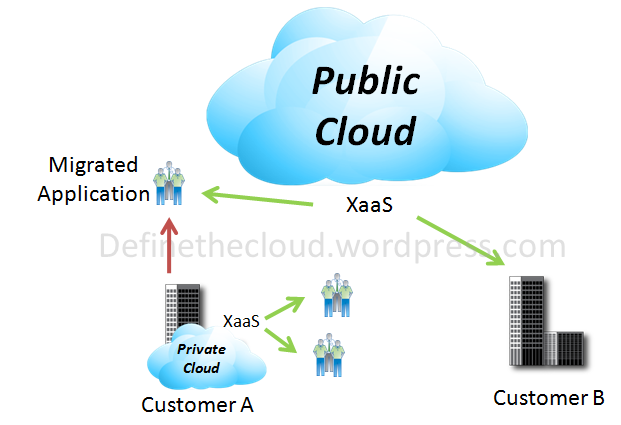
The Reality of Cloud Bursting

Recently while researching the concept of ‘Cloud Bursting‘ I received a history lesson in Cloud Computing after a misguided tweet at Chris Hoff (@Beaker.)  My snarky comment suggested Chris needed a lesson in Cloud history, but as it turns out I received the lesson.  My reference turned out to be a long debunked myth of Amazon cloud origins (S3 storage followed by EC2 Compute) the details of which can be found here: http://www.quora.com/How-and-why-did-Amazon-get-into-the-cloud-computing-business.  The silver lining of my self induced public twitter thrashing was two things: I learned yet again that the best preventative measure for Foot-In-Mouth-Disease is proper research, and I got some great background and info from Chris, Brian Gracely (@bgracely), Matt Davis (@da5is), Roman Tarnavski (@romant), Denis Guyadeen (@dguyadeen) and others.  This all began when I read Chris’s ‘Incomplete Thought: Cloudbursting Your Bubble – I call Bullshit’ (http://www.rationalsurvivability.com/blog/?p=3016.)  Chris takes the stance ‘TODAY cloud bursting is BS...’ to quote the man himself.  The ‘today’ is the part I didn’t infer from his blog post (lack of cloud history knowledge aside.)

Before we kick off let’s look at the concept of Cloud Bursting:

Cloud Bursting:

In a broad strokes fashion cloud bursting is the idea that an application normally runs in one type of cloud and is capable of utilizing additional resources of another cloud type during peak periods, or ‘bursting.’  The most common example of this type of utilization would be a retail company utilizing a private cloud for day-to-day operations bursting to the public cloud for peak periods such as a holiday season.
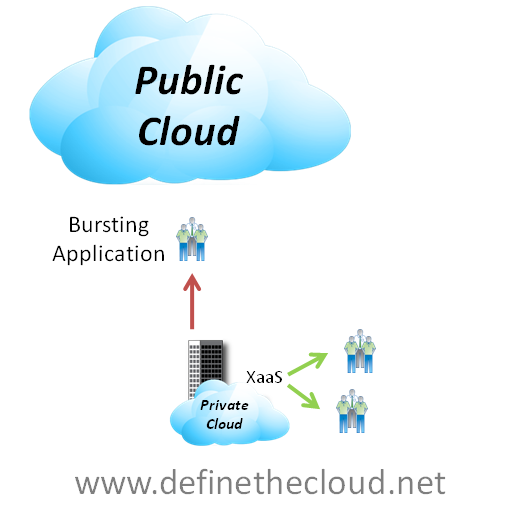
image

At first glance cloud bursting looks like a great way to have your cake and eat it too.  You get the comfort and security blanket of hosting your own applications with the knowledge that if your capacity spikes you’ve got excess available in the public cloud on-demand with a pay for use model.

The issue:

The issue is in the reality of this system, as several problems come to play:

  1. If you’ve designed the application to be public cloud compatible why wouldn’t you just run it there in the first place?
  2. Building a new private cloud infrastructure that doesn’t support your capacity demands is short-sighted.
  3. Designing an application for cloud bursting capability is no easy task and would probably require some portion (data?) to exist in the public cloud constantly skewing the benefits of the ‘on-demand’ concept of cloud bursting.
  4. Complicated cost model for any given application in which infrastructure is purchased up front and depreciated over time alongside pay-for-use costs as the application bursts

After carefully looking at these and other issues cloud bursting will most likely not be a reality for most enterprises and applications, and is currently a very rare cloud use case.

Note: Chris Hoff draws a distinction which I wholeheartedly echo: Cloud bursting is separate from Hybrid cloud approaches where specific apps are run in public or private clouds based on application/business requirements.  The issue above is specifically directed at individual applications bursting between clouds.

The Reality:

For the average enterprise cloud bursting is not an option today and will probably not be in the future.  While hybrid models can thrive, i.e. some applications run privately and some publicly, or a private cloud designed to failover to public cloud etc. individual applications bursting back forth between clouds will not be a reality.  Exceptions exist and there will still be use cases for cloud bursting, but they will be corner cases.  Things like high Performance Computing (HPC) can lend themselves well to cloud bursting due to the dynamic and distributed nature. 

Another possible use case for cloud bursting is environments that heavily utilize development and test systems but must utilize on-premise resources for production due to requirements such as security.  In these cases the dev/test may be capable of running in the cloud but can more cost effectively reside locally in the private cloud during off peak production hours.  The dev/test systems could be designed so that they burst to the cloud when production peaks and spare cycles are sparse.

Innovative Versus Integration Cloud Stacks

The Live Webcast with NetApp and Kingman Tang went quite well with good discussion on private cloud and data center stacks.  Check out the recording below.

A BrightTALK Channel

World Wide Technology’s Upcoming Geek Day

Coming up very quickly is World Wide Technology’s (www.wwt.com) annual Geek Day, March 10th 2011 (http://www.wwt.com/geekday/.)  I’m very much looking forward to the event for two reasons:

  1. It’s free to customers
  2. It’s totally focused on geeks interacting with geeks.

The event is focused around live interactive demo’s from sponsor technology companies with breakout sessions chosen by the attendees via online voting.  My favorite parts are that the sponsors aren’t allowed to do lead collecting (badge scanning you know from conferences), gimmicky swag giveaways, or stock their booths with gobs of marketing fluff.  It’s true focus is the demo, and engineer to engineer discussion.  See the link above for more information, and the video below for some customer feedback on the events.  I hope to see you here in St. Louis in March!

An End User’s Cloud Security Question

I recently received an email with a question about the security of cloud computing environments.  The question comes from a knowledgeable user and boils down to ‘Isn’t my data safer on my systems?’  I thought this would be a great question to open up to the wider community.  Does anyone have any thoughts or feedback for ‘Gramps’ question below?

Joe, I'm not a college grad, but a 70 yr old grandfather, that began programming on a Color Computer using an audio tape recorder for storage.  I've written some corporate code for Owens Corning Fiberglas before I retired, so I've been around the keyboard for a while. <grin>  To make a point, notice how you've told me what your email address is, on your blog (see the about page.)  Hackers, and scammers are so efficient, you and I can't even put our actual email out there.  Now, You are in high gear with putting almost your heart and soul on servers that can be anywhere on the planet... even where there are little or no laws (enforced) governing data piracy.  Joe, I'm not trying to pick a fight, no need to, but look at the Wikileaks > etc.  I guess I could cope with using cloud software for doing my things... but can you tell me you are willing to even leave your emails or data files out there too? Somehow, I just feel a whole lot safer having my critical stuff on my flash drive... Talk to me buddy... 

Jim 'Gramps' , Hillsboro OH

Promote Your Strategy to Boost Your Cloud Execution

Sitting on yet another flight during takeoff I was forced to read print because my Kindle could obviously disable the auto-pilot system and force us to crash land on a secret government island and start a horrible soap opera with a four letter title.  Since Harvard Business Review isn’t available for the Kindle it’s typically my takeoff and landing material.  At $17.00 US per issue it’s only barely worth the price, but the summary before each article puts it over the top because it allows me to quickly separate the garbage and filler from articles that aren’t common sense (uncommon virtue or not.)  One of the articles that caught my eye was ‘How Hierarchy Can Hurt Strategy Execution’ (HBR July-August 2010.)  It’s the one or two articles like this per issue that keep me occasionally buying HBR.

The key findings in the article are:

Overall the premise of the article is that 'the findings suggest a more bottom up approach to strategy development and a more transparent communication of overall strategy amongst the ranks.  Before I continue I highly suggest you go find and read this article, my summary doesn’t do it justice. 

This article resonated deeply with me for two reasons:

1) I’ve worked for companies in the past in which strategy and vision were never discussed and input from below was never sought out, the negative effects were openly apparent. I also currently work for a company that clearly understands the importance of promoting strategy and vision through the ranks, accepting input from all levels and ensuring that the entire company is operating toward a common set of goals.  Ask anyone within the company from a receptionist to the CEO and they will be able to tell you the companies values, vision, and year to year goals, as well as why they matter.  The difference it makes in both morale and execution is amazing. 

2) This is information that should be taken extremely seriously for any company engaging in a cloud strategy.  Moving an IT computing model to a cloud based model will be a disruptive change both technically and organizationally and there are many pitfalls that can occur if everyone involved is not working towards a common set of goals.

Whether moving to a public, private or hybrid cloud model there will be a lot of change.  The decision to make that move is typically going to happen at an executive level, but it will be carried out by the IT team and effect them the most directly.  If those teams don’t understand the goal, have a chance to provide input into the execution, and have a clear definition of what their role will be in the cloud model you will have a much harder time with the move, or fail completely. 

How helpful is a system administrator going to be with moving your applications to the cloud if they think that once they get them there they’re out of a job?  Whether that fear is realistic or not isn’t going to matter if it’s not addressed.  The other side of that communication coin will be the knowledge gathered from each level of your IT team.  There may be snags or beneficial ideas that get missed if everyone isn’t involved in the process. 

Once a decision has been made to migrate to a cloud architecture clearly define the goals and benefits then work with the entire team to develop the strategy and roadmap for the migration as well as defining what the individual contributors roles will be after the migration.  If various positions within the IT department will not be required after the migration is complete analyze the individuals in those roles and see where they may fit in other parts of the organization.  Involving them in that discussion is key, they may have career goals and skill sets that management teams aren’t aware of.  I’m a big believer in if you have the right people you can find or create the right fit.

The Cloud Storage Argument

The argument over the right type of storage for data center applications is an ongoing battle.  This argument gets amplified when discussing cloud architectures both private and public.  Part of the reason for this disparity in thinking is that there is no ‘one size fits all solution.’  The other part of the problem is that there may not be a current right solution at all.

When we discuss modern enterprise data center storage options there are typically five major choices:

In a Windows server environment these will typically be coupled with Common internet File Service (CIFS) for file sharing.  Behind these protocols there are a series of storage arrays and disk types that be used to meet the applications I/O requirements.

As people move from traditional server architectures to virtualized servers, and from static physical silos to cloud based architectures they will typically move away from DAS into one of the other protocols listed above to gain the advantages, features and savings associated with shared storage.  For the purpose of this discussion we will focus on these four: FC, FCoE, iSCSI, NFS.

The issue then becomes which storage protocol to use for transport of your data from the server to the disk?  I’ve discussed the protocol differences in a previous post (http://www.definethecloud.net/?p=43) so I won’t go into the details here.  Depending on who you’re talking to it’s not uncommon to find extremely passionate opinions.  There a quite a few consultants and engineers that are hard coded to one protocol or another.  That being said most end-users just want something that works, performs adequately and isn’t a headache to manage.

Most environments currently work on a combination of these protocols, plenty of FC data centers rely on DAS to boot the operating system and NFS/CIFS for file sharing.  The same can be said for iSCSI.  With current options a combination of these protocols is probably always going to be best, iSCSI, FCoE, and NFS/CIFS can be used side by side to provide the right performance at the right price on an application by application basis.

The one definite fact in all of the opinions is that running separate parallel networks as we do today  with FC and Ethernet is not the way to move forward, it adds cost, complexity, management, power, cooling and infrastructure that isn’t needed.  Combining protocols down to one wire is key to the flexibility and cost savings promised by end-to-end virtualization and cloud architectures.  If that’s the case which wire do we choose, and which protocol rides directly on top to transport the rest?

10 Gigabit Ethernet is currently the industries push for a single wire and with good reason:

For the sake of argument let’s assume we all agree on 10GE as the right wire/protocol to carry all of our traffic, what do we layer on top?  FCoE, iSCSI, NFS, something else?  Well that is a tough question.  the first part of the answer is you don’t have to decide, this is very important because none of these protocols is mutually exclusive.  The second part of the answer is, maybe none of these is the end-all-be-all long-term solution.  Each current protocol has benefits and draw backs so let’s take a quick look:

And a quick look at comparative performance:

Protocol Performanceimage

While the above performance model is subjective and network tuning and specific equipment will play a big role the general idea holds sound.

One of the biggest factors that needs to be considered when choosing these protocols is block vs. file.  Some applications require direct block access to disk, many databases fall into this category.  As importantly if you want to boot an operating system from disk block level protocol (iSCSI, FCoE) are required.  This means that for most diskless configurations you’ll need to make a choice between FCoE and iSCSI (still within the assumption of consolidating on 10GE.)  Diskless configurations have major benefits in large scale deployments including power, cooling, administration, and flexibility so you should at least be considering them.

If you chosen a diskless configuration and settled on iSCSI or FCoE for your boot disks now you still need to figure out what to do about file shares?  CIFS or NFS are your next decision, CIFS is typically the choice for Windows, and NFS for Linux/UNIX environments.  Now you’ve wound up with 2-3 protocols running to get your storage settled and your stacking those alongside the rest of your typical LAN data.

Now to look at management step back and take a look at block data as a whole.  If you’re using enterprise class storage you’ve got several steps of management to configure the disk in that array.  It varies with vendor but typically something to the effect of:

  1. Configure the RAID for groups of disks
  2. Pool multiple RAID groups
  3. Logically sub divide the pool
  4. Assign the logical disks to the initiators/servers
  5. Configure required network security (FC zoning/ IP security/ACL, etc)

While this is easy stuff for storage and SAN administrators it’s time consuming, especially when you start talking about cloud infrastructures with lots and lots of moves adds and changes.  It becomes way to cumbersome to scale into petabytes with hundreds or thousands of customers.  NFS has more streamlined management but it can’t be used to boot an OS.  This makes for extremely tough decisions when looking to scale into large virtualized data center architectures or cloud infrastructure.

There is a current option that allows you to consolidate on 10GE, reduce storage protocols and still get diskless servers.  I
t’s definitely not the solution for every use case (there isn’t one), and it’s only a great option because there aren’t a whole lot of other great options.

In a fully virtualized environment NFS is a great low management overhead protocol for Virtual Machine disks.  Because it can’t boot we need another way to get the operating system to server memory.  That’s where PXE Boot comes in.  Pre eXecutionEnvironment (PXE) is a network OS boot that works well for small operating systems, typically terminal clients or Linux images.  It allows for a single instance of the operating system to be stored on a PXE server attached to the network, and a diskless server to retrieve that OS at boot time.  Because some virtualization operating systems (Hypervisors) are light weight, they are great candidates for PXE boot.  This allows the architecture below.

PXE/NFS 100% Virtualized Environment

image

Summary:

While there are  several options for data center storage none of them solves every need.  Current options increase in complexity and management as the scale of the implementation increases.  Looking to the future we need to be looking for better ways to handle storage.  Maybe block based storage has run it’s course, maybe SCSI has run it’s course, either way we need more scalable storage solutions available to the enterprise in order to meet the growing needs of the data center and maintain manageability and flexibility.  New deployments should take all current options into account and never write off the advantages of using more than one, or all of them where they fit.

Cloud Types

Within the discussion of cloud computing there are several concepts that get tossed around and mixed up.  Part of the reason for this is that there are several cloud architecture types.  While there are tons of types and sub-types discussed I'll focus on four major deployment models here: Public Cloud, Private Cloud, Community Cloud and Hybrid Cloud.  Each cloud type can be used to deliver any combination of XaaS.  The key requirements to be defined as a cloud architecture are:

I’ve discussed the business drivers for a transition to cloud in a previous post (http://www.definethecloud.net/?p=27) and the technical drivers here (http://www.definethecloud.net/?p=52.)

Public Clouds:

According to NIST with Public Clouds ‘The cloud infrastructure is made available to the general public or a large industry group and is owned by an organization selling cloud services’ (http://bit.ly/cilxSJ.)  This is the service model for cloud computing, A company owns the resources that provide a service and sell that service to other users/companies.  This is a similar model to the utilities, companies pay for the amount of: infrastructure, processing, etc. that is use.  Examples of Public Cloud providers are:

These and more can be found on Search Cloud Computing’s Top 10 list (http://bit.ly/buIKh9.)

image

 Private Clouds:

NIST defines the Private Cloud as: ‘The cloud infrastructure is operated solely for an organization. It may be managed by the organization or a third party and may exist on premise or off premise.’

Private clouds are data center architectures owned by a single company that provide flexibility, scalability, provisioning, automation and monitoring.  The goal of a private cloud is not to sell XaaS to external customers but instead to gain the benefits of a cloud architecture without giving up the control of maintaining your own data center.  Typical private cloud architectures will be built on a foundation of end-to-end virtualization, with automation, monitoring, and provisioning tools layered on top.  While not in the definition of Private Clouds bear in mind that security should be a primary concern at every level of design.

There are several complete Private Cloud offerings from various industry leading vendors.  These solutions typically have the advantages joint testing, and joint support among others.  That being said Private Clouds can be built on any architecture you choose.

image

Community Clouds:

Community Clouds are when an ‘infrastructure is shared by several organizations and supports a specific community that has shared concerns (e.g., mission, security requirements, policy, and compliance considerations). It may be managed by the organizations or a third party and may exist on premise or off premise’ according to NIST.

A community cloud is a cloud service shared between multiple organizations with a common tie.  These types of clouds are traditionally thought of as farther out in the timeline of adoption.

image

Hybrid Clouds:

So while you can probably guess what a hybrid cloud is I’ll give you the official NIST definition first: ‘The cloud infrastructure is a composition of two or more clouds (private, community, or public) that remain unique entities but are bound together by standardized or proprietary technology that enables data and application portability (e.g., cloud bursting for load-balancing between clouds).

Using a Hybrid approach companies can maintain control of an internally managed private cloud while relying on the public cloud as needed.  For instance during peak periods individual applications, or portions of applications can be migrated to the Public Cloud.  This will also be beneficial during predictable outages: hurricane warnings, scheduled maintenance windows, rolling brown/blackouts.

image

Summary:

When defining a cloud strategy for your organization or customer’s organization it is important to understand the different models and the advantages each can have for a given workload.  No cloud model is mutually exclusive and many organizations will be able to benefit from more than one model at the same time.

Defining a long term vision now and developing a staged migration path to it with set timelines will help ease the transition into cloud based architectures and allow a faster ROI.

When Cloud Goes Bad:

image