Cisco unified Computing System (UCS) High-Level Overview

I’ve been looking for tools to supplement Power Point, Whiteboard, etc. and Brian Gracely (@bgracely) suggested I try Prezi (www.prezi.com.) Prezi is a very slick tool for non-slide based presentations.   I don’t think it will replace slides or white board for me, but it’s a great supplement.  It’s got a fairly quick learning curve if you watch the quick tutorials.  Additionally it works quite well for mind-mapping, I just throw all of my thoughts on the canvas and then start tying them together, whereas slides are very linear and take more planning.  My favorite feature of Prezi is the ability to break out of the flow, and quickly return to it at any time during a presentation.  I love this because real world discussions never go the way you mapped them out in advance.  To start learning the tool I created the following high-level overview of the Cisco Unified Computing System (UCS.)  This content is fully/usable and recyclable so do with it what you want!

GD Star Rating
loading...

An End User’s Cloud Security Question

I recently received an email with a question about the security of cloud computing environments.  The question comes from a knowledgeable user and boils down to ‘Isn’t my data safer on my systems?’  I thought this would be a great question to open up to the wider community.  Does anyone have any thoughts or feedback for ‘Gramps’ question below?

Joe, I’m not a college grad, but a 70 yr old grandfather, that began programming on a Color Computer using an audio tape recorder for storage.  I’ve written some corporate code for Owens Corning Fiberglas before I retired, so I’ve been around the keyboard for a while. <grin>  To make a point, notice how you’ve told me what your email address is, on your blog (see the about page.)  Hackers, and scammers are so efficient, you and I can’t even put our actual email out there.  Now, You are in high gear with putting almost your heart and soul on servers that can be anywhere on the planet… even where there are little or no laws (enforced) governing data piracy.  Joe, I’m not trying to pick a fight, no need to, but look at the Wikileaks > etc.  I guess I could cope with using cloud software for doing my things… but can you tell me you are willing to even leave your emails or data files out there too? Somehow, I just feel a whole lot safer having my critical stuff on my flash drive… Talk to me buddy… 

Jim ‘Gramps’ , Hillsboro OH

GD Star Rating
loading...

Virtualizing the PCIe bus with Aprius

One of the vendors that presented during Gestalt IT’s Tech Field day 2010 in San Jose was Aprius (http://gestaltit.com/field-day/) (http://www.aprius.com/.)  Aprius’s product virtualizes the PCIe I/O bus and pushes that PCIe traffic over 10GE to the server.  In Aprius’s model you have an Aprius appliance that houses multiple off-the-shelf PCIe cards and a proprietary Aprius initiator which resides in the server.  The concept is to be able to not only share PCIe devices to multiple servers but also allow the use of multiple types of PCIe cards on servers with limited slots.  Additionally there would be some implications for VMware virtualized servers as you could potentially utilize VMware Direct-Path I/O to present these cards directly to a VM.  Aprius’s main competitor is Xsigo which provides a similar benefit using a PCIe appliance containing proprietary PCIe cards and pushing the I/O over standard 10G Ethernet or Infiniband to the server NIC.  I look at the PCIe I/O virtualization space as very niche with limited use cases, let’s take a look at this in reference to Aprius,

With the industry moving more and more toward x64 server virtualization using VMware, HyperV, and Zen hardware compatibility lists come very much into play.  If a card is not on the list it most likely won’t work and is definitely not supported.  Aprius skates around this issue by using a card that appears transparent to the operating system and instead presents only the I/O devices assigned to a given server via the appliance.  This means that the Aprius appliance should work with any given virtualization platform, but support will be another issue.  Until Aprius is on an the Hardware Compatibility List (HCL) for any given hypervisor I wouldn’t recommend to my customers for virtualization.  Additionally the biggest benefit I’d see for using Aprius in a virtualization environment would be passing VMs PCIe devices that aren’t traditionally virtualized, think fax-modem etc.  This still wouldn’t be possible with the Aprius device because those cards aren’t on the virtualization HCL.

The next problem with these types of products is that the industry is moving to consolidate storage, network and HPC traffic on the same wire.  This can be done with FCoE, iSCSI, NFS, CIFS, etc. or any combination you choose.  That move is minimizing the I/O card requirements in the server and the need for specialized PCIe devices is getting smaller every day.  With less PCIe devices needed for any given server, what is the purpose of a PCIe aggregator?

Another use case of Aprius’s technology they shared with us was sharing a single card, for example 10GE NIC among several servers as a failover path rather than buying redundant cards per server.  This seems like a major stretch. This adds an Aprius appliance as a point of failure to your redundant path, and still requires an Aprius adapter in each server instead of the redundant NIC.

My main issue with both Aprius and Xsigo is that they both require me to put their boxes in my data path as a single additional point of failure.  You’re purchasing their appliance and their cards and using that to aggregate all of your server I/O leaving their appliance as a single point of failure for multiple servers I/O requirements. I just can’t swallow that, unless I have some 1-off tye of need that can’t be solved any other way.

The question I neglected to ask Aprius’s CEO during the short period he joined us is whether the company was started with the intent to sell a product, or the intent to sell a company.  My thinking is that the real answer is they’re only interested in selling enough appliances to get the company as a whole noticed and purchased.  The downside of that is they don’t seem to have enough secret sauce that can’t be easily copied to be valuable as an acquisition.

The technology both Aprius and Xsigo market would really only be of use if purchased by a larger server vendor with a big R&D budget and some weight with the standards community. It could then be used to push a PCIeoE standard to drive adoption.  Additionally the appliances may have a play within that vendors blade architecture as a way of minimizing required blade components and increasing I/O flexibility, i.e. a PCIe slot blade/module that could be shared across the chassis.

Summary:

Aprius seems to be a fantastic product with a tiny little market that will continue to shrink. This will never be a mainstream data center product but will fit the bill for niche issues and 1-off deployments.  In their shoes my goal would be to court the server vendors and find a buyer before the technology becomes irrelevant, or copied. Their only competition I’m aware of in this space is Xsigo and I think they have a better shot based on deployment model. They’re proprietary card in each server becomes a non-issue if a server vendor buys them and builds them into the system board.

GD Star Rating
loading...

Promote Your Strategy to Boost Your Cloud Execution

Sitting on yet another flight during takeoff I was forced to read print because my Kindle could obviously disable the auto-pilot system and force us to crash land on a secret government island and start a horrible soap opera with a four letter title.  Since Harvard Business Review isn’t available for the Kindle it’s typically my takeoff and landing material.  At $17.00 US per issue it’s only barely worth the price, but the summary before each article puts it over the top because it allows me to quickly separate the garbage and filler from articles that aren’t common sense (uncommon virtue or not.)  One of the articles that caught my eye was ‘How Hierarchy Can Hurt Strategy Execution’ (HBR July-August 2010.)  It’s the one or two articles like this per issue that keep me occasionally buying HBR.

The key findings in the article are:

  • ‘The biggest execution challenge is making strategy meaningful to frontline workers.’
  • ‘A lot of people can’t even tell you what their firm’s strategy is.’
  • ‘Strategy still comes mainly from the top.’
  • ‘People involved in its development are the most likely to buy in.’

Overall the premise of the article is that ‘the findings suggest a more bottom up approach to strategy development and a more transparent communication of overall strategy amongst the ranks.  Before I continue I highly suggest you go find and read this article, my summary doesn’t do it justice. 

This article resonated deeply with me for two reasons:

1) I’ve worked for companies in the past in which strategy and vision were never discussed and input from below was never sought out, the negative effects were openly apparent. I also currently work for a company that clearly understands the importance of promoting strategy and vision through the ranks, accepting input from all levels and ensuring that the entire company is operating toward a common set of goals.  Ask anyone within the company from a receptionist to the CEO and they will be able to tell you the companies values, vision, and year to year goals, as well as why they matter.  The difference it makes in both morale and execution is amazing. 

2) This is information that should be taken extremely seriously for any company engaging in a cloud strategy.  Moving an IT computing model to a cloud based model will be a disruptive change both technically and organizationally and there are many pitfalls that can occur if everyone involved is not working towards a common set of goals.

Whether moving to a public, private or hybrid cloud model there will be a lot of change.  The decision to make that move is typically going to happen at an executive level, but it will be carried out by the IT team and effect them the most directly.  If those teams don’t understand the goal, have a chance to provide input into the execution, and have a clear definition of what their role will be in the cloud model you will have a much harder time with the move, or fail completely. 

How helpful is a system administrator going to be with moving your applications to the cloud if they think that once they get them there they’re out of a job?  Whether that fear is realistic or not isn’t going to matter if it’s not addressed.  The other side of that communication coin will be the knowledge gathered from each level of your IT team.  There may be snags or beneficial ideas that get missed if everyone isn’t involved in the process. 

Once a decision has been made to migrate to a cloud architecture clearly define the goals and benefits then work with the entire team to develop the strategy and roadmap for the migration as well as defining what the individual contributors roles will be after the migration.  If various positions within the IT department will not be required after the migration is complete analyze the individuals in those roles and see where they may fit in other parts of the organization.  Involving them in that discussion is key, they may have career goals and skill sets that management teams aren’t aware of.  I’m a big believer in if you have the right people you can find or create the right fit.

GD Star Rating
loading...

Where Are You?

Joe wrote an excellent guest blog on my website called To Blade Or Not To Blade and offered me the same opportunity. Being a huge fan of Joe’s I’m honored. One of my favorites blog posts is his Data Center 101: Server Virtualization. Joe explained the benefits of server virtualization in the data center. I felt this post is appropriate because Joe showed us that virtualization is “supposed” to make life easier for Customers.  However, a lot of vendors have yet to come up with management tools that facilitate that concept. 

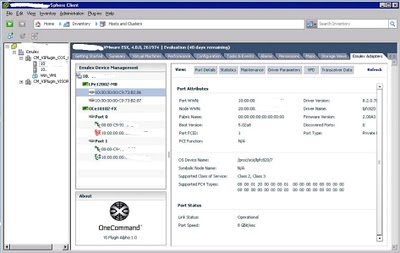
It’s a known fact that I’m a huge Underdog fan. However, what people don’t know is that Scooby-Doo is my second favorite cartoon dog. As a kid I always stayed current with the latest Underdog and Scooby-Doo after school episodes. This probably explains why my mother was always upset with me for not doing my homework first. I always got a kick out of the fact that no matter how many times Mystery Inc. would split up to find the ghost, it was always Scooby-Doo and Shaggy that managed (accidentally) to come face-to-face with the ghost while looking for food. Customers face the same issues that Scooby and Shaggy faced in ghost hunting. If a Customer was in VMware vCenter doing administrative tasks there was no way to effectively manage HBA settings (the ghost) without hunting around or opening a different management interface. Emulex has solved that issue with the new OneCommand Manager Plug-in for vCenter (OCM-VCp).

Being a former Systems Administrator in a previous life. I understand frustrations in opening multiple management interfaces to do a task(s). Emulex has already simplified infrastructure management with OneCommand. In OneCommand Customers already have the capability to manage HBAs across all protocols, generations, see/change CEE settings,  and do batch firmware/driver parameter updates (amongst a myriad of other capabilities).


 Not convinced? No problem. Let me introduce you to OCM-VCp interface. Take a look, you know have the opportunity to centrally discover, monitor and manage HBAs across the infrastructure from within vCenter, including vPort to to VM associations. How cool is that? Very.


 You get all the functions of the OneCommand HBA management application. No more looking for the elusive ghost that is called HBA settings. No more going back and forth between management interfaces. Which increases the probability of messing up the settings. However, out of all the cool capabilities here are the top 4 functions that I feel stand out for vCenter:

  • Diagnostic tools tab. This allows you to run PCI/Internal/External loopback and POST tests on a specific port on a specific VM.
  • Driver Parameters Tab. This tab is important to SAN/Network Administrators this is where you can update/change network parameters. The cool thing is that you can make changes temporary or save to a file for batch infrastructure updates/changes.
  • Maintenance Tab. Allows you to update firmware (single host or batch file) without rebooting the host.
  • CEE settings tab. Very important for Datacenter Bridging Capability Exchange Protocol (DCBX). 


In my opinion this couldn’t have come any sooner. As more organizations look to do more with less (virtualization principle) OCM-VCp will be the cornerstone of easing infrastructure management within VMware vCenter.  There is no learning curve because the plug-in has the same look and feel as the standalone management interface. In other words is very intuitive. So if you or your Customer(s) are expanding their adoption of virtualization take serious look at this plug-in, because it’s going to make your life so much easier.

http://www.niketown588.com/

GD Star Rating
loading...

My First Podcast: ‘Coffee With Thomas’

I had the pleasure of joining Thomas Jones on his new podcast ‘Coffee With Thomas’.’  His podcast is always good, well put together and about 30 minutes.  It’s done in a very refreshing conversation style as if your having a cup of coffee.  If your interested in listening to us talk technology, UCS, Apple, UFC, and other topics check it out: http://www.niketown588.com/2010/09/coffee-with-thomas-episode-5-wwts.html.


Thanks for the opportunity Thomas, that was a lot of fun!

GD Star Rating
loading...

The Brocade FCoE Proposition

I recently realized that I, like a lot of the data center industry, have completely forgotten about Brocade recently.  There has been little talked about on their FCoE front, Fibre Channel Front, or CNAs.  Cisco and HP have been dominating social media with blade and FCoE battles, but I haven’t seen much coming from Brocade.  I thought it was time to take a good look.

The Brocade Portfolio:

Brocade 1010 and 1020 CNAs The Brocade 1010 (single port) and Brocade 1020 (dual port) Converged Network Adapters (CNAs) integrate 10 Gbps Ethernet Network Interface Card (NIC) functionality with Fibre Channel technology—enabling transport over a 10 Gigabit Ethernet (GbE) connection through the new Data Center Bridging (DCB) and Fibre Channel over Ethernet (FCoE) protocols, providing best-in-class LAN connectivity and I/O consolidation to help reduce cost and complexity in next-generation data center environments.
Brocade 8000 Switch The Brocade 8000 is a top-of-rack link layer (Layer 2) CEE/FCoE switch with 24 10 Gigabit Ethernet (GbE) ports for LAN connections and eight Fibre Channel ports (with up to 8 Gbps speed) for Fibre Channel SAN connections. This reliable, high-performance switch provides advanced Fibre Channel services, supports Ethernet and CEE capabilities, and is managed by Brocade DCFM.
Brocade FCOE10-24 Blade The Brocade FCOE10-24 Blade is a Layer 2 blade with cut-though non-blocking architecture designed for use with Brocade DCX and DCX-4S Backbones. It features 24 10 Gbps CEE ports and extends CEE/FCoE capabilities to Brocade DCX Backbones, enabling end-of-row CEE/FCoE deployment. By providing first-hop connectivity for access layer servers, the Brocade FCOE10-24 also enables server I/O consolidation for servers with Tier 3 and some Tier 2 applications.

Source: http://www.brocade.com/products-solutions/products/index.page?dropType=Connectivity&name=FCOE

The breadth of Brocade’s FCoE portfolio is impressive when compared to the other major players: Emulex and Qlogic with CNAs, HP with FlexFabric for C-Class and H3C S5820X-28C Series ToR, and only Cisco providing a wider portfolio with an FCoE and virtualization aware I/O card (VIC/Palo), blade switches (Nexus 4000), ToR/MoR switches (Nexus 5000), and an FCoE Blade for the Nexus 7000.  This shows a strong commitment to the FCoE protocol on Brocade’s part, as does there participation on the standards body.

Brocade also provides a unique ability to standardize on one vendor from the server I/O card, through the FCoE network to the Fibre Channel (FC) core switching.  Additionally using the 10-24 blade customers can collapse the FCoE edge into their FC core providing a single hop collapsed core mixed FCoE/FC SAN.  That’s a solid proposition for a data center with a heavy investment in FC and a port count low enough to stay within a single chassis per fabric.

But What Does the Future Hold?

Before we take a look at where Brocade’s product line is headed, let’s look at the purpose of FCoE.  FCoE is designed as another tool in the data center arsenal for network consolidation.  We’re moving away from the cost, complexity and waste of separate networks and placing our storage and traditional LAN data on the same infrastructure.  This is similar to what we’ve done in the past in several areas, on mainframes we went from ESCON to FICON to leverage FC, our telephones went from separate infrastructures to IP based, we’re just repeating the same success story with storage.  The end goal is everything on Ethernet.  That end goal may be sooner for some than others, it all depends on comfort level, refresh cycle, and individual environment.

If FCoE is a tool for I/O consolidation and Ethernet is the end-goal of that, then where is Brocade heading?

This has been my question since I started researching and working with FCoE about three years ago.  As FCoE began hitting the mainstream media Cisco was out front pushing the benefits and announcing products, they were the first on the market with an FCoE switch, the Nexus 5000.  Meanwhile Brocade and others were releasing statements attempting to put the brakes on.  They were not saying FCoE was bad, just working to hold it off.

This makes a lot of sense from both perspectives, the core of Cisco’s business is routing and switching therefore FCoE is a great business proposition.  They’re also one of the only two options for FC switching in the enterprise (Brocade and Cisco) so they have the FC knowledge.  Lastly they had a series of products already in development. 

From Brocade’s and others perspectives they didn’t have products ready to ship, and they didn’t have the breath and depth in Ethernet so they needed time.  The marketing releases tended to become more and more positive towards FCoE as their products launched.

This also shows in Brocade’s product offering, two of the three products listed above are designed to maintain the tie to FC.

Brocade 8000:

This switch has 24x 10GE ports and 8x 8Gbps FC ports.  These ports are static onboard which means that this switch is not for you if:

  • You just need 10GE (iSCSI, NFS, RDMA, TCP, UDP, etc.)
  • You plan to fully migrate to FCoE (The FC ports then go unused.)
  • You only need FCoE, small deployment using FCoE based storage which is available today.

In comparison the competing product is the Nexus 5000 which has a modular design allowing customers to use all Ethernet/DCB or several combinations of Ethernet and FC at 1/2/4/8 Gbps.

Brocade FCoE 10/24 Blade:

This is an Ethernet blade for the DCX Fibre Channel director.  This ties Brocade’s FCoE director capabilities to an FC switch rather than Ethernet switch.  Additionally this switch only supports directly connected FCoE devices which will limit overall scalability.

In comparison the Cisco FCoE blade for the nexus 7000 is a DCB capable line card with FCoE capability by years end.  This merges FCoE onto the network backbone where it’s intended to go.

Summary:

If your purpose in assessing FCoE is to provide a consolidated edge topology for server connectivity tying it back to a traditional FC SAN then Brocade has a strong product suite for you.  If you’re end goal is consolidating the network as a whole then it’s important to seriously consider the purchase of FC based FCoE products.  That’s not to say don’t buy them, just understand what you’re getting, and why you’re getting it.  For instance if you need to tie to a Fibre Channel core now and don’t intend to replace that for 3-5 years then the Brocade 8000 may work for you because it can be refreshed at the same time.

Several options exist for FCoE today and most if not all of them have a good fit.  Assess first what your trying to accomplish and when, then look at the available products and decide what fits best.

GD Star Rating
loading...

Geekgasm

154252695-59c8c3b7fade904936b4a8f59b669b27_4c7e9ba8-scaled

So far this week at VMworld has been fantastic.  VMware definitely throws one of the best industry events for us geeks that really want to talk shop.  There’s definitely a fair share of marketing fluff, but if you want to talk bits and bytes the sessions and people are here for you.  I’ve had the pleasure to meet several people I respect in the industry and hang out with several others I know.  That’s really been the highlight of my time here, some of the offline conversations I’ve had make the trip worth it all one their own.

The best part of the conference for me so far has been the hanging out answering questions at the World Wide Technology booth.  Shameless plug or not it’s been an awesome experience.  We have three private cloud architectures on the solutions exchange floor up and running:

  • Secure multi-tenancy from NetApp Cisco and VMware
  • HP Matrix
  • vBlock from EMC Cisco and VMware

It’s phenomenal to have these three great solutions side by side and have the opportunity to talk to people about what each has to offer.  We’ve had a lot of great traffic and great questions at the booth and I’ve really enjoyed the chats I’ve had with everyone.  With all of that the part that has really made this a geekgasm for me is the experts that have stopped by to say hello and discuss the technology.  The picture below says it all, I had Brad Hedlund (@bradhedlund / www.bradhedlund.com) from Cisco and Ken Henault (@bladeguy http://www.hp.com/go/bladeblog)from HP having a conversation with me in front of the booth.

p21o

If you’re not familiar these guys are both top of their game within their respective companies and battle it out back and forth in the world of social media.  The conversation was great and it’s good to see a couple of competitors get together shake hands and have a good discussion in front of a technical showcase of some of their top gear.  If you’re at the show and haven’t stopped by to say hello and see the gear your missing out, get over to the booth, I’ll throw in a beer coozie!

GD Star Rating
loading...

The Difference Between ‘Foothold’ and ‘Lock-In’

There is always a lot of talk within IT marketing around vendor ‘lock-in’.  This is most commonly found within competitive marketing, i.e. ‘Product X from Company Y creates lock-in causing you to purchase all future equipment from them.  In some cases lock-in definitely exists, in other cases what you really have is better defined as ‘foothold.’  Foothold is an entirely different thing. 

Any given IT vendor wants to sell as much product as possible to their customers and gain new customers as quickly as possible, that’s business.  One way to do this is to use one product offering as a way in the door (foothold) and sell additional products later on.  Another way to do this is to sell a product that forces the sale of additional products.  There are other methods, including the ‘Build a better mousetrap method’, but these are the two methods I’ll discuss.

Foothold:

Foothold is like the beachhead at Normandy during WWII, it’s not necessarily easy to get but once held it gives a strategic position from which to gain more territory.

Great examples of foothold products exist throughout IT.  My favorite example is NetApp’s NFS/CIFS storage, which did the file based storage job so well they were able to convert their customer’s block storage to NetApp in many cases.  There are currently two major examples of the use of foothold in IT, HP and Cisco.

HP is using its leader position in servers to begin seriously pursuing the network equipment.  They’ve had ProCurve for some time but recently started pushing it hard, and acquired 3Com to significantly boost their networking capabilities (among other advantages.)  This is proper use of foothold and makes strategic sense, we’ll see how it pans out. 

Cisco is using its dominant position in networking to attack the market transition to denser virtualization and cloud computing with its own server line.  From a strategic perspective this could be looked at either offensively or defensively.  Either Cisco is on the offense attacking former strong vendor partner territory to grow revenue, or Cisco on the defense realized HP was leveraging its foothold in servers to take network market share.  In either event it makes a lot of strategic sense.  By placing servers in the data center they have foothold to sell more networking gear, and they also block HP’s traditional foothold.

From my perspective both are strong moves, to continue to grow revenue you eventually need to branch into adjacent markets.  You’ll here people cry and whine about stretching too thin, trying to do too much, etc, but it’s a reality.  As a publicly traded company stagnant revenue stream is nearly as bad as a negative revenue stream.

If you look closely at it both companies are executing in very complementary adjacent markets.  Networks move the data in and out of HP’s core server business, so why not own them?  Servers (and Flip cameras for that matter) create the data Cisco networks move, so why not own them?

Lock-In:

You’ll typically hear more about vendor lock-in then you will actually experience.  that’s not to say there isn’t plenty of it out there, but it usually gets more publicity than is warranted.

Lock-in is when a product you purchase and use forces you to buy another product/service from the same vendor, or replace the first.  To use my previous Cisco and HP example, both companies are using adjacent markets as foothold but neither lock you in.  For example both HP and Cisco servers can be connected to any vendors switching, their network systems interoperate as well.  Of course you may not get every feature when connecting to a 3rd party device but that’s part of foothold and the fact that they add proprietary value.

The best real example of lock-in is blades.  Don’t be fooled, every blade system on the market has inherent vendor lock-in.  Current blade architecture couldn’t provide the advantages it does without lock-in.  To give you an example let’s say you decide to migrate to blades and you purchase 7 IBM blades and a chassis, 4 Cisco blades and a chassis, or 8 HP blades and a chassis.  You now have a chassis half full of blades.  When you need to expand by one server, who you gonna call (Ghost Busters can’t help.)  Your obviously going to buy from the chassis vendor because blades themselves don’t interoperate and you’ve got empty chassis slots.  That is definite lock-in to the max capacity of that chassis.

When you scale past the first blade system you’ll probably purchase another from the same vendor, because you know and understand its unique architecture, that’s not lock-in, that’s foothold.

Summary:

Lock-in happens but foothold is more common.  When you here a vendor, partner, etc. say product X will lock you in to vendor Y make that person explain in detail what they mean.  Chances are you’re not getting locked-in to anything.  If you are getting locked-in, know the limits of that lock-in and make an intelligent decision on whether that lock-in is worth the advantages that made you consider the product in the first place, they very well might be.

GD Star Rating
loading...

Bacon And Eggs as a Service (BAEaaS) at VMworld

Yeah I know the ‘and’ between bacon and eggs should be lower case but that just looks silly, let’s move on ;-)

bacon_and_eggs

BAEaaS is a recovery tweetup following the previous nights festivities.  It was originally scheduled for Tuesday but due to popular demand has been moved to Wednesday (mainly because the amount of large parties going on Monday night may negate people’s desire to get out of bed any earlier than sessions require.)

Breakfast will go from 7:00am – 9:00am with the intent that people will filter in and out throughout the two hour period.  There are no reservations and Mel’s is a diner so it’s first come first serve, best bet is to come by 7 or at 8 (breakfast shift work.)

Come eat bacon #vmworld3word


Note: BAEaaS is a BYOB event (Buy Your Own Breakfast.)  That being said with plenty of partners and vendors around mention an interest and a budget and you may make it on somebody’s expenses.

Details:

twtvite: http://twtvite.com/BAEaaS

Wednesday 9/1 – 7:00am –9:00am Pacific

http://www.melsdrive-in.com/menu/breakfast.html

801 Mission St San Francisco CA 94103

 Overflow:

For any overflow there are two close by options where groups can go: Denny’s and Starbucks depending on your preferences.  See all locations on the map below:

Green Pin: Moscone Center

Red Pin: Mel’s Drive-In

Blue Pin: Denny’s

Orange Pin: Starbucks

image  http://bit.ly/8YWTvD

Special Thanks:

@juiceLSU009 the brains behind the idea

@tscalzott for naming the location which looks to be fantastic food

Extra Special Thanks:

@crystal_lowe Crystal provided me with wonderful suggestions and contacts for properly planning an event such as this.  Due to time constraints, budget, personal laziness, etc. I ignored all of her suggestions.  If any part of the BAEaaS is not up to snuff please ensure you retweet Crystal’s well deserved ‘I told you so.’

If you’re not familiar with Crystal and have a spouse that attends industry events with you, it’s time to familiarize yourself.  Here are links to what she’s got planned this year for the spouses.

Special note: you cannot exchange you actual VMworld pass for a Spousetivities pass although you’ll want to.

http://spousetivities.com/

http://blog.scottlowe.org/2010/08/22/vmworld-2010-spouse-activities-calendar/

http://spousetivities.eventbrite.com/

GD Star Rating
loading...