Data Center 101: Server Virtualization

Virtualization is a key piece of modern data center design.  Virtualization occurs on many devices within the data center, conceptually virtualization is the ability to create multiple logical devices from one physical device.  We’ve been virtualizing hardware for years:  VLANs and VRFs on the network, Volumes and LUNs on storage, and even our servers were virtualized as far back as the 1970s with LPARs. Server virtualization hit mainstream in the data center when VMware began effectively partitioning clock cycles on x86 hardware allowing virtualization to move from big iron to commodity servers. 

This post is the next segment of my Data Center 101 series and will focus on server virtualization, specifically virtualizing x86/x64 server architectures.  If you’re not familiar with the basics of server hardware take a look at ‘Data Center 101: Server Architecture’ (http://www.definethecloud.net/?p=376) before diving in here.

What is server virtualization:

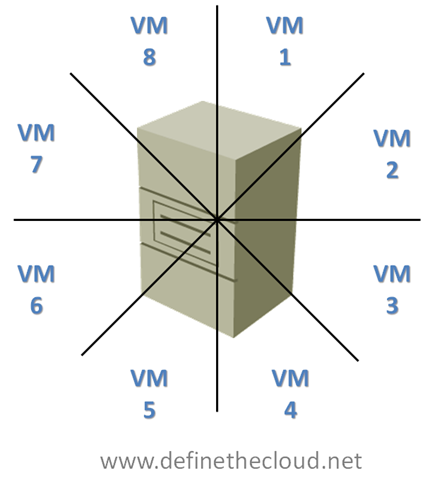
Server virtualization is the ability to take a single physical server system and carve it up like a pie (mmmm pie) into multiple virtual hardware subsets. 

imageEach Virtual Machine (VM) once created, or carved out, will operate in a similar fashion to an independent physical server.  Typically each VM is provided with a set of virtual hardware which an operating system and set of applications can be installed on as if it were a physical server.

Why virtualize servers:

Virtualization has several benefits when done correctly:

How does virtualization work?

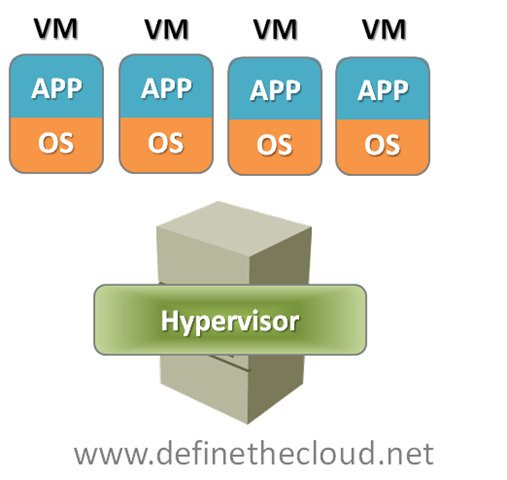
Typically within an enterprise data center servers are virtualized using a bare metal installed hypervisor.  This is a virtualization operating system that installs directly on the server without the need for a supporting operating system.  In this model the hypervisor is the operating system and the virtual machine is the application. 

image

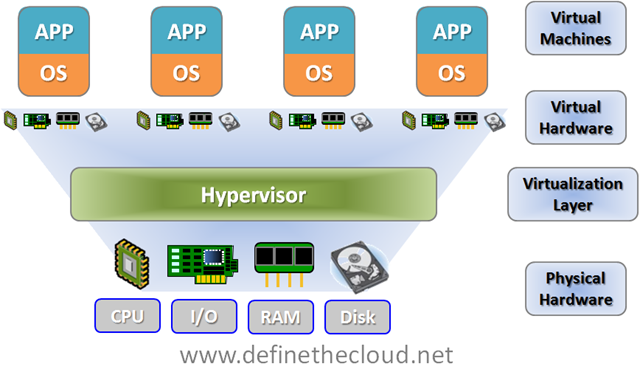
Each virtual machine is presented a set of virtual hardware upon which an operating system can be installed.  The fact that the hardware is virtual is transparent to the operating system.  The key components of a physical server that are virtualized are:

image

At a very basic level memory and disk capacity, I/O bandwidth, and CPU cycles are shared amongst each virtual machine.  This allows multiple virtual servers to utilize a single physical servers capacity while maintaining a traditional OS to application relationship.  The reason this does such a good job of increasing utilization is that your spreading several applications across one set of hardware.  Applications typically peak at different times allowing for a more constant state of utilization.

For example imagine an email server, typically an email server is going to peak at 9am, possibly again after lunch, and once more before quitting time.  The rest of the day it’s greatly underutilized (that’s why marketing email is typically sent late at night.)  Now picture a traditional backup server, these historically run at night when other servers are idle to prevent performance degradation.  In a physical model each of these servers would have been architected for peak capacity to support the max load, but most of the day they would be underutilized.  In a virtual model they can both be run on the same physical server and compliment one another due to varying peak times.

Another example of the uses of virtualization is hardware refresh.  DHCP servers are a great example, they provide an automatic IP addressing system by leasing IP addresses to requesting hosts, these leases are typically held for 30 days.  DHCP is not an intensive workload.  In a physical server environment it wouldn’t be uncommon to have two or more physical DHCP servers for redundancy.  Because of the light workload these servers would be using minimal hardware, for instance:

If this physical server were 3-5 years old replacement parts and service contracts would be hard to come by, additionally because of hardware advancements the server may be more expensive to keep then to replace.  When looking for a refresh for this server, the same hardware would not be available today, a typical minimal server today would be:

The application requirements haven’t changed but hardware has moved on.  Therefore refreshing the same DHCP server with new hardware results in even greater underutilization than before.  Virtualization solves this by placing the same DHCP server on a virtualized host and tuning the hardware to the application requirements while sharing the resources with other applications.

Summary:

Server virtualization has a great deal of benefits in the data center and as such companies are adopting more and more virtualization every day.  The overall reduction in overhead costs such as power, cooling, and space coupled with the increased hardware utilization make virtualization a no-brainer for most workloads.  Depending on the virtualization platform that’s chosen there are additional benefits of increased uptime, distributed resource utilization, increased manageability.

Data Center 101: Server Systems

As the industry moves deeper and deeper into virtualization, automation, and cloud architectures it forces us as engineers to break free of our traditional silos.  For years many of us were able to do quite well being experts in one discipline with little to no knowledge in another.  Cloud computing, virtualization and other current technological and business initiatives are forcing us to branch out beyond out traditional knowledge set and understand more of the data center architecture as a whole.

It was this concept that gave me the idea to start a new series on the blog covering the foundation topics of each of the key areas of data center.  This will be lessons designed from the ground up to give you a familiarity with a new subject or refresh on an old one.  Depending on your background, some, none, or all of these may be useful to you.  As we get further through the series I will be looking for experts to post on subjects I’m not as familiar with, WAN and Security are two that come to mind.  If you’re interested in writing a beginners lesson in one of those topics, or any other please comment or contact me directly.

Server Systems:

As I’ve said before in previous posts the application is truly the heart of the data center.  Applications themselves are the reason we build servers, networks, and storage systems.  Applications are the email systems, databases, web content, etc that run our businesses.  Applications run within the confines of an operating system which interfaces directly with server hardware and firmware (discussed later) and provides a platform to run the application.  Operating systems come in many types, commonly Unix, Linux, and Windows with other variants used for specialized purposes such as mainframe and super computers.

Because the server itself sits more closely than any other hardware to the application understanding the server hardware and functionality is key.  Server hardware breaks down into several major components and concepts.  For this discussion we will stick with the more common AMD/Intel architectures known as the x86 architecture.

Server

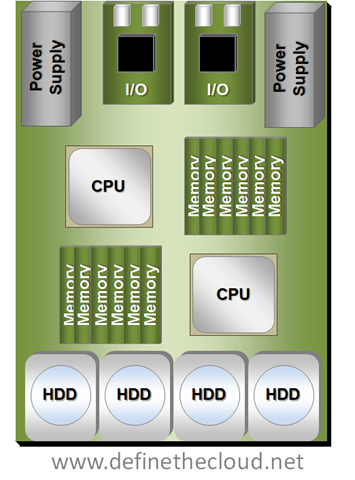
image

The diagram above shows a two socket server.  Starting at the bottom you can see the disks, in this case internal Hard Disk Drives (HDD.)  Moving up you can see two sets of memory and CPU followed by the I/O cards and power supplies.  The power supplies convert A/C current to appropriate D/C current levels for use in the system.  Additionally not shown would be fans to move air through the system for cooling.

The bus systems, which are not shown, would be a series of traces and chips on the system board allowing separate components to communicate.

A Quick Note About Processors:

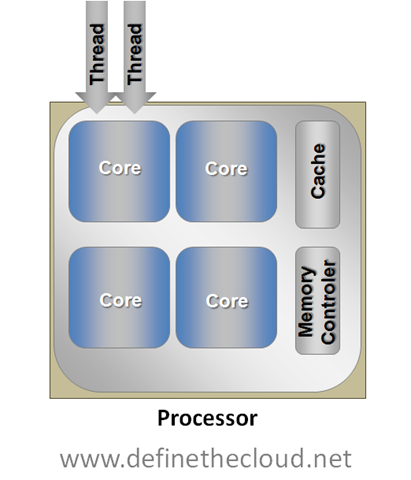
Processors come in many shapes, sizes, and were traditionally rated by speed measures in hertz.  Over the last few years a new concept has been added to processors, and that is ‘cores.’  Simply put a core is a CPU placed on a chip beside other cores which each share certain components such as cache and memory controller (both outside the scope of this discussion.)  If a processor has 2 cores it will operate as if it was 2 physically independent identical processors and provide the advantages of such.

Another technology has been around for quite some time called hyper threading.  A processor can traditionally only process one calculation per cycle (measured in hertz) this is known as a thread.  Many of these processes only use a small portion of the processor itself leaving other portions idle.  Hyper threading allows a processor to schedule 2 processes in the same cycle as long as they don’t require overlapping portions of the processor.  For applications that are able to utilize multiple threads hyper threading will provide an average of approximately 30% increases whereas a second core would double performance.

Hyper threading and multiple cores can be used together as they are not mutually exclusive.  For instance in the diagram above if both installed processors were 4 core processors, that would provide 8 total cores, with hyper threading enabled it would provide a total of 16 logical cores.

Not all applications and operating systems can take advantage of multiple processors and cores, therefore it is not always advantageous to have more cores or processors.  Proper application sizing and tuning is required to properly match the number of cores to the task at hand.

image

Server Startup:

When a server is first powered on the BIOS is loaded from EEPROM (Electronically Erasable Programmable Read-Only Memory) located on the system board.  While the BIOS is in control it performs a series of Power On Self Tests (POST) ensuring the basic operability of the main system components.  From there it detects and initializes key components such as keyboard, video, mouse, etc.  Last the BIOS searches for a bootable device.  The BIOS searches through available bootable media for a device containing a bootable and valid Master Boot Record (MBR.)  It then loads this and allows that code to take over with the load of the operating system.

The order and devices the BIOS searches is configurable in the BIOS settings.  Typical boot devices are:

Boot order is very important when there is more than one available boot device, for instance when booting to a CD-ROM to perform recovery of an operating system that is installed.  It is also important to note that both iSCSI and Fibre Channel network connected disks are handled by the operating system as if they were internal Small Computer System Interface (SCSI) disks.  This becomes very important when configuring non-local boot devices.  SCSI as a whole will be covered during this series.

Operating System:

Once the BIOS is done getting things ready and has transferred control to the bootable data in the MBR that bootable data takes over.  That is called the operating system (OS.)  The OS is the interface between the user/administrator and the server hardware.  The OS provides a common platform for various applications to run on and handles the interface between those applications and the hardware.  In order to properly interface with hardware components the OS requires drivers for that hardware.  Essentially the drivers are an OS level set of software that allow any application running in the OS to properly interface with the firmware running on the hardware.

Applications:

Applications come in many different forms to provide a wide variety of services.  Applications are the core of the data center and are typically the most difficult piece to understand.  Each application whether commercially available or custom built has unique requirements.  Different applications have different considerations for processor, memory, disk, and I/O.  These considerations become very important when looking at new architectures because any change in the data center can have significant effect on application performance.

Summary:

The server architecture goes from the I/O inputs through the server hardware to the application stack.  Proper understanding of this architecture is vital to application performance and applications are the purpose of the data center.  Servers consist of a set of major components, CPU's to process data, RAM to store data for fast access, I/O devices to get data in and out, and disk to store data in a permanent fashion.  This system is put together for the purpose of serving an application.

This post is the first in a series intended to build the foundation of data center.  If your starting from scratch they may all be useful, if your familiar in one or two aspects then pick and choose.  If this series becomes popular I may do a 202 series as a follow on.  If I missed something here, or made a mistake please comment.  Also if you’re a subject matter expert in a data center area that would like to contribute a foundation blog in this series please comment or contact me.

UCS Server Failover

I spent the day today with a customer doing a proof of concept and failover testing demo on a Cisco UCS, VMware and NetApp environment.  As I sit on the train heading back to Washington from NYC I thought it might be a good time to put together a technical post on the failover behavior of UCS blades.  UCS has some advanced availability features that should be highlighted, it additionally has some areas where failover behavior may not be obvious.  In this post I’m going to cover server failover situations within the UCS system, without heading very deep into the connections upstream to the network aggregation layer (mainly because I’m hoping Brad Hedlund at http://bradhedlund.com will cover that soon, hurry up Brad 😉

**Update** Brad has posted his UCS Networking Best Practices Post I was hinting at above.  It's a fantastic video blog in HD, check it out here: http://bradhedlund.com/2010/06/22/cisco-ucs-networking-best-practices/

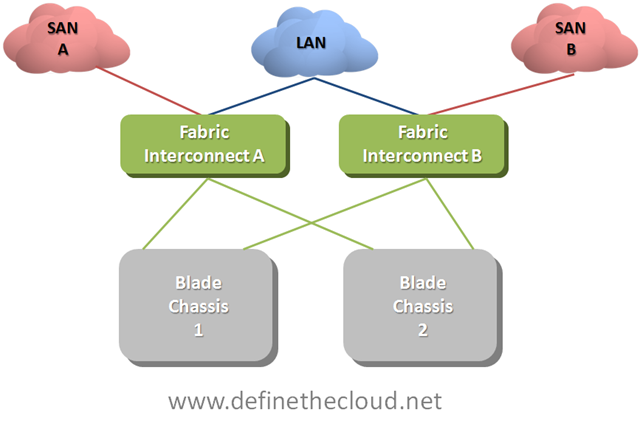
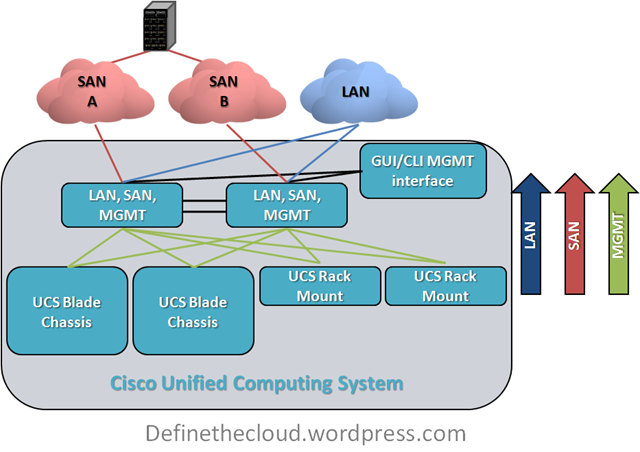
To start this off let’s get up to a baseline level of understanding on how UCS moves server traffic.  UCS is comprised of a number of blade chassis and a pair of Fabric Interconnects (FI.)  The blade chassis hold the blade servers and the FIs handle all of the LAN and SAN switching as well as chassis/blade management that is typically done using six separate modules in each blade chassis in other implementations.

Note: When running redundant Fabric interconnects you must configure them as a cluster using L1 and L2 cluster links between each FI.  These ports carry only cluster heartbeat and high-level system messages no data traffic or Ethernet protocols and therefore I have not included them in the following diagrams.

UCS Network Connectivity

image

Each individual blade gets connectivity to the network(s) via mezzanine form factor I/O card(s.)  Depending on which blade type you select  each blade will either have one redundant set of connections to the FIs or two redundant sets.  Regardless of the type of I/O card you select you will always have 1x10GE connection to each FI through the blade chassis I/O module (IOM.)

UCS Blade Connectivity

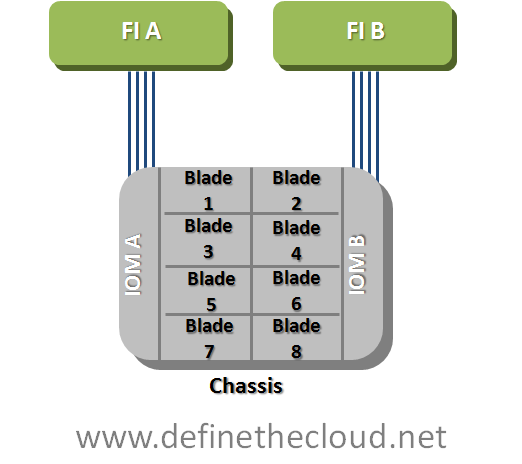
image In the diagram your seeing the blade connectivity for a blade with a single mezzanine slot.  You can see that the blade is redundantly connected to both Fabric A and Fabric B via 2x10GE links.  This connection occurs via the IOM which is not a switch itself and instead acts as a remote device managed by the fabric interconnect. What this means is that all forwarding decisions are handled by the FIs and frames are consistently scheduled within the system regardless of source and or destination.  The total switching latency of the UCS system is approximately equal to a top-of-rack switch or blade form factor LAN switch within other blade products.  Because the IOM is not making switching decisions it will need another method to move 8 internal mid-plane ports traffic upstream using it’s 4 available uplinks.  the method it uses is static pinning.  This method provides a very elegant switching behavior with extremely predictable failover scenarios. Let’s first look at the pinning later what this means for the UCS network failures.

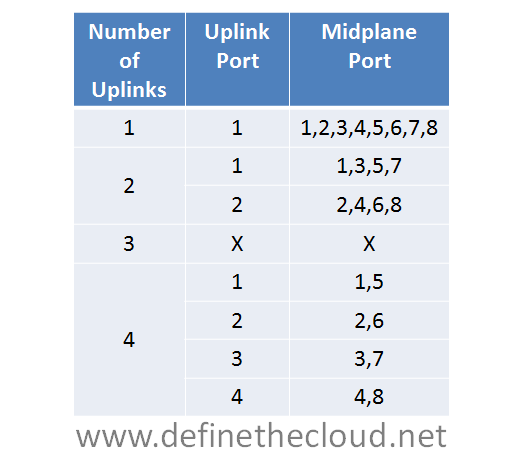
Static Pinningimage

The chart above shows the static pinning mechanism used within UCS.  Given the configured number of uplinks from IOM to FI you will know exactly which uplink port a particular mid-plane port is using.  Each half-width blade attaches to a single mid-plane port and each full width blade attaches to two.  In the diagram the use of three ports does not have a pinning mechanism because this is not supported.  If three links are used the 2 port method will define how uplinks are utilized.  This is because eight devices cannot be evenly load-balanced across three links.

IOM Connectivity

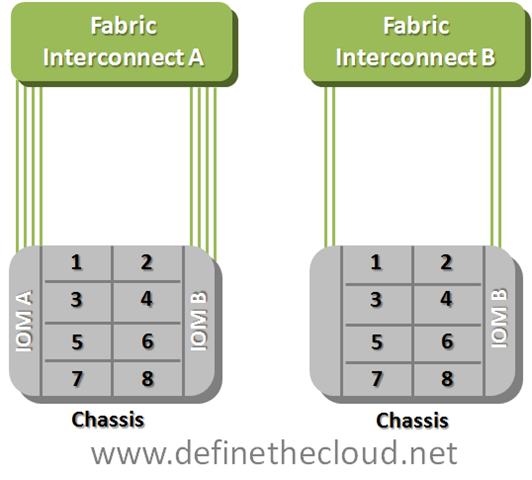
image

The example above shows the numbering of mid-plane ports.  If you were using half width blades their numbering would match.  When using full-width blades each blade has access to a pair of mid-plane ports (1-2, 3-4, 5-6, 7-8.)In the example above blade three would utilize mid-plane port three in the left example and one in the second based on the static pinning in the chart.

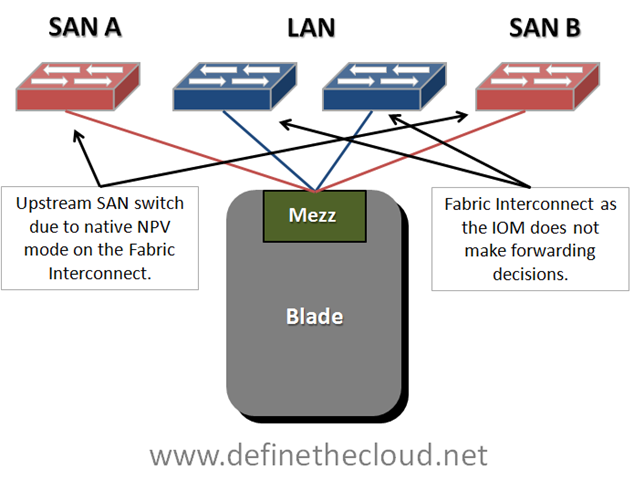
So now let’s discuss how failover happens, starting at the operating system.  We have two pieces of failover to discuss, NIC teaming, and SAN multi-pathing.  In order to understand that we need a simple logical connectivity view of how a UCS blade see’s the world.

UCS Logical Connectivity

image

In order to simplify your thinking when working with blade systems reduce your logical diagram to the key components, do this by removing the blade chassis itself from the picture.  Remember that a blade is nothing more than a server connected to a set of switches, the only difference is that the first hop link is on the mid-plane of the chassis rather than a cable.  The diagram above shows that a UCS blade is logically cabled directly to redundant Storage Area Network (SAN) switches for Fibre Channel (FC) and to the FI for Ethernet.  Out of personal preference I leave the FIs out of the SAN side of the diagram because they operate in N_Port Virtualizer (NPV) mode which means forwarding decisions are handled by the upstream NPiV standard compliant SAN switch.

Starting at the Operating System (OS) we will work up the network stack to the FIs to discuss failover.  We will be assuming FCoE is being used, if you are not using FCoE ignore the FC piece of the discussion as the Ethernet will remain the same.

SAN Multi-Pathing:

SAN multi-pathing is the way we obtain redundancy in FC, FCoE, and iSCSI networks.  It is used to provide the OS with two separate paths to the same logical disk.  This allows the server to access the data in the event of a failure and in some cases load-balance traffic across two paths to the same disk.  Multi-pathing comes in two general flavors: active/active, or active passive.  Active/active load balances and has the potential to use the full bandwidth of all available paths.  Active/Passive uses one link as a primary and reserves the others for failover.  Typically the deciding factor is cost vs. performance.

Multi-pathing is handled by software residing in the OS usually provided by the storage vendor.  The software will monitor the entire path to the disk ensuring data can be written and/or read from the disk via that path.  Any failure in the path will cause a multi-pathing failover.

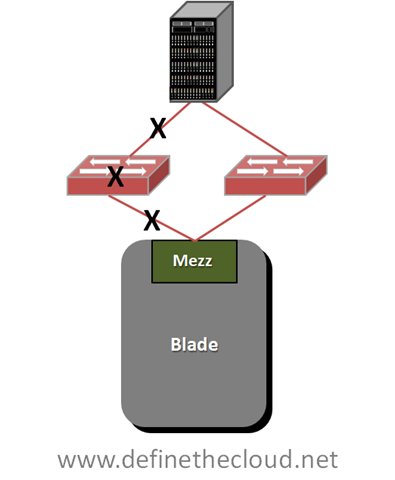
Multi-Pathing Failure Detection

image

Any of the failures designated by the X’s in the diagram above will trigger failover, this also includes failure of the storage controller itself which are typically redundant in an enterprise class array.  SAN multi-pathing is an end-to-end failure detection system.  This is much easier to implement in SAN as there is one constant target as opposed to a LAN where data may be sent to several different targets across the LAN and WAN.  Within UCS SAN multi-pathing does not change from the system used for standalone servers.  Each blade is redundantly connected and any path failure will trigger a failover.

NIC-Teaming:

NIC teaming is handled in one of three general ways: active/active load-balancing, active/passive failover, or active/active transmit with active/passive receive.  The teaming type you use is dependant on the network configuration.

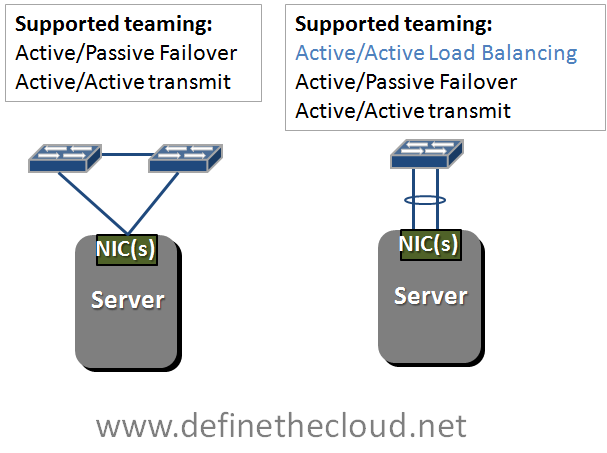
Supported teaming Configurations

image 

In the diagram above we see two network configurations, one with a server dual connected to two switches, and a second with a server dual connected to a single switch using a bonded link.  Bonded links act as a single logical link with the redundancy of the physical links within.  Active/Active load-balancing is only supported using a bonded link due to MAC address forwarding decisions of the upstream switch.  In order to load balance an active/active team will share a logical MAC address, this will cause instability upstream and lost packets if the upstream switches don’t see both links as a single logical link.  This bonding is typically done using the Link Aggregation Control Protocol (LACP) standard.

If you glance back up at the UCS logical connectivity diagram you’ll see that UCS blades are connected in the method on the left of the teaming diagram.  This means that our options for NIC teaming are Active/Passive failover and Active Active transmit only.  This is assuming a bare metal OS such as Windows or Linux installed directly on the hardware, when using virtualized environments such as VMware all links can be actively used for transmit and receive because there is another layer of switching occurring in the hypervisor. 

I typically get feedback that the lack of active/active NIC teaming on UCS bare metal blades is a limitation.  In reality this is not the case.  Remember Active/Active NIC teaming was traditionally used on 1GE networks to provide greater than 1GE of bandwidth.  This was limited to a max of 8 aggregated links for a total of 8GE of bandwidth.  A single UCS link at 10GE provides 20% more bandwidth than an 8 port active/active team.

NIC teaming like SAN multi-pathing relies on software in the OS, but unlike SAN multi-pathing it typically only detects link failures and in some cases loss of a gateway.  Due to the nature of the UCS system NIC teaming in UCS will detect failures of the mid-plane path, the IOM, the utilized link from the IOM to the Fabric Interconnect or the FI itself.  This is because the IOM is a linecard of the FI and the blade is logically connected directly to the FI.

UCS Hardware Failover:

UCS has a unique feature on several of the available mezzanine cards to provide hardware failure detection and failover on the card itself.  Basically some of the mezzanine cards have a mini-switch built in with the ability to fail path A to path B or vice versa.  This provides additional failure functionality and improved bandwidth/failure management.  This feature is available on Generation I Converged network Adapters (CNA) and the Virtual Interface Card (VIC) and is currently only available in UCS blades.

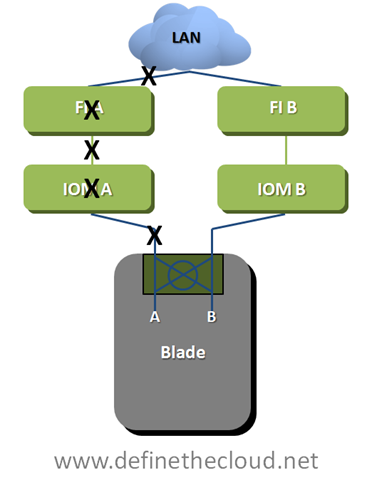
UCS Hardware Failover

image

UCS Hardware failover will provide greater failure visibility than traditional NIC teaming due to advanced intelligence built into the FI as well as the overall architecture of the system.  In the diagram above HW failover detects: mid-plane path, IOM and IOM uplink failures as link failures due to the architecture.  Additionally if the FI loses it’s upstream network connectivity to the LAN it will signal a failure to the mezzanine card triggering failure.  In the diagram above any failure at a point designated by an X will trigger the mezzanine card to divert Ethernet traffic to the B path.  UCS hardware failover applies only to Ethernet traffic as SAN networks are built as redundant independent networks and would not support this failover method.

Using UCS hardware failover provides two key advantages over other architectures:

The next piece of UCS server failover involves the I/O modules themselves.  Each I/O module has a maximum of four 10GE uplinks providing 8x10GE mid-plane connections to the blades at an oversubscription of 1:1 to 8:1 depending on configuration.  As stated above UCS uses a static non-configurable pinning mechanism to assign a mid-plane port to a specific uplink from the IOM to the FI.  Using this pinning system allows the IOM to operate as an extension of the FI without the need for Spanning Tree Protocol (STP) within the UCS system.  Additionally this system provides a very clear network design for designing oversubscription in both nominal and failure situations.

For the discussion of IOM failover we will use an example of a max configuration of 8 half-width blades and 4 uplinks on each redundant IOM.

Fully Configured 8 Blade UCS Chassis

image In this diagram each blade is currently redundantly connected via 2x10GE links.  One link through each IOM to each FI.  Both IOMs and FIs operate in an active/active fashion from a switching perspective so each blade in this scenario has a potential bandwidth of 20GE depending on the operating system configuration.  The overall blade chassis is configured with 2:1 oversubscription in this diagram as each IOM is using its max of 4x10GE uplinks while providing its max of 8x10GE mid-plane links for the 8 blades.  If each blade were to attempt to push a sustained 20GE of throughput at the same time (very unlikely scenario) it would receive only 10GE because of this oversubscription.  The bandwidth can be finely tuned to ensure proper performance in congestion scenarios such as this one using Quality of Service (QoS) and Enhanced Transmission Selection (ETS) within the UCS system.

In the event that a link fails between the IOM and the FI the servers pinned to that link will no longer have a path to that FI.  The blade will still have a path to the redundant FI and will rely on SAN multi-pathing, NIC teaming and or UCS hardware failover to detect the failure and divert traffic to the active link.

For example if link one on IOM A fails blades one and five would lose connectivity through Fabric A and any traffic using that path would fail to link one on Fabric B ensuring the blade was still able to send and receive data.  When link one on IOM A was repaired or replaced data traffic would immediately be able to start using the A path again.

IOM A will not automatically divert traffic from Blade one and five to an operational link, nor is this possible through a manual process.  The reason for this is that diverting blade one and fives traffic to available links would further oversubscribe those links and degrade servers that should be unaffected by the failure of link one.  In a real world data center a failed link will be quickly replaced and the only servers that will have been affected are blade one and five. 

In the event that the link cannot be repaired quickly there is a manual process called re-acknowledgement which an administrator can perform.  This process will adjust the pinning of IOM to FI links based on the number of active links using the same static pinning referenced above.  In the above example servers would be re-pinned based on two active ports because three port configurations are not supported. 

Overall this failure method and static pinning mechanism provides very predictable bandwidth management as well as limiting the scope of impact for link failures.

Summary:

The UCS system architecture is uniquely designed to minimize management points and maximize link utilization by removing dependence on STP internally.  Because of its unique design network failure scenarios must be clearly understood in order to maximize the benefits provided by UCS.  The advanced failure management tools within UCS will provide for increased application uptime and application throughput in failure scenarios if properly designed.

Why Cisco UCS is my 'A-Game' Server Architecture

A-Game:

When I discuss my A-Game it’s my go to hardware vendor for a specific data center component.  For example I have an A-Game platform for:

As this post is in regards to my server A-Game I’ll leave the rest undefined for now and may blog about them later.

Over the last 4 years I’ve worked in some capacity or another as an independent customer advisor or consultant with several vendor options to choose from.  This has been either with a VAR or strategic consulting firm such as www.fireflycom.net.)  In both cases there is typically a company lean one way or another but my role has given me the flexibility to choose the right fit for the customer not my company or the vendors which is what I personally strive to do.  I’m not willing to stake my own integrity on what a given company wants to push today.  I’ve written about my thoughts on objectivity in a previous blog (http://www.definethecloud.net/?p=112.)

Another rule in regards to my A-Game is that it’s not a rule, it’s a launching point.  I start with a specific hardware set in mind in order to visualize the customer need and analyze the best way to meet that need.  If I hit a point of contention that negates the use of my A-Game I’ll fluidly adapt my thinking and proposed architecture to one that better fits the customer.  These points of contention may be either technical, political, or business related:

If I hit one of these roadblocks I’ll shift my vendor strategy for the particular engagement without a second thought.  The exception to this is if one of these roadblocks isn’t actually a roadblock and my A-Game definitely provides the best fit for the customer I’ll work with the customer to analyze actual requirements and attempt to find ways around the roadblock.

Basically my A-Game is a product or product line that I’ve personally tested, worked with and trust above the others that is my starting point for any consultative engagement.

A quick read through my blog page or a jump through my links will show that I work closely with Cisco products and it would be easy to assume that I am therefore inherently skewed towards Cisco.  In reality the opposite is true, over the last few years I’ve had the privilege to select my job(s) and role(s) based on the products I want to work with.

My sorted UCS history:

As anyone who’s worked with me can attest to I’m not one to pull punches, feign friendliness, or accept what you try and sell me based on a flashy slide deck or eloquent rhetoric.  If you’re presenting to me don’t expect me to swallow anything without proof, don’t expect easy questions, and don’t show up if you can’t put the hardware in my hands to cash the checks your slides write.  When I’m presenting to you, I expect and encourage the same.

Prior to my exposure to UCS I worked with both IBM and HP servers and blades.  I am an IBM Certified Blade Expert (although dated at this point.)  IBM was in fact my A-Game server and blade vendor.  This had a lot to do with the technology of the IBM systems as well as the overall product portfolio IBM brought with it.  That being said I’d also be willing to concede that HP blades have moved above IBM’s in technology and innovation, although IBM’s MAX5 is one way IBM is looking to change that.

When I first heard about Cisco’s launch into the server market I thought, and hoped, it was a joke.  I expected some Frankenstein of a product where I’d place server blades in Nexus or Catalyst chassis.  At the time I was working heavily with the Cisco Nexus product line primarily 5000, 2000, and 1000v.  I was very impressed with these products, the innovation involved, and the overall benefit they’d bring to the customer.  All the love in the world for the Nexus line couldn’t overcome my feeling that there was no way Cisco could successfully move into servers.

Early in 2009 my resume was submitted among several others by my company to Learning at Cisco and the business unit in charge of UCS.  This was part of an application process for learning partners in order to be invited to the initial external Train The Trainer (TTT) and participate in training UCS to: Cisco, partners, and customers worldwide.  Myself and two other engineer/trainers (Dave Alexander and Fabricio Grimaldi) were selected from my company to attend.  The first interesting thing about the process was that the three of us were selected above CCIEs, 2x CCIEs and more experienced instructors from our company based on our server backgrounds.  It seemed Cisco really was looking to push servers not some network adaptation.

During the TTT I remained very skeptical.  The product looked interesting but not ‘game-changing.’  The user interfaces were lacking and definitely showed their Alpha and Beta colors.  Hardware didn’t always behave as expected and the real business/technological benefits of the product didn’t shine through.  That being said remember that at this point the product was months away from launch and this was a very Beta version of hardware/software we were working with.  Regardless of the underlying reasons I walked away from the TTT feeling fully underwhelmed.

I spent the time on my flight back to the East Coast from San Jose looking through my notes and thinking about the system and components.  It definitely had some interesting concepts but I didn’t feel it was a platform I would stake my name to at this point.

Over the next couple of months Fabricio Grimaldi and I assisted Dave Alexander (http://theunifiedcomputingblog.com) in developing the UCS Implementation certification course.  Through this process I spent a lot of time digging into the underlying architecture, relating it back to my server admin days and white boarding the concepts and connections in my home office.  Additionally I got more and more time on the equipment to ‘kick-the-tires.’  During this process Dave myself and Fabrico began instructing an internal Cisco course known as UCS Bootcamp.  The course was designed for Cisco engineers from both pre-sales and post-sales roles and focused specifically on the technology as a product deep dive.

It was over these months having discussions on the product, wrapping my head around the technology, and developing training around the components that the lock cylinders in my brain started to click into place and finally the key turned: UCS changes the game for server architecture, the skeptic had become a convert.

UCS the game changer:

The term game changer ge
ts thrown around all willy nilly like in this industry.  Every minor advancement is touted by its owner as a ‘Game Changer.’  In reality ‘Game Changers’ are few and far between.  In order to qualify you must actually shift the status quo, not just improve upon it.  To use vacuums as an example, if your vacuum sucks harder it just sucks harder, it doesn’t change the game.  A Dyson vacuum may vacuum better than anyone else’s but Roomba (http://www.irobot.com/uk/home_robots.cfm) is the one that changed the game.  With Dyson I still have to push the damn thing around the living room, with Roomba I watch it go.

In order to understand why UCS changes the game rather than improving upon it, you first need to define UCS:

UCS is NOT a blade system it is a server architecture

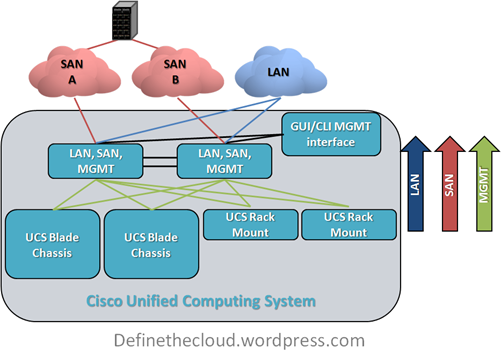
Cisco’s unified Computing System (UCS) is not all about blades, it is about rack mount servers, blade servers, and management being used as a flexible pool of computing resources.  Because of this it has been likened to an x86-64 based mainframe system.

UCS takes a different approach to the original blade system designs.  It’s not a solution for data center point problems (power, cooling, management, space, cabling) in isolation it’s a redefinition of the way we do computing.

‘Instead of asking how can I improve upon current architectures’

Cisco/Nuova asked

‘What’s the purpose of the server and what’s the best way to accomplish that goal.’

Many of the ideas UCS utilizes have been tried and implemented in other products before: Unified I/O, single point of management, modular scalability, etc., but never all in one cohesive design.

There are two major features of UCS that I call ‘the cake’ and three more that are really icing.  The two cake features are the reason UCS is my A-Game and the others just further separate it.

Unified Management:

Blade architectures are traditionally built with space savings as a primary concern.  In order to do this a blade chassis is built with a shared LAN, SAN, power, cooling infrastructure and an onboard management system to control server hardware access, fan speeds, power levels, etc.  M. Sean McGee describes this much better than I could hope to in his article The “Mini-Rack” approach to Blade Design (http://bit.ly/bYJVJM.)  This traditional design saves space and can also save on overall power, cooling, and cabling but causes pain points in management among other considerations.

UCS was built from the ground up with a different approach, and Cisco has the advantage of zero legacy server investment which allows them to execute on this.  The UCS approach is:

The key difference here is that all management of the LAN, SAN, server hardware, and chassis itself is pulled into the access layer and performed on the UCS Fabric Interconnect which provides all of the switching and management functionality for the system.  The system itself was built from the ground up with this in mind, and as such this is designed into each hardware component.  Other systems that provide a single point of management do so by layering on additional hardware and software components in order to manage underlying component managers.  Additionally these other systems only manage blade enclosures while UCS is designed to manage both blades and traditional rack mounts from one point.  This functionality will be available in firmware by the end of CY10.

To put this in perspective Cisco UCS provides a very similar rapid repeatable physical server deployment model to the virtual server deployment model VMware provides.  Through the use of granular Role Based Access Control (RBAC) UCS ensures that organizational changes are not required, while at the same time providing the flexibility to streamline people and process if desired.

Workload Portability:

Workload portability has significant benefits within the data center, the concept itself is usually described as ‘statelessness.’  If you’re familiar with VMware this is the same flexibility VMware provides for virtual machines, i.e. there is no tie to the underlying hardware. One of the key benefits of UCS is the ability to apply this type of statelessness at the hardware level.  This removes the tie of the server or workload to the blade or slot it resides in, and provides major flexibility to maintenance and repair cycles, as well as deployment times for new or expanding applications.

Within UCS all management is performed on the Fabric Interconnect through the UCS Manager GUI or CLI.  This includes any network configuration for blades, chassis, or rack-mounts, all server configuration including firmware BIOS, NIC/HBA and boot order among other things.  The actual blade is configured through an object called a ‘service profile'.’  This profile defines the server on the network as well as the way in which the server hardware operates (BIOS/Firmware, etc.)

All of the settings contained within a server profile are traditionally configured, managed and stored in hardware on a server.  Because these are now defined in a configuration file the underlying hardware tie is stripped away and a server workload can be quickly moved from one physical blade to another without requiring changes in the networks, or storage arrays.  This decreases maintenance windows and speeds roll-out.

Within UCS, Service Profiles can be created using templates or pools which is unique to UCS.  This further increases the benefits of service profiles and decreases the risk inherent with multiple configuration points, and case-by-case deployment models.

UCS Profiles and Templates

image

These two features and their real world applications and value are what place UCS in my A-Game slot.  These features will provide benefits to ANY server deployment model, and are unique to UCS.  While subcomponents exist within other vendors they are not:

Icing on the cake:

Each of these feature also offer real world benefits but the real heart of UCS is the Unified management and server statelessness.  You can find more information on these other features through var
ious blogs and Cisco documentation.

When is it time for my B-Game?:

By now you should have an understanding as to why I chose UCS as my A-Game (not to say you necessarily agree, but that you understand my approach.)  So what are the factors that move me towards my B-Game?  I will list three considerations and the qualifying question that would finalize a decision to position a B-Game system:

Infiniband If the customer is using Infiniband for networking UCS does not currently support it.  I would first assess whether there was an actual requirement for Infiniband or if it was just the best option at the time of last refresh.  If Infiniband is required I would move to another solution.
Non-Intel Processors Requirement for non-Intel processors would steer me towards another vendor as UCS does not currently support non-Intel.  As above I would first verify whether non-Intel was a requirement or a choice.
Requirement for chassis based storage If a customer had a requirement for chassis based storage there is no current Cisco offering for this within UCS.  This is however very much a corner case and only a configuration I would typically recommend for single chassis deployments with little need to scale.  In-chassis storage becomes a bottle neck rather than a benefit in multi-chassis configurations.

While there are other reasons I may have to look at another product for a given engagement they are typically few and far between.  UCS has the right combination of entry point and scalability to hit a great majority of server deployments.  Additionally as a newer architecture there is no concern with the architectural refresh cycle of other vendors.  As other blade solutions continue to age there will be an increased risk to the customer in regards to forward compatibility.

Summary:

UCS is not the only server or blade system on the market, but it is the only complete server architecture.  Call it consolidated, unified, virtualized, whatever but there isn’t another platform to combine rack-mounts and blades under a single architecture with a single management window and tools for rapid deployment.  The current offering is appropriate for a great majority of deployments and will continue to get better.

If your considering a server refresh or new deployment it would be a mistake not to take a good look at the UCS architecture.  Even if it’s not what you choose it may give you some ideas as to how you want to move forward, or features to ask your chosen vendor for.

Even if you never buy a UCS server you can still thank Cisco for launching UCS.  The lower pricing you’re getting today, and the features being put in place on other vendors product lines are being driven by a new server player in the market, and the innovation they launched with.

Comments, concerns, complaints always appreciated!
The Cloud Storage Argument

The argument over the right type of storage for data center applications is an ongoing battle.  This argument gets amplified when discussing cloud architectures both private and public.  Part of the reason for this disparity in thinking is that there is no ‘one size fits all solution.’  The other part of the problem is that there may not be a current right solution at all.

When we discuss modern enterprise data center storage options there are typically five major choices:

In a Windows server environment these will typically be coupled with Common internet File Service (CIFS) for file sharing.  Behind these protocols there are a series of storage arrays and disk types that be used to meet the applications I/O requirements.

As people move from traditional server architectures to virtualized servers, and from static physical silos to cloud based architectures they will typically move away from DAS into one of the other protocols listed above to gain the advantages, features and savings associated with shared storage.  For the purpose of this discussion we will focus on these four: FC, FCoE, iSCSI, NFS.

The issue then becomes which storage protocol to use for transport of your data from the server to the disk?  I’ve discussed the protocol differences in a previous post (http://www.definethecloud.net/?p=43) so I won’t go into the details here.  Depending on who you’re talking to it’s not uncommon to find extremely passionate opinions.  There a quite a few consultants and engineers that are hard coded to one protocol or another.  That being said most end-users just want something that works, performs adequately and isn’t a headache to manage.

Most environments currently work on a combination of these protocols, plenty of FC data centers rely on DAS to boot the operating system and NFS/CIFS for file sharing.  The same can be said for iSCSI.  With current options a combination of these protocols is probably always going to be best, iSCSI, FCoE, and NFS/CIFS can be used side by side to provide the right performance at the right price on an application by application basis.

The one definite fact in all of the opinions is that running separate parallel networks as we do today  with FC and Ethernet is not the way to move forward, it adds cost, complexity, management, power, cooling and infrastructure that isn’t needed.  Combining protocols down to one wire is key to the flexibility and cost savings promised by end-to-end virtualization and cloud architectures.  If that’s the case which wire do we choose, and which protocol rides directly on top to transport the rest?

10 Gigabit Ethernet is currently the industries push for a single wire and with good reason:

For the sake of argument let’s assume we all agree on 10GE as the right wire/protocol to carry all of our traffic, what do we layer on top?  FCoE, iSCSI, NFS, something else?  Well that is a tough question.  the first part of the answer is you don’t have to decide, this is very important because none of these protocols is mutually exclusive.  The second part of the answer is, maybe none of these is the end-all-be-all long-term solution.  Each current protocol has benefits and draw backs so let’s take a quick look:

And a quick look at comparative performance:

Protocol Performanceimage

While the above performance model is subjective and network tuning and specific equipment will play a big role the general idea holds sound.

One of the biggest factors that needs to be considered when choosing these protocols is block vs. file.  Some applications require direct block access to disk, many databases fall into this category.  As importantly if you want to boot an operating system from disk block level protocol (iSCSI, FCoE) are required.  This means that for most diskless configurations you’ll need to make a choice between FCoE and iSCSI (still within the assumption of consolidating on 10GE.)  Diskless configurations have major benefits in large scale deployments including power, cooling, administration, and flexibility so you should at least be considering them.

If you chosen a diskless configuration and settled on iSCSI or FCoE for your boot disks now you still need to figure out what to do about file shares?  CIFS or NFS are your next decision, CIFS is typically the choice for Windows, and NFS for Linux/UNIX environments.  Now you’ve wound up with 2-3 protocols running to get your storage settled and your stacking those alongside the rest of your typical LAN data.

Now to look at management step back and take a look at block data as a whole.  If you’re using enterprise class storage you’ve got several steps of management to configure the disk in that array.  It varies with vendor but typically something to the effect of:

  1. Configure the RAID for groups of disks
  2. Pool multiple RAID groups
  3. Logically sub divide the pool
  4. Assign the logical disks to the initiators/servers
  5. Configure required network security (FC zoning/ IP security/ACL, etc)

While this is easy stuff for storage and SAN administrators it’s time consuming, especially when you start talking about cloud infrastructures with lots and lots of moves adds and changes.  It becomes way to cumbersome to scale into petabytes with hundreds or thousands of customers.  NFS has more streamlined management but it can’t be used to boot an OS.  This makes for extremely tough decisions when looking to scale into large virtualized data center architectures or cloud infrastructure.

There is a current option that allows you to consolidate on 10GE, reduce storage protocols and still get diskless servers.  I
t’s definitely not the solution for every use case (there isn’t one), and it’s only a great option because there aren’t a whole lot of other great options.

In a fully virtualized environment NFS is a great low management overhead protocol for Virtual Machine disks.  Because it can’t boot we need another way to get the operating system to server memory.  That’s where PXE Boot comes in.  Pre eXecutionEnvironment (PXE) is a network OS boot that works well for small operating systems, typically terminal clients or Linux images.  It allows for a single instance of the operating system to be stored on a PXE server attached to the network, and a diskless server to retrieve that OS at boot time.  Because some virtualization operating systems (Hypervisors) are light weight, they are great candidates for PXE boot.  This allows the architecture below.

PXE/NFS 100% Virtualized Environment

image

Summary:

While there are  several options for data center storage none of them solves every need.  Current options increase in complexity and management as the scale of the implementation increases.  Looking to the future we need to be looking for better ways to handle storage.  Maybe block based storage has run it’s course, maybe SCSI has run it’s course, either way we need more scalable storage solutions available to the enterprise in order to meet the growing needs of the data center and maintain manageability and flexibility.  New deployments should take all current options into account and never write off the advantages of using more than one, or all of them where they fit.

Technical Drivers for Cloud Computing

In a previous post I've described the business drivers for Cloud Computing infrastructures (http://www.definethecloud.net/?p=27.)  Basically the idea of transforming data center from a cost center into a profit center.  In this post I'll look at the underlying technical challenges that cloud looks to address in order to reduce data center cost and increase data center flexibility.

There are several infrastructure challenges faced by most data centers globally: Power, Cooling, Space and Cabling,  In addition to these challenges data centers are constantly driven to adapt more rapidly and do more with less.  Let's take a look at the details of these challenges.

Power:

Power is a major data center consideration.  As data centers have grown and hardware has increased in capacity power requirements have exponentially scaled.  This large power usage causes concerns of both cost and of environmental impact.  Many power companies provide incentives for power reduction due to the limits on the power they can produce.  Additionally many governments provide either incentives for power reduction or mandates for the reduction of usage typically in the form of 'green initiatives.

Power issues within the data center come in two major forms: total power usage, and usage per square meter/foot.  Any given data center can experience either or both of these issues.  Solving one without addressing the other may lead to new problems.

Power problems within the data center as a whole come from a variety of issues such as equipment utilization and how effectively purchased power is used.  A common metric for identifying the latter is Power Usage Effectiveness (PUE.)  PUE is a measure of how much power drawn from the utility company is actually available for the computing infrastructure.  PUE is usually expressed as a Kilowatt ratio X:Y where X is power draw and Y is power that reaches computing equipment such as switches, servers and storage.  The rest is lost to such things as power distribution, battery backup and cooling.  Typically PUE numbers for data centers average 2.5:1 meaning 1.5 KW is lost for every 1 KW delivered to the compute infrastructure.  Moving to state-of-the-art designs has brought a few data centers to 1.2:1 or lower.

Power per square meter/foot is another major concern and increases in importance as compute density increases.  More powerful servers, switches, and storage require more power to run.  Many data centers were not designed to support modern high density hardware such as blades and therefore cannot support full density implementations of this type of equipment.  It's not uncommon to find data centers with either near empty racks housing a single blade chassis or increased empty floor space in order to support sparsely set fully populated racks.  The same can be said for cooling.

Cooling:

Data center cooling issues are closely tied to the issues with power.  Every watt of power used in the data center must also be cooled, the coolers themselves in turn draw more power.  Cooling also follows the same two general areas of consideration: cooling as a whole and cooling per square meter/foot.

One of the most common traditional data center cooling methods uses forced-air cooling provided under raised floors.  This air is pushed up through the raised floor in 'cold-aisles' with the intake side of equipment facing in.  The equipment draws the air through cooling internal components and exhausts into 'hot-aisles' which are then vented back into the system.  As data center capacity has grown and equipment density has increased traditional cooling methods have been pushed to or past their limits.

Many solutions exist to increase cooling capacity and or reduce cooling cost.  Specialized rack and aisle enclosures prevent hot/cold air mixing, hot spot fans alleviate trouble points, and ambient outside air can be used for cooling in some geographic locations.  Liquid cooling is another promising method of increasing cooling capacity and/or reducing costs.  Many liquids have a higher capacity for storing heat than air, allowing them to more efficiently pull heat away from equipment.  Liquid cooling systems for high-end devices have existed for years, but more and more solutions are being targeted at a broader market.  Solutions such as horizontal liquid racks allow off-the-shelf-traditional servers to be fully immersed in mineral oil based solutions that have a high capacity for transferring heat and are less conductive than dry wood.

Beyond investing in liquid cooling solutions or moving the data center to Northern Washington there are  tools that can be used to reduce data center cooling requirements.  One method that works effectively is that equipment can be run at higher temperatures to reduce cooling cost with acceptable increases in mean-time-to-failure for components.  The most effective solution for reducing cooling is reducing infrastructure.  The 'greenest' equipment is the equipment you don't ever bring into the data center, less power drawn equates directly to less cooling required.

Space:

Space is a very interesting issue because it's all about who you are and more importantly, where you are.  For instance many companies started their data centers in locations like London, Tokyo and New York because that's where they were based.  Those data centers pay an extreme premium for the space they occupy.  Using New York as an example many of those companies could save hundreds of dollars per month moving the data center across the Hudson with little to no loss in performance.

That being said many data centers require high dollar space because of location.  As an example 'Market data' is all about latency (time to receive or transmit data) every micro-second counts.  These data centers must be in financial hubs such as London and New York.  Other data centers may pay less per square meter/foot but could reduce costs by reducing space.  In either event reducing space reduces overhead/cost.

Cabling:

Cabling is often a pain point understood by administrators but forgotten by management.  Cabling nightmares have become an accepted norm of rapid change in a data center environment.  The reason cabling has such a potential for neglect is that it's been an unmanageable and or not understood problem.  Engineers tend to forget that a 'rat's nest' of cables behind the servers/switches or under the floor tiles hinder cooling efficiency.  To understand this think of the back of the last real-world server rack you saw and the cables connecting those servers.  Take that thought one step further and think about the cables under the floor blocking what may be primary cold air flow.

When thinking about cabling it's important to remember the key points: Each cable has a purchase cost, each cable has a power cost, and each cable has a cooling cost.  Regardless of complex metrics to quantify those three on a total basis it's easy to see that reducing cables reduce cost.

Taking all four of those factors in mind and producing a solution that provides benefits for each is the goal of cloud computing.  If you solve one problem by itself you will most likely increase another.  Cloud computing is a tool to reduce infrastructure and cabling within a Small-to-Medium-Business (SMB) all the way up to a global enterprise.  At the same time cloud-infrastructures support faster adoption times for business applications.  Say that how you will, but 'cloud' has the potential to reduce cost while increasing 'mean-time-to-market' 'business-agility' 'data-center flexibility' or any other term you'd like to apply.  Cloud is simply the concept of rethinking the way we do IT today in order to meet the challenges of the way we do business today.  If right now you're asking 'why aren't we/they all doing it' then stay tuned for my next post on the challenges of adopting cloud architectures.

Business Drivers for Cloud Infrastructures

There are several business challenges that drive the cloud discussion and cloud infrastructure market.  These business challenges are very different from the technical challenges that are more commonly discussed along with cloud.  It's key to differentiate between the two because typically only one or the other is relevant to any given audience.  If you're talking to an engineer something like hardware redundancy is quite relevant, but that same concept isn't relevant to an end-user or CxO.

For this discussion we'll focus on Business drivers for cloud and save technical demands for a later time.  While thinking about business demands you'll want to put the data center as a whole in perspective from a business standpoint.  Put on a CxO hat for a minute and decide what data center means to you.  If you're thinking like many CxO's you're thinking of the data center as a cost center, not much different from the cost of paying the lease on a building, or paying taxes.  It's a necessary expense of doing business.

Recently this has been very true, for instance the business needs a way to communicate more quickly than the typed memo so they invest in an email system, the email system is a cost no different from the paper and ink required for the memos.  This wasn't always the case, originally Information Technology (IT) was a competitive advantage, remember way back when not everybody had a data center infrastructure?  Back then building a server or network for a business application gave you an edge, lately it's more of a keeping up with the Jones's, who by the way are very hard to keep up with.  That brings us to our first business driver for cloud:

Competitive Advantage: The ability to do something, better, faster, or at lower cost than the competition.

Applying that to the cloud: If my competition is thinking/building their IT infrastructure in the traditional methods and paying the price for it what can I do to improve on that?

Now let's look for some other business drivers, and lets grab the easy ones ('low hanging fruit.')  Nearly every business on earth has one common goal, 'grow the business.'  There are few if any businesses that hit a certain size and say 'This is just right, let's stop right here!.'  That only works for Goldilocks.  So then to put this in simple terms let's assume all businesses want the ability to 'scale.'  Now that seems easy enough but let's take that idea one step further: in a good economy I may want to scale out (grow), in a bad economy I may want to scale in (focus on core competencies.)  With that in mind let's move on to our next business objective:

Ability to scale the business (out and in):  Being able to deploy business applications on demand and retire them when needs change.

Applying that to the cloud: I need to bring new business initiatives online quickly and decommission non-profitable initiatives on-demand.

So now we have two business drivers, and while there are many we don't have time for a comprehensive list.  Let's look for one more that is another nearly ubiquitous driver.  In most companies globally, private or publicly traded, there is one major focus and that is profit.  Profit is what can be applied to the owner's pocket or increase the share value.  Profit is what's left over after all of the business costs.  What's an easy way to increase profit?  Reduce cost.

Reduce Costs:  Reducing the amount spent to run the business.  If the goal is increasing profits then costs must be reduced without sacrificing revenue (total amount of money received by a company for goods or services sold.)

Applying that to the cloud: I need to reduce IT overhead without sacrificing business revenue.

So three of the major business drivers that push the various cloud initiatives are: Competitive Advantage, Ability to scale, and Reduction in cost.  These are the real reasons people are looking to cloud architectures of all shapes and sizes in order to redesign the way IT is done.

The most important concept is that cloud is retooling the way we think of IT.  If you think in terms of 'How can I improve upon the way I run IT now' you'll miss the mark.  In order to gain the maximum benefits from cloud infrastructures you need to think 'What am I trying to do and what's the best way to do that.'

Consolidated I/O

Consolidated I/O (input/output) is a hot topic and has been for the last two years, but it's not a new concept.  We've already consolidated I/O once in the data center and forgotten about it, remember those phone PBXs before we replaced them with IP Telephony?  The next step in consolidating I/O comes in the form of getting management traffic, backup traffic and storage traffic from centralized storage arrays to the servers on the same network that carries our IP data.  In the most general terms the concept is 'one wire.'  'Cable Once' or 'One Wire' allows a flexible I/O infrastructure with a greatly reduced cable count and a single network to power, cool and administer.

Solutions have existed and been used for years to do this, iSCSI (SCSI storage data over IP networks) is one tool that has been commonly used to do this.  The reason the topic has hit the mainstream over the last 2 years is that 10GB Ethernet was ratified and we now have a common protocol with the proper bandwidth to support this type of consolidation.  Prior to 10GE we simply didn't have the right bandwidth to effectively put everything down the same pipe.

The first thing to remember when discussing I/O consolidation is that contrary to popular belief I/O consolidation does not mean Fibre Channel over Ethernet (FCoE.)  I/O consolidation is all about using a single infrastructure and underlying protocol to carry any and all traffic types required in the data center.  The underlying protocol of choice is 10G Ethernet because it's lightweight, high bandwidth and Ethernet itself is the most widely used data center protocol today.  Using 10GE and the IEEE standards for Data Center bridging (DCB) as the underlying data center network, any and all protocols can be layered on top as needed on a per application basis.  See my post on DCB for more information (http://www.definethecloud.net/?p=31.)These protocols can be FCoE, iSCSI, UDP, TCP, NFS, CIFS, etc. or any combination of them all.

If you look at the data center today most are already using a combination of these protocols, but typically have 2 or more separate infrastructures to support them.  A data center that uses Fibre Channel heavily has two Fibre Channel networks (for redundancy) and one or more LAN networks. These 'Fibre Channel shops' are typically still using additional storage protocols such as NFS/CIFS for file based storage.  The cost of administering, powering, cooling, and eventually upgrading/refreshing these separate networks continues to grow.

Consolidating onto a single infrastructure not only provides obvious cost benefits but also provides the flexibility required for a cloud infrastructure.  Having a 'Cable Once' infrastructure allows you to provide the right protocol at the right time on an application basis, without the need for hardware changes.

Call it what you will I/O Consolidation, Network Convergence, or Network Virtualization, a cable once topology that can support the right protocol at the right time is one of the pillars of cloud architectures in the data center.

What's a cloud?

So to start things off I thought I'd take a stab at defining the cloud.  This is always an interesting subject because so many people have placed very different labels and definitions on the cloud.  YouTube is filled with videos of high dollar IT talking heads spitting up non-sensical answers as to what cloud is, or in many cases diverting the question and discussing something they understand.  So before we get into what it is let's talk about why it's so hard to define?

Part of the difficulty in defining cloud comes from the fact that the term gets its power from being loosely defined.  If you put a strict definition on it, the term becomes useless.  For example put yourself in the shoes of an IT vendor account manager (sales rep), if you are an account manager stay in your own shoes for the next excercise and forget I said sales rep.

Now from those shoes imagine yourself in a meeting with a CxO discussing the data center.  A question such as 'Have you looked into implementing a cloud strategy and if so what are your goals' can be quite powerful.  It's an open-ended question that leaves plenty of room for discussion.  Within that discussion there is a large opportunity to identify business challenges, and begin to narrow down solutions which equates to potential product sales to meet the customers requirements.

If cloud had a strict definition such as 'Providing an off-site hosted service at a subscription rate' it would only be applicable to a handful of customers.  Any strict definition of cloud based on size, location, infrastructure requirements, etc. reduces the overall usability of the term.  This doesn't imply that cloud is just a sales term and should be ignored, but it does make the definition more complicated.

From a sales perspective the value of cloud is the flexibility of the term, which is quite interestingly one of the technical values to the customer (we'll discuss that later.)  From a customer perspective the real challenge is defining what it means to you.  Service providers such as BT and AT&T will have very different definitions of cloud from Amazon and Google.  Amazon and Google will define cloud differently than SalesForce.com, and they'll all have totally different definitions than the average enterprise customer.  This is because the definition of cloud is in the eye of the beholder, it's all about how the concept can be effectively applied to the individual business demands.

Part of the reason engineers tend to cringe when they hear the term cloud is that it has no real meaning to an engineer.  Engineers work with defined terms that are quantifiable, bandwidth, bus speed, port count, disk space. If you use any of those terms in your definition you've already missed the point.  To make matters worse the more cloud gets discussed the more confusing it becomes from an engineering standpoint, we started with just cloud and now have: private cloud, internal cloud, public cloud, secure cloud, hybrid cloud, semi-private cloud.  It's akin to LAN, MAN, WAN, CAN, PAN, GAN to describe various 'Area networks' except at least those can move data and cloud is just a term.

Cloud is not an engineering term, cloud is a business term.

Cloud does not solve IT problems, cloud solves business problems.

So to bring a definition to the term let's stay at 10,000 feet and think conceptually, because that's what it's really all about.  Think about the last time you saw a PDF, or drew a whiteboard that discussed moving data across the internet.  Did you draw the complex series of routers and switches, optical mux's and de-mux's that moved your packet from London to Beijing?  Of course not, but what did you draw instead, why?   If you're like most of the world you drew a cloud, you drew that cloud because you don't care about the underlying infrastructure or complexity.  You know that the web has already been built and it works.  You know that if you put a packet in one end, it will eventually come out the other.  You don't care how it gets there, only that it does.  The term cloud is no more complex than that, it's all about putting together an infrastructure that gets the job done without having to dwell on the underlying components.

The point of moving to a cloud architecture is a rethinking of what the data center really does and how it does it in order to alleviate current data center issues without causing new ones.  Start by asking what is the purpose of the data center, and really take some time to think about it.  The entire data center, from the input power through the distribution system and UPS, the cooling, the storage, the network, and the servers are all there to do one thing, run applications.  The application truly is the center of the data center universe.  If you've ever been on a help desk team and got a call from a user saying 'the network is slow' it wasn't because they ran a throughput test and found a bottleneck, it was because their email wouldn't load or it took them an extra 15 seconds to access a database.  The data center itself is there to support the applications that run the business.

That tends to be a hard pill to swallow for people who have spent their lives in networks, or storage, or even server hardware because in reality the only Oscar they could ever receive is best supporting actor, applications are the star of the show.  No company built a network and then decided they should find an application to use up some of that bandwidth.  We've built our infrastructures to support the applications we choose to run our business, and that's where the problems came from.

We've built data center infrastructures one app at a time as our businesses grew, adding on where necessary and removing when/if possible.  What we've ended up with is a Frankenstein type mess of siloed architecture and one trick pony infrastructure.  We've consolidated, and scaled in or out, we've virtualized all to try to fix this and we've failed.  We've failed because we've taken a view of the current problems while wearing blinders that prevented seeing the big picture.  The big picture is that businesses require apps, apps come and go, and apps require infrastructure.  The solution is building a flexible, available, high performance platform that adapts to our immediate businesses needs.  A dynamic infrastructure that ties directly to the business needs without the need for procurement or decommission when an app comes up or hits its end-of-life.  That applies to any type of cloud you care to talk about.

In future blogs I'll describe the technical and business drivers behind cloud solutions, the types of clouds, the risks of cloud, and the technology that enables a move to cloud.  I'll do my best to remain vendor neutral and keep my opinions out of it as much as possible.  I welcome any and all feedback, comments and corrections.

The cloud doesn't have to be a pig