Cloudy with a 100% Chance of Cloud

I recently remembered that my site, and blog is Called Define the Cloud. That realization led me to understand that I should probably write a cloudy blog from time to time. The time is now.

It's 2018 and most, if not all of the early cloud predictions have proven to be wrong. The battle of public vs. private, on-premises vs. off, etc. has died. The world as it sits now uses both, with no signs of that changing anytime soon. Cloud proved not to be universally cheaper, in fact it's more expensive in many cases, depending on a plethora of factors. That being said, public cloud adoption grew, and continues to grow, anyway. That's because the value isn't in the cost, it's in the technical agility. We're knee deep in a transition from IT as a cost center back to it's original position as a business and innovation enabler. The 13.76 white guys that sit in a Silicon Valley ivory tower making up buzzwords all day call this Digitization, or Digital Transformation.

Goonies


Down here, it's our time. It's our time down here…

It’s also our time. Our time! Up there!


<rant>

This a very good thing. When we started buying servers and installing them in closets, literal closets, we did so as a business enabler. That email server replaced type written memos. That web server differentiated me from every company in my category still reliant solely on the Yellow Pages. In my first tech job I assisted with a conversion of analog hospital dictation systems to an amazing, brand-new technology that was capable of storing voice recordings digitally, today every time you pick up a phone your voice is transmitted digitally.
Over the next few years the innovation leveled out for the most part. Everyone had the basics, email, web, etc. That's when the shift occurred. IT moved from a budget we invested in for innovation and differentiation, to a bucket we bled money into to keep the lights on. This was no-good for anyone involved. CIOs started buying solely based on ROI metrics. Boil ROI down to it's base-level and what you get is 'I know I'm not going to move the needle, so how much money can you save me on what I'm doing right now.'
The shift back is needed, and good for basically everyone: IT practitioners, IT sales, vendors who can innovate, etc. Technology departments are getting new investment to innovate, and if they can't then the lines-of-business simply move around them. That's still additional money going into technology innovation.

</rant>

One of the more interesting things that's played out is not just that it's not all or nothing private vs. public, but it's also not all-in on one public cloud. The majority of companies are utilizing more than one public cloud in addition to their private resources. Here are some numbers from the Right Scale State of the Cloud 2018 report (feel free to choose your own numbers, this is simply an example from a reasonable source.) Original source: https://www.rightscale.com/lp/state-of-the-cloud.

So the question becomes why multi-cloud? The answer is fairly simple, it's the same answer that brought us to today's version of hybrid-cloud with companies running apps in both private and public infrastructure. Because different tasks need different tools. In this case those tasks are apps, and those tools are infrastructure options.
Cloud Bursting

As an industry we chased our tails for quite a while around a crazy concept of 'Cloud Bursting' as the primary use-case for hybrid-cloud. That use case distracted us from looking at the problem more realistically. Different apps have different requirements, and different infrastructures might offer advantages based on those requirements. For more of my thoughts on cloud bursting see this old post: https://www.networkcomputing.com/cloud-infrastructure/hybrid-clouds-burst-bubble/2082848167.

Once we let that craptastic idea go we moved over to a few new and equally dumb concepts. The cloud doomsayers used a couple of public cloud outages to build FUD and people started fearing the stability of cloud. People of course jumped to the least rational, completely impractical solution they could: stretching apps across cloud providers for resiliency. Meanwhile those companies using cloud, who stayed up right through the cloud outages laughed, and wondered why people just didn't build stability into their apps using the tools the cloud provides. Things like multiple regions and zones are there for a reason. So some chased their tails a little on that idea. Startups started, got funded, and failed, etc., etc.

Finally we got to today, I rather like today. Today is a place where we can choose to use as many clouds as we want, and we're smart enough to make that decision based on the app itself, and typically keep that app in the place we chose, and only that place. Yay us!


Quick disclaimer: Not all multi-cloud came from brilliant planning. I'd take a guess that a solid majority of multi-cloud happened by accident. When cloud hit the market IT departments were sitting on static, legacy, silo'd infrastructure with slow, manual change-management. Getting new apps and services online could be measured in geological time. As organizations scrambled to figure out if/how/when to use cloud, their departments went around IT and started using cloud. They started generating revenue, and building innovation in the public cloud. Because they went out on their own, they picked the cloud or service that made sense for them. I think many organizations were simply handed a multi-cloud environment, but that doesn't make the concept bad.

Now for the fun part. How do you choose which clouds to use? Some of this will simply be dictated by what's already being used, so that parts easy. Beyond that, you probably already get that it won't be smart to open the flood gates and allow any and every cloud. So what we need is some sort of defined catalogue of services. Hmm, we could call that a service catalogue! Someone should start building that Service Now.

Luckily this is not a new concept, we've been assessing and offering multiple infrastructure services since way back in the way back. Airlines and banks often run applications on a mix of mainframe, UNIX, Linux, and Windows systems. Each of these provides pros, and cons, but they've built them into the set of infrastructure services they offer. Theoretically software to accomplish all of their computing needs could be built on one standardized operating system, but they've chosen not to based on the unique advantages/disadvantages for their organization.

The same thinking can be applied to multi-cloud offerings. In the most simple terms your goal should be to get as close to one offering (meaning one cloud, public or private) as possible. For the most part only startups will achieve an absolute one infrastructure goal, at least in the near term. They'll build everything in their cloud of choice until they hit some serious scale and have decisions to make. If you want to get super nit-picky, even they won't be at one because they'll be consuming several SaaS offerings for things like web-conferencing, collaboration, payroll, CRM, etc.

There's no need to stress if your existing app sprawl and diversity force you to offer a half-dozen or more clouds for now. What you want to focus on is picking two very important numbers:

  1. How many clouds will I offer to my organization now?
  2. How many clouds will I offer to my organization in five years? It should go without saying, but the answer to #1 should be >= the answer to #2 for all but the most remote use-cases.

With these answers in place the most important thing is sticking to your guns. Let's say you choose to deliver 5 clouds now (Private on DC 1 and DC 2, Azure, AWS, and GCP). You also decide that the five year plan is bringing that down to three clouds. Let's take a look at next steps with that example in mind.

You'll first want to be religious about maintaining a max of five offerings in the near term, without being so rigid you miss opportunities. One way to accomplish this is to put in place a set of quantifiable metrics to assess requests for an additional cloud service offering. Do this up-front. You can even add a subjective weight into this metric by having an assigned assessment group and letting them each provide a numeric personal rating and using the average of that rating along with other quantifiable metrics to come up with a score. Weigh that score against a pre-set minimum bar and you have your decision right there. In my current role we use a system just like this to assess new product offerings brought to us by our team or customers.

The next step is deciding how you'll whittle down three of the existing offerings over time. The lowest hanging fruit there is deciding whether you can exist with only one privately operated DC. The big factor here will be disaster recovery. If you still plan on running some business-critical apps in-house five years down the road, this is probably a negating factor. Off the bat that will mean private cloud stays two of your three. Let's assume that's the case.

That leaves you with the need to pick two of your existing cloud offerings to phase out over time. This is a harder decision. Here are several factors I'd weigh in:

In the real world no decision will be perfect, but indecision itself is a decision, and the furthest from perfect. If you build a plan that makes the transition as smooth as possible over time, gather stake-holder buy-in, provide training etc., you'll silence a lot of the grumbling's. One way to do this is identifying internal champions for the offerings you choose. You'll typically have naturally occurring champions, people that love the offering and want to talk about it. Use them, arm them, enable them to help spread the word. The odds are that when properly incentivized and motivated your developers and app teams can work with any robust cloud offering you choose public or private. Humans have habits, and favorites, but we can learn and change. Well, not me, but I've heard that most humans can.

If you want to see some thoughts on how you can use intent-based automation to provide more multi-cloud portability check out my last blog: http://www.definethecloud.net/intent-all-of-the-things-the-power-of-end-to-end-intent/.
Intent all of the things: The Power of end-to-end Intent

Intent

The tech world is buzzing with talk of intent. Intent based this, intent driven that. Let's take a look at intent, and where we as an industry want to go with it.

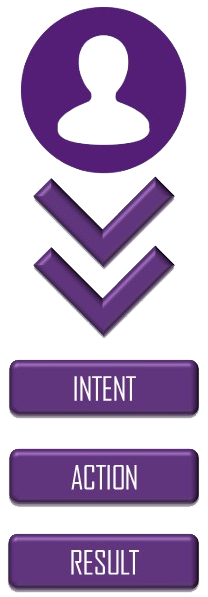
First, and briefly, what's intent? Intent is fairly simple if you let it be, it's what you want from the app or service you're deploying. Think business requirements of the app. Some examples are the apps requirements for: governance, security, compliance, risk, Geo-dependency, up-time, user-experience, etc. Eventually these will all get translated into the technical garbage language of infrastructure, but at some point they're business decisions, that's exactly where we want to capture them. For the purpose of this post I'll focus on using intent for new apps, or app redesign, discovering intent for existing apps is a conversation or ten in itself.

There are several reasons we want to capture them at this level. Here are a few:

Conceptually any intent based, or driven, system will capture this intent at the highest level in a format abstracted from implementation detail. For example, financial regulations such as PCI compliance would be captured in intent. That actual intent will be implemented by a number of different devices that can be interchanged and acquired from different vendors. The intent, PCI compliance, must be captured in a way that separates it from underlying configuration requirements of devices such as firewalls.

The actual language used to define the intent is somewhat arbitrary but should be as universally usable as possible. What this means is that you'd ideally want one intent repository that could be used to provision intent for any application on any infrastructure, end-to-end. We obviously don't live in an ideal world so this is not fully possible with current products, but we should continue to move towards this goal.

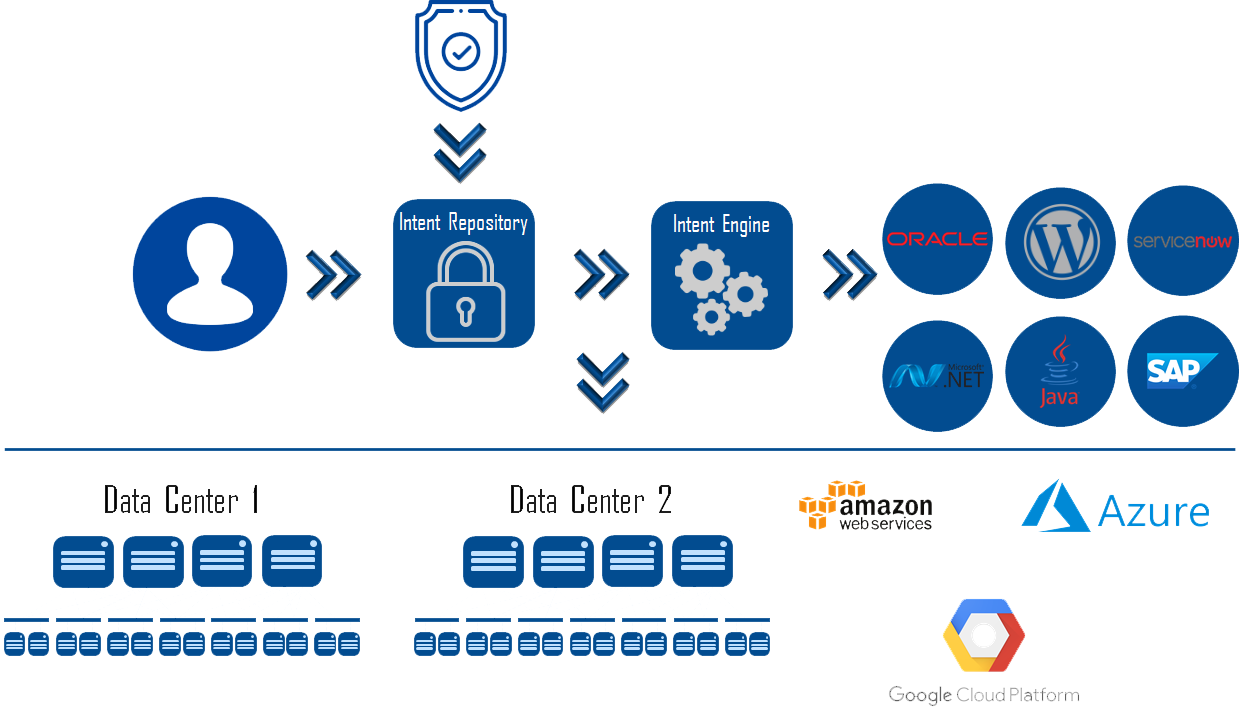
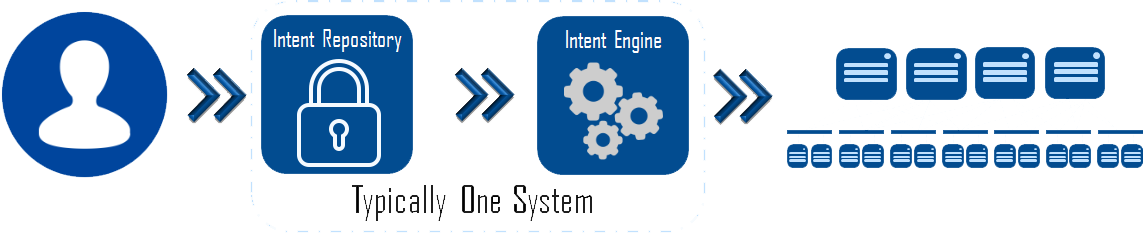
The next step of the process is the deployment of the intent onto infrastructure. The infrastructure itself is irrelevant, it can be on-premises, hosted, cloud, unicorn powered, or any combination. In most, if not all, products available today the intent repository and the automation engine responsible for this deployment are one and the same. The intent engine is responsible for translating the intent description stored in the repository down onto the chosen supported infrastructure. In the real world the engine may have multiple parts, or may be translated by more than one abstraction, but this should be transparent from an operational perspective. This process is shown in the following graphic.

Intent System

Now's where things start to get really sexy, and the true value of intent starts to shine. If I have an intent based system with a robust enough abstraction layer, my infrastructure becomes completely irrelevant. I define the intent for my application, and the system is responsible for translating that intent into the specific provisioning instructions required by the underlying infrastructure whatever that infrastructure is, and wherever that infrastructure lives (private, public, hosted, Alpha Centauri.)

The only restriction to this is that the infrastructure itself must have the software, hardware, and feature set required to implement intent. Using the PCI compliance example again, if the infrastructure isn't capable of providing your compliance requirements, the intent system can't help make that happen. Where the intent system can help with this is preventing the deployment of the application if doing so would violate intent. For example you have three underlying infrastructure options: Amazon EC2, Google Cloud Platform, and an on-premises private-cloud, if only your private-cloud meets your defined intent then the system prevents deployment to the two public cloud options. This type of thing is handled by the intent assurance engine which may be a seperate product or component of one of the pieces discussed above. For more on intent assurance see my blog http://www.definethecloud.net/intent-driven-architecture-part-iii-policy-assurance/.

This is where I see the most potential as this space matures. The intent for your application is defined once, and the application can be deployed, or moved anywhere with the intent assured, and continuously monitored. You can build and test in one environment with your full intent model enforced, then move to another environment for production. You can move your app from one cloud to another without redefining requirements. Equally important you can perform your audits on the central intent repository instead of individual apps as long as the infrastructures you run them on have been verified to properly consume the intent. Imagine auditing your PCI compliance intent definition one time, then simply deploying apps tagged with that intent without the need for additional audits. Here's a visual on that.

 Multi-Cloud Intent

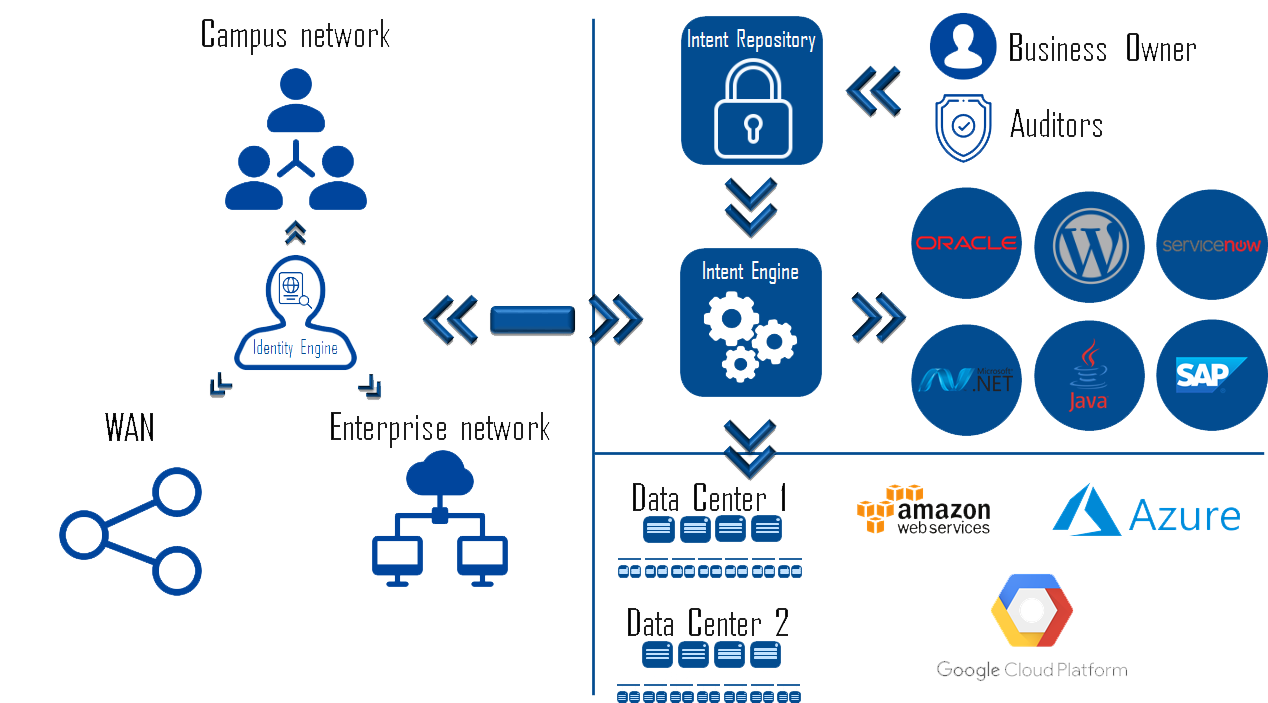
Now let's move this one step further: end-to-end intent. The umbrella of intent applies from the initial point of a user accessing the network, and should be carried consistently through to any resource they touch, data center, cloud, or otherwise. We need systems that can provide identity at initial access, carry that identity throughout the network, and enforce intent consistently along with the traffic.

This, unsurprisingly, is a very complex task. The challenges include:

The bright side here is that products to handle each portion of this exist. At least one vendor has a portfolio that can provide this end-to-end architecture using several products. The downside or fine print is that these all still exist as separate domain products with little-to-no-integration. I would consider that more of a consideration than an adoption road-block. Custom integration can be built, or bought, and you can expect product integration to be a top road map priority. The graphic below shows the full picture of an intent driven architecture.

End-to-end Intent

Utilizing intent as the end-to-end policy deployment method provides an immense amount of value to the IT organization. The use of intent:

While Intent driven architectures are in early maturity levels, they are already being deployed fairly widely in various fashions. As the maturity continues to grow here are some things I'd like to see from the industry:

We Live in a Multi-Cloud World: Here's Why

It's almost 2019 and there's still a lot of chatter, specifically from hardware vendors, that 'We're moving to a multi-cloud world. This is highly erroneous. When you hear someone say things like that, what they mean is 'we're catching up to the rest of the world and trying to sell a product in the space.'

Multi-cloud is a reality, and it's here today. Companies are deploying applications on-premises, using traditional IT stacks, automated stacks, IaaS, and private-cloud infrastructure. They are simultaneously using more than one public cloud resources. If you truly believe that your company, or company x is not operating in a multi-cloud fashion start asking the lines of business. The odds are you'll be surprised.

Most of the world has moved past the public-cloud vs. private-cloud debate. We realized that there are far more use-cases for hybrid clouds than the original asinine idea of 'cloud-bursting' which I ranted about for years (http://www.definethecloud.net/the-reality-of-cloud-bursting/ and https://www.networkcomputing.com/cloud-infrastructure/hybrid-clouds-burst-bubble/2082848167.) After the arguing, vendor nay saying, and general moronics slowed down we started to see that specific applications made more sense in specific environments, for specific customers. Imagine that, we came full-circle to the only answer that ever applies in technology: it depends.

There are many factors that would come into play when deciding where to deploy or build an application (specifically which public or private resource, and which deployment model (IaaS, PaaS, SaaS, etc.) The following is not intended to be an exhaustive list:

Lastly, don't discount peoples technology religions. There is typically more than one way to skin a cat, so it's not often worth it to fight an uphill battle against an entrenched opinion. Personally when I'm working with my customers if I start to sense a 'religious' stance to a technology or vendor I assess whether a more palatable option can fit the same need. Only when the answer is no do I push the issue. I believe I've discussed that in this post: http://www.definethecloud.net/why-cisco-ucs-is-my-a-game-server-architecture/.

The benefits of multi-cloud models are wide, and varied, and like anything else, they come with drawbacks. The primary benefit I focus on is the ability to put the application in focus. With traditional on-premises architectures we are forced to define, design, and deploy our application stack based on infrastructure constraints. This is never beneficial to the success of our applications, or our ability to deploy and change them rapidly.

When we move to a multi-cloud world we can start by defining the app we need, draw from that it's requirements, and finally use those requirements to decide which infrastructure options are most suited to them. Sure I can purchase/build CRM, or expense software, deploy them in my data center or my cloud provider's but I can also simply use the applications as a service. In a multi-cloud world I have all of those options available after defining the business requirements of the application.

Here's two additional benefits that have made multi-cloud today's reality. I'm sure there are others so help me out in the comments:

Cloud portability:

Even if you only intend to use one public cloud resource, and only in an IaaS model building for portability can save you pain in the long run. Let history teach you this lesson. You built your existing apps assuming you'd always run apps from your own infrastructure. Now you're struggling with the cost and complexity of moving them to cloud, might history repeat itself? Remember that cost models and features change with time, this means it may be attractive down the road to switch from cloud a to cloud b. If you neglect to design for this up-front, the pain will be exponentially greater down the road.

Note: This doesn't mean you need to go all wild-west with this shit. You can select a small set of public and private services such as IaaS and add them to a well-defined service-catalogue. It's really not that far off from what we've traditionally done within large on-premises IT organizations for years.

Picking the right tool for the job:

Like competitors in any industry, public clouds attempt to differentiate from one another to win your business. This differentiation comes in many forms: cost, complexity, unique feature-set, security, platform integration, openness, etc. The requirements for an individual app, within any unique company, will place more emphasis on one or more of these. In a multi-cloud deployment those requirements can be used to decide the right cloud, public or private, to use. Simply saying 'We're moving everything to cloud x' is placing you right back into the same situation where your infrastructure dictates your applications.

As I stated early on, multi-cloud doesn't come without it's challenges. One of the more challenging parts is that the tools to alleviate these challenges are, for the most part, in their infancy. The three most common challenges are: holistic visibility (cost, performance, security, compliance, etc.), administrative manageability, and policy/intent consistency especially as it pertains to security.

Visibility:

We've always had visibility challenges when operating IT environments. Almost no one can tell you exactly how many applications they have, or hell, even define what an 'application' is to them. Is it the front-end? Is it the three tiers of the web-app? What about the dependencies, is Active-Directory an app or a service? Oh shit, what's the difference between an app or a service? Because this is already a challenge within the data center walls, and across on-premises infrastructure, it gets exacerbated as we move to a multi-cloud model. More tools are emerging in this space, but be wary as most promise far more than they deliver. Remember not to set your expectations higher than needed. For example if you can find a tool that simply shows you all your apps across the multi-cloud deployment from one portal, you're probably better off than you were before.

Manageability:

Every cloud is unique in how it operates, is managed, and how applications are written to it. For the most part they all use their own proprietary APIs to deploy applications, provide their own dashboards and visibility tools, etc. This means that each additional cloud you use will add some additional overhead and complexity, typically in an exponential fashion. The solution is to be selective in which private and public resources you use, and add to that only when the business and technical benefits outweigh the costs.

Tools exist to assist in this multi-cloud management category, but none that are simply amazing. Without ranting too much on sepcfic options, the typical issues you'll see with these tools are they oversimplify things dumbing down the underlying infrastructure and negating the advantages underneath, they require far too much customization and software development upkeep, and they lack critical features or vendor support that would be needed.

Intent Consistency:

Policy, or intent can be described as SLAs, user-experience, up-time, security, compliance and risk requirements. These are all things we're familiar with supporting and caring for on our existing infrastructure. As we expand into multi-cloud we find the tools for intent enforcement are all very disparate, even if the end result is the same. I draw an analogy to my woodworking. When joining two pieces of wood there are several joint options to choose from. The type of joint will narrow the selection down, but typically leave more than one viable option to get the desired result. Depending on the joint I'm working on, I must know the available options, and pick my preference of the ones that will work for that application.

Each public or private infrastructure generally provides the tools to acheive an equivelant level of intent enforcement (joints), but they each offer different tools for the job (joinery options.) This means that if you stretch an application or its components across clouds, or move it from one to the other, you'll be stuck defining it's intent multiple times.

This category offers the most hope, in that an overarching industry architecture is being adopted to solve it. This is known as intent driven architecture, which I've described in a three part series starting here: http://www.definethecloud.net/intent-driven-architectures-wtf-is-intent/. The quick and dirty description is that 'Intent Driven' is analogous to the park button appearing in many cars. I push park, and the car is responsible for deciding if the space is parallel, pull-through, or pull-in, then deciding the required maneuvers to park me. With intent driven deployments I say park the app with my compliance accounted for, and the system is responsible for the specifics of the parking space (infrastructure). Many vendors are working towards products in this category, and many can work in very heterogeneous environments. While it's still in it's infancy it has the most potential today. The beauty of intent driven methodologies is that while alleviating policy inconsistency they also help with manageability and visibility.

Overall, multi-cloud is here, and it should be. There are of course companies that deploy holistically on-premises, or holistically in one chosen public cloud, but in today's world these are more corner case than the norm, especially with more established companies.

For another perspective check out this excellent blog article I was pointed to by Dmitri Kalintsev (@dkalintsev) https://bravenewgeek.com/multi-cloud-is-a-trap/. I very much agree with much, if not all of what he has to say. His article is focused primarily on running an individual app, or service across multiple clouds, where I'm positioning different cloud options for different workloads.

Intent Driven Architecture Part III: Policy Assurance

Here I am finally getting around to the third part of my blog on Intent Driven Architectures, but hey, what's a year between friends. If you missed or forgot parts I and II the links are below:

Intent Driven Architectures: WTF is Intent

Intent Driven Architectures Part II: Policy Analytics

Intent Driven Data Center: A Brief Overview Video

Now on to part III and a discussion of how assurance systems finalize the architecture.

What gap does assurance fill?

'Intent' and 'Policy' can be used interchangeably for the purposes of this discussion. Intent is what I want to do, policy is a description of that intent. The tougher question is what intent intent assurance is. Using the network as an example, let's assume you have a proper intent driven system that can automatically translate a business level intent into infrastructure level configuration.

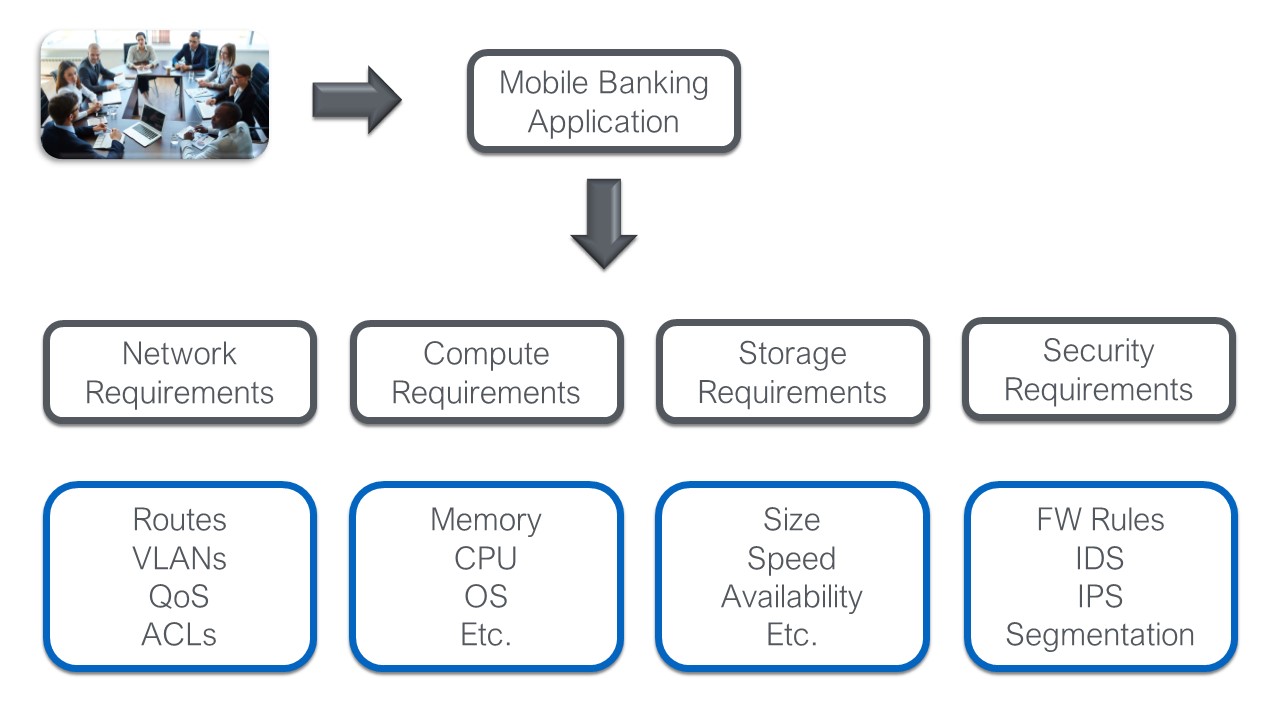
An intent like deploying a financial application beholden to PCI compliance will boil down into a myriad of config level objects: connectivity, security, quality, etc. At the lowest level this will translate to things like Access Control lists (ACLs), VLANs, firewall (FW) rules, and Quality of Service (QoS) settings. The diagram below shows this mapping.

Note: In an intent driven system the high level business intent is automatically translated down into the low-level constructs based on pre-defined rules and resource pools. Basically, the mapping below should happen automatically.

Blog Graphics

The translation below is one of the biggest challenges in traditional architectures. In those architectures the entire process is manual and human driven. Automating this process through intent creates an exponential speed increase while reducing risk and providing the ability to apply tighter security. That being said it doesn't get us all the way there. We still need to deploy this intent. Still within the networking example the intent driven system should have a network capable of deploying this policy automatically, but how do you know it can accept these changes, and what they will effect?

In steps assurance…

The purpose of an assurance system is to guarantee that the proposed changes (policy modifications based on intent) can be consumed by the infrastructure. Let's take one small example to get an idea of how important this is. This example will sound technical, but the technical bits are irrelevant. We'll call this example F'ing TCAM.

F'ing TCAM:

That's only one example of verification that needs to happen before a new intent can be pushed out. Things like VLAN and route availability, hardware/bandwidth utilization, etc. are also important. In the traditional world two terrible choices are available: verify everything manually per device, or 'spray and pray' (push the configuration and hope.)

This is where the assurance engine fits in. An assurance engine verifies the ability of the infrastructure to consume new policy before that policy is pushed out. This allows the policy to be modified if necessary prior to changes on the system, and reduces troubleshooting required after a change.

Advanced assurance systems will take this one step further. They perform step 1 as outlined above, which verifies that the change can be made. Step 2 will verify if the change should be made. What I mean by this is that step 2 will check compliance, IT policy, and other guidelines to ensure that the change will not violate them. Many times a change will be possible, even though it will violate some other policy, step 2 ensures that administrators are aware of this before a change is made.

This combination of features is crucial for the infrastructure agility required by modern business. It also greatly reduces the risk of change allowing maintenance windows to be reduced greatly or eliminated. Assurance is a critical piece of achieving true intent driven architectures.

Data Center 101: Server Virtualization

Virtualization is a key piece of modern data center design.  Virtualization occurs on many devices within the data center, conceptually virtualization is the ability to create multiple logical devices from one physical device.  We’ve been virtualizing hardware for years:  VLANs and VRFs on the network, Volumes and LUNs on storage, and even our servers were virtualized as far back as the 1970s with LPARs. Server virtualization hit mainstream in the data center when VMware began effectively partitioning clock cycles on x86 hardware allowing virtualization to move from big iron to commodity servers. 

This post is the next segment of my Data Center 101 series and will focus on server virtualization, specifically virtualizing x86/x64 server architectures.  If you’re not familiar with the basics of server hardware take a look at ‘Data Center 101: Server Architecture’ (http://www.definethecloud.net/?p=376) before diving in here.

What is server virtualization:

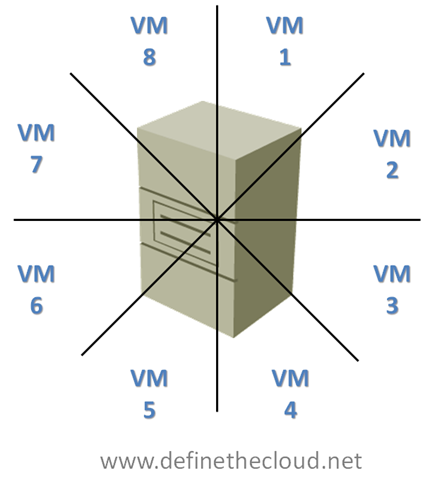
Server virtualization is the ability to take a single physical server system and carve it up like a pie (mmmm pie) into multiple virtual hardware subsets. 

imageEach Virtual Machine (VM) once created, or carved out, will operate in a similar fashion to an independent physical server.  Typically each VM is provided with a set of virtual hardware which an operating system and set of applications can be installed on as if it were a physical server.

Why virtualize servers:

Virtualization has several benefits when done correctly:

How does virtualization work?

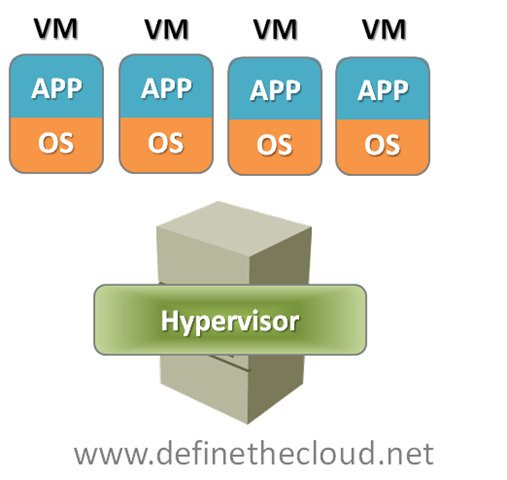
Typically within an enterprise data center servers are virtualized using a bare metal installed hypervisor.  This is a virtualization operating system that installs directly on the server without the need for a supporting operating system.  In this model the hypervisor is the operating system and the virtual machine is the application. 

image

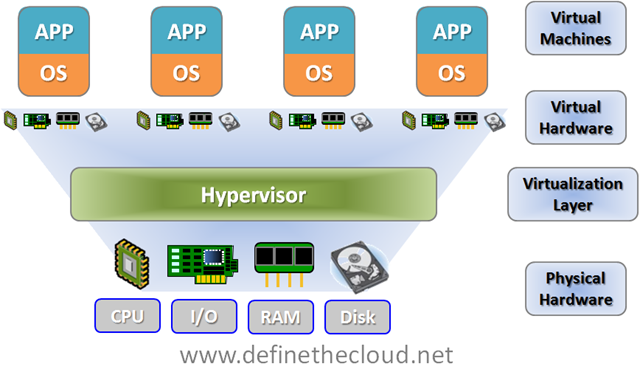
Each virtual machine is presented a set of virtual hardware upon which an operating system can be installed.  The fact that the hardware is virtual is transparent to the operating system.  The key components of a physical server that are virtualized are:

image

At a very basic level memory and disk capacity, I/O bandwidth, and CPU cycles are shared amongst each virtual machine.  This allows multiple virtual servers to utilize a single physical servers capacity while maintaining a traditional OS to application relationship.  The reason this does such a good job of increasing utilization is that your spreading several applications across one set of hardware.  Applications typically peak at different times allowing for a more constant state of utilization.

For example imagine an email server, typically an email server is going to peak at 9am, possibly again after lunch, and once more before quitting time.  The rest of the day it’s greatly underutilized (that’s why marketing email is typically sent late at night.)  Now picture a traditional backup server, these historically run at night when other servers are idle to prevent performance degradation.  In a physical model each of these servers would have been architected for peak capacity to support the max load, but most of the day they would be underutilized.  In a virtual model they can both be run on the same physical server and compliment one another due to varying peak times.

Another example of the uses of virtualization is hardware refresh.  DHCP servers are a great example, they provide an automatic IP addressing system by leasing IP addresses to requesting hosts, these leases are typically held for 30 days.  DHCP is not an intensive workload.  In a physical server environment it wouldn’t be uncommon to have two or more physical DHCP servers for redundancy.  Because of the light workload these servers would be using minimal hardware, for instance:

If this physical server were 3-5 years old replacement parts and service contracts would be hard to come by, additionally because of hardware advancements the server may be more expensive to keep then to replace.  When looking for a refresh for this server, the same hardware would not be available today, a typical minimal server today would be:

The application requirements haven’t changed but hardware has moved on.  Therefore refreshing the same DHCP server with new hardware results in even greater underutilization than before.  Virtualization solves this by placing the same DHCP server on a virtualized host and tuning the hardware to the application requirements while sharing the resources with other applications.

Summary:

Server virtualization has a great deal of benefits in the data center and as such companies are adopting more and more virtualization every day.  The overall reduction in overhead costs such as power, cooling, and space coupled with the increased hardware utilization make virtualization a no-brainer for most workloads.  Depending on the virtualization platform that’s chosen there are additional benefits of increased uptime, distributed resource utilization, increased manageability.

Data Center 101: Local Area Network Switching

Interestingly enough 2 years ago I couldn’t even begin to post an intelligent blog on Local Area Networking 101, funny how things change.  That being said I make no guarantees that this post will be intelligent in any way.  Without further ado let’s get into the second part of the Data Center 101 series and discuss the LAN.

I find the best way to understand a technology is to have a grasp on its history and the problems it solves, so let’s take a minute to dive into the history of the LAN.  For the sake of simplicity and real world applicability I’m going to stick to Ethernet as it is the predominant LAN technology in today’s data center environments.  Before we even go into the history we’ll define Ethernet and where it fits on the OSI model.

Ethernet:

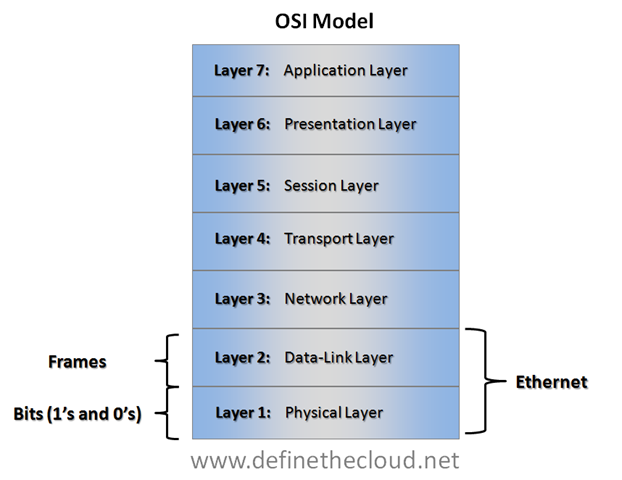
Ethernet is a frame based networking technology which is comprised as a set of standards for Layer 1 and 2 of the OSI model.  Ethernet devices use a address called a Media-Access Control Address (MAC) for communication.  MAC addresses are a flat address space which is not routable (can only be used on a flat layer 2 network) and is composed of several components most importantly a vendor ID known as an Organizational Unique Identifier (OUI) and a unique address for the individual port.

OSI Model:

The Open-Systems Interconnection (OSI) model is a sub-division of the components of communication that is used as a tool to create interoperable network systems and is a fantastic model for learning networks.  The OSI model breaks into 7-Layers much like my favorite taco dip.

image Understanding the OSI model and where protocols and hardware fit into it will not only help you learn but also help with understanding new technologies and how they fit together.   I often revert back to placing concepts in terms of the OSI model when having highly technical discussions about new concepts and technology.  The beauty of the model is that it allows for easy interoperability and flexibility.  For instance Ethernet is still Ethernet whether you use Fiber cables or copper cables because only Layer 1 is changing.

Ethernet LAN History:

As the LAN networks we use today evolved they typically started with individual groups within an organization.  For instance a particular group would have a requirement for a database server and would purchase a device to connect that group.  Those devices were commonly a hub.

Hub:

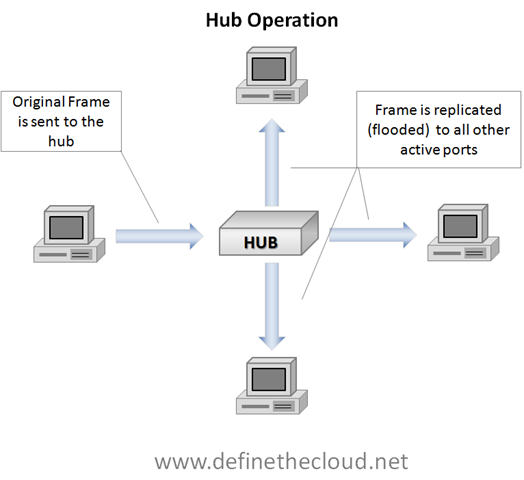
A network hub is a device with multiple ports used to connect several devices for the purposes of network communication.  When an Ethernet hub receives a frame it replicates it to all connected ports except the one it received it on in a process called flooding.  All connected devices receive a copy of the frame and will typically only process the frame if the destination MAC address is their own (there are exceptions to this which are beyond the scope of this discussion.)

image

In the diagram above you see a single device sending a frame and that frame being flooded to all other active ports.  This works quite well for small networks consisting of a single hub and low port count, but you can easily see where problems start to arise as the network grows.

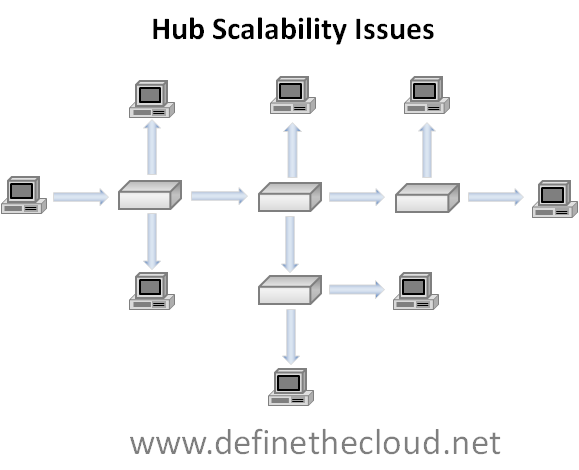
image

Once multiple hubs are connected and the network grows each hub will flood every frame, and all devices will receive these frames regardless of whether they are the intended recipient.  This causes major overhead in the network due to the unneeded frames consuming bandwidth.

Bridge:

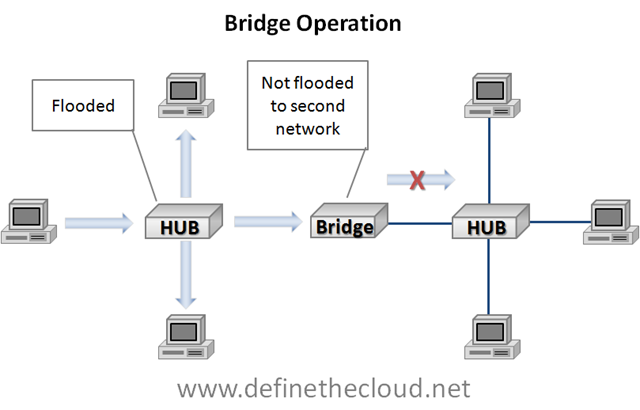
The next step in the network evolution is called bridging and was designed to alleviate this problem and decrease the overhead of forwarding unneeded frames.  A bridge is a device that makes an intelligent decision on when and where to flood frames based on MAC addresses stored in a table.  These MAC addresses can be static (manually input) or dynamic (learned on the fly.)  Because it is more common we will focus on dynamic.  The original bridges were typically 2 or more ports (low port counts) and could separate MAC addresses using the table for those ports.

image

In the above diagram you see a hub operating normally on the left flooding the frame to all active ports.  When the frame is received by the bridge a MAC address lookup is done on the MAC table and the bridge makes a decision whether or not to flood to the other side of the network.  Because the frame in this example is destined for a MAC address existing on the left side of the network the bridge does not flood the frame.  These addresses will be learned dynamically as devices send frames.  If the destination MAC address had been a device on the right side of the network the bridge would have sent the frame to that side to be flooded by the hub.

Bridges reduced unnecessary network traffic between groups or departments while allowing resource sharing when needed.  The limitation of original bridges came from the low port counts and changing data patterns.  Because the bridges were typically only separating 2-4 networks there was still quite a bit of flooding, especially when more and more resources were shared across groups.

Switches:

Switches are the next evolution of bridges and the operation they perform is still considered bridging.  In very basic terms a switch is a high port-count bridge that is able to make decisions on a port-by-port basis.  A switch maintains a MAC table and only forwards frames to the appropriate port based on the destination MAC.  If the switch has not yet learned the destination MAC it will flood the frame.  Switches and bridges will also flood multi-cast (traffic destined for multiple recipients) and broadcast (traffic destined for all recipients) frames which are beyond the scope of this discussion.

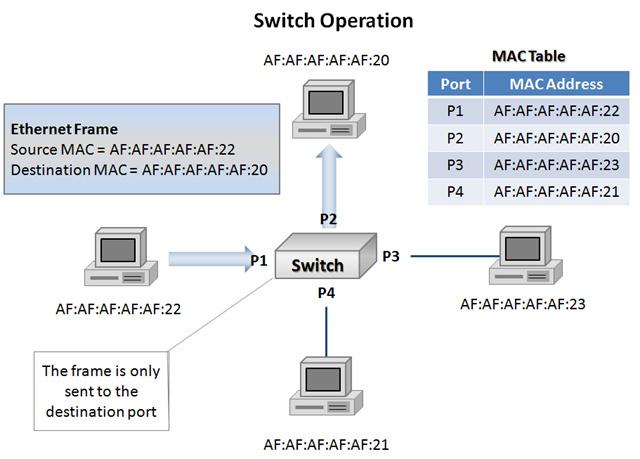
image

In the diagram above I have added several components to clarify switching operations now that we are familiar with basic bridging. Starting in the top left of the diagram you see some of the information that is contained in the header of an Ethernet frame.  In this case it is the source and destination MAC addresses of two of the devices connected to the switch.  Each end-point in the above diagram is labeled with a MAC address starting with AF:AF:AF:AF:AF.  In the top right we see a representation of a MAC table which is stored on the switch and learned dynamically.  The MAC table contains a listing of which MAC addresses are known to be on each port.  Because the MAC table in this example is fully populated we can assume that the switch has previously seen a frame from each device in order to populate the table.  That auto population is the ‘dynamic learning’ and it is done be recording the source MAC address of incoming frames.  Lastly we see that the frame being sent by the device on port 1 is only being forwarded to the device on port 2.  In the event port 2’s MAC address had not yet been learned the switch would be forced to flood the frame to all ports except the one it received it on in order to ensure it was received by the destination device.

So far we’ve learned that bridges improved upon hubs, and switches improved upon basic bridging.  The next kink in the evolution of Ethernet LANs came as our networks grew beyond single switches and we began adding in redundancy.

The three issues that arose can all be grouped as problems with network loops (specifically Layer 2 Ethernet loops.)  These issues are:

Multiple Frame Copies:

When a device receives the same frame more than once due to replication or loop issues it is a multiple frame copy.  This can cause issues for some hardware and software and also consumes additional unnecessary bandwidth.

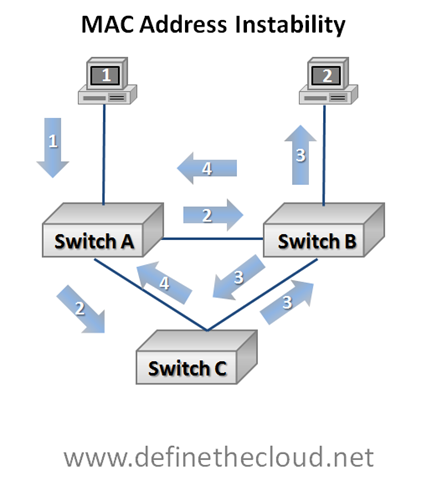
MAC Address Instability:

When a switch must repeatedly change its MAC table entry for a given device this is considered MAC address instability.

Broadcast Storms:

Broadcast storms are the most serious of the three issues as they can literally bring all traffic to a halt.  If you ask someone who has been doing networking for quite some time how they troubleshoot a broadcast storm you are quite likely to hear ‘Unplug everything and plug things back in one at a time until you find the offending device.’  The reason for this is that in the past the storm itself would soak up all available bandwidth leaving no means to access switching equipment in order to troubleshoot the issue.  Most major vendors now provide protection against this level of problem but storms are still a serious problem that can have a major performance impact on production data.  Broadcast storms are caused when a broadcast, multi-cast or flooded frame is repeatedly forwarded and replicated by one or more switches.

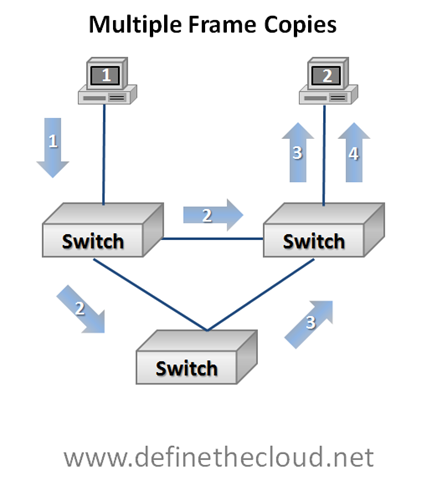
 image In the diagram above we can see a switched loop.  We can also observe several stages of frame forwarding starting with the device 1 in the top left sending a frame to the device 2 in the top right.

  1. Device 1 forwards a frame to device 2.  This one-to-one communication is known as unicast.
  2. The switch on the top left does not yet have device 2 in its MAC table therefore it is forced to flood the frame, meaning replicate the frame to all ports except the one where it was received. 
  3. In stage three we see two separate things occur:
    1. The switch in the top right delivers the frame to the intended device (for simplicities sake we are assuming the switch in the top right already has a MAC table entry for the device.)
    2. The bottom switch having received the frame forwards the frame to the switch in the top right.
  4. The switch in the top right receives the second copy and forwards it based on MAC table delivering the second copy of the same frame to device 2.


image

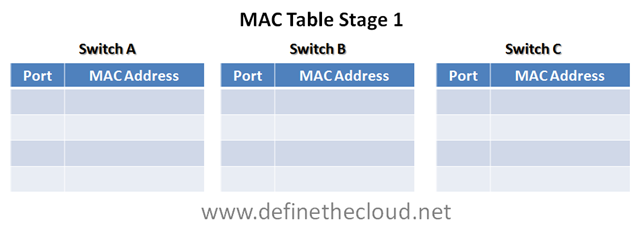
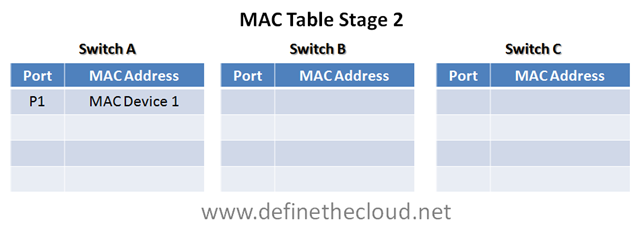
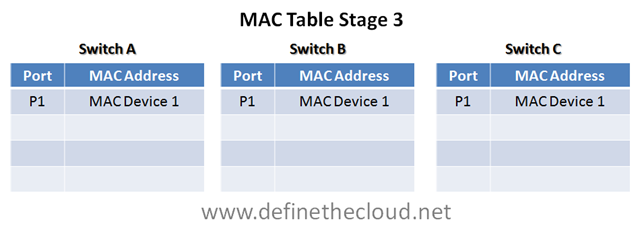
The above example has a little more going on and can become confusing quickly.  For the purposes of this example assume all three switches have blank MAC address tables with no devices known.  Also remember that they are building the MAC table dynamically based on the source MAC address they see in a frame.  To aid in understanding I will fill out the MAC tables at each step.

1. Our first stage is the easy one.  Device 1 forwards a unicast frame to device 2.  Switch A receives this frame on the top port.

image

2. When switch A receives the frame it checks its MAC table for the correct port to forward frames to device 2.  Because its MAC table is currently blank it must flood the frame (replicate it to all ports except the one where it was received.)  As it floods the frame it also records the MAC address and attached port of device 1 because it has seen this MAC as the source in the frame.

image

3. In stage 3 two switches receive the frame and must make decisions. 

  1. Switch C having a blank MAC table must flood the frame.  Because there is only one port other than the one it received it on switch C floods the frame to the only available port, at the same time it records the source MAC address as having been received on its port 1.  
  2. Switch B also receives the frame from switch A, and must make a decision.  Like switch C, switch B has no records in its MAC table and must flood the frame.  It floods the frame down to switch B, and up to device 2.  At the same time switch B records the source MAC in its MAC table.

image

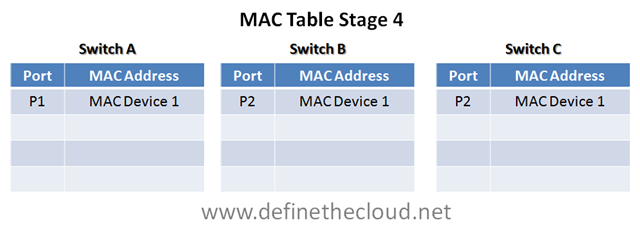
4. In the fourth stage we again have several things happening. 

  1. Switch C has received the same frame for the second time, this time from port 2.  Because it still has not seen the destination device it must flood the frame.  Additionally because this is the exact same frame switch C sees the MAC address of device 1 coming from its right port, port 2, and assumes the device has moved.  This forces switch C to change it's MAC table. 
  2. At the same time Switch B receives another copy of the frame.  Switch B seeing the same source address must change its MAC table and because it still does not have the destination MAC in the table it must flood the frame again.

image

In the above diagram pay close attention to the fact that the MAC tables have been changed for switch B and C.  Because they saw the same frame come from a different port they must assume the device has moved and change the table.  Additionally because the cycle has not been completed the loop will continue and this is one way broadcast storms begin.  More and more of these endless loops hit the network until there is no bandwidth left to serve data frames. 

In this simple example it may seem that the easy solution is to not build loops like the triangle in my diagram.  This is actually the premise of the next Ethernet evolution we’ll discuss, but first let’s look at how easy it is to create loops just by adding redundancy.

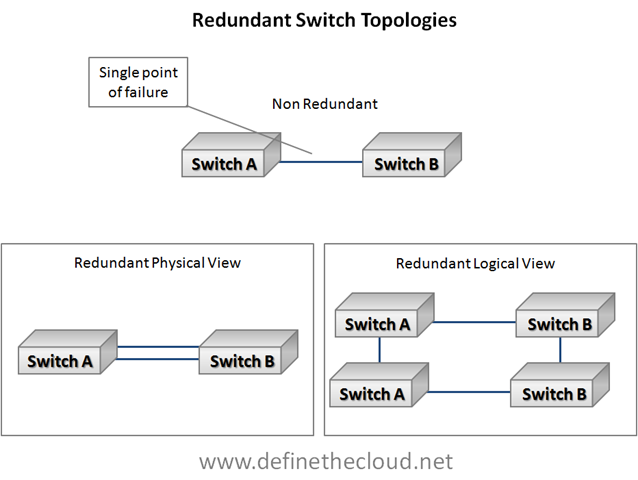
image

In the diagram above we start with a non-redundant switch link.  This link is a single point of failure and in the event a component fails devices on separate switches will be unable to communicate.  The simple solution is adding a second port for redundancy, with the assumed added benefit of having more bandwidth.  In reality without another mechanism in place adding the second link turns the physical view on the bottom left into the logical view on the bottom right which is loop.  This is where the next evolution comes into play.

Spanning-Tree Protocol (STP):

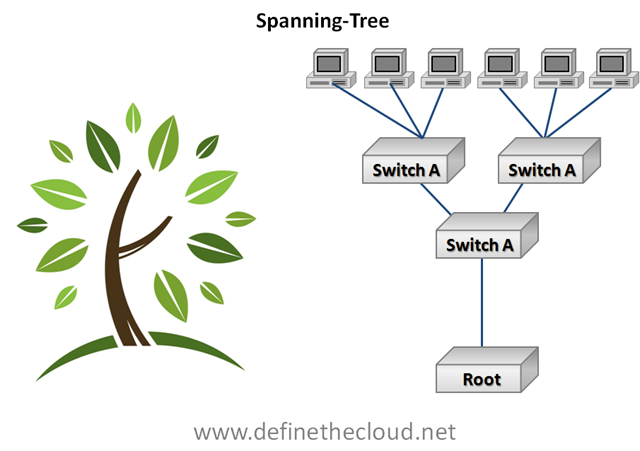
STP is defined in IEEE 802.1d and provides an automated method for building loop free topologies based on a very simple algorithm.  The premise is to allow the switches to automatically configure a loop free topology by placing redundant links in a blocked state.  Like a tree this loop free topology is built up from the root (root bridge) and branches out (switches) to to the leaves (end-nodes) with only one path to get to each end-node.

imageThe way Spanning-tree does this is by detecting redundant links and placing them in a ‘blocked’ state.  This means that the ports do not send or receive frames. In the event of a primary link failure (designated port) the blocked port is brought online.  The issue with spanning-tree is two fold:

Multiple versions of STP have been implemented and standardized to improve upon the original 802.1d specification.  These include:

Per-VLAN Spanning-Tree Protocol (PVSTP):

Performs the blocking algorithm independently for each VLAN allowing greater bandwidth utilization.

Rapid Spanning-Tree Protocol (RSTP):

Uses additional port-types not in the original STP specification to allow faster convergence during failure events.

Per-VLAN Rapid Spanning-Tree (PVRSTP):

Provides rapid spanning-tree functionality on a per VLAN basis.

Other STP implementations exist and the details of STP operation in each of its flavors is beyond the scope of what I intend to cover with the 101 series.  If there is a demand these concepts may be covered in a more in-depth 202 series once this series is completed.

Summary:

Ethernet networking has evolved quite a bit over the years and is still a work in progress.  Understanding the how’s and why’s of where we are today will help in understanding the advancements that continue to come.  If you have any comments, questions, or corrections please leave them in the comments or contact me in any of the ways listed on the about page.

Data Center 101: Server Systems

As the industry moves deeper and deeper into virtualization, automation, and cloud architectures it forces us as engineers to break free of our traditional silos.  For years many of us were able to do quite well being experts in one discipline with little to no knowledge in another.  Cloud computing, virtualization and other current technological and business initiatives are forcing us to branch out beyond out traditional knowledge set and understand more of the data center architecture as a whole.

It was this concept that gave me the idea to start a new series on the blog covering the foundation topics of each of the key areas of data center.  This will be lessons designed from the ground up to give you a familiarity with a new subject or refresh on an old one.  Depending on your background, some, none, or all of these may be useful to you.  As we get further through the series I will be looking for experts to post on subjects I’m not as familiar with, WAN and Security are two that come to mind.  If you’re interested in writing a beginners lesson in one of those topics, or any other please comment or contact me directly.

Server Systems:

As I’ve said before in previous posts the application is truly the heart of the data center.  Applications themselves are the reason we build servers, networks, and storage systems.  Applications are the email systems, databases, web content, etc that run our businesses.  Applications run within the confines of an operating system which interfaces directly with server hardware and firmware (discussed later) and provides a platform to run the application.  Operating systems come in many types, commonly Unix, Linux, and Windows with other variants used for specialized purposes such as mainframe and super computers.

Because the server itself sits more closely than any other hardware to the application understanding the server hardware and functionality is key.  Server hardware breaks down into several major components and concepts.  For this discussion we will stick with the more common AMD/Intel architectures known as the x86 architecture.

Server

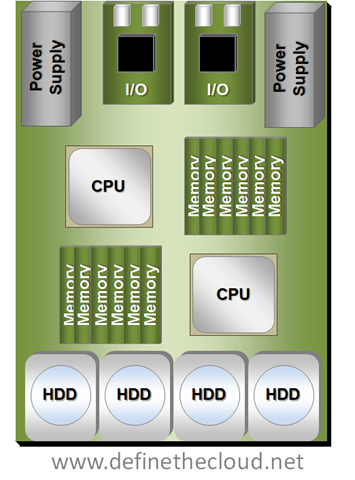
image

The diagram above shows a two socket server.  Starting at the bottom you can see the disks, in this case internal Hard Disk Drives (HDD.)  Moving up you can see two sets of memory and CPU followed by the I/O cards and power supplies.  The power supplies convert A/C current to appropriate D/C current levels for use in the system.  Additionally not shown would be fans to move air through the system for cooling.

The bus systems, which are not shown, would be a series of traces and chips on the system board allowing separate components to communicate.

A Quick Note About Processors:

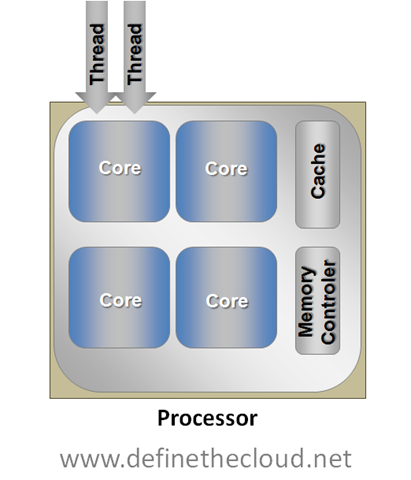
Processors come in many shapes, sizes, and were traditionally rated by speed measures in hertz.  Over the last few years a new concept has been added to processors, and that is ‘cores.’  Simply put a core is a CPU placed on a chip beside other cores which each share certain components such as cache and memory controller (both outside the scope of this discussion.)  If a processor has 2 cores it will operate as if it was 2 physically independent identical processors and provide the advantages of such.

Another technology has been around for quite some time called hyper threading.  A processor can traditionally only process one calculation per cycle (measured in hertz) this is known as a thread.  Many of these processes only use a small portion of the processor itself leaving other portions idle.  Hyper threading allows a processor to schedule 2 processes in the same cycle as long as they don’t require overlapping portions of the processor.  For applications that are able to utilize multiple threads hyper threading will provide an average of approximately 30% increases whereas a second core would double performance.

Hyper threading and multiple cores can be used together as they are not mutually exclusive.  For instance in the diagram above if both installed processors were 4 core processors, that would provide 8 total cores, with hyper threading enabled it would provide a total of 16 logical cores.

Not all applications and operating systems can take advantage of multiple processors and cores, therefore it is not always advantageous to have more cores or processors.  Proper application sizing and tuning is required to properly match the number of cores to the task at hand.

image

Server Startup:

When a server is first powered on the BIOS is loaded from EEPROM (Electronically Erasable Programmable Read-Only Memory) located on the system board.  While the BIOS is in control it performs a series of Power On Self Tests (POST) ensuring the basic operability of the main system components.  From there it detects and initializes key components such as keyboard, video, mouse, etc.  Last the BIOS searches for a bootable device.  The BIOS searches through available bootable media for a device containing a bootable and valid Master Boot Record (MBR.)  It then loads this and allows that code to take over with the load of the operating system.

The order and devices the BIOS searches is configurable in the BIOS settings.  Typical boot devices are:

Boot order is very important when there is more than one available boot device, for instance when booting to a CD-ROM to perform recovery of an operating system that is installed.  It is also important to note that both iSCSI and Fibre Channel network connected disks are handled by the operating system as if they were internal Small Computer System Interface (SCSI) disks.  This becomes very important when configuring non-local boot devices.  SCSI as a whole will be covered during this series.

Operating System:

Once the BIOS is done getting things ready and has transferred control to the bootable data in the MBR that bootable data takes over.  That is called the operating system (OS.)  The OS is the interface between the user/administrator and the server hardware.  The OS provides a common platform for various applications to run on and handles the interface between those applications and the hardware.  In order to properly interface with hardware components the OS requires drivers for that hardware.  Essentially the drivers are an OS level set of software that allow any application running in the OS to properly interface with the firmware running on the hardware.

Applications:

Applications come in many different forms to provide a wide variety of services.  Applications are the core of the data center and are typically the most difficult piece to understand.  Each application whether commercially available or custom built has unique requirements.  Different applications have different considerations for processor, memory, disk, and I/O.  These considerations become very important when looking at new architectures because any change in the data center can have significant effect on application performance.

Summary:

The server architecture goes from the I/O inputs through the server hardware to the application stack.  Proper understanding of this architecture is vital to application performance and applications are the purpose of the data center.  Servers consist of a set of major components, CPU's to process data, RAM to store data for fast access, I/O devices to get data in and out, and disk to store data in a permanent fashion.  This system is put together for the purpose of serving an application.

This post is the first in a series intended to build the foundation of data center.  If your starting from scratch they may all be useful, if your familiar in one or two aspects then pick and choose.  If this series becomes popular I may do a 202 series as a follow on.  If I missed something here, or made a mistake please comment.  Also if you’re a subject matter expert in a data center area that would like to contribute a foundation blog in this series please comment or contact me.