Redundancy in Data Storage: Part 2: Geographical Replication

This is a followup to my previous article, Redundancy in Data Storage: Part 1: RAID Levels, where I discussed various site-local data redundancy technologies. Here, I will attempt to detail many of the choices available to provide redundancy beyond the data center that organizations use to solve disaster recovery, business continuity, and continuity of operations (COOP).

It's obvious that site-local redundancy isn't enough for critical applications. The threat of natural disasters is always looming, regional power outages occur, building electrical and mechanical systems fail, and backhoes seem to hate fiber optic cable. Enterprises therefore attempt to use geographic redundancy to ensure that even when these things happen critical applications and data remain available. At the heart of making an application geographically redundant is making sure the application's data resides in more than one geographical location. There are a number of technology and architectural choices that can be used to achieve this geographical replication of data. Often these solutions will be evaluated in terms of cost, RTO (recovery time objective), and RPO (recovery point objective), as I outlined in Disaster Recovery and the Cloud.

One obvious place to build redundancy is at the storage area network level. There are a variety of technologies available to replicate SAN volumes between geographic locations. Synchronous replication tightly couples the primary and backup sites and does not return success to the storage controller until a write completes in both locations, providing a zero RPO. However, synchronous replication requires very fast network connections and requires that the backup site be located very close to the primary location because otherwise latency will severely reduce storage performance. To allow the sites to be further apart, asynchronous replication can be used where the changes are streamed to the backup site but completion of the I/O is signalled before receiving an acknowledgement. Finally, point-in-time replication generates many snapshots of the storage and sends the delta between each snapshot.

All of these SAN replication approaches are bandwidth intensive. Applications make many changes to the disk as part of their ordinary functioning and these changes are almost certainly not encoded in a dense fashion that allows them to efficiently cross networks. An application might make small updates to the same disk block many times in short order and all of these changes would have to be sent across the network in asynchronous or synchronous replication. Point in time replication lowers this overhead a small amount (because redundant changes between snapshots are not sent) at the cost of worse RPO.

Redundancy can also be implemented through database replication. Just as in SAN replication, synchronous, asynchronous, and snapshot-based techniques are available. Many of the same tradeoffs apply, although generally database changes can be sent more efficiently across a WAN. Unfortunately, effectively using database replication to provide geographic redundancy is difficult. For one, database replication can only stand on its own if all of the critical application data resides within the database. This is often not the case. Moreover, sophisticated database deployments involving data partitioning, federation, and integration often greatly complicate replication to the point that effective configuration becomes prohibitive.

Finally, the application itself can handle data redundancy. Often the highest end applications (for instance financial, logistics, and reservation systems) require the federation of data at the application level. This allows extreme top-end performance to be reached and also allows compliance with various types of data jurisdiction requirements (for instance, national directives requiring customer identifiable information to remain in the country of origin.) Unfortunately, this is very difficult and error prone.

Data redundancy is only one piece of the business continuity problem. Applications require other infrastructure to run, such as the network and application servers. Some organizations are using virtualized approaches here with some success to build geographically redundant architectures. Others rely on configuration management technologies to ensure that the disaster recovery sites remain synchronized and ready to handle workload. Another important point to consider is how to handle moving the active instance of the application to the backup site, and also how to re-establish redundancy after a failure and move applications back to the primary. Any approach to provide geographic redundancy must be designed carefully and continually tested well, because today's complicated application architectures provide too many opportunities for mistakes to be made in provisioning redundancy.

These replication techniques still require the site-local mechanisms like RAID discussed in part 1, because otherwise the facilities involved would be far too unreliable, and also require significant investments in network links, replication technologies, and personnel effort. Also, for the most part, these technologies require the duplication of infrastructure for disaster recovery purposes. In my forthcoming part 3, I will discuss emerging approaches in cloud architectures that unify redundancy mechanisms and significantly simplify the effort involved in implementing resilient business systems.

About the Author

Michael Lyle (@MPLyle) is CTO and co-founder of Translattice, and is responsible for the company's strategic technical direction.  He is a recognized leader in developing distributed systems technologies and has extensive experience in datacenter and information technology operations.

Inter-Fabric Traffic in UCS–Part II

In the first part of this post (http://www.definethecloud.net/inter-fabric-traffic-in-ucs) I discuss server traffic flows within a UCS system focusing on End-Host mode (EH mode.)  EH mode is the default and recommended mode for the majority of UCS implementations, but the system can also be used in ‘Switch mode’ which causes the Fabric Interconnects to operate as standard L2 switches.  This post will focus on server-to-server communication in switched mode.  For more information on when/where to use switch mode and the recommended upstream connectivity options see Brad Hedlund’s post in HD video: http://bradhedlund.com/2010/06/22/cisco-ucs-networking-best-practices/ and the white paper he co-authored on the subject: http://bradhedlund.com/2010/12/01/cisco-nexus-7000-connectivity-solutions-for-cisco-ucs/.  Both of these are must reads for anyone designing UCS solutions as well as great traffic flow information on the Nexus 7000 as a whole.

Note: Remember that switched-mode is rarely recommended and has become less important with the 12/2010 release of UCSM 1.4 which allows for ‘Appliance’ and ‘Storage’ ports in EH Mode.  For more information on the new port types see Dave Alexander's post on the new feature: http://www.unifiedcomputingblog.com/?p=187.

The only time I would recommend using switch mode is when locally switch traffic is required within the UCS system itself.  Lets take a quick look at the typical UCS connectivity diagram:

image

In the diagram above we see the basic connectivity for a UCS system.  In the default EH mode the only connections supported between the Fabric interconnects are the cluster links shown which do not carry data traffic.  This means that all switching from Fabric A to Fabric B must traverse the uplinks and be handled by an upstream device.

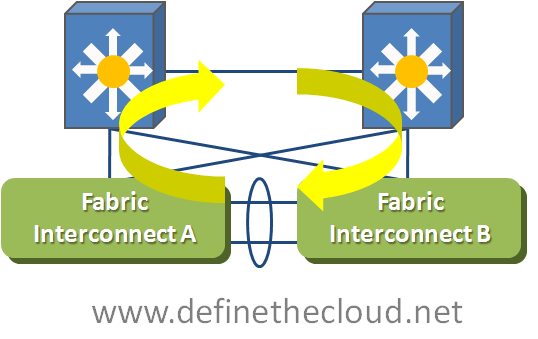
When the Fabric interconnects are moved into Switched Mode data links are now supported between Fabric Interconnect A and B.  Lets take a look at how this works.

image

The only change in the above drawing is that I’ve replaced the cluster links with 10GE port-channel carrying data traffic.  In this diagram and the following I have removed the cluster links for visual clarity, but they would still be required and follow the same rules as in EH mode.  With port-channel in place it is possible for data to be switched between the Fabric Interconnects, there are however some considerations.

When the Fabric Interconnects are placed in Switch Mode they begin to operate as traditional switches, this includes participating in Spanning-Tree Protocol (STP) for loop avoidance.  In the case of UCS the STP protocol used is Per-VLAN Rapid Spanning Tree+   (PVRST+.)  PVRST+ is a faster converging version of traditional spanning tree that operates independently on a per VLAN basis.  PVRST+ is commonly used, standards based and backward compatible with other STP versions.  With Switch Mode running the Fabric Interconnects will send and receive Bridge Protocol Data Units (BPDU) and block ports based on the network topology information in those BPDUs.  Now let’s take a closer look at how this looks within UCS.

image

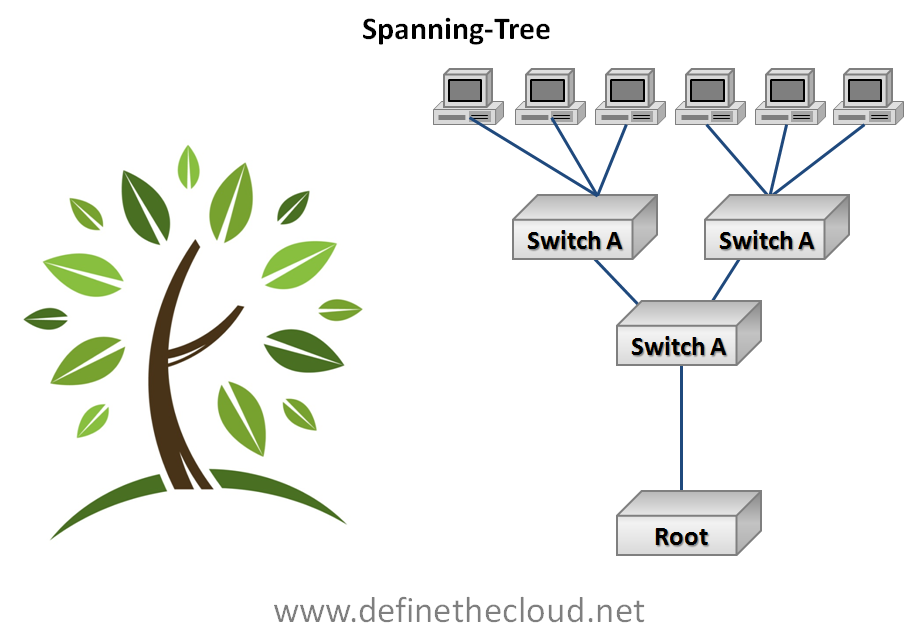
In the diagram above we can see that moving to switch mode and connecting the Fabric Interconnects together via data links we’ve created loops which will have to be closed by STP.  STP utilizes a loop avoidance algorithm based on a root bridge which acts as the base of the network topology and a loop free branch topology is built providing each ‘leaf’ one path to the root by blocking redundant links.  image

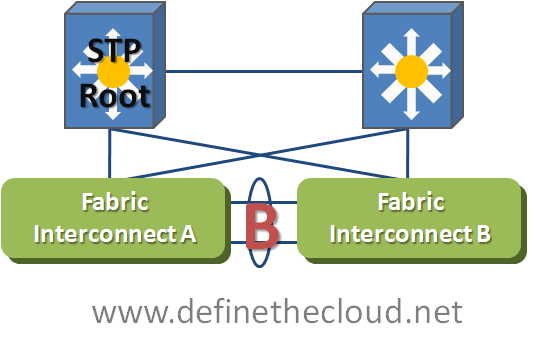
Best practices dictate that the root bridge be manually configured as a highly available switch typically in the aggregation or core layer, for performance and stability reasons.  With this in mind we can assume that the UCS Fabric Interconnects will not be the STP root bridge.  This means that our UCS network diagram will look similar to the following diagram.

image


In the above diagram we can see an example where the top left upstream switch is the root for a given VLAN.  In order to avoid looped behavior STP will block the links between the two Fabric Interconnects.  This means that no traffic will pass between the Fabric Interconnects for that VLAN and all Fabric A to B communication will be passed upstream the same way it would in EH mode.  This will occur for any VLANs that exist in both the upstream network and the Fabric Interconnects.  This behavior would be the same regardless of which upstream switch were acting as the Root Bridge for that VLAN.  This means that even in switch mode there is no Fabric A to Fabric B switching handled locally for common VLANs.  Common VLANs is the key phrase in that sentence, let’s take a look at how we get Fabric A to B switching handled locally.

image

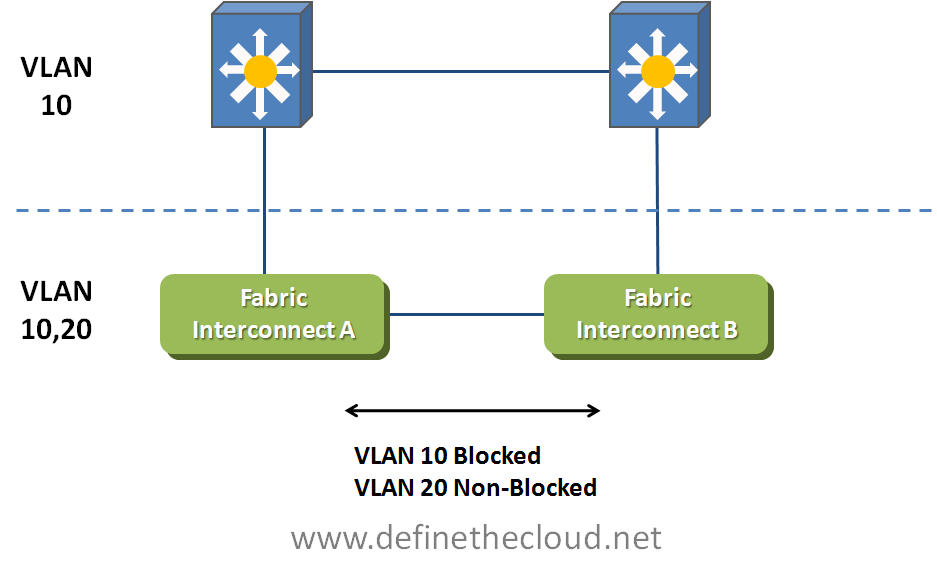
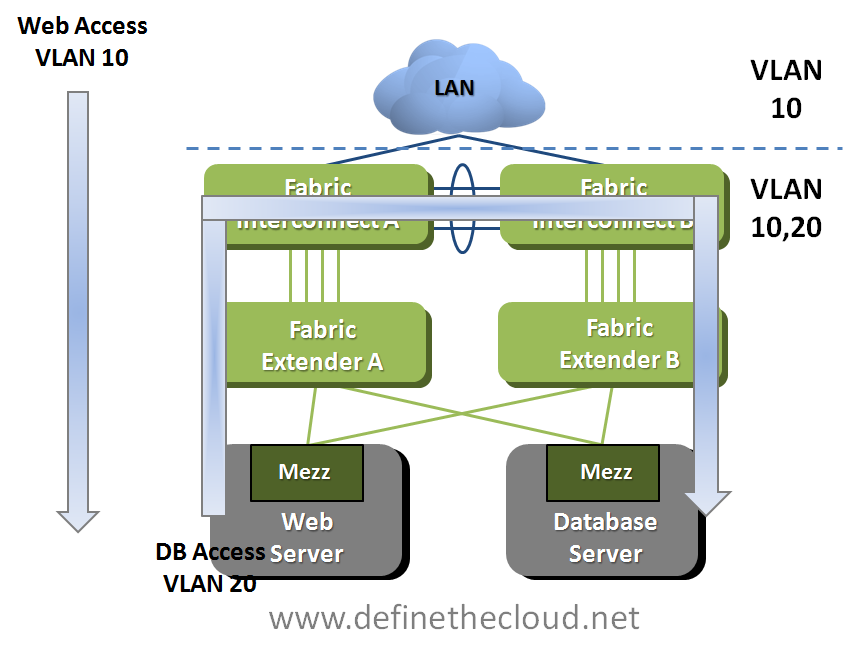
In the above diagram we see that VLAN 10 is common upstream and on the Fabric Interconnects.  Assuming best practices are in place VLAN 10’s Root Bridge will be upstream and therefore VLAN 10 will be blocked on the link between Fabric Interconnects.  VLAN 20 on the other hand only exists within the UCS system and therefore there is no loop in place or requirement for blocked links.  For VLAN 20 one of the Fabric interconnects will operate as the root bridge and traffic will be forwarded across the links.  This UCS only VLAN can be used for server to server communication, one example is depicted in the following diagram.

image

In the example above we see web access on VLAN 10 incoming from the upstream network.  This VLAN is blocked across the connections between Fabric Interconnects because it is common upstream and within UCS.  VLAN 20 is used for the web servers to access the database servers and is only needed within the UCS system.  Because this VLAN only exists internally traffic is forwarded across the links between Fabric interconnects and is switched locally.  Local VLANs can be used to utilize the high-bandwidth low-latency of the UCS switching system for server to server communication.

Summary:

Utilizing switched mode enables inter-fabric traffic to be switched locally but there are design considerations that must be addressed.  When deciding between modes for these purposes remember that UCS is a very low-latency system with sub 7us switching latency which means that with the appropriate switch hardware upstream total latency for round-trip inter-fabric traffic will still be below 40-50us or faster depending on hardware.  Also remember that intra-fabric traffic (A to A or B to B) is always switched locally sub 7us regardless of mode.  In most cases it is best to design your applications to utilize the same fabric if they communicate frequently rather than designing a switched mode solution.

Redundancy in Data Storage: Part 1: RAID Levels

I recently read Joe Onisick’s piece, “Have We Taken Data Redundancy Too Far?”  I think Joe raises a good point, and this is a natural topic to dissect in detail after my previous article about cloud disaster recovery and business continuity.  I, too, am concerned by the variety of data redundancy architectures used in enterprise deployments and the duplication of redundancy on top of redundancy that often results.  In a series of articles beginning here, I will focus on architectural specifics of how data is stored, the performance implications of different storage techniques, and likely consequences to data availability and risk of data loss.

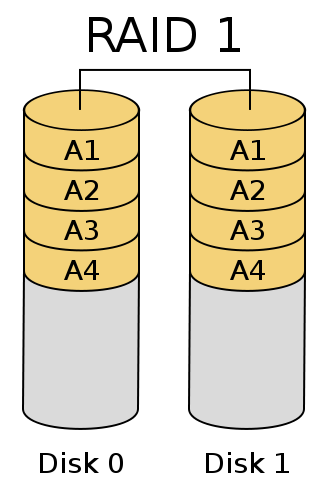
The first technology that comes to mind for most people when thinking of data redundancy is RAID, which stands for Redundant Array of Independent Drives.  There are a number of different RAID technologies, but here I will discuss just a few.  The first is mirroring, or RAID-1, which is generally employed with pairs of drives.  Each drive in a RAID-1 set contains the exact same information.  Mirroring generally provides double the random access read performance of a single disk, while providing approximately the same sequential read performance and write performance.  The resulting disk capacity is the capacity of a single drive.  In other words, half the disk capacity is sacrificed.

RAID-1, or Mirroring

RAID-1, or Mirroring;
Courtesy Colin M. L. Burnett

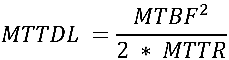
A useful figure of merit for data redundancy architectures is MTTDL, or Mean Time To Data Loss, which can be calculated for a given storage technology using the underlying MTBF, Mean Time Between Failures, and MTTR, Mean Time To Repair/Restore redundancy.  All “mean time” metrics really specify an average rate over an operating lifetime; in other words, if the MTTDL of an architecture is 20 years, there is a 1/20 = approximately 5% chance in any given year of suffering data loss.  Similarly, MTBF specifies the rate of underlying failures.   MTTDL includes only failures in the storage architecture itself, and not the risk of a user or application corrupting data.

For a two-drive mirror set, the classical calculation is:

This is a common reason to have hot-spares in drive arrays; allowing an automatic rebuild significantly reduces MTTR, which would appear to also significantly increase MTTDL.  However…

While hard drive manufacturers claim very large MTBFs, studies such as this one have consistently found numbers closer to 100,000 hours.  If recovery/rebuilding the array takes 12 hours, the MTTDL would be very large, implying an annual risk of data loss of less than 1 in 95,000.  Things don’t work this well in the real world, for two primary reasons:

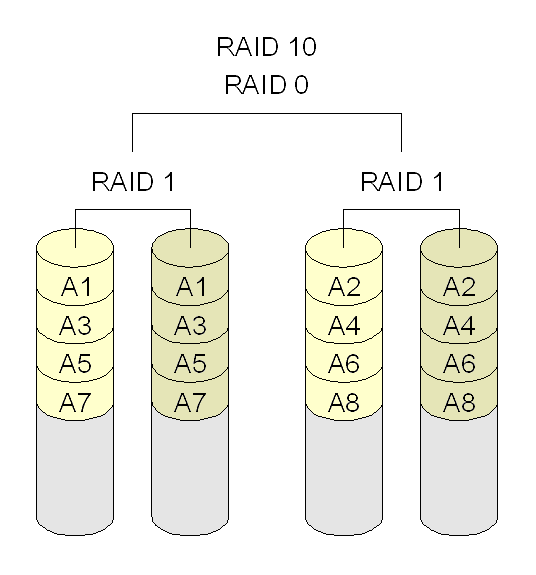
RAID 1+0: Mirroring and Striping

RAID 1+0: Mirroring and Striping;
Courtesy MovGP

With the latter in mind, the MTTDL becomes:

When the rebuild failure rate is very large compared to 1/MTBF:

In this case, MTTDL is approximately 587,000 hours, or a 1 in 67 risk of losing data per year.

RAID-1 can be extended to many drives with RAID-1+0, where data is striped across many mirrors.  In this case, capacity and often performance scales linearly with the number of stripes.  Unfortunately, so does failure rate.  When one moves to RAID-1+0, the MTTDL can be determined by dividing the above by the number of stripes.  A ten drive (five stripes of two-disk mirrors) RAID-1+0 set of the above drives would have a 15% chance of losing data in a year (again without considering correlation in failures.)  This is worse than the failure rate of a single drive.

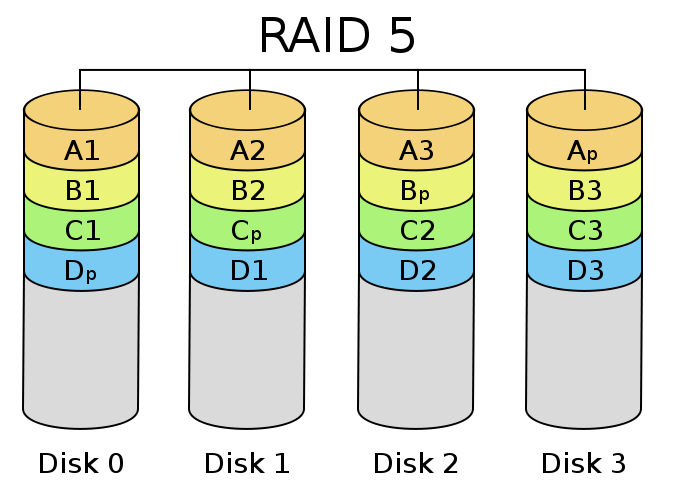
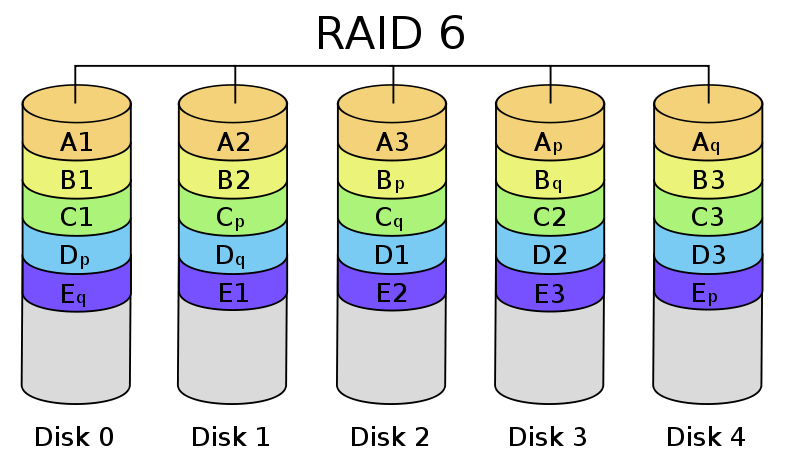
RAID-5RAID-6

RAID-5 and RAID-6;
Courtesy Colin M. L. Burnett

Because of the amount of storage required for redundancy in RAID-1, it is typically only used for small arrays or applications where data availability and performance are critical.  RAID levels using parity are widely used to trade-off some performance for additional storage capacity.

RAID-5 stripes blocks across a number of disks in the array (minimum 3, but generally 4 or more), storing parity blocks that allow one drive to be lost without losing data.  RAID-6 works similarly (with more complicated parity math and more storage dedicated to redundancy) but allows up to two drives to be lost.  Generally, when a drive fails in a RAID-5 or RAID-6 environment, the entire array must be reread to restore redundancy (during this time, application performance usually suffers.)

While SAN vendors have attempted to improve performance for parity RAID environments, significant penalties remain.  Sequential writes can be very fast, but random writes generally entail reading neighboring information to recalculate parity.  This burden can be partially eased by remapping the storage/parity locations of data using indirection.

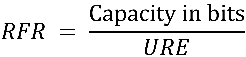
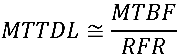
For RAID-5, the MTTDL is as follows:

Again, when the RFR is large compared to 1/MTBF, the rate of double complete drive failure can be ignored:

However, here RFR is much larger as it is calculated over the entire capacity of the array.  For example, achieving an equivalent capacity to the above ten-drive RAID-1+0 set would require 6 drives with RAID-5.  The RFR here would be over 80%, yielding little benefit from redundancy, and the array would have a 63% chance of failing in a year.

Properly calculating the RAID-6 MTTDL requires either Markov chains or very long series expansions, and there is significant difference in rebuild logic between vendors.  However, it can be estimated, when RFR is relatively large, and an unrecoverable read error causes the array to entirely abandon using that disk for rebuild, as:

Evaluating an equivalent, 7-drive RAID-6 array yields an MTTDL of approximately 100,000 hours, or a 1 in 11 chance of array loss per year.

The key things I note about RAID are:

Because of these factors, additional redundancy is required in conventional application deployments, which I will cover in subsequent articles in this series.

Images in this article created by MovGP (RAID-1+0, public domain) and Colin M. L. Burnett (all others, CC-SA) from Wikipedia.

This series is continued in Redundancy in Data Storage: Part 2: Geographical Replication.

About the Author

Michael Lyle (@MPLyle) is CTO and co-founder of Translattice, and is responsible for the company's strategic technical direction.  He is a recognized leader in developing new technologies and has extensive experience in datacenter operations and distributed systems.

Intel’s Betting the Storage I/O Farm on the CPU


I had the privilege of attending Tech Field Day 4 in San Jose this week as a delegate thanks to Stephen Foskett and Gestalt IT.  It was a great event and a lot of information was covered in two days of presentations.  I’ll be discussing the products and vendors that sponsored the event over the next few blogs starting with this one on Intel.  Check out the official page to view all of the delegates and find links to the recordings etc. http://gestaltit.com/field-day/2010-san-jose/.

Intel presented both their Ethernet NIC and storage I/O strategy as well as a processor update and public road map, this post will focus on the Ethernet and I/O presentation.

Intel began the presentation with an overview of the data center landscape and a description of the move towards converged I/O infrastructure, meaning storage, traditional LAN and potentially High Performance Computing (HPC) on the same switches and cables.  Anyone familiar with me or this site knows that I am a fan and supporter of converging the network infrastructure to reduce overall cost and complexity as well as provide more flexibility to data center I/O so I definitely liked this messaging.  Next was a discussion of iSCSI and its tradition of being used as a consolidation tool.

iSCSI:

iSCSI has been used for years in order to provide a mechanism for consolidated block storage data without the need for a separate physical network.  Most commonly iSCSI has been deployed as a low-cost alternative to Fibre Channel.  Its typically been used in the SMB space and for select applications in larger datacenters.  iSCSI was previously limited to 1 Gigabit pipes (prior to the 10GE ratification) and it also suffers from higher latency and lower throughput than Fibre Channel.  The beauty of iSCSI is the ability to use existing LAN infrastructure and traditional NICs to provide block access to shared disk, the Achilles heal is performance.  Because of this cost has always been the primary deciding factor to use iSCSI. For more information on iSCSI see my post on storage protocols: http://www.definethecloud.net/storage-protocols.

In order to increase the performance of iSCSI and decrease the overhead on the system processor(s) the industry developed iSCSI Host Bus Adapters (HBA) which offload the protocol overhead to the I/O card hardware.  These were not widely adopted due to the cost of the cards, this means that a great deal of iSCSI implementations rely on a protocol stack in the operating system (OS.) 

Intel then drew parallels to doing the same with FCoE via the FCoE software stack available for Windows and included in current Linux kernels.  The issue with drawing this parallel is that iSCSI is a mid-market technology that sacrifices some performance and reliability for cost, whereas FCoE is intended to match/increase the performance and reliability of FC while utilizing Ethernet as the transport.  This means that when looking at FCoE implementations the additional cost of specialized I/O hardware makes sense to gain the additional performance and reduce the CPU overhead.

Intel also showed some performance testing of FCoE software stack versus hardware offload using a CNA.  The IOPS they showed were quite impressive for a software stack, but IOPS isn’t the only issue.  The other issue is protocol overhead on the processor.Their testing showed an average of about 6% overhead for the software stack.  6% is low but we were only being shown one set of test criteria for a specific workload.  Additionally we were not provided the details of the testing criteria.  Other tests I’ve seen of the software stack are about 2 years old and show very comparable CPU utilization for FCoE software stack and Generation I CNAs for 8 KB reads, but a large disparity as the block size increased (CPU overhead became worse and worse for the software stack.)  In order to really understand the implications of utilizing a software stack Intel will need to publish test numbers under multiple test conditions:

I’ve since located the test Intel referenced from Demartek.  It can be obtained here (http://www.demartek.com/Reports_Free/Demartek_Intel_10GbE_FCoE_iSCSI_Adapter_Performance_Evaluation_2010-09.pdf.)  Notice that in the forward Demartek states the importance of CPU utilization data and stresses that they don’t cherry pick data then provides CPU utilization data only for the Microsoft Exchange simulation through JetStress, not for the SQLIO simulation at various block sizes.  I find that you can learn more from the data not shown in vendor sponsored testing, than the data shown.

Even if we were to make two big assumptions: Software stack IOPS are comparable to CNA hardware, and additional CPU utilization is less than or equal to 6% would you want to add an additional 6% CPU overhead to your virtual hosts?  The purpose of virtualization is to come as close as possible to full hardware utilization via placing multiple workloads on a single server.  In that scenario adding additional processor overhead seems short sighted.

The technical argument for doing this is two fold:

If you’re looking to save cost and are comfortable with the processor and performance overhead then there is no major issue with using the software stack.  That being said if you’re really trying to maximize performance and or virtualization ratios you want to squeeze every drop you can out of the processor for the virtual machines.  As far as the second point of processor capacity goes, it most definitely rings true but with each newer faster processor you buy you’re losing that assumed 6% off the top for protocol overhead.  That isn’t acceptable to me.

The Other Problem:

FC and FCoE have been designed to carry native SCSI commands and data and treat them as SCSI expects, most importantly frames are not dropped (lossless network.)  The flow control mechanism FC uses for this is called buffer-to-buffer credits (B2B.)  This is a hop-to-hop mechanism implemented in hardware on HBAs/CNAs and FC switches.  In this mechanism when two ports initialize a link they exchange a number of buffer spaces they have dedicated to the device on the other side of the link based on agreed frame size. When any device sends a frame it is responsible for keeping track of the buffer space available on the receiving device based on these credits.  When a device receives a frame and has processed it (removing it from the buffer) it returns an R_RDY similar to a TCP ACK which lets the sending device know that a buffer has been freed.  For more information on this see the buffer credits section of my previous post: http://www.definethecloud.net/whats-the-deal-with-quantized-congestion-notification-qcn.  This mechanism ensures that a device never sends a frame that the receiving device does not have sufficient buffer space for and this is implemented in hardware. 

On FCoE networks we’re relying on Ethernet as the transport so B2B credits don’t exist.  Instead we utilize Priority Flow Control (PFC) which is a priority based implementation of 802.3x pause.  For more information on DCB see my previous post: http://www.definethecloud.net/data-center-bridging-exchange.  PFC is handled by DCB capable NICs and will handle sending a pause before the NIC buffers overflow.  This provides for a lossless mechanism that can be translated back into B2B credits at the FC edge. 

The issue here with the software stack is that while the DCB capable NIC ensures the frame is not dropped on the wire via PFC it has to pass processing across the PCIe bus to the processor and allow the protocol to be handled by the OS kernel.  This adds layers in which the data could be lost or corrupted that don’t exist with a traditional HBA or CNA.

Summary:

FCoE software stack is not a sufficient replacement for a CNA.  Emulex, Broadcom, Qlogic and Brocade are all offloading protocol to the card to decrease CPU utilization and increase performance.  HP has recently announced embedding Emulex OneConnect adapters, which offload iSCSI, TCP and FCoE, on the system board.  That’s a lot of backing for protocol offload with only Intel standing on the other side of the fence.  My guess is that Intel’s end goal is to sell more processors, and utilizing more cycles for protocol processing makes sense.  Additionally Intel doesn’t have a proven FC stack to embed on a card and the R/D costs would be significant, so throwing it in the kernel and selling their standard NIC makes sense to the business.  Lastly don’t forget storage vendor qualification, Intel has an uphill battle getting an FCoE software stack on the approved list for the major storage vendors.

Full Discloser:  Tech Field Day is organized by the folks at Gestalt IT and paid for by the presenters of the event.  My travel, meals and accommodations were paid for by the event but my opinions negative or positive are all mine.

Inter-Fabric Traffic in UCS

It’s been a while since my last post, time sure flies when you’re bouncing all over the place busy as hell.  I’ve been invited to Tech Field Day next week and need to get back in the swing of things so here goes.

In order for Cisco’s Unified Computing System (UCS) to provide the benefits, interoperability and management simplicity it does, the networking infrastructure is handled in a unique fashion.  This post will take a look at that unique setup and point out some considerations to focus on when designing UCS application systems.  Because Fibre Channel traffic is designed to be utilized with separate physical fabrics exactly as UCS does this post will focus on Ethernet traffic only.   This post focuses on End Host mode, for the second art of this post focusing on switch mode use this link: http://www.definethecloud.net/inter-fabric-traffic-in-ucspart-ii.  Let’s start with taking a look at how this is accomplished:

UCS Connectivity

image

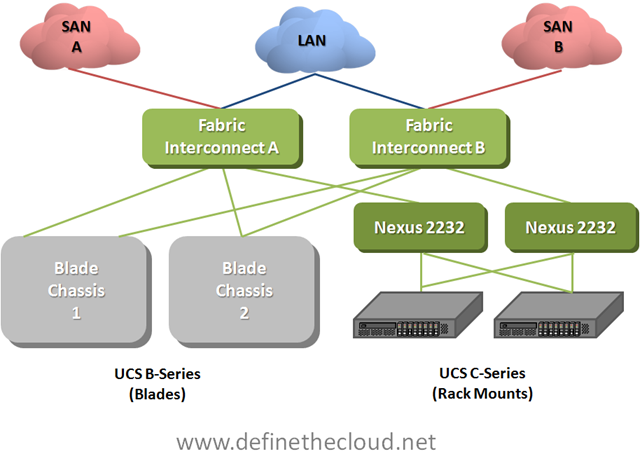
In the diagram above we see both UCS rack-mount and blade servers connected to a pair of UCS Fabric Interconnects which handle the switching and management of UCS systems.  The rack-mount servers are shown connected to Nexus 2232s which are nothing more than remote line-cards of the fabric interconnects known as Fabric Extenders.  Fabric Extenders provide a localized connectivity point (10GE/FCoE in this case) without expanding management points by adding a switch.  Not shown in this diagram are the I/O Modules (IOM) in the back of the UCS chassis.  These devices act in the same way as the Nexus 2232 meaning they extend the Fabric Interconnects without adding management or switches.  Next let’s look at a logical diagram of the connectivity within UCS.

UCS Logical Connectivity

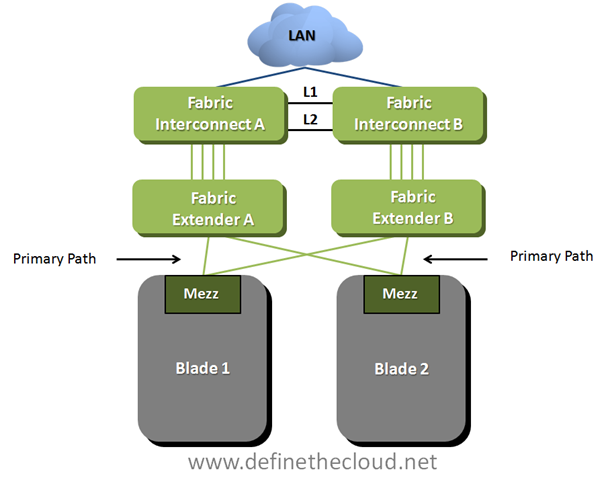
imageIn the last diagram we see several important things to note about UCS Ethernet networking:

At first glance handling all switching at the Fabric Interconnect level looks as though it would add latency (inter-blade traffic must be forwarded up to the fabric interconnects then back to the blade chassis.)  While this is true, UCS hardware is designed for low latency environments such as High Performance Computing (HPC.)  Because of this design goal all components operate at very low latency.  The Fabric Interconnects themselves operate at approximately 3.2us (micro seconds), and the Fabric Extenders operate at about 1.5us.  This means total roundtrip time blade to blade is approximately 6.2us right inline or lower than most Access Layer solutions.  Equally as important with this design switching between any two blades/servers in the system will occur at the same speed regardless of location (consistent predictable latency.)

The question then becomes how is traffic between fabrics handled?  The answer is that traffic between fabrics must be handled upstream (next hop device(s) shown in the diagrams as the LAN cloud.)  This is an important consideration when designing UCS implementations and selecting a redundancy/load-balancing behavior for server NICs.

Let’s take a look at two examples, first a bare-metal OS (Windows, Linux, etc.) next a VMware server.

Bare-Metal Operating System

image In the diagram above we see two blades which have been configured in an active/passive NIC teaming configuration using separate fabrics (within UCS this is done within the service profile.)  This means that blade 1 is using Fabric A as a primary path with B available for failover and blade 2 is doing the opposite.  In this scenario any traffic sent from blade 1 to blade 2 would have to be handled by the upstream device depicted by the LAN cloud.  This is not necessarily an issue for the occasional frame but will impact performance for servers that communicate frequently.

Recommendation:

For bare-metal operating systems analyze the blade to blade communication requirements and ensure chatty server to server applications are utilizing the same fabric as a primary:

VMware Servers

image

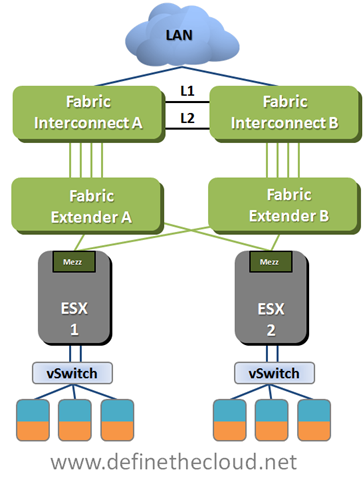
In the above diagram we see that the connectivity is the same from a physical perspective but in this case we are using VMware as the operating system.  In this case a vSwitch, vDS, or Cisco Nexus 1000v will be used to connect the VMs within the Hypervisor.  Regardless of VMware switching option the case will be the same.  It is necessary to properly design the the virtual switching environment to ensure that server to server communication is handled in the most efficient way possible.

Recommendation:

Summary:

UCS utilizes a unique switching design in order to provide high bandwidth, low-latency switching with a greatly reduced management architecture compared to competing solutions.  The networking requires a  thorough understanding in order to ensure architectural designs provide the greatest available performance.  Ensuring application groups that utilize high levels of server to server traffic are placed on the same path will provide maximum performance and minimal additional overhead on upstream networking equipment.

Access Layer Network Virtualization: VN-Tag and VEPA

One of the highlights of my trip to lovely San Francisco for VMworld was getting to join Scott Lowe and Brad Hedlund for an off the cuff whiteboard session.  I use the term join loosely because I contributed nothing other than a set of ears.  We discussed a few things, all revolving around virtualization (imagine that at VMworld.)  One of the things we discussed was virtual switching and Scott mentioned a total lack of good documentation on VEPA, VN-tag and the differences between the two.  I’ve also found this to be true, the documentation that is readily available is:

This blog is my attempt to demystify VEPA and VN-tag and place them both alongside their applicable standards, and by that I mean contribute to the extensive garbage info revolving around them both.  Before we get into them both we’ll need to understand some history and the problems they are trying to solve.

First let’s get physical.  Looking at a traditional physical access layer we have two traditional options for LAN connectivity: Top-of-Rack (ToR) and End-of-Row (EoR) switching topologies.  Both have advantages and disadvantages.

EoR:

EoR topologies rely on larger switches placed on the end of each row for server connectivity.

Pros:

Cons:

ToR:

ToR utilizes a switch at the top of each rack (or close to it.)

Pros:

Cons:

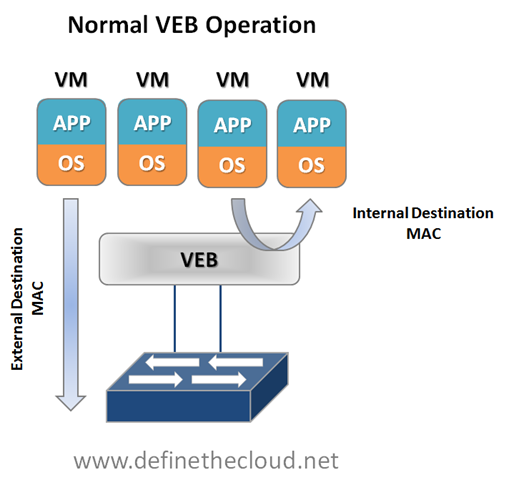
Now let’s virtualize.  In a virtual server environment the most common way to provide Virtual Machine (VM) switching connectivity is a Virtual Ethernet Bridge (VEB) in VMware we call this a vSwitch.  A VEB is basically software that acts similar to a Layer 2 hardware switch providing inbound/outbound and inter-VM communication.  A VEB works well to aggregate multiple VMs traffic across a set of links as well as provide frame delivery between VMs based on MAC address.  Where a VEB is lacking is network management, monitoring and security.  Typically a VEB is invisible and not configurable from the network teams perspective.  Additionally any traffic handled by the VEB internally cannot be monitored or secured by the network team.

Pros:

Cons:

These are the two issues that VEPA and VN-tag look to address in some way.  Now let’s look at the two individually and what they try and solve.

Virtual Ethernet Port Aggregator (VEPA):

VEPA is standard being lead by HP for providing consistent network control and monitoring for Virtual Machines (of any type.)  VEPA has been used by the IEEE as the basis for 802.1Qbg ‘Edge Virtual Bridging.’  VEPA comes in two major forms: a standard mode which requires minor software updates to the VEB functionality as well as upstream switch firmware updates, and a multi-channel mode which will require additional intelligence on the upstream switch.

Standard Mode:

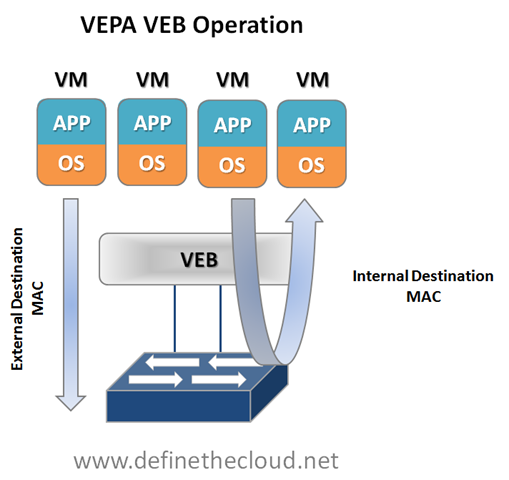
The beauty of VEPA in it’s standard mode is in it’s simplicity, if you’ve worked with me you know I hate complex designs and systems, they just lead to problems.  In the standard mode the software upgrade to the VEB in the hypervisor simply forces each VM frame out to the external switch regardless of destination.  This causes no change for destination MAC addresses external to the host, but for destinations within the host (another VM in the same VLAN) it forces that traffic to the upstream switch which forwards it back instead of handling it internally, called a hairpin turn.)  It’s this hairpin turn that causes the requirement for the upstream switch to have updated firmware, typical STP behavior prevents a switch from forwarding a frame back down the port it was received on (like the saying goes, don’t egress where you ingress.)  The firmware update allows the negotiation between the physical host and the upstream switch of a VEPA port which then allows this hairpin turn.  Let’s step through some diagrams to visualize this.

image  image

Again the beauty of this VEPA mode is in its simplicity.  VEPA simply forces VM traffic to be handled by an external switch.  This allows each VM frame flow to be monitored managed and secured with all of the tools available to the physical switch.  This does not provide any type of individual tunnel for the VM, or a configurable switchport but does allow for things like flow statistic gathering, ACL enforcement, etc.  Basically we’re just pushing the MAC forwarding decision to the physical switch and allowing that switch to perform whatever functions it has available on each transaction.  The drawback here is that we are now performing one ingress and egress for each frame that was previously handled internally.  This means that there are bandwidth and latency considerations to be made.  Functions like Single Root I/O Virtualization (SR/IOV) and Direct Path I/O can alleviate some of the latency issues when implementing this.  Like any technology there are typically trade offs that must be weighed.  In this case the added control and functionality should outweigh the bandwidth and latency additions.

Multi-Channel VEPA:

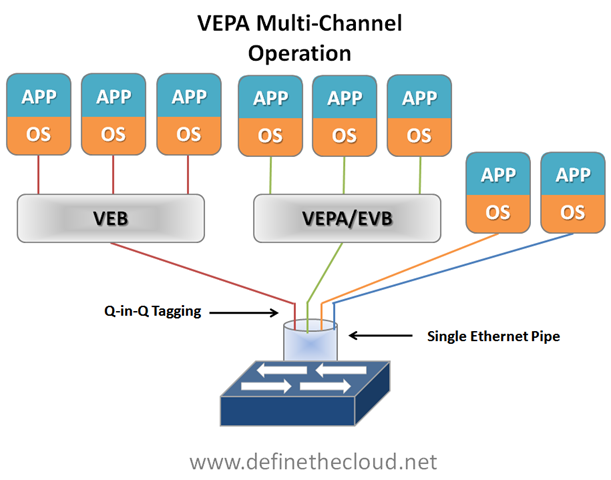
Multi-Channel VEPA is an optional enhancement to VEPA that also comes with additional requirements.  Multi-Channel VEPA allows a single Ethernet connection (switchport/NIC port) to be divided into multiple independent channels or tunnels.  Each channel or tunnel acts as an unique connection to the network.  Within the virtual host these channels or tunnels can be assigned to a VM, a VEB, or to a VEB operating with standard VEPA.  In order to achieve this goal Multi-Channel VEPA utilizes a tagging mechanism commonly known as Q-in-Q (defined in 802.1ad) which uses a service tag ‘S-Tag’ in addition to the standard 802.1q VLAN tag.  This provides the tunneling within a single pipe without effecting the 802.1q VLAN.  This method requires Q-in-Q capability within both the NICs and upstream switches which may require hardware changes.

image VN-Tag:

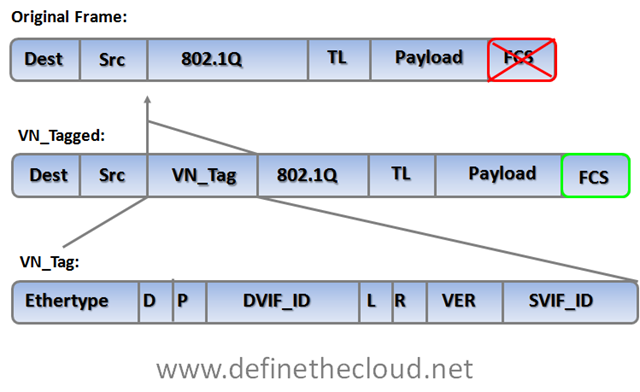
The VN-Tag standard was proposed by Cisco and others as a potential solution to both of the problems discussed above: network awareness and control of VMs, and access layer extension without extending management and STP domains.  VN-Tag is the basis of 802.1qbh ‘Bridge Port Extension.’  Using VN-Tag an additional header is added into the Ethernet frame which allows individual identification for virtual interfaces (VIF.)

image

The tag contents perform the following functions:


Ethertype

Identifies the VN tag

D

Direction, 1 indicates that the frame is traveling from the bridge to the interface virtualizer (IV.)

P

Pointer, 1 indicates that a vif_list_id is included in the tag.

vif_list_id

A list of downlink ports to which this frame is to be forwarded (replicated). (multicast/broadcast operation)

Dvif_id

Destination vif_id of the port to which this frame is to be forwarded.

L

Looped, 1 indicates that this is a multicast frame that was forwarded out the bridge port on which it was received. In this case, the IV must check the Svif_id and filter the frame from the corresponding port.

R

Reserved

VER

Version of the tag

SVIF_ID

The vif_id of the source of the frame

The most important components of the tag are the source and destination VIF IDs which allow a VN-Tag aware device to identify multiple individual virtual interfaces on a single physical port.

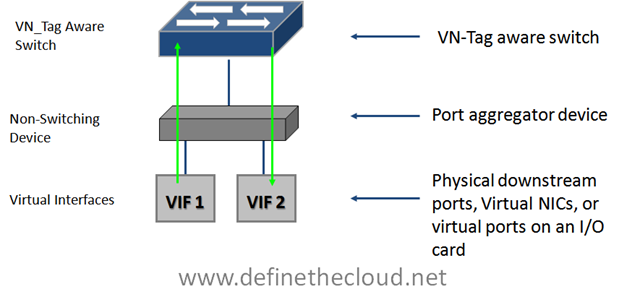
VN-Tag can be used to uniquely identify and provide frame forwarding for any type of virtual interface (VIF.)  A VIF is any individual interface that should be treated independently on the network but shares a physical port with other interfaces.  Using a VN-Tag capable NIC or software driver these interfaces could potentially be individual virtual servers.  These interfaces can also be virtualized interfaces on an I/O card (i.e. 10 virtual 10G ports on a single 10G NIC), or a switch/bridge extension device that aggregates multiple physical interfaces onto a set of uplinks and relies on an upstream VN-tag aware device for management and switching.

image

Because of VN-tags versatility it’s possible to utilize it for both bridge extension and virtual networking awareness.  It also has the advantage of allowing for individual configuration of each virtual interface as if it were a physical port.  The disadvantage of VN-Tag is that because it utilizes additions to the Ethernet frame the hardware itself must typically be modified to work with it.  VN-tag aware switch devices are still fully compatible with traditional Ethernet switching devices because the VN-tag is only used within the local system.  For instance in the diagram above VN-tags would be used between the VN-tag aware switch at the top of the diagram to the VIF but the VN-tag aware switch could be attached to any standard Ethernet switch.  VN-tags would be written on ingress to the VN-tag aware switch for frames destined for a VIF, and VN-tags would be stripped on egress for frames destined for the traditional network. 

Where does that leave us?

We are still very early in the standards process for both 802.1qbh and 802.1Qbg, and things are subject to change.  From what it looks like right now the standards body will be utilizing VEPA as the basis for providing physical type network controls to virtual machines, and VN-tag to provide bridge extension.  Because of the way in which each is handled they will be compatible with one another, meaning a VN-tag based bridge extender would be able to support VEPA aware hypervisor switches.

Equally as important is what this means for today and today’s hardware.  There is plenty of Fear Uncertainty and Doubt (FUD) material out there intended to prevent product purchase because the standards process isn’t completed.  The question becomes what’s true and what isn’t, let’s take care of the answers FAQ style:

Will I need new hardware to utilize VEPA for VM networking?

No, for standard VEPA mode only a software change will be required on the switch and within the Hypervisor.  For Multi-Channel VEPA you may require new hardware as it utilizes Q-in-Q tagging which is not typically an access layer switch feature.

Will I need new hardware to utilize VN-Tag for bridge extension?

Yes, VN-tag bridge extension will typically be implemented in hardware so you will require a VN-tag aware switch as well as VN-tag based port extenders. 

Will hardware I buy today support the standards?

That question really depends on how much change occurs with the standards before finalization and which tool your looking to use:

Are there products available today that use VEPA or VN-Tag?

Yes Cisco has several products that utilize VN-Tag: Virtual interface Card (VIC), Nexus 2000, and the UCS I/O Module (IOM.)  Additionally HP’s FlexConnect technology is the basis for multi-channel VEPA.

Summary:

VEPA and VN-tag both look to address common access layer network concerns and both are well on their way to standardization.  VEPA looks to be the chosen method for VM aware networking and VN-Tag for bridge extension.  Devices purchased today that rely on pre-standards versions of either protocol should maintain compatibility with the standards as they progress but it’s not guaranteed.    That being said standards are not required for operation and effectiveness, and most start as unique features which are then submitted to a standards body.

What’s the deal with Quantized Congestion Notification (QCN)

For the last several months there has been a lot of chatter in the blogosphere and Twitter about FCoE and whether full scale deployment requires QCN.  There are two camps on this:

  1. FCoE does not require QCN for proper operation with scale.
  2. FCoE does require QCN for proper operation and scale.

Typically the camps break down as follows (there are exceptions) :

  1. HP camp stating they’ve not yet released a suite of FCoE products because QCN is not fully ratified and they would be jumping the gun.  The flip side of this is stating that Cisco did jumped the gun with their suite of products and will have issues with full scale FCoE.
  2. Cisco camp stating that QCN is not required for proper FCoE frame flow and HP is using the QCN standard as an excuse for not having a shipping product.

For the purpose of this post I’m not camping with either side, I’m not even breaking out my tent.  What I’d like to do is discuss when and where QCN matters, what it provides and why.  The intent being that customers, architects, engineers etc. can decide for themselves when and where they may need QCN.

QCN: QCN is a form of end-to-end congestion management defined in IEEE 802.1.Qau.  The purpose of end-to-end congestion management is to ensure that congestion is controlled from the sending device to the receiving device in a dynamic fashion that can deal with changing bottlenecks.  The most common end-to-end congestion management tool is TCP Windows sizing.

TCP Window Sizing:

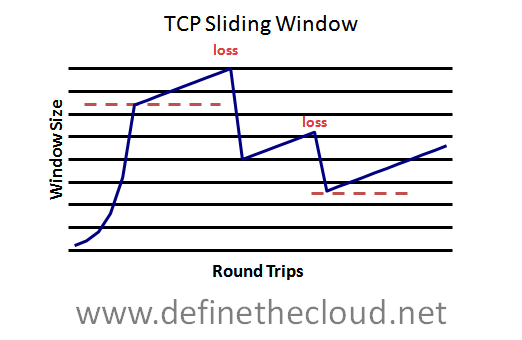
With window sizing TCP dynamically determines the number of frames to send at once without an acknowledgement.  It continuously ramps this number up dynamically if the pipe is empty and acknowledgements are being received.  If a packet is dropped due to congestion and an acknowledgement is not received TCP halves the window size and starts the process over.  This provides a mechanism in which the maximum available throughput can be achieved dynamically.

Below is a diagram showing the dynamic window size (total packets sent prior to acknowledgement) over the course of several round trips.  You can see the initial fast ramp up followed by a gradual increase until a packet is lost, from there the window is reduced and the slow ramp begins again.

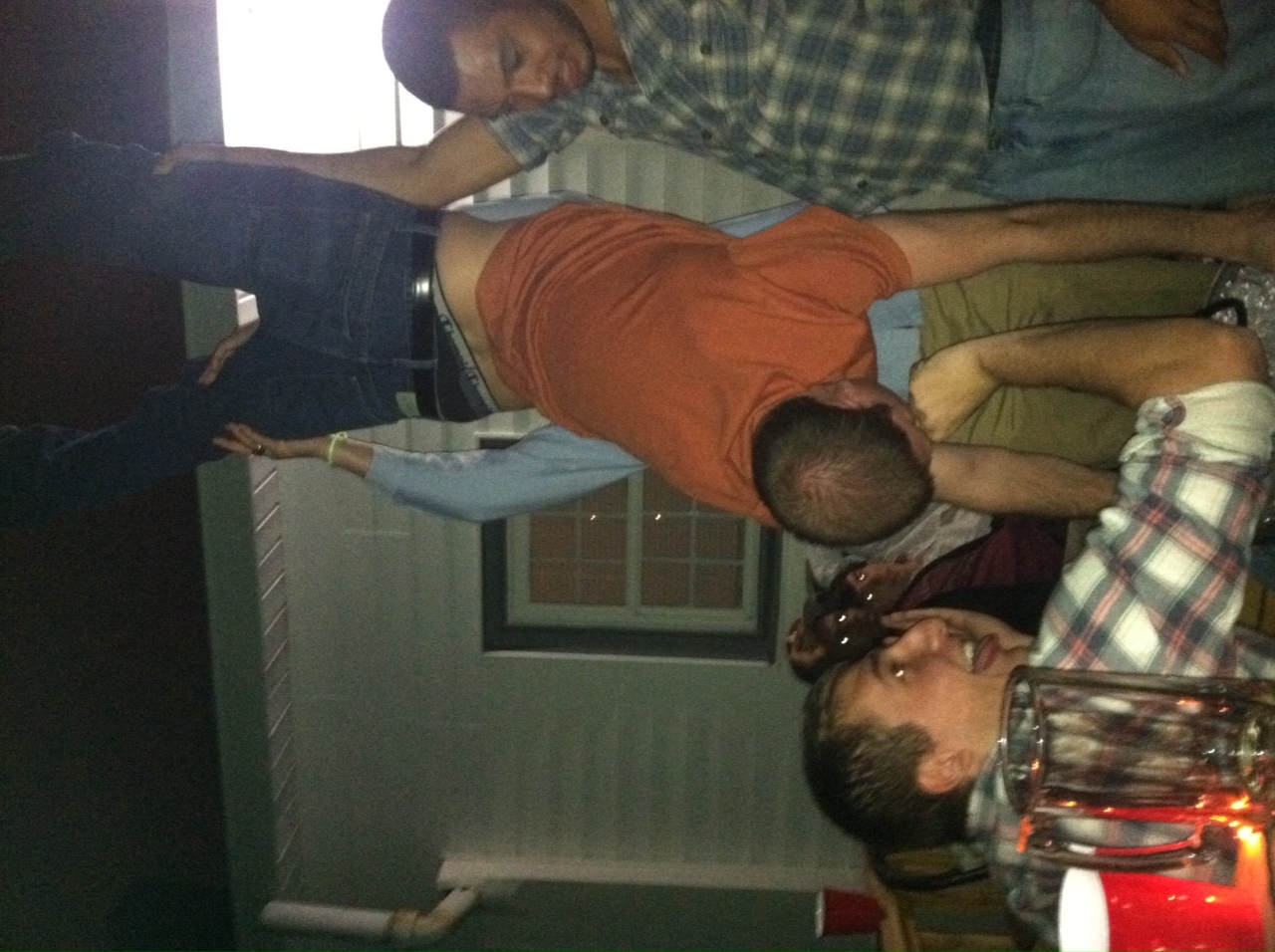
image If you prefer analogies I always refer to TCP sliding windows as a Keg Stand (http://en.wikipedia.org/wiki/Keg_stand.)

File:Kegstand147.jpg

In the photo we see several gentleman surrounding a keg, with one upside down performing a keg stand.

To perform a keg stand:

What the hell does this have to do with TCP Flow Control? I’m so glad you asked.

During a keg stand your friend is trying to push as much beer down your throat as it can handle, much like TCP increasing the window size to fill the end-to-end pipe.  Both of your hands are occupied holding your own weight, and your mouth has a beer hose in it, so like TCP you have no native congestion signaling mechanism.  Just like TCP the flow doesn’t slow until packets/beer drops, when you start to spill they stop the flow.

So that’s an example of end-to-end congestion management.  Within Ethernet and FCoE specifically we don’t have any native end-to-end congestion tools (remember TCP is up on L4 and we’re hanging out with the cool kids at L2.)  No problem though because We’re talking FCoE right?  FCoE is just a L1-L2 replacement for Fibre Channel (FC) L0-L1, so we’ll just use FC end-to-end congestion management… Not so fast boys and girls, FC does not have a standard for end-to-end congestion management, that’s right our beautiful over engineered lossless FC has no mechanism for handling network wide, end-to-end congestion.  That’s because it doesn’t need it.

FC is moving SCSI data, and SCSI is sensitive to dropped frames, latency is important but lossless delivery is more important.  To ensure a frame is never dropped FC uses a hop-by-hop flow control known as buffer-to-buffer (B2B) credits. At a high level each FC device knows the amount of buffer spaces available on the next hop device based on the agreed upon frame size (typically 2148 bytes.)  This means that a device will never send a frame to a next hop device that cannot handle the frame.  Let’s go back to the world of analogy.

Buffer-to-buffer credits:

The B2B credit system works in the same method you’d have 10 Marines offload and stack a truckload of boxes (‘fork-lift, we don’t need no stinking forklift.’)  The best system to utilize 10 Marines to offload boxes is to line them up end-to-end one in the truck and one on the other end to stack.  Marine 1 in the truck initiates the send by grabbing a box and passing it to Marine 2, the box moves down the line until it gets to the target Marine 10 who stacks it.  Before any Marine hands another Marine a box they look to ensure that Marines hands are empty verifying they can handle the box and it won’t be dropped.  Boxes move down the line until they are all offloaded and stacked.  If anyone slows down or gets backed up each marine will hold their box until the congestion is relieved.

In this analogy the Marine in the truck is the initiator/server and the Marine doing the stacking is the target/storage with each Marine in between being a switch.

When two FC devices initiate a link they follow the Link-Initialization-Protocols (LIP.)  During this process they agree on an FC frame size and exchange the available dedicated frame buffer spaces for the link.  A sender is always keeping track of available buffers on the receiving side of the link.  The only real difference between this and my analogy is each device (Marine) is typically able to handle more than one frame (box) at once.

So if FC networks operate without end-to-end congestion management just fine why do we need to implement a new mechanism in FCoE, well there-in lies the rub.  Do we need QCN?  The answer is really Yes and No, and it will depend on design.  FCoE today provides the exact same flow control as FC using two standards defined within Data Center Bridging (DCB) these are Enhanced Transmission Selection (ETS) and Priority-Flow Control (PFC) for more info on theses see my DCB blog: http://www.definethecloud.net/?p=31.)  Basically ETS provides a bandwidth guarantee without limiting and PFC provides lossless delivery on an Ethernet network.

Why QCN:

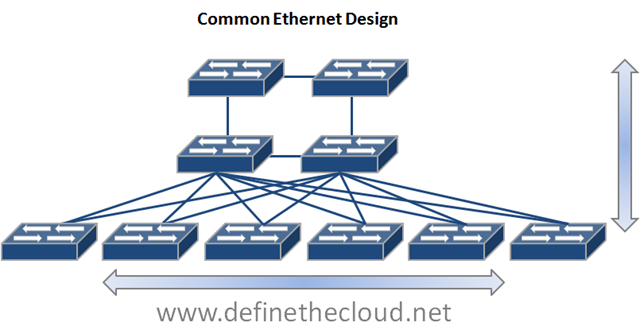
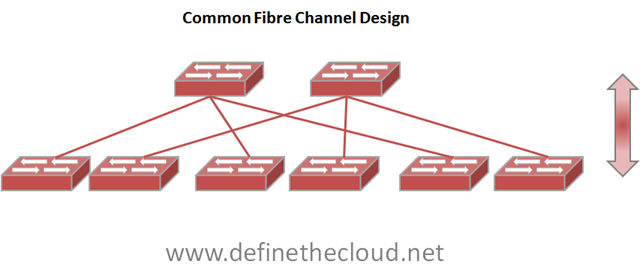
The reason QCN was developed is the differences between the size, scale, and design of FC and Ethernet networks.  Ethernet networks are usually large mesh or partial mesh type designs with multiple switches.  FC designs fall into one of three major categories Collapsed core (single layer), Core edge (two layer) or in rare cases for very large networks edge-core-edge (three layer.)  This is because we typically have far fewer FC connected devices than we do Ethernet (not every device needs consolidated storage/backup access.)

If we were to design our FCoE networks where every current Ethernet device supported FCoE and FCoE frames flowed end-to-end QCN would be a benefit to ensure point congestion didn’t clog the entire network.  On the other hand if we maintain similar size and design for FCoE networks as we do FC networks, there is no need for QCN.

Let’s look at some diagrams to better explain this:

image

 image In the diagrams above we see a couple of typical network designs.  The Ethernet diagram shows Core at the top, aggregation in the middle, and edge on the bottom where servers would connect.  The Fibre Channel design shows a core at the top with an edge at the bottom.  Storage would attach to the core and servers would attach at the bottom.  In both diagrams I’ve also shown typical frame flow for each traffic type.  Within Ethernet, servers commonly communicate with one another as well network file systems, the WAN etc.  In an FC network the frame flow is much more simplistic, typically only initiator target (server to storage) communication occurs.  In this particular FC example there is little to no chance of a single frame flow causing a central network congestion point that could effect other flows which is where end-to-end congestion management comes into play.

What does QCN do:

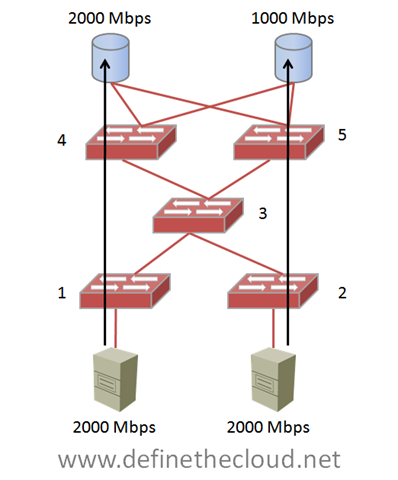
QCN moves congestion from the network center to the edge to avoid centralized congestion on DCB networks.  Let’s take a look at a centralized congestion example (FC only for simplicity):

image In the above example two 2Gbbps hosts are sending full rate frame flows to two storage devices.  One of the storage devices is a 2Gbps device and can handle the full speed, the other is a 1Gbps device and is not able to handle the full speed. If these rates are sustained switch 3’s buffers will eventually fill and cause centralized congestion effecting frame flows to both switch 4, and 5.  This means that the full rate capable devices would be affected by the single slower device.  QCN is designed to detect this type of congestion and push it to the edge, therefore slowing the initiator on the bottom right avoiding overall network congestion.

This example is obviously not a good design and is only used to illustrate the concept.  In fact in a properly designed FC network with multiple paths between end-points central congestion is easily avoidable.

When moving to FCoE if the network is designed such that FCoE frames pass through the entire full-mesh network shown in the Common Ethernet design above, there would be greater chances of central congestion.  If the central switches were DCB capable but not FCoE Channel Forwarders (FCF) QCN could play a part in pushing that congestion to the edge.

If on the other hand you design FCoE in a similar fashion to current FC networks QCN will not be necessary.  An example of this would be:

imageThe above design incorporates FCoE into the existing LAN Core, Aggregation, Edge design without clogging the LAN core with unneeded FCoE traffic.  Each server is dual connected to the common Ethernet mesh, and redundantly connected to FCoE SAN A and B.  This design is extremely scalable and will provide more than enough ports for most FCoE implementations.

Summary:

QCN like other congestion management tools before it such as FECN and BECN have significant use cases.  As far as FCoE deployments go QCN is definitely not a requirement and depending on design will provide no benefit for FCoE.  It’s important to remember that the DCB standards are there to enhance Ethernet as a whole, not just for FCoE.  FCoE utilizes ETS and PFC for lossless frame delivery and bandwidth control, but the FCoE standard is a separate entity from DCB.

Also remember that FCoE is an excellent tool for virtualization which reduces physical server count.  This means that we will continue to require less and less FCoE ports overall especially as 40Gbps and 100Gbps are adopted.  Scaling FCoE networks further than today’s FC networks will most likely not be a requirement.

Networking Showdown: UCS vs. HP Virtual Connect (Updated)

Note: I have made updates to reflect that Virtual Connect is two words, and technical changes to explain another method of network configuration within Virtual Connect that prevents the port blocking described below.  Many thanks to the Ken Henault at HP who graciously walked me through the corrections, and beat them into my head until I understood them.

I’m sitting on a flight from Honolulu to Chicago in route home after a trip to Hawaii for customer briefings.  I was hoping to be asleep at this point but a comment Ken Henault left on my ‘FlexFabric – Small Step, Right Direction’ post is keeping me awake… that’s actually a lie, I’m awake because I’m cramped into a coach seat for 8 hours while my fiancé, who joined me for a couple of days, enjoys the first class luxuries of my auto upgrade, all the comfort in the world wouldn’t make up for the looks I got when we landed if I was the one up front.

So, being that I’m awake anyway I thought I’d address the comment from the aforementioned post.  Before I begin I want to clarify that my last post had nothing to do with UCS, I intentionally left UCS out because it was designed with FCoE in mind from the start so it has native advantages in an FCoE environment.  Additionally within UCS you can’t get away from FCoE, if you want Fibre Channel connectivity your using FCoE so it’s not a choice to be made (iSCSI, NFS, and others are supported but to connect to FC devices or storage it’s FCoE.) The blog was intended to state exactly what it did: HP has made a real step into FCoE with FlexFabric but there is still a long way to go. To see the original post click the link (http://www.definethecloud.net/?p=419.)

I’ve got a great deal of respect for both Ken and HP whom he works for.  Ken knows his stuff, our views may differ occasionally but he definitely gets the technology.  The fact that Ken knows HP blades inside, outside, backwards forwards and has a strong grasp on Cisco’s UCS made his comment even more intriguing to me, because it highlights weak spots in the overall understanding of both UCS and server architecture/design as it pertains to network connectivity. 

Scope:

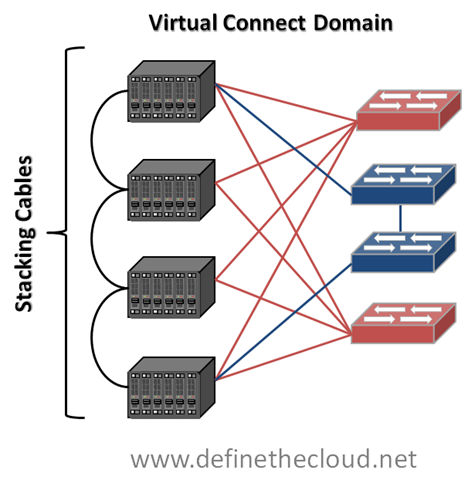
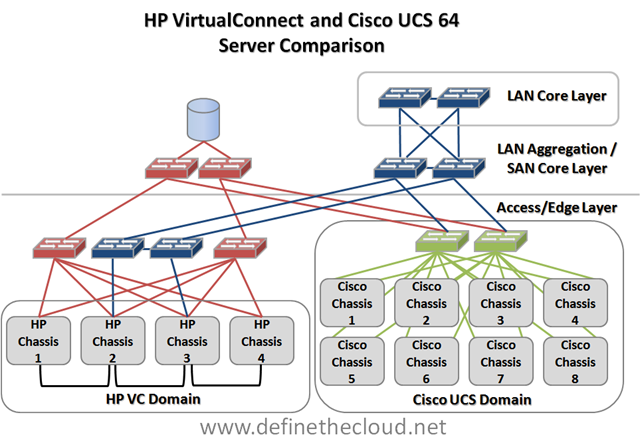
This post will cover the networking comparison of HP C-Class using Virtual Connect (VC) modules and Virtual Connect (VC) management as it compares to the Cisco UCS Blade System.  This comparison is the closest ‘apples-to-apples’ comparison that can be done between Cisco UCS and HP C-Class.  Additionally I will be comparing the max blades in a single HP VC domain which is 64 (4 chassis x 16 blades) against 64 UCS blades which would require 8 Chassis.

Accuracy and Objectivity:

It is not my intent to use numbers favorable to one vendor or the other.  I will be as technically accurate as possible throughout, I welcome all feedback, comments and corrections from both sides of the house.

HP Virtual Connect:

VC is an advanced management system for HP C-Class blades that allows 4 blade chassis to be interconnected and managed/networked as a single system.  In order to provide this functionality the LAN/SAN switch modules used must be VC and the chassis must be interconnected by what HP calls a stacking-link.  HP does not consider VC Ethernet modules to be switches, but for the purpose of this discussion they will be.  I make this decision based on the fact that: They make switching decisions and they are the same hardware as the ProCurve line of blade switches.

Note: this is a networking discussion so while VC has other features they are not discussed here.

Let’s take a graphical view of a 4-chassis VC domain.
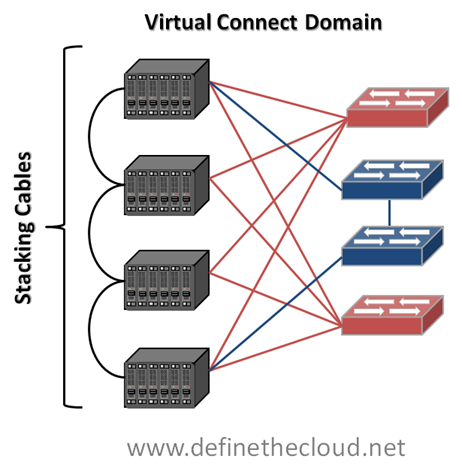
image In the above diagram we see a single VC domain cabled for LAN and SAN connectivity.  You can see that each chassis is independently connected to SAN A and B for Fibre Channel access, but Ethernet traffic can traverse the stacking-links along with the domain management traffic.  This allows a reduced number of uplinks to be used from the VC domain to the network for each 4 chassis VC domain.  This solution utilizes 13 total links to provide 16 Gbps of FC per chassis (assuming 8GB uplinks) and 20 Gbps of Ethernet for the entire VC domain (with blocking considerations discussed below.)  More links could be added to provide additional bandwidth.

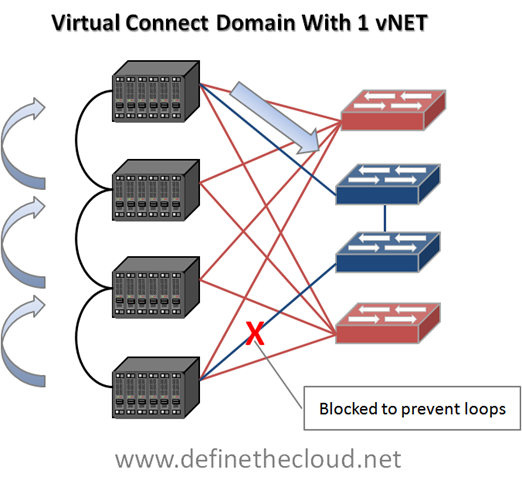
This method of management and port reduction does not come without its drawbacks.  In the next graphic I add loop prevention and server to server communication.
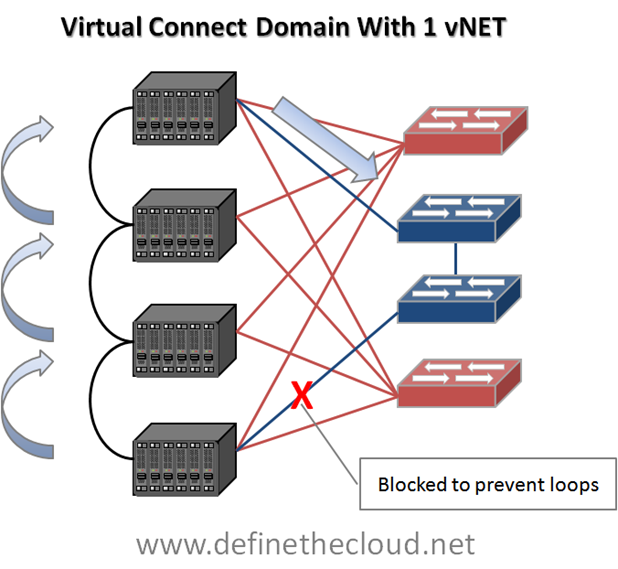
image

The first thing to note in the above diagram is the blocked link.  When only a single vNet is configured accross the VC Domain (1-4 chassis) only 1 link or link aggregate group may forward per VLAN.  This means that per VC domain there is only one ingress or egress point to the network per VLAN.  This is because VC is not ‘stacking’ 4 switches into one distributed switch control plane but instead ‘daisy-chaining’ four independent switches together using an internal loop prevention mechanism.  This means that to prevent loops from being caused within the VC domain only one link can be actively used for upstream connectivity per VLAN.

Because of this loop prevention system you will see multiple-hops for frames destined between servers in separate chassis, as well as frames destined upstream in the network.  In the diagram I show a worst case scenario for educational purposes where a frame from a server in the lower chassis must hop three times before leaving the VC domain.  Proper design and consideration would reduce these hops to two max per VC domain.

**Update**

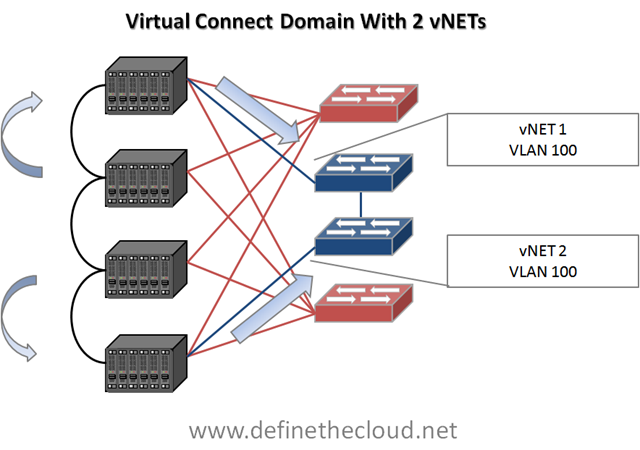
This is only one of the methods available for configuring vNets within a VC domain.  The second method will allow both uplinks to be configured using separate vNets which allows each uplink to be utilized even within the same VLANs but segregates that VLAN internally.  The following diagram shows this configuration.
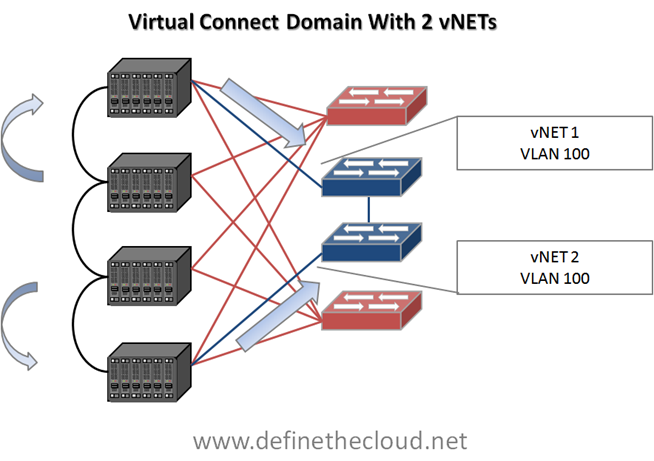
image

In this configuration server NIC pairs will be configured to each use one vNet and NIC teaming software will provide failover.  Even though both vNets use the same VLAN the networks remain separate internally which prevents looping, upstream MAC address instability etc.  For example a server utilizing only two onboard NICs would have one NIC in vNet1 and one in vNet2.  In the event of an uplink failure for vNet1 the NIC in that vNet would have no north/south access but NIC teaming software could be relied upon to force traffic to the NIC in vNet 2. 

While both methods have advantages and disadvantages this will typically be the preferred method to avoid link blocking and allow better bandwidth utilization.  In this configuration the center two chassis will still require an extra one or two hops to send/receive north/south traffic depending on which vNet is being used.

**End Update**

The last thing to note is that any Ethernet cable reduction will also result in lower available bandwidth for upstream/northbound traffic to the network.  For instance in the top example above only one link will be usable per VLAN.  Assuming 10GE links, that leaves 10G bandwidth upstream for 64 servers.  Whether that is acceptable or not depends on the particular I/O profile of the applications.  Additional links may need to be added to provide adequate upstream bandwidth.  That brings us to our next point:

Calculating bandwidth needs:

Before making a decision on bandwidth requirements it is important to note the actual characteristics of your applications.  Some key metrics to help in design are:

For instance, using the example above, if all of my server traffic is East/West within a single chassis then the upstream link constraints mentioned are mute points.  If the traffic must traverse multiple chassis the stacking-link must be considered.  Lastly if traffic must also move between chassis as well as North/South to the network, uplink bandwidth becomes critical.  With networks it is common to under-architect and over-engineer, meaning spend less time designing and throw more bandwidth at the problem, this does not provide the best results at the right cost.

Cisco Unified Computing System:

Cisco UCS takes a different approach to providing I/O to the blade chassis.  Rather than placing managed switches in the chassis UCS uses a device called an I/O Module or Fabric Extender (IOM/FEX) which does not make switching decisions and instead passes traffic based on an internal pinning mechanism.  All switching is handled by the upstream Fabric Interconnects (UCS 6120 or 6140.)  Some will say the UCS Fabric Interconnect is ‘not-a-switch’ using the same logic as I did above for HP VC devices the Fabric Interconnect is definitely a switch.  In both operational modes the interconnect will make forwarding decisions based on MAC address.

One major architectural difference between UCS and HP, Dell, IBM, Sun blade implementations is that the switching and management components are stripped from the individual chassis and handled in the middle of row by a redundant pair of devices (fabric interconnects.)  These devices replace the LAN Access and SAN edge ports that other vendors Blade devices connect to.  Another architectural difference is that the UCS system never blocks server links to prevent loops (all links are active from the chassis to the interconnects) and in the default mode, End Host mode it will not block any upstream links to the network core.  For more detail on these features see my posts: Why UCS is my ‘A-Game Server Architecture http://www.definethecloud.net/?p=301, and UCS Server Failover http://www.definethecloud.net/?p=359.) 

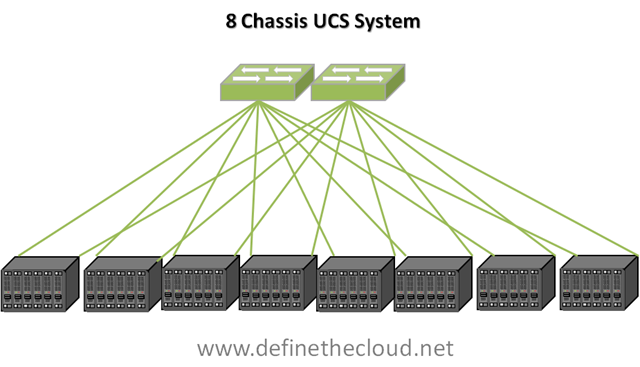
A single UCS implementation can scale to  a max 40 Chassis 320 servers using a minimal bandwidth configuration, or 10 chassis 80 servers using max bandwidth depending on requirements.  There is also flexibility to mix and match bandwidth needs between chassis etc.  Current firmware limits a single implementation to 12 chassis (96 servers) for support and this increases with each major release.  Let’s take a look at the 8 chassis 64 server implementation for comparison to an equal HP VC domain.
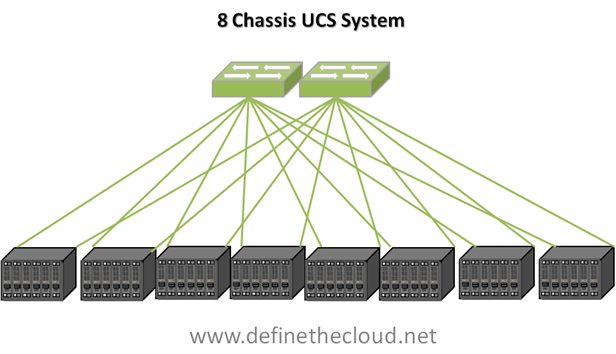
image

In the diagram above we see an 8 chassis 64 server implementation utilizing the minimum number of links per chassis to provide redundancy (the same as was done in the HP example above.  Here we utilize 16 links for 8 chassis providing 20Gbps of LAN and SAN traffic to each chassis.  Because there is no blocking required for loop-prevention all links shown are active.  Additionally because the Fabric Interconnects shown here in green are the access/edge switches for this topology all east/west traffic between servers in a single chassis or across chassis is fully accounted for.  Depending on bandwidth requirements additional uplinks could be added to each chassis.  Lastly there would be no additional management cables required from the interconnects to the chassis as all management is handled on dedicated, prioritized internal VLANs.

In the system above all traffic is aggregated upstream via the two fabric interconnects, this means that accounting for North/South traffic is handled by calculating the bandwidth needs of the entire system and designing the appropriate number of links.

Side by Side Comparison:
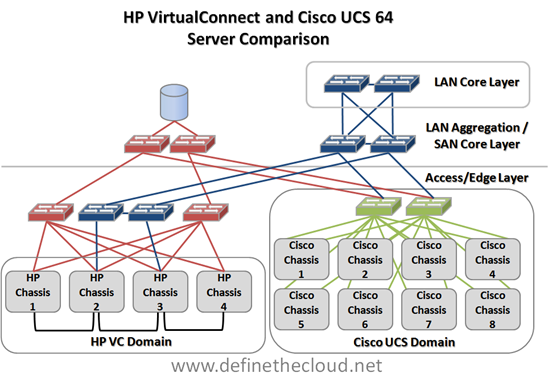
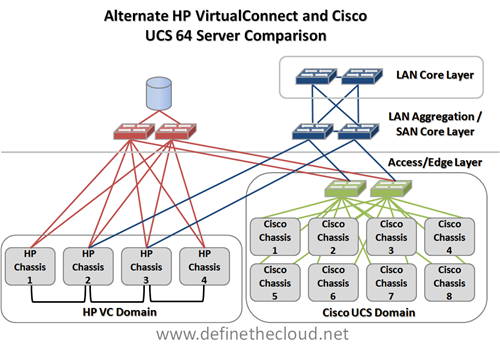
imageIn the diagram we see a maximum server scale VC Domain compared to an 8 chassis UCS domain.  The diagram shows both domains connected up to a shared two-tier SAN design (core/edge) and 3 tier network design (Access, Aggregation, Core.)  In the UCS domain all access layer connectivity is handled within the system.

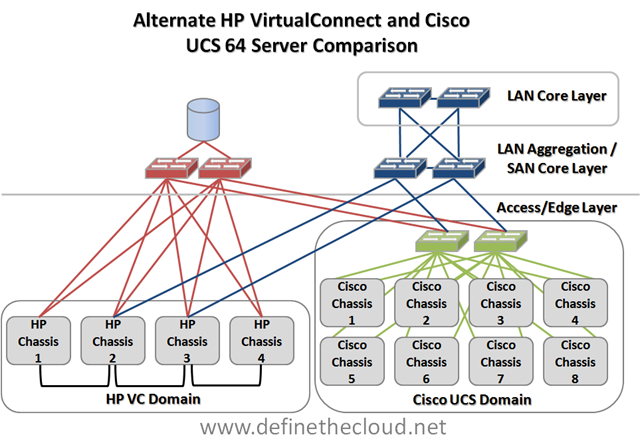
In the next diagram we look at an alternative connectivity method for the HP VC domain utilizing the switch modules in the HP chassis as the access layer to reduce infrastructure.
image

In this method we have reduced the switching infrastructure by utilizing the onboard switching of the HP chassis as the access layer.  The issue here will be the bandwidth requirements and port costs at the LAN aggregation/SAN core.  Depending on application bandwidth requirements additional aggregation/core ports will be required which can be more costly/complex than access connectivity.  Additionally this will increase cabling length requirements in order to tie back to the data center aggregation/core layer. 

Summary:

When comparing UCS to HP blade implementations a base UCS blade implementation is best compared against a single VC domain in order to obtain comparable feature parity.  The total port and bandwidth counts from the chassis for a minimum redundant system are:

  HP Cisco
Total uplinks 13 16
Gbps FC 16 per chassis N/A
Gbps Ethernet 10 per VLAN per VC Domain/ 20 Total N/A
Consolidated I/O N/A 20 per chassis
Total Chassis I/O 21 Gbps for 16 servers 20 Gbps for 8 servers


This does not take into account the additional management ports required for the VC domain that will not be required by the UCS implementation.  An additional consideration will be scaling beyond 64 servers.  With this minimal consideration the Cisco UCS will scale to 40 chassis 320 servers where the HP system scales in blocks of 4 chassis as independent VC domains.  While multiple VC domains can be managed by a Virtual Connect Enterprise Manager (VCEM) server the network stacking is done per 4 chassis domain requiring North/South traffic for domain to domain communication.

The other networking consideration in this comparison is that in the default mode all links shown for the UCS implementation will be active.  The HP implementation will have one available uplink or port aggregate uplink per VLAN for each VC domain, further restraining bandwidth and/or requiring additional ports.
UCS Server Failover

I spent the day today with a customer doing a proof of concept and failover testing demo on a Cisco UCS, VMware and NetApp environment.  As I sit on the train heading back to Washington from NYC I thought it might be a good time to put together a technical post on the failover behavior of UCS blades.  UCS has some advanced availability features that should be highlighted, it additionally has some areas where failover behavior may not be obvious.  In this post I’m going to cover server failover situations within the UCS system, without heading very deep into the connections upstream to the network aggregation layer (mainly because I’m hoping Brad Hedlund at http://bradhedlund.com will cover that soon, hurry up Brad 😉

**Update** Brad has posted his UCS Networking Best Practices Post I was hinting at above.  It's a fantastic video blog in HD, check it out here: http://bradhedlund.com/2010/06/22/cisco-ucs-networking-best-practices/

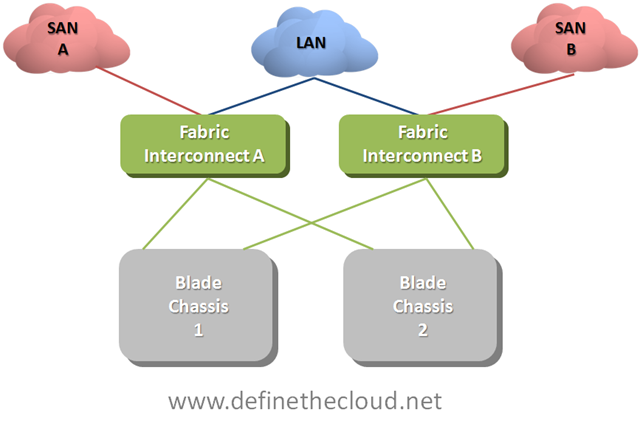
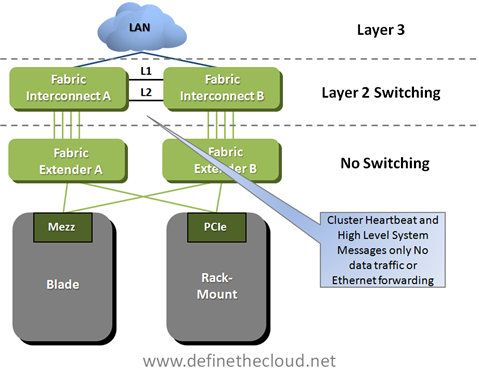
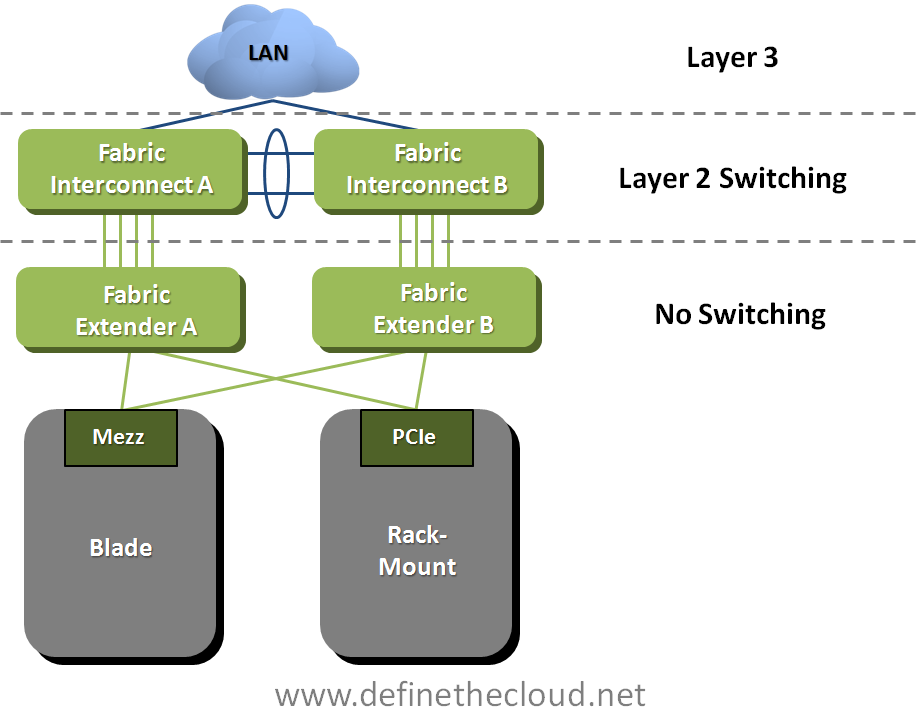
To start this off let’s get up to a baseline level of understanding on how UCS moves server traffic.  UCS is comprised of a number of blade chassis and a pair of Fabric Interconnects (FI.)  The blade chassis hold the blade servers and the FIs handle all of the LAN and SAN switching as well as chassis/blade management that is typically done using six separate modules in each blade chassis in other implementations.

Note: When running redundant Fabric interconnects you must configure them as a cluster using L1 and L2 cluster links between each FI.  These ports carry only cluster heartbeat and high-level system messages no data traffic or Ethernet protocols and therefore I have not included them in the following diagrams.

UCS Network Connectivity

image

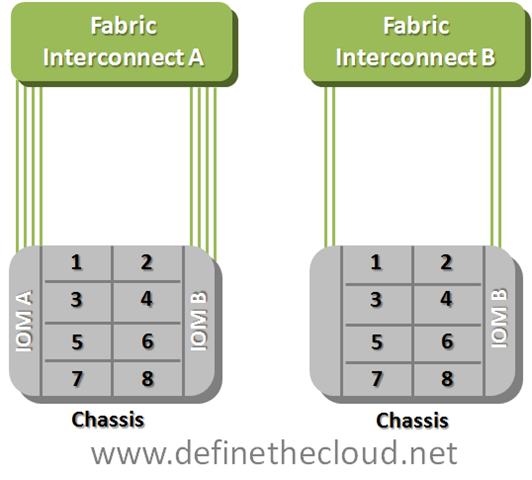
Each individual blade gets connectivity to the network(s) via mezzanine form factor I/O card(s.)  Depending on which blade type you select  each blade will either have one redundant set of connections to the FIs or two redundant sets.  Regardless of the type of I/O card you select you will always have 1x10GE connection to each FI through the blade chassis I/O module (IOM.)

UCS Blade Connectivity

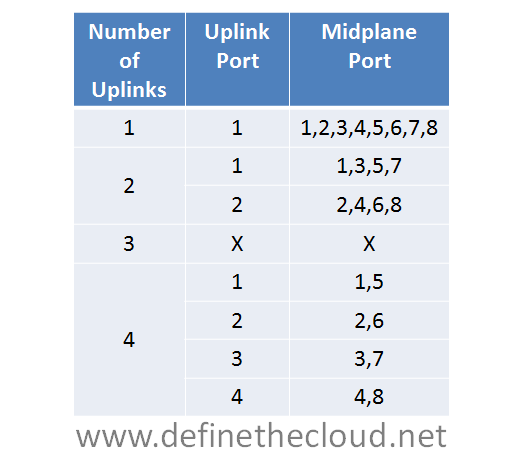
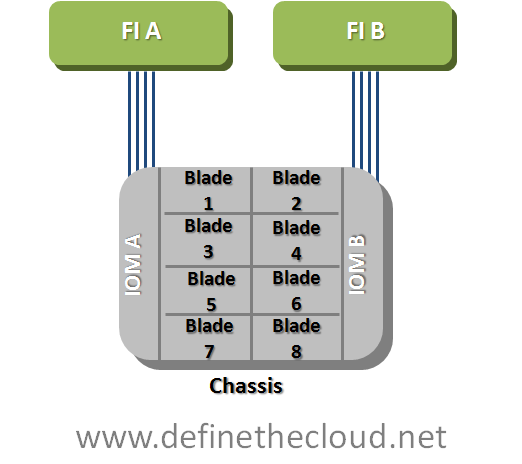
image In the diagram your seeing the blade connectivity for a blade with a single mezzanine slot.  You can see that the blade is redundantly connected to both Fabric A and Fabric B via 2x10GE links.  This connection occurs via the IOM which is not a switch itself and instead acts as a remote device managed by the fabric interconnect. What this means is that all forwarding decisions are handled by the FIs and frames are consistently scheduled within the system regardless of source and or destination.  The total switching latency of the UCS system is approximately equal to a top-of-rack switch or blade form factor LAN switch within other blade products.  Because the IOM is not making switching decisions it will need another method to move 8 internal mid-plane ports traffic upstream using it’s 4 available uplinks.  the method it uses is static pinning.  This method provides a very elegant switching behavior with extremely predictable failover scenarios. Let’s first look at the pinning later what this means for the UCS network failures.

Static Pinningimage

The chart above shows the static pinning mechanism used within UCS.  Given the configured number of uplinks from IOM to FI you will know exactly which uplink port a particular mid-plane port is using.  Each half-width blade attaches to a single mid-plane port and each full width blade attaches to two.  In the diagram the use of three ports does not have a pinning mechanism because this is not supported.  If three links are used the 2 port method will define how uplinks are utilized.  This is because eight devices cannot be evenly load-balanced across three links.

IOM Connectivity

image

The example above shows the numbering of mid-plane ports.  If you were using half width blades their numbering would match.  When using full-width blades each blade has access to a pair of mid-plane ports (1-2, 3-4, 5-6, 7-8.)In the example above blade three would utilize mid-plane port three in the left example and one in the second based on the static pinning in the chart.
So now let’s discuss how failover happens, starting at the operating system.  We have two pieces of failover to discuss, NIC teaming, and SAN multi-pathing.  In order to understand that we need a simple logical connectivity view of how a UCS blade see’s the world.

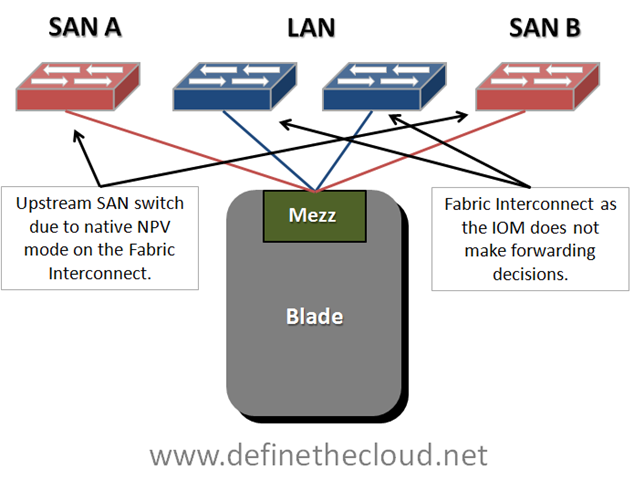
UCS Logical Connectivity

image

In order to simplify your thinking when working with blade systems reduce your logical diagram to the key components, do this by removing the blade chassis itself from the picture.  Remember that a blade is nothing more than a server connected to a set of switches, the only difference is that the first hop link is on the mid-plane of the chassis rather than a cable.  The diagram above shows that a UCS blade is logically cabled directly to redundant Storage Area Network (SAN) switches for Fibre Channel (FC) and to the FI for Ethernet.  Out of personal preference I leave the FIs out of the SAN side of the diagram because they operate in N_Port Virtualizer (NPV) mode which means forwarding decisions are handled by the upstream NPiV standard compliant SAN switch.

Starting at the Operating System (OS) we will work up the network stack to the FIs to discuss failover.  We will be assuming FCoE is being used, if you are not using FCoE ignore the FC piece of the discussion as the Ethernet will remain the same.

SAN Multi-Pathing:

SAN multi-pathing is the way we obtain redundancy in FC, FCoE, and iSCSI networks.  It is used to provide the OS with two separate paths to the same logical disk.  This allows the server to access the data in the event of a failure and in some cases load-balance traffic across two paths to the same disk.  Multi-pathing comes in two general flavors: active/active, or active passive.  Active/active load balances and has the potential to use the full bandwidth of all available paths.  Active/Passive uses one link as a primary and reserves the others for failover.  Typically the deciding factor is cost vs. performance.

Multi-pathing is handled by software residing in the OS usually provided by the storage vendor.  The software will monitor the entire path to the disk ensuring data can be written and/or read from the disk via that path.  Any failure in the path will cause a multi-pathing failover.

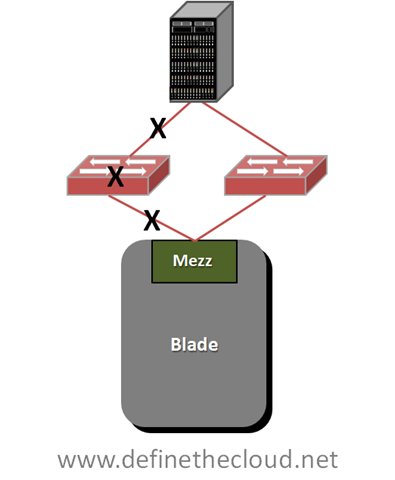
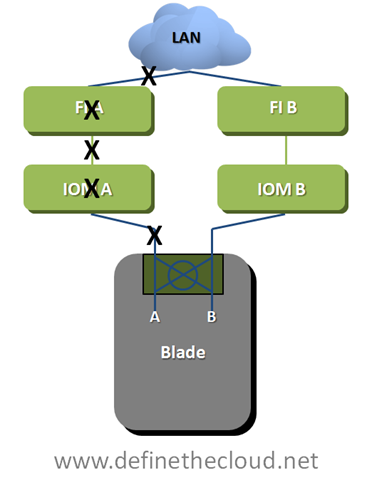
Multi-Pathing Failure Detection

image

Any of the failures designated by the X’s in the diagram above will trigger failover, this also includes failure of the storage controller itself which are typically redundant in an enterprise class array.  SAN multi-pathing is an end-to-end failure detection system.  This is much easier to implement in SAN as there is one constant target as opposed to a LAN where data may be sent to several different targets across the LAN and WAN.  Within UCS SAN multi-pathing does not change from the system used for standalone servers.  Each blade is redundantly connected and any path failure will trigger a failover.

NIC-Teaming:

NIC teaming is handled in one of three general ways: active/active load-balancing, active/passive failover, or active/active transmit with active/passive receive.  The teaming type you use is dependant on the network configuration.

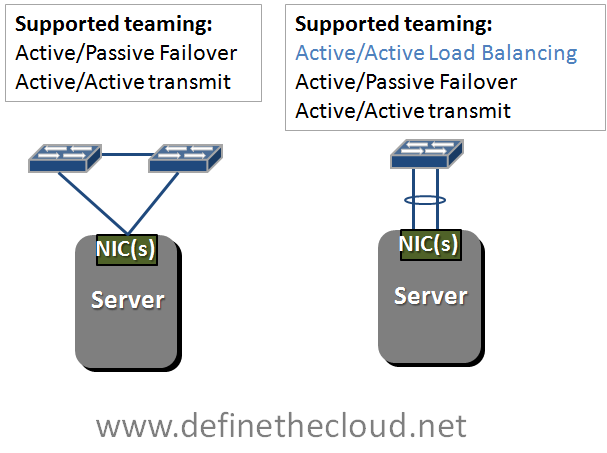
Supported teaming Configurations

image 

In the diagram above we see two network configurations, one with a server dual connected to two switches, and a second with a server dual connected to a single switch using a bonded link.  Bonded links act as a single logical link with the redundancy of the physical links within.  Active/Active load-balancing is only supported using a bonded link due to MAC address forwarding decisions of the upstream switch.  In order to load balance an active/active team will share a logical MAC address, this will cause instability upstream and lost packets if the upstream switches don’t see both links as a single logical link.  This bonding is typically done using the Link Aggregation Control Protocol (LACP) standard.

If you glance back up at the UCS logical connectivity diagram you’ll see that UCS blades are connected in the method on the left of the teaming diagram.  This means that our options for NIC teaming are Active/Passive failover and Active Active transmit only.  This is assuming a bare metal OS such as Windows or Linux installed directly on the hardware, when using virtualized environments such as VMware all links can be actively used for transmit and receive because there is another layer of switching occurring in the hypervisor. 

I typically get feedback that the lack of active/active NIC teaming on UCS bare metal blades is a limitation.  In reality this is not the case.  Remember Active/Active NIC teaming was traditionally used on 1GE networks to provide greater than 1GE of bandwidth.  This was limited to a max of 8 aggregated links for a total of 8GE of bandwidth.  A single UCS link at 10GE provides 20% more bandwidth than an 8 port active/active team.

NIC teaming like SAN multi-pathing relies on software in the OS, but unlike SAN multi-pathing it typically only detects link failures and in some cases loss of a gateway.  Due to the nature of the UCS system NIC teaming in UCS will detect failures of the mid-plane path, the IOM, the utilized link from the IOM to the Fabric Interconnect or the FI itself.  This is because the IOM is a linecard of the FI and the blade is logically connected directly to the FI.

UCS Hardware Failover:

UCS has a unique feature on several of the available mezzanine cards to provide hardware failure detection and failover on the card itself.  Basically some of the mezzanine cards have a mini-switch built in with the ability to fail path A to path B or vice versa.  This provides additional failure functionality and improved bandwidth/failure management.  This feature is available on Generation I Converged network Adapters (CNA) and the Virtual Interface Card (VIC) and is currently only available in UCS blades.

UCS Hardware Failover

image

UCS Hardware failover will provide greater failure visibility than traditional NIC teaming due to advanced intelligence built into the FI as well as the overall architecture of the system.  In the diagram above HW failover detects: mid-plane path, IOM and IOM uplink failures as link failures due to the architecture.  Additionally if the FI loses it’s upstream network connectivity to the LAN it will signal a failure to the mezzanine card triggering failure.  In the diagram above any failure at a point designated by an X will trigger the mezzanine card to divert Ethernet traffic to the B path.  UCS hardware failover applies only to Ethernet traffic as SAN networks are built as redundant independent networks and would not support this failover method.

Using UCS hardware failover provides two key advantages over other architectures:

The next piece of UCS server failover involves the I/O modules themselves.  Each I/O module has a maximum of four 10GE uplinks providing 8x10GE mid-plane connections to the blades at an oversubscription of 1:1 to 8:1 depending on configuration.  As stated above UCS uses a static non-configurable pinning mechanism to assign a mid-plane port to a specific uplink from the IOM to the FI.  Using this pinning system allows the IOM to operate as an extension of the FI without the need for Spanning Tree Protocol (STP) within the UCS system.  Additionally this system provides a very clear network design for designing oversubscription in both nominal and failure situations.

For the discussion of IOM failover we will use an example of a max configuration of 8 half-width blades and 4 uplinks on each redundant IOM.

Fully Configured 8 Blade UCS Chassis

image In this diagram each blade is currently redundantly connected via 2x10GE links.  One link through each IOM to each FI.  Both IOMs and FIs operate in an active/active fashion from a switching perspective so each blade in this scenario has a potential bandwidth of 20GE depending on the operating system configuration.  The overall blade chassis is configured with 2:1 oversubscription in this diagram as each IOM is using its max of 4x10GE uplinks while providing its max of 8x10GE mid-plane links for the 8 blades.  If each blade were to attempt to push a sustained 20GE of throughput at the same time (very unlikely scenario) it would receive only 10GE because of this oversubscription.  The bandwidth can be finely tuned to ensure proper performance in congestion scenarios such as this one using Quality of Service (QoS) and Enhanced Transmission Selection (ETS) within the UCS system.

In the event that a link fails between the IOM and the FI the servers pinned to that link will no longer have a path to that FI.  The blade will still have a path to the redundant FI and will rely on SAN multi-pathing, NIC teaming and or UCS hardware failover to detect the failure and divert traffic to the active link.

For example if link one on IOM A fails blades one and five would lose connectivity through Fabric A and any traffic using that path would fail to link one on Fabric B ensuring the blade was still able to send and receive data.  When link one on IOM A was repaired or replaced data traffic would immediately be able to start using the A path again.

IOM A will not automatically divert traffic from Blade one and five to an operational link, nor is this possible through a manual process.  The reason for this is that diverting blade one and fives traffic to available links would further oversubscribe those links and degrade servers that should be unaffected by the failure of link one.  In a real world data center a failed link will be quickly replaced and the only servers that will have been affected are blade one and five. 

In the event that the link cannot be repaired quickly there is a manual process called re-acknowledgement which an administrator can perform.  This process will adjust the pinning of IOM to FI links based on the number of active links using the same static pinning referenced above.  In the above example servers would be re-pinned based on two active ports because three port configurations are not supported. 

Overall this failure method and static pinning mechanism provides very predictable bandwidth management as well as limiting the scope of impact for link failures.

Summary:

The UCS system architecture is uniquely designed to minimize management points and maximize link utilization by removing dependence on STP internally.  Because of its unique design network failure scenarios must be clearly understood in order to maximize the benefits provided by UCS.  The advanced failure management tools within UCS will provide for increased application uptime and application throughput in failure scenarios if properly designed.

FCoE multi-hop; Do you Care?

There is a lot of discussion in the industry around FCoE’s current capabilities, and specifically around the ability to perform multi-hop transmission of FCoE frames and the standards required to do so.  A recent discussion between Brad Hedlund at Cisco and Ken Henault at HP (http://bit.ly/9Kj7zP) prompted me to write this post.  Ken proposes that FCoE is not quite ready and Brad argues that it is. 

When looking at this discussion remember that Cisco has had FCoE products shipping for about 2 years, and has a robust product line of devices with FCoE support including: UCS, Nexus 5000, Nexus 4000 and Nexus 2000, with more products on the road map for launch this year.  No other switching vendor has this level of current commitment to FCoE.  For any vendor with a less robust FCoE portfolio it makes no sense to drive FCoE sales and marketing at this point and so you will typically find articles and blogs like the one mentioned above.  The one quote from that blog that sticks out in my mind is:

“Solutions like HP’s upcoming FlexFabric can take advantage of FCoE to reduce complexity at the network edge, without requiring a major network upgrades or changes to the LAN and SAN before the standards are finalized.”

If you read between the lines here it would be easy to take this as ‘FCoE isn’t ready until we are.’  This is not unusual and if you take a minute to search through articles about FCoE over the last 2-3 years you’ll find that Cisco has been a big endorser of the protocol throughout (because they actually had a product to sell) and other vendors become less and less anti-FCoE as they announce FCoE products.

It’s also important to note that Cisco isn’t the only vendor out there embracing FCoE: NetApp has been shipping native FCoE storage controllers for some time, EMC has them road mapped for the very near future, Qlogic is shipping a 2nd generation of Converged Network adapter, and Emulex has fully embraced 10Gig Ethernet as the way forward with their OneConnect adapter (10GE, iSCSI, FCoE all in one card.)  Additionally support for FCoE switching of native Fibre Channel storage is widely supported by the storage community.

Fibre Channel over Ethernet (FCoE) is defined in IEEE FC-BB5 and requires the switches it traverses to support the IEEE Data Center Bridging (DCB)standards for proper traffic treatment on the network.  For more information on FCoE or DCB see my previous posts on the subjects (FCoE: http://www.definethecloud.net/?p=80, DCB: http://www.definethecloud.net/?p=31.)

DCB Has four major components, and the one in question in the above article is Quantized Congestion Notification (QCN) which the article states is required for multi-hop FCoE.  QCN is basically a regurgitation of FECN and BECN from frame relay.  It allows a switch to monitor it’s buffers and push congestion to the edge rather than clog the core. In the comments Brad correctly states that QCN is not required for FCoE, the reason for this is that Fibre Channel operates today without any native version of QCN, therefore when placing it on Ethernet you will not need to add functionality that wasn’t there to begin with, remember Ethernet is just a new layer 1-2 for native FC layers 2-4, the FC secret sauce remains unmodified.  Remember that not every standard defined by a standards body has to be adhered to by every device, some are required, some are optional.  Logical SANs are a great example of an optional standard.

Rather than discuss what is or isn’t required for multi-hop FCoE I’d like to ask a more important question that we as engineers tend to forget: Do I care?  This question is key because it avoids having us argue the technical merits of something we may never actually need, or may not have a need for today.

Do we care?

First let’s look at why we do multi-hop anything: to expand the port-count of our network.  Take TCP/IP networks and the internet for example, we require the ability to move packets across the globe through multiple routers (hops.)  This is in order to attach devices on all corners of the globe.

Now let’s look at what we do with FC today: typically one or two hop networks (sometimes three) used to connect several hundred devices (occasionally but rarely more.)  It’s actually quite common to find FC implementations with less than 100 attached ports.  This means that if you can hit the right port count without multiple hops you can remove complexity and decrease latency, in Storage Area Networks (SAN) we call this the collapsed core design.
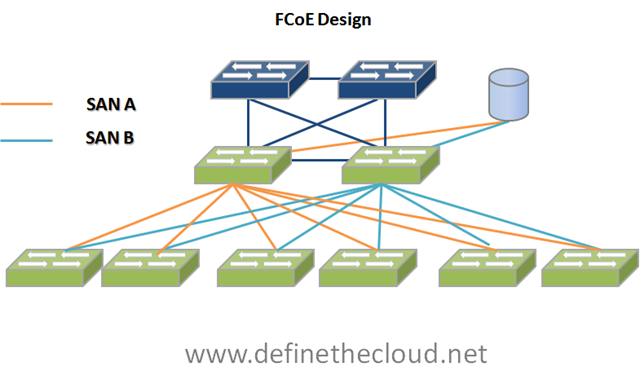
The second thing to consider is a hypothetical question: If FCoE were permanently destined for single hop access/edge only deployments (it isn’t) should that actually stop you from using it?  The answer here is an emphatic no, I would still highly recommend FCoE as an access/edge architecture even if it were destined to connect back to an FC SAN and Ethernet LAN for all eternity.  Let’s jump to some diagrams to explain.  In the following diagrams I’m going to focus on Cisco architecture because as stated above they are currently the only vendor with a full FCoE product portfolio.

 image

In the above diagram you can see a fairly dynamic set  of FCoE connectivity options.  Nexus 5000 can be directly connected to servers, or to Nexus 4000 in IBM BladeCenter to pass FCoE.  It can also be connected to 10GE Nexus 2000s to increase its port density. 

To use the nexus 5000 + 2000 as an example it’s possible to create a single-hop (2000 isn’t an L2 hop it is an extension of the 5000) FCoE architecture of up to 384 ports with one point of switching management per fabric.  If you take server virtualization into the picture and assume 384 servers with a very modest V2P ratio of 10 virtual machines to 1 physical machine that brings you to 3840 servers connected to a single hop SAN.  That is major scalability with minimal management all without the need for multi-hop. The diagram above doesn’t include the Cisco UCS product portfolio which architecturally supports up to 320 FCoE connected servers/blades.

The next thing I’ve asked you to think about is whether or not you should implement FCoE in a hypothetical world where FCoE stays an access/edge architecture forever.  The answer would be yes.  In the following diagrams I outline the benefits of FCoE as an edge only architecture.

image

The first benefit is reducing the networks that are purchased, managed, power, and cooled from 3 to 1 (2 FC and 1 Eth to 1 FCoE.)  Even just at the access layer this is a large reduction in overhead and reduces the refresh points as I/O demands increase.

image The second benefit is the overall infrastructure reduction at the access layer.  Taking a typical VMware server as an example we reduce 6x 1GE ports, 2x 4GFC ports and the 8 cables required for them to 2x 10GE ports carrying FCoE.  This increases total bandwidth available while greatly reducing infrastructure.  Don’t forget the 4 top-of-rack switches (2x FC, 2x GE) reduced to 2 FCoE switches.

Since FCoE is fully compatible with both FC and pre-DCB Ethernet this requires 0 rip-and-replace of current infrastructure.  FCoE is instead used to build out new application environments or expand existing environments while minimizing infrastructure and complexity.

What if I need a larger FCoE environment?

If you require a larger environment than is currently supported extending your SAN is quite possible without multi-hop FCoE.  FCoE can be extended using existing FC infrastructure.  Remember customers that require an FCoE infrastructure this large already have an FC infrastructure to work with.

image 

What if I need to extend my SAN between data centers?

FCoE SAN extension is handled in the exact same way as FC SAN extension, CWDM, DWDM, Dark Fiber, or FCIP.  Remember we’re still moving Fibre Channel frames.

image

Summary:

FCoE multi-hop is not an argument that needs to be had for most current environments.  FCoE is a supplemental technology to current Fibre Channel implementations.  Multi-hop FCoE will be available by the end of CY2010 allowing 2+ tier FCoE networks with multiple switches in the path, but there is no need to wait for them to begin deploying FCoE.  The benefits of an FCoE deployment at the access layer only are significant, and many environments will be able to scale to full FCoE roll-outs without ever going mutli-hop.