The Lorax: A History of Silicon Valley

This is adapted from ‘The Lorax’ by the Great Dr. Seuss. If you have not read his work, please do. His stories teach beautiful lessons through the use of whimsy and wonder.

I love Dr. Seuss, so this is a thing I do. If you like it, there are links to others at the end. I make no guarantees as to the freshness of the content.

Unless someone like you cares a whole awful lot, nothing is going to get better. It’s not.

Dr. Seuss 'The Lorax'
  At the far end of tech 
 where the products are sold
 and the wind smells of sandwiches delivered half-cold,
 where no roadmap is ever delivered when told…
 is the street of the Lifted Lorax.
  
 And deep in that end, some people say, 
 if you look deep enough you can still see, today, 
 where the Lorax once stood
 just as long as it could
 before somebody lifted the Lorax away.
 What was the Lorax? 
 And why was it there? 
 And why was it lifted and taken somewhere 
 from the far end of town where the products are sold? 
 The old Once-ler still lives here.
 Ask him. He knows.
  
 You won’t see the Once-ler.
 Don’t look for his booth.
 He stays in his mansion, alone with his things,
 where he drinks cold-pressed juice
 that someone else brings.
 And on rare occasions, out of the blue,
 he tweets
 out a message
 he often repeats
 and tells how the Lorax was lifted away.
  
 He’ll tell you, perhaps…
 If you’re willing to pay.
  
 He’ll send you a link
 to an app where you lay
 one third of your equity, then sign
 NDA
 of course, he will say
 it’s always this way.
    
 He then checks the app
 triple checks the amount
 to ensure he owns you
 that you can’t dismount.
  
 Then he adds what you paid him
 to the piles of cash
 some used for the mortgage
 the rest wipe his ass.
  
 He slacks, “I will ping you by video call,
 While out on my yacht, with crappy sig-nal.
  
 BLURRP!
 The blurps of his call, ring loud in your ear
 and the old Once-ler’s voice is not at all clear,
 since he’s out on the water on cell-phone connection
 choppy and garbled,
 This makes him sound
 quite verbally hobbled.
  
 “Now I’ll tell you.” He says, with his ego displayed,
 “how the Lorax got lifted and taken away…
  
 It all started way back…
 such a long, long time back…
  
 Way back in the days when “The Valley” was green
 and orchards spread far
 for a beautiful scene,
 and a house could be bought by a regular Jane…
 one morning I came to this place I remain.
 And I first saw the schools!
 Stanford and Berkley
 their talent you see!
 So much innovation, but money was lacking,
 an untapped resource, for someone like me.
  
 Between them a freeway Junipero Serra
 with a great halfway point up above Santa Clara
 where Sand Hill Road sat, doing just fine, in a soon to die era.
  
 From the nearby South bay
 came cool morning breezes
 which moistened the fruit
 as it hung in the treeses.
  
 But that talent! Those brains!
 Those smart engineers!
 All my life I’ve been searching
 seeking to obtain
 a resource like this
 that I could abuse.
 A resource I’d care about,
 If I’d read Dr. Seuss.
  
 My heart leapt with joy,
 I’d be an investor!
 I leased a small space
 Near an old shopping center
  
 With GREAT BRAINS AND SKILL, plus some damn lucky timing, 
 We started to watch, our net-worth start climbing.
 In no time at all, I had built a small group
 so I cut down an orchard, at the end of the loop.
  
 The moment I’d finished, I heard W-T-F!
 I looked.
 Something popped out of a plum that had struck
 the ground next to where the last tree lay dead,
 His looks were as strange as the things that he said.
  
 He was small. He was old.
 Had a drawl and was bossy.
 He looked straight on over
 Like he didn’t even know me.
  
 “Douche bag! He said, with a stern knowing tone,
 “I am the Lorax. I speak for what’s grown.
 I speak for what’s grown and warn of what comes!
 And I demand to know, what you’ve done to my plums”-
 He was winded and red; his anger was showing.
 “Why the hell would you destroy, all the things that are growing!”
  
 “Look bro” I said. “No need to get pissy.
 It’s one little orchard. No one will miss. See?
 I’m saving the world. This thing is a network.
 To connect all the people, he said as he smirked.
 It’s a book. It’s a phone. It’s music! It’s apps!
 But it has more to offer than all of that crap!
 You can use it for ads and make tons of money!
 Selling people like products while they use a freebie”
  
               The Lorax replied,
               “Dude, your ego is large, so this may just sting.
               There is no one on earth
               who would need such a thing.
  
 Just as my mouth opened to say “go-to-hell”
 around the corner came AOL,
 they thought this web would be great for a buck.
 They hired some people and backed up a truck.
  
 I clowned the old Lorax, “You stupid old man!
 You’ll never quite get, what we just began!”
  
 “I repeat cried the Lorax,
 I speak for what’s grown!”
  
 “You’re expired. I told him.
 “Go retire in peace.”
  
 I ran for the phone, in those days they plugged in,
 I put in quick calls to nephews and cousins.
 I called all my friends, my college frat buddies
 said here’s the scoop, lets go make some monies!
 We’re going to make the old world move forwards!
 Get over here fast, take the road through the orchards,
 Turn left when there’s strip malls instead of more woods.
  
 And in no time at all,
 the cement was flowing,
 buildings and car lots sprung up in quick fashion,
 concrete and rebar were doing the growing.
 We ‘innovated’
 and we stayed very busy,
 with two maybe three drinks at lunches
 wining and dining,
 betting millions on hunches.
  
 Then…
 Hello, there, hello!
 How the money did flow!
 We needed more buildings
 more car lots
 more blow!
  
 So we cleared orchards with speed
 driven purely by greed.
 We were changing the world
 this was progress we said.
 And that Lorax?...
 We guessed he was dead.
  
 The very next month
 a knock at the door
 open it up, and he’s standing there.
  
 He bellowed, “I’m the Lorax, I speak for what grows,
 Which you are destroying, wherever it shows.
 But I’m also in charge of the birds and the bees
 Who live on the fruit of these orchard trees
 and gorge on the nectar and fruit as they please.”
  
 “Because of your buildings, your car lots, and malls
 there’s not enough food for the winter and falls.
 My poor birds and bees and dying in droves
 the rest are out searching for new homes and new groves.”
  
 “This was paradise to them, but now they must go.
 They require new orchards where their families can grow.
 Good luck my fine friends,” he said as he hung his head low.
  
 I, the Once-ler, felt something
 As I watched them all go.
 BUT…
 Money I worship!
 And I’ve got plenty of blow.
 Who needs birds anyway? I drive a Lambo.
  
 It wasn’t intentional. I didn’t want that.
 But bigger is better when wallets are fat.
 I biggered my bets. I biggered my tech.
 I biggered my campuses. I biggered my head.
 Our tech started shipping, all over the globe
 from Bangkok to Paris and back to Latrobe.
 So I kept on biggering… selling more tech.
 And I biggered my wealth, with each inbound check.
  
 Then there he was, the Lorax was back
 That angry old coot with more shit that was whack.
  
 “I am the Lorax,” he choked through a cough.
 Clearing his throat he readied a scoff.
 “Once-ler!” He roared, with the rasp of his age.
 “Once-ler! The air’s filled with smog. Disengage!
 My poor lotis butterfly, well they can’t see their way.
 At this rate we’ll lose sight of the sun through the day.
  
 “And so,” said the Lorax,
 “-please pardon my tone
 They can’t survive here.
 I’ve sent them off to places unknown.”
  
 “Where will they end?...
 I don’t comprehend.”
  
 “They may have to fly for week upon week
 To get away from you, and the smog that you leak.”
  
 “But worse,” cried the Lorax, his neck hair stood up.
 “Let me say a few words about this f’ng slop.
 Your plants are dumping this shit without stop.
 They build your chips and out this stuff pops.
 And what do you do with this poo smelling goo?
 I’ll show you, you self-entitled boy-man you!”
  
 “You’re killing the lakes where the Lake Splittail fish swims!
 No more can they frolic and live out their whims.
 So I’ve ordered them off. Their future is bleak.
 They’ll wander on land, flip-flopping and weak
 searching for water without oil streaks.”
  
 And then I got angry.
 So shakingly angry.
 I yelled at the Lorax, “Now listen here, Pops!
 All you do is whine, and scream Stop! Stop! Stop!
 Well, I have my liberty, sir, and I’ll tell you
 I intend to keep doing what I want to do!
 And! For your information, you Lorax, I’m going to keep biggering
               And BIGGERING
                             And BIGGERING
                                          And BIGGERING,
 Turning orchards into lots for engineers cars
 to build more tech we can trade for gold bars!”
  
 And at that very moment, we heard a loud sound!
 Outside in the orchards a tree hit the ground.
 The final fruit tree did finally fall.
 The orchards were gone, once and for all.
  
 No room. No more boom. No work to be done.
 So, in no time, my friends, nephews, cousins, every one,
 Threw up two fingers as they hopped in my cars,
 Peace out, they said as the tires burned tar. 
  
 Now all that was left was a bad smelling sky
 Office buildings, parking lots…
 the Lorax…
 and I.
  
 The Lorax said nothing. Stared through my soul…
 his stare said to me, what he saw wasn’t whole…
 as he rose to get going, his mood black as coal.
 I’ll never forget that look on his face
 when he stood one last time, to take leave of this place,
 this Garden of Eden, that I had erased.
  
 And all that the Lorax left here in this mess
 Was a pile of rocks, with one word…
 “Unless.”
 Whatever that meant, well, I just couldn’t guess.
  
 It’s ancient history now.
 But I’ve thought of it lots.
 Worried, and muddled
 to untangle the plot. 
 While Silicon Valley crumbled away
 I’ve tried to make sense
 I’ve worried, I’ve wondered,
 and not just for legal defense.
  
 “But now,” says the Once-ler,
 “Now that you’re here,
 The word of the Lorax seems perfectly clear.
 UNLESS someone like you
 Cares a whole awful lot,
 Nothing is going to get better.
 It’s not.
  
 “So…
 Listen!” cries the Once-ler
 “I’ve sent you a seed
 in it you’ll find the hope that you need.
 It’s the last of its kind, so treat it as such
 there’s no other thing, the world needs this much.
 Plant it somewhere bleak and dreary
 Feed it, water it, and in theory
 The hope will grow big and strong
 and one day the Lorax will come back along. 

Driving Digital Transformation

Driving Digital Transformation

“Digital, Digitization, Digital, Digital, Digital Transformation. There, I've hit my mandatory quota of 5 digital mentions for my presentation, now we can get to something interesting.”

That was my opening line at a large data center and cloud conference in Rome. It wasn't the one I'd planned, but I had just spent a day listening to my executive colleagues from around the industry wax philosophically about 'digital' with no mention of how, why, or what. No call to action, no roadmap, no substance. The previous presenter was sitting front row center with his jaw wide open when I finished the sentence. He'd had digital-this, digital-that, as the title for every slide in his deck. Sorry, not sorry.

I haven't watched 'Game of Thrones' but I imagine 'Winter is Coming' might be similar to the way 'Digital Transformation' gets thrown around. 'Um yeah, it's this thing, it's on it's way, it's already happening in some places. Everyone knows what it is, definitely, for sure.' Let's agree that: it is a thing, it is happening, and it is coming in stronger waves. From there let's look at what it is, where it's coming from, and how it can be embraced.

Let's rewind to the beginning of widespread Information Technology adoption. We'll go back to the early days of networked computing and use the adoption of email systems as an example. As a company adopted email systems for the first time, they were dipping their toe into digital transformation. Paper based systems and analog based voice calls were converted to a digital medium. What that was doing under the surface was creating business value through technology adoption. That is the key to digital transformation.

Theoretically if there were two companies in the same industry and one was first to deploy and adopt an email system, they'd have a competitive advantage. The advantage of speed and agility. The hidden key phrase of the sentence being adopt. Deploying an email system wasn't enough. They had to drive adoption, incorporate it into their process and modify work flows to take advantage of it.

As technology became commonplace a shift occurred behind the scenes. Information Technology (IT) moved from a value-creation center to a cost-center. Technology purchase decisions moved from 'what can it do for the business' to how much money can we save doing the same thing. IT sales conversations shifted to circular conversations about return-on-investment (ROI), and sales cycles began incorporating any number of questionable ROI calculations.

Now comes Digital Transformation with all it's hype being treated as something new. It's not. Like most everything in technology it's circular. We're at a technology inflection point where IT can move back into the 'what can it do for the business' seat. Digital Transformation is simply using emerging technology and new IT operational models to drive new value streams for the business or mission. No more, no less.

Several things are coming together at once to form the catalyst of this shift. New technologies like big data, and AI. New consumption models like mobile first compute users. And new delivery models like cloud which provide an extremely low compute entry cost and a scale up model as a company grows. Uber is one of the most touted examples of combining these things to create market disruption, which is just silicon valley's term of the week for transformation.

Uber is an example I like, and not in the doom and gloom 'disrupt or be disrupted' way people love to use them. The question I ask my customers is different: 'If you were the taxi companies three years before Uber launched, and you had the idea for an Uber like app, could you have executed on it? Would your IT infrastructure and organization been able to build and adopt the new model?' Universally the answer is no.

The first stage of digital transformation is modernizing the technology delivery stack into a system that provides agility. Agility to test out new ideas, agility to fail and try again. Agility to deploy the bright ideas that your organization comes up with. The world moves fast, the longer it takes to process an idea, and get it stood up, the higher the chance of missing the market and being out maneuvered.

The dirty secret in all of this is that the technology is easy. There are hundreds of great options to choose from when it comes to the right technology. You can cloud it, automate it, DevOps it, etc. Alone or in tandem all of these things can work perfectly from a technology perspective to achieve your goals. The tech is easy, but most still fail.

The hard part is choosing the technology stack that fits your organization, then remodeling your people and process to take full advantage of it. Nobody likes to admit that getting new technology running is the easy part. The hard part is getting it adopted to it's fullest potential within your organization. Successfully launching a product or project internally is as important as picking the right tech and standing it up.

I look at this like Marine Corps boot camp. As a recruit we spend all of boot camp hating it and waiting to graduate, thinking boot camp is the hard part. Our drill instructors assure us boot camp is the easiest part of being a Marine. Years later we find out they were right. Boot camp, like a technology install, is fairly color by the numbers, if you follow the instructions things work as expected. Being in the fleet, post boot camp is like technology adoption. You're up and running but now it's your responsibility to apply the skills and capabilities the right way every day.

When looking at making technology shifts be ready to tackle the people and process with as much energy as you do the technology. You'll need leaders, champions, early adopters. You'll need to provide a clear sense of direction, intended outcome, and a sense of 'why'. If your team is bought in, and all moving towards the same goal the technology stack becomes a supporting character in the transformation you'll drive.

As a parting thought on Digital Transformation try and think big. I've been privileged to travel the world working with customers of all types in some very interesting places. I've gotten to see first hand the positive transformative power technology can have. From banks in Africa using cell-phone usage statistics to assess credit worthiness and provide small-business loans to people with no credit history, to hospitals in India using tele-medicine to provide advanced patient care on-site in remote villages.

Digital transformation is as much about change and a better future as it is about profit lines. Even better, the two don't have to be separate goals. This is why I wake up every morning excited to see what I can help my customers achieve that day.

IT Needs its Gates and Jobs

Scour the data sheets and marketing of the best business technology hardware and software and you will see complexity. You will see references to ports, protocols, abstractions, management models, object-oriented and non-object-oriented practices, etc. Hand that data sheet to a highly-intelligent, well-educated lay-person and you will get a blank stare.

It often feels like we thrive on the complexity, we water it, we feed it, we want it to grow big and strong. Maybe we do -- maybe that complexity exists so that as masters of it we can command higher salaries – maybe it’s just a byproduct of moving so quickly. Either way it needs to change.

Hand your iPad to a child and within minutes they’re navigating through their favorite videos or playing a beloved game; no instruction or education is required. Hand an English major an SSH session and ask them to configure your switch, results will vary. Move up to our most common high-level abstraction ‘the orchestration layer’ and ask them to deploy an application. No dice.

This complexity isn’t necessary. This complexity can go away, it really can, but we’re missing something.

Enterprise technology is actually missing two things: the Bill Gates, and the Steve Jobs.

Sordid and detailed history aside Gates and Microsoft made computing a reality for the masses. The combination of good-enough technology in Windows, combined with powerful vision, sales, and marketing moved the PC into every home.

Jobs took this to another level and turned technology into art. His genius was in simplicity; providing consumers with technology they never knew they needed but could from that point forward never live without. He did this by combining hardware, software and service into experience. The iPod wasn’t a device like its competition. The iPod was the hassle-free experience of listening to exactly what you wanted, wherever you wanted to listen.

And then we return to enterprise technology. Even the sales pitch is atrocious. We focus on individual value propositions of point products. We occasionally get bold: tying a handful of products into a ‘solution’ and espouse the specific values of that solution in isolation. Never do we discuss the value to the business, the experience of the user. We never discuss anything that has true value, or real differentiation.

All is not lost, there are emerging technologies and trends that look to address this. Intent driven systems, and ‘Serverless’ are on the right track. They speak to the overall experience of architecting/deploying applications or coding/building them respectively. This is a major move in the right direction.

This move still needs help:

As consumers of enterprise tech, we must be more open to looking towards vision and outcomes. In fact, we must demand that the sellers we communicate with articulate that first.

As sellers, we must learn how to weave technology together for the higher-level purpose of those outcomes. We must then learn to communicate it in that fashion and get religious about doing so.

As vendors we must move from building products in isolation. A move to building products and driving trends that focus on tangible vision, and business outcomes.

As an enterprise technology community, we must hope for our Gates, and our Jobs. Our visionary leaders who can provide us the hope required so that we can buy into that vision and move forward towards it.

Technology should be simple to consume. It takes hard work and understanding to keep it that way.

What Product Management, Sales, and Job Candidates Have in Common

Pop quiz hot-shot. What do the following three people all have in common?

Answer: They must all understand how to define value, understand how that value differentiates, and be able to definitively communicate that differentiation.

I'll call these the 3–Ds' of Winning because they are applicable almost anywhere you look.

I think you get the point. We often classify these as sales skills. That's a mistake. That's like saying the body's 'motor-skills' are 'driving-skills.' Sure they help with driving, but they have much broader applicability. The reason this is important is that if you think of them as sales skills it's too easy to write them off: 'I'm not in sales', or 'I hate sales.' Letting yourself fall into this trap does nothing but sell yourself short every time. Reclassify these skills as tools you use for winning the game of life. Just like the game of life you can hone things and use them to play with integrity by the rules, or take a different path. That's your decision, and the one that decides if the skill is sleazy, or underhanded.

The nice thing about the 3–Ds' of winning is that they neatly describe a 3–step path required to position value in a way that separates whatever is being positioned from the pack. We live in a world of options, and instant access to information. If you can't find a way to remove yourself from the noise you're in trouble.

I like the example of a corporate restructure or lay-off. They happen all the time, and cut some number or percentage from the work force. It's a common trimming tool for companies, and can easily be argued as a necessary one. When they occur, the CFO along with the top executives decide a dollar figure, workforce percentage, number of head-count, etc. that they need to cut. They then pass this down the chain in some fashion.

Here I am Joe, a Director at the company and I'm tasked with cutting 20% of my team which means two of my ten people have to go. This sucks. I've been the right combination of adept and lucky in my leadership roles. So much so that I can say that I've built high-performance teams. At best I've had teams where I'd classify each member as excellent and my manager peers would agree. At worst I've had one complete dud hanging around. Let's take that case.

Step one is obviously easy. The dud is my first choice of the two. I don't like letting people go, but I also don't like wasting my time on people who refuse to take ownership of their deficiencies and their growth. If you're the 'world happens to me' type, go work for someone else. As I said, step one is easy. Whether that person has been at the company 20 minutes, or 20 years I won't lose sleep over cutting them if they are the dud I just described.

Step two is hard. Step two sucks. Step two will keep me up for weeks. Nothing about the necessity of a restructure, maintaining share-holder value, etc. makes it any better. How do I decide between 8 excellent employees? There's honestly no good way to do this. It's probably going to boil down to one of the following regardless of who you are or where you work.

Now if 8 of my remaining 9 have differentiated themselves and the 9th is an excellent technical contributor, with outstanding work ethic among a company where there are a lot of those, I know who to cut. Obviously team member 9 is excellent, I have no complaints with them, what they do daily is commendable, it just isn't differentiated. Worse, maybe it is differentiated but I don't know how it is.

Take this thought experiment one step further. Let's say all 9 of my remaining team members are excellent and visibly differentiated after selecting the dud for the cut. This poses a brilliant opportunity for me, and them. I can now use the 3–Ds' of Winning to identify that unique, differentiated value-proposition and communicate it to my leader.

I can make a very valid case for why I can only cut one from my team. I have a real opportunity to remove the hard decision, and keep my high-performance team in tact. This is not theoretical, this happens regularly. Ever notice those leaders that only make shallow cuts, if any at all? This is what they're doing.

I hope that quick example shows you both how important the 3–Ds of Winning are, and how widely applicable they'll be for you. So where do you start? For the following I'm going to focus on the idea of defining your own value for the purpose of salary/promotion negotiation or a job-interview. I'll leave it to you to make the simple fluid wording adjustments to apply the same questions, and concepts to your team, your product, your company, etc.

Define Your Value

The questions are easy, the answers take thought, self-reflection, and time. Get comfortable with being uncomfortable because you need to really sell yourself here.

These are just examples, formulate your own, or grab a book on the subject. The key is to express who you are, and what you do in succinct value statements.

Here's one of mine I bring a unique ability to communicate information, regardless of the format. My super power is making the complex relatable.

Differentiate

Step back once you have your value statements. Think about those statements from the perspective of the person who needs to buy that value. I find it easiest to start with what they don't care about. It narrows the process down quickly.

I'll stick with me as the example. Maybe my direct manager doesn't care bout communication in my role, maybe they want me heads down building technical architecture guidelines rooted in system configuration. Does that mean I don't have unique value. I hope not (although in my case, many would argue yes.) Time to modify my value statement.

My ability to communicate information allows me to make the architectural relatable, bringing business relevance and readability to system configuration.

I haven't changed the root value at all, I simply word-smithed it into a format that relates more directly to my intended audience. This step is key. Gas mileage isn't relevant to someone buying a Corvette in order to go 0–60 in 2.8 seconds. Pick a value that can apply, then make it apply. Try to come up with 3 tailored value statements.

Run them through a litmus test for differentiation. Could any of my peers theoretically say me too? If so, it's time to play with them a little more until they are uniquely differentiated. Back to myself as an example. Maybe I'm on a team of brilliant people, maybe two of them can do this as well, or close enough that it doesn't matter. I'm obviously not going to go competitive against my peers, so to avoid that I need to differentiate more.

My ability to communicate information allows me to make the architectural relatable bringing business relevance and readability to system configuration. The unique value I bring is in tying the business outcome to the technology.

Now I'm separated from the pack, without undermining anyone else. Where I'm unique is understanding the business and bringing the conversation down from that level. My peers still have room for differentiation, they can go deeper and swim with the propeller heads, fantastic! Overall you need both.

Definitively Communicate

This tends to be the hardest piece, especially for people who are extremely technical or extremely humble. The only solution is practice. You can't expect people to always see your value, if you aren't willing to guide them. Your leaders are worried about this for themselves, at the same time they are for their team. Meanwhile the have a job to do, it's easy for you and your value to get lost in the noise.

Start with a video camera or mirror, practice communicating this value. Read some books on this subject, and find ways to start communicating in public. Pipe up in meetings, attend toast-masters, stand up at an Alcoholics Anonymous meeting and tell your story. Where you do it is irrelevant, that you do it is imperative.

My accompanying video: https://youtu.be/3E7kdpntsaY

For more on the overall subject of Career and Salary negotiation check out my YouTube channel on the subject. Plenty of content there, and more coming every week:

https://www.youtube.com/channel/UCQYtv3NzUiFFHHI9XLsIGQA

You can also grab a shirt or mug to remind you that it's Your Career | Your Rules: https://teespring.com/stores/define-the-cloud


Negotiating Your Career

In this 35 minute video I provide some advice for building your career, putting a price on your value, and negotiating for salary/promotion. I'm having some issues with the frames display so the direct link may be better for you: https://youtu.be/ER5msIAx7do

Cloudy with a 100% Chance of Cloud

I recently remembered that my site, and blog is Called Define the Cloud. That realization led me to understand that I should probably write a cloudy blog from time to time. The time is now.

It's 2018 and most, if not all of the early cloud predictions have proven to be wrong. The battle of public vs. private, on-premises vs. off, etc. has died. The world as it sits now uses both, with no signs of that changing anytime soon. Cloud proved not to be universally cheaper, in fact it's more expensive in many cases, depending on a plethora of factors. That being said, public cloud adoption grew, and continues to grow, anyway. That's because the value isn't in the cost, it's in the technical agility. We're knee deep in a transition from IT as a cost center back to it's original position as a business and innovation enabler. The 13.76 white guys that sit in a Silicon Valley ivory tower making up buzzwords all day call this Digitization, or Digital Transformation.

Goonies


Down here, it's our time. It's our time down here…

It’s also our time. Our time! Up there!


<rant>

This a very good thing. When we started buying servers and installing them in closets, literal closets, we did so as a business enabler. That email server replaced type written memos. That web server differentiated me from every company in my category still reliant solely on the Yellow Pages. In my first tech job I assisted with a conversion of analog hospital dictation systems to an amazing, brand-new technology that was capable of storing voice recordings digitally, today every time you pick up a phone your voice is transmitted digitally.
Over the next few years the innovation leveled out for the most part. Everyone had the basics, email, web, etc. That's when the shift occurred. IT moved from a budget we invested in for innovation and differentiation, to a bucket we bled money into to keep the lights on. This was no-good for anyone involved. CIOs started buying solely based on ROI metrics. Boil ROI down to it's base-level and what you get is 'I know I'm not going to move the needle, so how much money can you save me on what I'm doing right now.'
The shift back is needed, and good for basically everyone: IT practitioners, IT sales, vendors who can innovate, etc. Technology departments are getting new investment to innovate, and if they can't then the lines-of-business simply move around them. That's still additional money going into technology innovation.

</rant>

One of the more interesting things that's played out is not just that it's not all or nothing private vs. public, but it's also not all-in on one public cloud. The majority of companies are utilizing more than one public cloud in addition to their private resources. Here are some numbers from the Right Scale State of the Cloud 2018 report (feel free to choose your own numbers, this is simply an example from a reasonable source.) Original source: https://www.rightscale.com/lp/state-of-the-cloud.

So the question becomes why multi-cloud? The answer is fairly simple, it's the same answer that brought us to today's version of hybrid-cloud with companies running apps in both private and public infrastructure. Because different tasks need different tools. In this case those tasks are apps, and those tools are infrastructure options.

Cloud Bursting

As an industry we chased our tails for quite a while around a crazy concept of 'Cloud Bursting' as the primary use-case for hybrid-cloud. That use case distracted us from looking at the problem more realistically. Different apps have different requirements, and different infrastructures might offer advantages based on those requirements. For more of my thoughts on cloud bursting see this old post: https://www.networkcomputing.com/cloud-infrastructure/hybrid-clouds-burst-bubble/2082848167.

Once we let that craptastic idea go we moved over to a few new and equally dumb concepts. The cloud doomsayers used a couple of public cloud outages to build FUD and people started fearing the stability of cloud. People of course jumped to the least rational, completely impractical solution they could: stretching apps across cloud providers for resiliency. Meanwhile those companies using cloud, who stayed up right through the cloud outages laughed, and wondered why people just didn't build stability into their apps using the tools the cloud provides. Things like multiple regions and zones are there for a reason. So some chased their tails a little on that idea. Startups started, got funded, and failed, etc., etc.

Finally we got to today, I rather like today. Today is a place where we can choose to use as many clouds as we want, and we're smart enough to make that decision based on the app itself, and typically keep that app in the place we chose, and only that place. Yay us!


Quick disclaimer: Not all multi-cloud came from brilliant planning. I'd take a guess that a solid majority of multi-cloud happened by accident. When cloud hit the market IT departments were sitting on static, legacy, silo'd infrastructure with slow, manual change-management. Getting new apps and services online could be measured in geological time. As organizations scrambled to figure out if/how/when to use cloud, their departments went around IT and started using cloud. They started generating revenue, and building innovation in the public cloud. Because they went out on their own, they picked the cloud or service that made sense for them. I think many organizations were simply handed a multi-cloud environment, but that doesn't make the concept bad.

Now for the fun part. How do you choose which clouds to use? Some of this will simply be dictated by what's already being used, so that parts easy. Beyond that, you probably already get that it won't be smart to open the flood gates and allow any and every cloud. So what we need is some sort of defined catalogue of services. Hmm, we could call that a service catalogue! Someone should start building that Service Now.

Luckily this is not a new concept, we've been assessing and offering multiple infrastructure services since way back in the way back. Airlines and banks often run applications on a mix of mainframe, UNIX, Linux, and Windows systems. Each of these provides pros, and cons, but they've built them into the set of infrastructure services they offer. Theoretically software to accomplish all of their computing needs could be built on one standardized operating system, but they've chosen not to based on the unique advantages/disadvantages for their organization.

The same thinking can be applied to multi-cloud offerings. In the most simple terms your goal should be to get as close to one offering (meaning one cloud, public or private) as possible. For the most part only startups will achieve an absolute one infrastructure goal, at least in the near term. They'll build everything in their cloud of choice until they hit some serious scale and have decisions to make. If you want to get super nit-picky, even they won't be at one because they'll be consuming several SaaS offerings for things like web-conferencing, collaboration, payroll, CRM, etc.

There's no need to stress if your existing app sprawl and diversity force you to offer a half-dozen or more clouds for now. What you want to focus on is picking two very important numbers:

  1. How many clouds will I offer to my organization now?
  2. How many clouds will I offer to my organization in five years? It should go without saying, but the answer to #1 should be >= the answer to #2 for all but the most remote use-cases.

With these answers in place the most important thing is sticking to your guns. Let's say you choose to deliver 5 clouds now (Private on DC 1 and DC 2, Azure, AWS, and GCP). You also decide that the five year plan is bringing that down to three clouds. Let's take a look at next steps with that example in mind.

You'll first want to be religious about maintaining a max of five offerings in the near term, without being so rigid you miss opportunities. One way to accomplish this is to put in place a set of quantifiable metrics to assess requests for an additional cloud service offering. Do this up-front. You can even add a subjective weight into this metric by having an assigned assessment group and letting them each provide a numeric personal rating and using the average of that rating along with other quantifiable metrics to come up with a score. Weigh that score against a pre-set minimum bar and you have your decision right there. In my current role we use a system just like this to assess new product offerings brought to us by our team or customers.

The next step is deciding how you'll whittle down three of the existing offerings over time. The lowest hanging fruit there is deciding whether you can exist with only one privately operated DC. The big factor here will be disaster recovery. If you still plan on running some business-critical apps in-house five years down the road, this is probably a negating factor. Off the bat that will mean private cloud stays two of your three. Let's assume that's the case.

That leaves you with the need to pick two of your existing cloud offerings to phase out over time. This is a harder decision. Here are several factors I'd weigh in:

In the real world no decision will be perfect, but indecision itself is a decision, and the furthest from perfect. If you build a plan that makes the transition as smooth as possible over time, gather stake-holder buy-in, provide training etc., you'll silence a lot of the grumbling's. One way to do this is identifying internal champions for the offerings you choose. You'll typically have naturally occurring champions, people that love the offering and want to talk about it. Use them, arm them, enable them to help spread the word. The odds are that when properly incentivized and motivated your developers and app teams can work with any robust cloud offering you choose public or private. Humans have habits, and favorites, but we can learn and change. Well, not me, but I've heard that most humans can.

If you want to see some thoughts on how you can use intent-based automation to provide more multi-cloud portability check out my last blog: http://www.definethecloud.net/intent-all-of-the-things-the-power-of-end-to-end-intent/.

Intent all of the things: The Power of end-to-end Intent

Intent

The tech world is buzzing with talk of intent. Intent based this, intent driven that. Let's take a look at intent, and where we as an industry want to go with it.

First, and briefly, what's intent? Intent is fairly simple if you let it be, it's what you want from the app or service you're deploying. Think business requirements of the app. Some examples are the apps requirements for: governance, security, compliance, risk, Geo-dependency, up-time, user-experience, etc. Eventually these will all get translated into the technical garbage language of infrastructure, but at some point they're business decisions, that's exactly where we want to capture them. For the purpose of this post I'll focus on using intent for new apps, or app redesign, discovering intent for existing apps is a conversation or ten in itself.

There are several reasons we want to capture them at this level. Here are a few:

Conceptually any intent based, or driven, system will capture this intent at the highest level in a format abstracted from implementation detail. For example, financial regulations such as PCI compliance would be captured in intent. That actual intent will be implemented by a number of different devices that can be interchanged and acquired from different vendors. The intent, PCI compliance, must be captured in a way that separates it from underlying configuration requirements of devices such as firewalls.

The actual language used to define the intent is somewhat arbitrary but should be as universally usable as possible. What this means is that you'd ideally want one intent repository that could be used to provision intent for any application on any infrastructure, end-to-end. We obviously don't live in an ideal world so this is not fully possible with current products, but we should continue to move towards this goal.

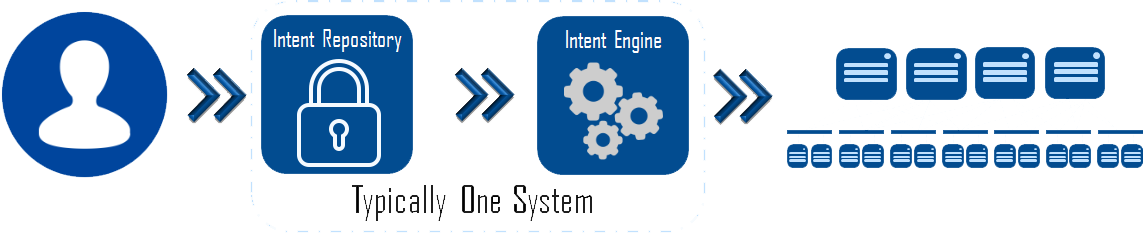
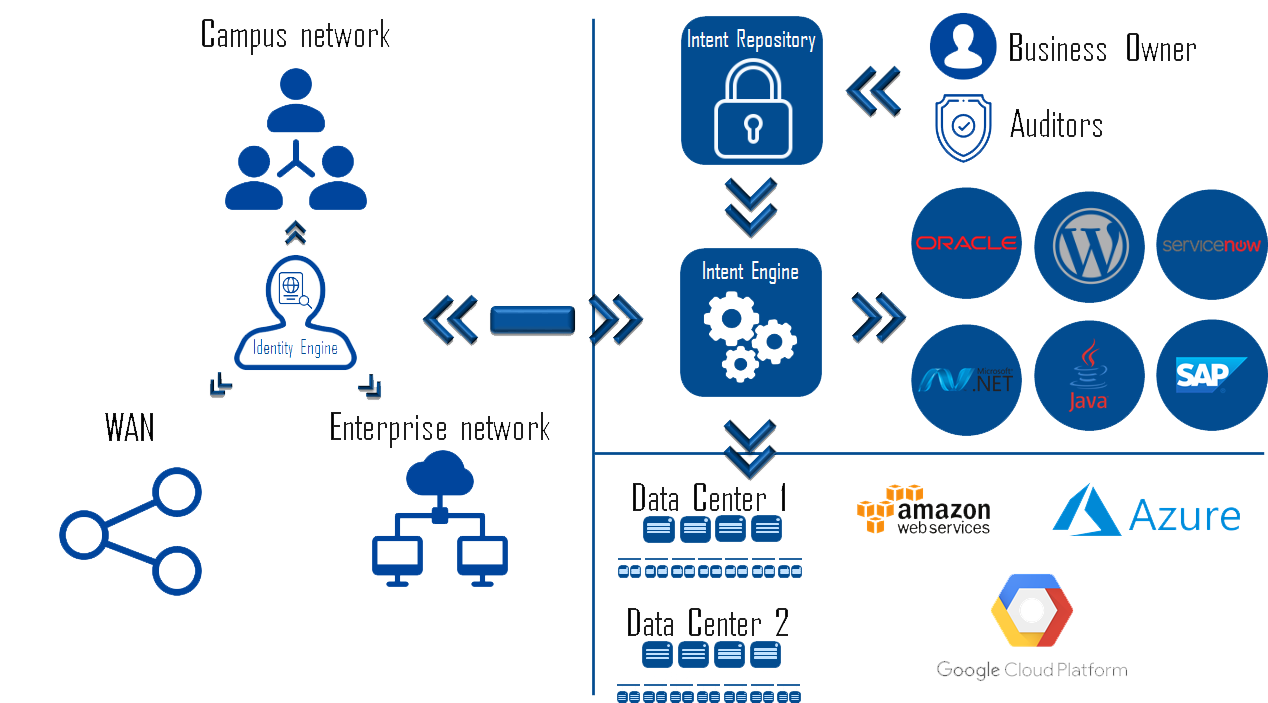
The next step of the process is the deployment of the intent onto infrastructure. The infrastructure itself is irrelevant, it can be on-premises, hosted, cloud, unicorn powered, or any combination. In most, if not all, products available today the intent repository and the automation engine responsible for this deployment are one and the same. The intent engine is responsible for translating the intent description stored in the repository down onto the chosen supported infrastructure. In the real world the engine may have multiple parts, or may be translated by more than one abstraction, but this should be transparent from an operational perspective. This process is shown in the following graphic.

Intent System

Now's where things start to get really sexy, and the true value of intent starts to shine. If I have an intent based system with a robust enough abstraction layer, my infrastructure becomes completely irrelevant. I define the intent for my application, and the system is responsible for translating that intent into the specific provisioning instructions required by the underlying infrastructure whatever that infrastructure is, and wherever that infrastructure lives (private, public, hosted, Alpha Centauri.)

The only restriction to this is that the infrastructure itself must have the software, hardware, and feature set required to implement intent. Using the PCI compliance example again, if the infrastructure isn't capable of providing your compliance requirements, the intent system can't help make that happen. Where the intent system can help with this is preventing the deployment of the application if doing so would violate intent. For example you have three underlying infrastructure options: Amazon EC2, Google Cloud Platform, and an on-premises private-cloud, if only your private-cloud meets your defined intent then the system prevents deployment to the two public cloud options. This type of thing is handled by the intent assurance engine which may be a seperate product or component of one of the pieces discussed above. For more on intent assurance see my blog http://www.definethecloud.net/intent-driven-architecture-part-iii-policy-assurance/.

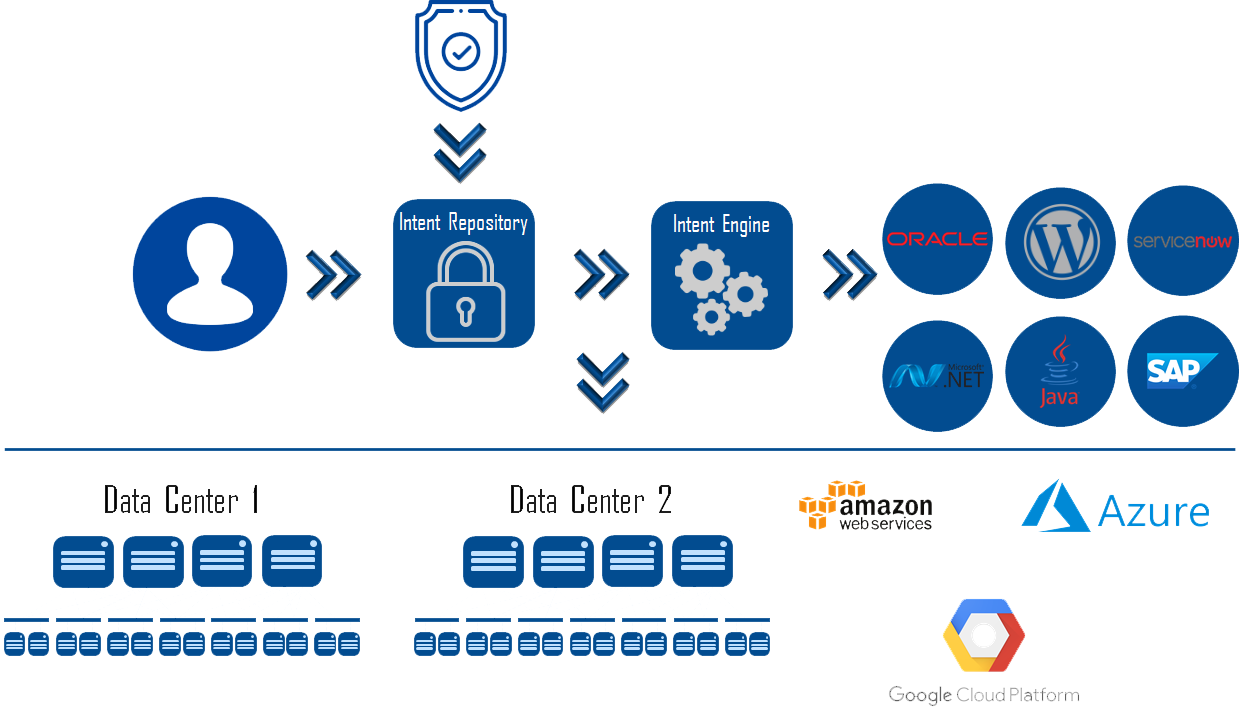
This is where I see the most potential as this space matures. The intent for your application is defined once, and the application can be deployed, or moved anywhere with the intent assured, and continuously monitored. You can build and test in one environment with your full intent model enforced, then move to another environment for production. You can move your app from one cloud to another without redefining requirements. Equally important you can perform your audits on the central intent repository instead of individual apps as long as the infrastructures you run them on have been verified to properly consume the intent. Imagine auditing your PCI compliance intent definition one time, then simply deploying apps tagged with that intent without the need for additional audits. Here's a visual on that.

 Multi-Cloud Intent

Now let's move this one step further: end-to-end intent. The umbrella of intent applies from the initial point of a user accessing the network, and should be carried consistently through to any resource they touch, data center, cloud, or otherwise. We need systems that can provide identity at initial access, carry that identity throughout the network, and enforce intent consistently along with the traffic.

This, unsurprisingly, is a very complex task. The challenges include:

The bright side here is that products to handle each portion of this exist. At least one vendor has a portfolio that can provide this end-to-end architecture using several products. The downside or fine print is that these all still exist as separate domain products with little-to-no-integration. I would consider that more of a consideration than an adoption road-block. Custom integration can be built, or bought, and you can expect product integration to be a top road map priority. The graphic below shows the full picture of an intent driven architecture.

End-to-end Intent

Utilizing intent as the end-to-end policy deployment method provides an immense amount of value to the IT organization. The use of intent:

While Intent driven architectures are in early maturity levels, they are already being deployed fairly widely in various fashions. As the maturity continues to grow here are some things I'd like to see from the industry:

Reassesing 'Vendor Lock-In'

Lock in is an oft discussed consideration when making technology decisions. I tend to see it used more by vendors seeding Fear Uncertainty and Doubt (FUD), but I also see it in the native decision making processes of many of my customers. Let's take a look at it, starting with what it really is. I've dabbled into this topic a bit in the past if you're interested: http://www.definethecloud.net/the-difference-between-foothold-and-lock-in/.

If you're an American the best example I have is your cable company. Those bastards have you locked-in. At some point in human pre-history they footed some of the cost of getting cable run to neighborhoods, and the homes in them. They used that investment to lobby politicians into providing them government protected monopolies. Since then they've spent obscene amounts of money keeping your politicians fat and happy in order to maintain that monopoly. Don't like their pricing, offering, etc? Too F'ng bad. If you want decent broadband internet access, you'll be paying them. Because you already pay them for that, you'll probably lump in some cable TV. A content medium allowed to stay horrible and antiquated based on the above monopoly. In short, you're locked-in.

This is the most extreme form of lock-in, but it does a good job of illustrating the point. Lock-in can be a natural effect of the technology, purposefully driven into products by the vendor, or even driven through law and governmental controls such as above. Lock-in is real, exists all over the place, and can range from annoyance to being a real problem creating huge costs to the end-user as is the case above. FYI if you want to do something about that above monopoly skip voting about it unless you're a fan of wasting your time. Instead use your wallet and switch to your cell-provider for home broadband when they start offering it in your area, then dump cable TV in exchange for the plethora of internet TV options.

Now let's take a deeper look into lock-in starting on the consumer side. Love them or hate them, Apple has one of the most locked-in eco-systems in the consumer world. They beautifully tie their hardware and software together building an eco-system where each Apple product often only works with others, and each Apple product is greatly enhanced by the next. You like the IOS experience, great, buy an iPhone. Love your Android phone but really want that shiny Apple watch? Time to replace that phone. Even the default browser on the phone is Apple software. Companies that want into that closed system pay for it. Google is reportedly about to pay Apple $9 Billion for the privilege of staying the default search engine (https://9to5mac.com/2018/09/28/google-paying-apple-9-billion-default-seach-engine/.) Even their cable, and interfaces are often proprietary forcing you to buy their expensive eco-system of accessories and adaptors, which from what I hear tend to change with every new phone.

Now, while that's a lot of lock-in it isn't necessarily a bad thing, and shouldn't necessarily keep you from buying Apple. It is the reason I don't buy Apple products but not simply because the lock-in exists. I don't buy Apple because the devices, prices, features, as a whole don't outweigh the lock-in for my personal use-cases. That is going to be a different decision for every individual. The moral of the story is that the existence of lock-in shouldn't bar you from choosing a product, but it should be weighed against all of the other factors. In my case, if I was willing to switch from PC to Mac that would be the tipping point to switch me into the entirety of the Apple eco-system.

Now let's move up the stack to enterprise tech. There is a lot of real and perceived lock-in. Networking is a great example of where it gets talked about a lot. Interoperability in network is driven through standards, but those standards move s-l-o-w-l-y. Often networking vendors launch features, protocols etc. before they become standardized. This typically means that the feature will only work with their equipment and software. In these cases it doesn't mean you shouldn't use it, if you need it now, you need it now. Again, you weigh the advantages against the risks, just like every other decision.

As we move to cloud, the lock-in conversation appears again. Each cloud uses it's own API, provides it's own interfaces, and features, nearly all proprietary. If you design and build an application on cloud a, you'll need to redesign and build it if you want to move. This creates a perceived lock-in problem. Should I put all of my eggs in one basket knowing I have a costly transition if I ever need it? Should I design my apps to run on multiple clouds? Should I attempt to implement some form of cloud broker that can abstract the underlying architecture and provide cloud portability?

These are valid questions, and will have to be assessed at some level within every organization. That being said, the potential lock-in should not turn you off from cloud adoption. The on-premises infrastructure you've been running for years has as much, or more, lock-in than any cloud you may move to.

The biggest pitfall to avoid comes in the form of a specific form of multi-cloud deployment in which organizations attempt to build apps for multiple clouds. This will almost always be a mistake, whether it's to avoid lock-in or some misguided disaster recovery/business continuity strategy. The issue with this method is the significant cost and complexity involved in trying to build an application capable of running on multiple-cloud environments. These will almost always outweigh the perceived benefits.

Multi-cloud is not a bad thing, but avoiding lock-in should not be a primary factor. Additionally when looking at deploying a multi-cloud environment you should be looking to do so on a per app basis, not disaggregating an individual app. There will also be some limited use-cases where individual application tiers, or components may reside on separate private or public cloud infrastructures.

In almost all technology cases your complexity and overall operational costs will be exponentially lower the fewer vendors you utilize. From sales calls, product updates, to integration points and customization each additional vendor adds cost. This doesn't mean that you should move to single vendor strategies, it does mean you should assess the decision carefully. You want a dual-vendor strategy at each technology tier, great, stick to two. You want to choose a single vendor for each piece of the stack, fantastic. Either way align the costs and complexities, to the benefit they provide.

The downside of lock-in is universally exaggerated. The real question is whether you're getting the value from the product you need, in an eco-system that supports your requirements, at a cost you can afford to pay. If those things weigh out, then any real or perceived lock-in becomes a complete non-issue.

We Live in a Multi-Cloud World: Here's Why

It's almost 2019 and there's still a lot of chatter, specifically from hardware vendors, that 'We're moving to a multi-cloud world. This is highly erroneous. When you hear someone say things like that, what they mean is 'we're catching up to the rest of the world and trying to sell a product in the space.'

Multi-cloud is a reality, and it's here today. Companies are deploying applications on-premises, using traditional IT stacks, automated stacks, IaaS, and private-cloud infrastructure. They are simultaneously using more than one public cloud resources. If you truly believe that your company, or company x is not operating in a multi-cloud fashion start asking the lines of business. The odds are you'll be surprised.

Most of the world has moved past the public-cloud vs. private-cloud debate. We realized that there are far more use-cases for hybrid clouds than the original asinine idea of 'cloud-bursting' which I ranted about for years (http://www.definethecloud.net/the-reality-of-cloud-bursting/ and https://www.networkcomputing.com/cloud-infrastructure/hybrid-clouds-burst-bubble/2082848167.) After the arguing, vendor nay saying, and general moronics slowed down we started to see that specific applications made more sense in specific environments, for specific customers. Imagine that, we came full-circle to the only answer that ever applies in technology: it depends.

There are many factors that would come into play when deciding where to deploy or build an application (specifically which public or private resource, and which deployment model (IaaS, PaaS, SaaS, etc.) The following is not intended to be an exhaustive list:

Lastly, don't discount peoples technology religions. There is typically more than one way to skin a cat, so it's not often worth it to fight an uphill battle against an entrenched opinion. Personally when I'm working with my customers if I start to sense a 'religious' stance to a technology or vendor I assess whether a more palatable option can fit the same need. Only when the answer is no do I push the issue. I believe I've discussed that in this post: http://www.definethecloud.net/why-cisco-ucs-is-my-a-game-server-architecture/.

The benefits of multi-cloud models are wide, and varied, and like anything else, they come with drawbacks. The primary benefit I focus on is the ability to put the application in focus. With traditional on-premises architectures we are forced to define, design, and deploy our application stack based on infrastructure constraints. This is never beneficial to the success of our applications, or our ability to deploy and change them rapidly.

When we move to a multi-cloud world we can start by defining the app we need, draw from that it's requirements, and finally use those requirements to decide which infrastructure options are most suited to them. Sure I can purchase/build CRM, or expense software, deploy them in my data center or my cloud provider's but I can also simply use the applications as a service. In a multi-cloud world I have all of those options available after defining the business requirements of the application.

Here's two additional benefits that have made multi-cloud today's reality. I'm sure there are others so help me out in the comments:

Cloud portability:

Even if you only intend to use one public cloud resource, and only in an IaaS model building for portability can save you pain in the long run. Let history teach you this lesson. You built your existing apps assuming you'd always run apps from your own infrastructure. Now you're struggling with the cost and complexity of moving them to cloud, might history repeat itself? Remember that cost models and features change with time, this means it may be attractive down the road to switch from cloud a to cloud b. If you neglect to design for this up-front, the pain will be exponentially greater down the road.

Note: This doesn't mean you need to go all wild-west with this shit. You can select a small set of public and private services such as IaaS and add them to a well-defined service-catalogue. It's really not that far off from what we've traditionally done within large on-premises IT organizations for years.

Picking the right tool for the job:

Like competitors in any industry, public clouds attempt to differentiate from one another to win your business. This differentiation comes in many forms: cost, complexity, unique feature-set, security, platform integration, openness, etc. The requirements for an individual app, within any unique company, will place more emphasis on one or more of these. In a multi-cloud deployment those requirements can be used to decide the right cloud, public or private, to use. Simply saying 'We're moving everything to cloud x' is placing you right back into the same situation where your infrastructure dictates your applications.

As I stated early on, multi-cloud doesn't come without it's challenges. One of the more challenging parts is that the tools to alleviate these challenges are, for the most part, in their infancy. The three most common challenges are: holistic visibility (cost, performance, security, compliance, etc.), administrative manageability, and policy/intent consistency especially as it pertains to security.

Visibility:

We've always had visibility challenges when operating IT environments. Almost no one can tell you exactly how many applications they have, or hell, even define what an 'application' is to them. Is it the front-end? Is it the three tiers of the web-app? What about the dependencies, is Active-Directory an app or a service? Oh shit, what's the difference between an app or a service? Because this is already a challenge within the data center walls, and across on-premises infrastructure, it gets exacerbated as we move to a multi-cloud model. More tools are emerging in this space, but be wary as most promise far more than they deliver. Remember not to set your expectations higher than needed. For example if you can find a tool that simply shows you all your apps across the multi-cloud deployment from one portal, you're probably better off than you were before.

Manageability:

Every cloud is unique in how it operates, is managed, and how applications are written to it. For the most part they all use their own proprietary APIs to deploy applications, provide their own dashboards and visibility tools, etc. This means that each additional cloud you use will add some additional overhead and complexity, typically in an exponential fashion. The solution is to be selective in which private and public resources you use, and add to that only when the business and technical benefits outweigh the costs.

Tools exist to assist in this multi-cloud management category, but none that are simply amazing. Without ranting too much on sepcfic options, the typical issues you'll see with these tools are they oversimplify things dumbing down the underlying infrastructure and negating the advantages underneath, they require far too much customization and software development upkeep, and they lack critical features or vendor support that would be needed.

Intent Consistency:

Policy, or intent can be described as SLAs, user-experience, up-time, security, compliance and risk requirements. These are all things we're familiar with supporting and caring for on our existing infrastructure. As we expand into multi-cloud we find the tools for intent enforcement are all very disparate, even if the end result is the same. I draw an analogy to my woodworking. When joining two pieces of wood there are several joint options to choose from. The type of joint will narrow the selection down, but typically leave more than one viable option to get the desired result. Depending on the joint I'm working on, I must know the available options, and pick my preference of the ones that will work for that application.

Each public or private infrastructure generally provides the tools to acheive an equivelant level of intent enforcement (joints), but they each offer different tools for the job (joinery options.) This means that if you stretch an application or its components across clouds, or move it from one to the other, you'll be stuck defining it's intent multiple times.

This category offers the most hope, in that an overarching industry architecture is being adopted to solve it. This is known as intent driven architecture, which I've described in a three part series starting here: http://www.definethecloud.net/intent-driven-architectures-wtf-is-intent/. The quick and dirty description is that 'Intent Driven' is analogous to the park button appearing in many cars. I push park, and the car is responsible for deciding if the space is parallel, pull-through, or pull-in, then deciding the required maneuvers to park me. With intent driven deployments I say park the app with my compliance accounted for, and the system is responsible for the specifics of the parking space (infrastructure). Many vendors are working towards products in this category, and many can work in very heterogeneous environments. While it's still in it's infancy it has the most potential today. The beauty of intent driven methodologies is that while alleviating policy inconsistency they also help with manageability and visibility.

Overall, multi-cloud is here, and it should be. There are of course companies that deploy holistically on-premises, or holistically in one chosen public cloud, but in today's world these are more corner case than the norm, especially with more established companies.

For another perspective check out this excellent blog article I was pointed to by Dmitri Kalintsev (@dkalintsev) https://bravenewgeek.com/multi-cloud-is-a-trap/. I very much agree with much, if not all of what he has to say. His article is focused primarily on running an individual app, or service across multiple clouds, where I'm positioning different cloud options for different workloads.

Your Technology Sunk Cost is KILLING you

I recently bought a Nest Hello to replace my perfectly good, near new, Ring Video Doorbell. The experience got me thinking about sunk cost in IT and how significantly it strangles the business and costs companies ridiculous amounts of money.

When I first saw the Nest Hello, I had no interest. I had recently purchased and installed my Ring. I was happy with it, and the Amazon Alexa integration was great. I had no need to change. A few weeks later I decided to replace my home security system because it's a cable provider system and like everything from a cable provider it's a shit service at caviar pricing because 'Hey, you have no choice you sad F'er.' That's the beauty of the monopoly our government happily built and sustains for them. I chose to go with a system from Nest, because I already have two of their thermostats, several of their smoke detectors, and a couple of their indoor cameras. I ordered the security system components I needed, and a few cameras to compliment it, then I looked back into the Nest Hello.

The Nest Hello is a much better camera, and more feature rich device. More importantly it will integrate seamlessly with my new security system, and existing devices, eliminating yet another single use app on my phone (the Ring app.) The counter argument for purchasing the device was my sunk cost. I'd spent money on the Ring, and I'd also spent time and hassle installing it. The Nest might require me to get back in the attic and change out the transformer for my doorbell as well as wire in a new line conditioner. Not things I enjoy doing. The sunk cost nearly stopped my purchase. Why throw away a good device I just installed, to get a feature or two and a better picture.

I then stepped back and looked at it from a different point of view. What's my business case? What's the outcome I'm purchasing this technology to achieve? The answer is a little bit of security, but a lot of piece of mind for my home. I live alone, and I travel a lot. While I'm gone I need to manage packages, service people, and my pets. I also need to do this quickly and easily. This means that seamless integration is a top priority for me, and video quality, etc. is another big concern. Nest's Hello camera feature set far better for my use case, especially when adding their IQ cameras. Lastly for video recording and monitoring service, I would now only need one provider, and one manageable bill rather than one for Nest and one for Ring. From that perspective the answer became clear: the cost I sunk wasn't providing any value based on my use-cases, therefore it was irrelevant. It was actually irrelvant in the first place, but we'll get back to that.

I went ahead and bought the Nest Hello. Next came another sunk cost problem. My house is covered in Amazon Alexa devices which integrate quite well with Ring. I have no fewer than 8 Alexa enabled devices around the home, garage, etc. Nest is a Google product, so it's best integration is with Google Home. Do I replace my beloved Amazon devices with Google Home to get the best integration?

First a rant: The fact that I should even have to consider this is ludicrous, and shows that both products are run by shit heads that won't even feign the semblance of looking out for their customers interests. Because they have competing products they forcibly degrade any integration between the systems rather than integrating and differentiating on product quality rather than engineered lock-in. I despise this, it's bad business, and completely unnecessary. I'd guess it actually stalls potential sales of both because people want to 'sit back and see how it plays out' before investing in one or the other.

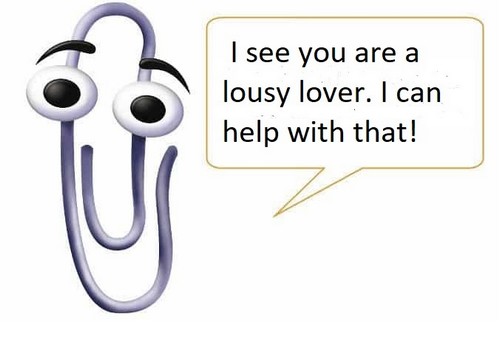
I have a lot of sunk financial cost in my Alexa devices. There's also some cost in time setting them up and integrating them with my other home-automation tools. That in mind I went back to the outcome I'm trying to achieve. My Alexa/Ring integration allowed me to see who was at the front door, and talk to them. My Alexa/Hello integration will only let me view the video. What's my use-case? I use the integration to see the door, and decide if I should walk to the front door to answer. If it's a package delivery, I can grab it later. If it needs a signature, I'll see them waiting. If it's something else, I walk to the door for a conversation. Basically I only use the integration to view the video and decide if I should go to the door or not. This means that Alexa/Hello integration, while not ideal, meets my needs perfectly. I easily chose to keep Alexa which provides the side benefit of not providing the evil behemoth that is Google any more access to my life than I already have. Last thing I need is my Gmail recommending male potency remedies after the Google device in my bedroom listens in on a night with my girlfriend. I'm picturing Microsoft Clippy here for some reason.

Clippy Help - Copy


I'm much more comfortable with Amazon listening in and craftily adding some books on love making for dummies to my Kindle recommendations while using price discrimination to charge me more for marital aid purchases because they know I need them.

Ok, enough TMI, back to the point. Your technology sunk cost is killing you, mmkay? When making technology decisions for your company you should ignore sunk costs. Your rational brain knows this, but you don't do it.

“Rational thinking dictates that we should ignore sunk costs when making a decision. The goal of a decision is to alter the course of the future. And since sunk costs cannot be changed, you should avoid taking those costs into account when deciding how to proceed.” https://blog.fastfedora.com/2011/01/the-sunk-cost-dilemma.html

You have sunk cost in hardware, software, people-hours, consulting, and everywhere else under the sun. If you're like most these sunk costs hinder every decision you make. “I just refreshed my network, I can't buy new equipment.” “My servers are only two years old, I won't swap them out.” I have an enterprise ELA with them, I should use their version. These are all bad reasons to make a decision. The cost is already spent, it's gone, it can't be changed, but future costs, and capabilities can. Maybe:

This issue becomes insanely more relevant as you try and modernize for more agile IT delivery. Regardless of the buzzword you're shooting towards, DevOps, Cloud, UnicornRainbowDeliverySystems, the shift will be difficult. It will be exponentially more difficult if you anchor it with the sunk cost of every bad decision ever made in your environment.

“Of course your tool sounds great, and we need something exactly like it, but we already have so many tools, I can't justify another one.” I've heard that verbatim from a customer, and it's bat—shit—freaking—crazy. If your other tools suck, get rid of them, don't let those bad decisions negate you from purchasing something that does what you need. Maybe it's your vetting process, or um, eh, that thing you see when you look in the mirror that needs changing. That's like saying 'My wife needs a car to get to work, but I already have these two project cars I can't get running, I can't justify buying her a commuter car.'

Most of our data centers are built using the same methodology Dr. Frankenstein used to reanimate the dead. He grabbed a cart and a wheelbarrow and set off for his local graveyard. He dug up graves grabbing the things he needed, a torso, a couple of legs, a head, etc. and carted them back to his lab. Once safely back at the lab he happily stitched them together and applied power.

Data centers have been built buying the piece needed at the time from the favored vendor of the moment. A smattering of HP here, a dash of Cisco there, some EMC, a touch of NetApp, oh this Arista thing is shiny… Then up through the software stack, a teaspoon of Oracle makes the profits go down, the profits go down… some SalesForce, some VMware, and on, and on. We've stitched these things together with Ethernet and applied power.

Now you want to 'DevOps that', or 'cloudify the thing'? Really, are you sure you REALLY want to do that? Fine go ahead, I won't call you crazy, I'll just think… never mind, yes I will call you crazy… crazy. DevOps, Cloud, etc. are all like virtualization before them, if you put them on a shit foundation, you get shit results.

Now don't get me wrong. You can protect your sunk costs, sweat your assets, and still achieve buzzword greatness. It's possible. The question is should you, and would it actually save you money? The answer is no, and 'hell no.' The cost of additional tools, customization, integration and lost time will quickly, and exponentially, outweigh any perceived 'investment protection' savings, except in the most extreme of corner-cases.

I'm not promoting throwing the baby out with the bathwater, or rip-and-replace every step of the way. I am recommending you consider those options. Look at the big picture and ignore sunk-cost as much as you can.

Maybe you replace $500,000 in hardware and software you bought last year with $750,000 worth of new-fangled shit today, and $250,000 in services to build and launch it. Crap, you wasted the sunk $500K and sunk $1 million more! How do you explain that? Maybe you'll be explaining it as the cost of moving your company from 4 software releases per year to 1 software reease per week. Maybe that release schedule is what just allowed your Dev team to 'dark test' then rolling release the next killer feature on your customer platform. Maybe customer attrition is down 50% while the cost of customer acquisition is 30% of what it was a year ago. Maybe you'll be explaining the tough calls it takes to be the hero.